What Have I done?

thekaptone

New member
Local time
2:44 PM
Messages
13
Hi all I am a newbie here but cant find the answer to my problem so i thought I would post.

Where to start. I have been having issues with my video card 8600gt and lagging so I thought I would get a new one. Turns out I need a new PSU to help run a new one. After getting some advice I purchased an antec 520w and fitted it Monday, to do this I took the MO-BO out along with everything else because it has a large fan on top of it so I cut out a hole in the top of the case. When I refitted everything I was pleased because it is very quiet. However I noticed that the onboard LAN now does not work. I got an old network card and got myself up and running but now the whole win7 system lags like a dead person and it takes forever and a day to boot up and open any Windows ie to do anything. I tried to dwnld a new set of drivers but no good then tried win update which has not helped and now today I have just done a registry clean but no avail.
Is it possible I have cooked the MO-BO or what, I have tried dwnlding so many drivers I am not sure what drivers are there now

the MO-BO is an said m2n68


Thnaks Heaps will answer anymore questions if needed
 

My Computer

OS
win 7
CPU
amd
Motherboard
asus m2n68
Memory
2gb
Graphics Card(s)
8600gt
PSU
antec 525w
First check that both your power connections have been made to your motherboard and the connectors are pushed in tightly.
 

My Computer

Computer type
PC/Desktop
Computer Manufacturer/Model Number
Custom Build
OS
Windows 7 Home Premium 64 bit SP1
CPU
Intel i7 4790k
Motherboard
MSI Z97-G55 SLI
Memory
16 GB Corsair 2400 MHz DDR3
Graphics Card(s)
Visiontek Radeon R9 285
Sound Card
None
Monitor(s) Displays
Gateway FHX2402L
Screen Resolution
1920 X 1080
Hard Drives
Samsung 840 EVO 500GB
PSU
Corsair 750 TX
Case
Fractal Design
Cooling
Stock fans
Keyboard
Logitech K800
Mouse
Logitech M510
Internet Speed
60.88 Mbps download 10.47 Mbps upload (Speedtest.net)
Antivirus
Norton
Browser
Opera
Other Info
First Computer used: A Commodore Pet of course
Love using Manjaro KDE Linux 64 bit and Windows 7/10 64 bit
I purchased an antec 520w

This one?

Newegg.com - Antec NEO ECO 520C 520W Continuous Power ATX12V v2.3 / EPS12V 80 PLUS Certified Active PFC Power Supply

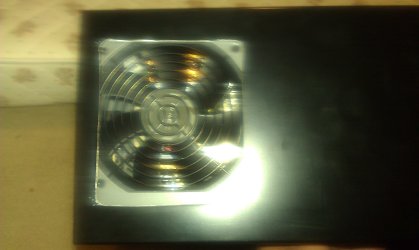
to do this I took the MO-BO out along with everything else because it has a large fan on top of it so I cut out a hole in the top of the case.

Hate to say this but you hacked up your case for no reason. That fan is supposed to be pointing down and help with airflow through the computer.

First check that both your power connections have been made to your motherboard and the connectors are pushed in tightly.

Also double check that all mounting screws are in, and if you removed any of the standoffs (those little things under the motherboard that hold it up from the case) are all back in their proper place. Also double check that the back plate is not touching anything it shouldn't be.
 

My Computer

Computer type
PC/Desktop
Computer Manufacturer/Model Number
Me
OS
Win 7 Ultimate x64
CPU
FX-8350 @ 4.6 GHz so far
Motherboard
Asus M5A97 EVO
Memory
ADATA XPG V1 Series Black 8GB DDR3 1600
Graphics Card(s)
Sapphire R9 270x Dual-X
Sound Card
Xonar DGX w/ Corsair Vengence 1300
Monitor(s) Displays
Acer S232HL Abid
Screen Resolution
1920x1080
Hard Drives
120 GB OCZ Vertex 3
500 GB Seagate 7200.12
PSU
Antec Earthwatts 650W Green
Case
Antec Three Hundred
Cooling
Cooler Master 212 EVO
Keyboard
Logitech G510
Mouse
Logitech G500s
Internet Speed
35000/3000
Hi Stormy yes that is the pwr supply i bought

I had got all the mounting screws right but i will re check them tonight when home from work and I will also make sure the cables are plugged in correctly


I know NOW that i did not have to cut the case found that out after the event
 

My Computer

OS
win 7
CPU
amd
Motherboard
asus m2n68
Memory
2gb
Graphics Card(s)
8600gt
PSU
antec 525w
Just had a look at all the connections and they were in correctly BUT I did notice that the 24 pin connector on the OSI has one blank spot with no pin and the plug on the MO-BO has no blank spaces in it and as type I get the feeling that this is massive factor and not much can be done but perhaps I am wrong
 

My Computer

OS
win 7
CPU
amd
Motherboard
asus m2n68
Memory
2gb
Graphics Card(s)
8600gt
PSU
antec 525w
Can you do a system restore to a date before you replaced the Power Supply?
Open device manager (if you don't know how to do this post back) and see if there is any item with a Yellow exclamation mark.
 

My Computer

Computer type
PC/Desktop
Computer Manufacturer/Model Number
Self Built Custom Computer.
OS
Windows 10 Pro x64
CPU
i7-4770K
Motherboard
Asus Z87 Sabertooth
Memory
16Gig DDR3-2400
Graphics Card(s)
Gigabyte GT740
Sound Card
Onboard
Monitor(s) Displays
Benq 27" - Dell 23' - Benq 22"
Screen Resolution
1680x1050
Hard Drives
Samsung 840 Pro 128g SSD
1xWestern Digital Caviar Green 1tb
2xWestern Digital Caviar Green 2 tb
PSU
Seasonic 760 watt Platinum
Case
Coolermaster Haf - X
Cooling
Noctua NH-C12P CPU Cooler
Keyboard
Logitech illuminated keyboard
Mouse
Logitech Perfomance MX
Internet Speed
Cable = speeds to 20Mbps downsteam and 512kbps upsteam
Antivirus
Avast Internet Security
Browser
Firefox
Have done a system restore and it did not change and device manager shows no exclamation marks
 

My Computer

OS
win 7
CPU
amd
Motherboard
asus m2n68
Memory
2gb
Graphics Card(s)
8600gt
PSU
antec 525w
Well some interesting news perhaps. I had the thought that i might have bumped the Heat sink fan whilst removing the main board so I took it out and cleaned it and added some new Arctic silver and now things seem to be running smoothly, I am almost happy but will have to wait a while and see what happens but i have done more ow in the last 10 minutes than the last couple of days so fingers crossed.

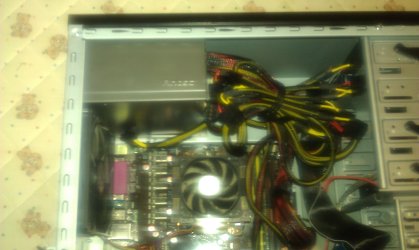
I will attach some photos of the cuts I made and the PSU before i turned it around the right way.Looking at the picture do you think my fans are going to work well or can i disconnect the one on the back of the case because the PSU fan will now do the job
 

Attachments

  • IMAG0018 (3).jpg
    IMAG0018 (3).jpg
    456.1 KB · Views: 9
  • IMAG0019.jpg
    IMAG0019.jpg
    523.1 KB · Views: 12

My Computer

OS
win 7
CPU
amd
Motherboard
asus m2n68
Memory
2gb
Graphics Card(s)
8600gt
PSU
antec 525w
Unless noise is a major issue leave all your fans running. Heat is enemy number one, when it comes to computers the cooler the better.
 

My Computer

Computer type
PC/Desktop
Computer Manufacturer/Model Number
Custom Build
OS
Windows 7 Home Premium 64 bit SP1
CPU
Intel i7 4790k
Motherboard
MSI Z97-G55 SLI
Memory
16 GB Corsair 2400 MHz DDR3
Graphics Card(s)
Visiontek Radeon R9 285
Sound Card
None
Monitor(s) Displays
Gateway FHX2402L
Screen Resolution
1920 X 1080
Hard Drives
Samsung 840 EVO 500GB
PSU
Corsair 750 TX
Case
Fractal Design
Cooling
Stock fans
Keyboard
Logitech K800
Mouse
Logitech M510
Internet Speed
60.88 Mbps download 10.47 Mbps upload (Speedtest.net)
Antivirus
Norton
Browser
Opera
Other Info
First Computer used: A Commodore Pet of course
Love using Manjaro KDE Linux 64 bit and Windows 7/10 64 bit
Just wondering if I should move the case fan to the bottom on the front of the caser so it blows air in and the PSU sucks it up and ouut of the case and also across the other components on the way
 

My Computer

OS
win 7
CPU
amd
Motherboard
asus m2n68
Memory
2gb
Graphics Card(s)
8600gt
PSU
antec 525w
I would leave it where it is, which is in line with the processor.
 

My Computer

Computer type
PC/Desktop
Computer Manufacturer/Model Number
Custom Build
OS
Windows 7 Home Premium 64 bit SP1
CPU
Intel i7 4790k
Motherboard
MSI Z97-G55 SLI
Memory
16 GB Corsair 2400 MHz DDR3
Graphics Card(s)
Visiontek Radeon R9 285
Sound Card
None
Monitor(s) Displays
Gateway FHX2402L
Screen Resolution
1920 X 1080
Hard Drives
Samsung 840 EVO 500GB
PSU
Corsair 750 TX
Case
Fractal Design
Cooling
Stock fans
Keyboard
Logitech K800
Mouse
Logitech M510
Internet Speed
60.88 Mbps download 10.47 Mbps upload (Speedtest.net)
Antivirus
Norton
Browser
Opera
Other Info
First Computer used: A Commodore Pet of course
Love using Manjaro KDE Linux 64 bit and Windows 7/10 64 bit
Yep. Leave that one where it is and just add another to front.


BTW, regardless of mistake - I like the ghetto mod :thumbsup:
 

My Computer

Computer type
PC/Desktop
Computer Manufacturer/Model Number
Systems by SmartEyeball
OS
8 Pro x64
CPU
i7 3770K 4.6GHz
Motherboard
ASUS P8Z77 WS
Memory
16GB G.Skill Trident X 2666mhz
Graphics Card(s)
x2 EVGA 780 Ti Superclocked SLI
Sound Card
SB X-FI Surround 5.1 PRO USB / ATH-AD900 Headphones
Monitor(s) Displays
x3 Dell U2410 / 58" Samsung
Screen Resolution
5760*1200/ 1920*1200
Hard Drives
2x Intel 520 240GB (RAID 0) * 2x WD Caviar Blacks 2TB (RAID 0) * 2TB WD Caviar Black * Sony Optirac DVD
PSU
Silverstone Strider Evolution 1200W
Case
Thermaltake Level 10 GT Snow Edition
Cooling
Noctua NH-D14
Keyboard
Topre Realforce // Ducky Shine MX Black // Filco Ninja TKL
Mouse
Thermaltake Theron (Highly Recommended) + Razer Imperator
Antivirus
MSE
Browser
IE, FF, WaterFox
Other Info
GT Extreme V2 Sim Racing Cockpit + 40" LCD and K/B Mouse stand ▼
Fanatec CSR Elite Wheel + Clubsport V1 Pedals + CSR shifter/7G-H ▼Saitek X52 Pro ▼ TrackIR 5 Pro
Buttkicker v2 Seat Rumbler with Dedicated 5.1 and Sub Woofer attached to frame ▼
=
Bloody Big Grin
Thanks , at least no one will nick it now it will look like rubbish LOL
 

My Computer

OS
win 7
CPU
amd
Motherboard
asus m2n68
Memory
2gb
Graphics Card(s)
8600gt
PSU
antec 525w
That's the spirit :D
 

My Computer

Computer type
PC/Desktop
Computer Manufacturer/Model Number
Systems by SmartEyeball
OS
8 Pro x64
CPU
i7 3770K 4.6GHz
Motherboard
ASUS P8Z77 WS
Memory
16GB G.Skill Trident X 2666mhz
Graphics Card(s)
x2 EVGA 780 Ti Superclocked SLI
Sound Card
SB X-FI Surround 5.1 PRO USB / ATH-AD900 Headphones
Monitor(s) Displays
x3 Dell U2410 / 58" Samsung
Screen Resolution
5760*1200/ 1920*1200
Hard Drives
2x Intel 520 240GB (RAID 0) * 2x WD Caviar Blacks 2TB (RAID 0) * 2TB WD Caviar Black * Sony Optirac DVD
PSU
Silverstone Strider Evolution 1200W
Case
Thermaltake Level 10 GT Snow Edition
Cooling
Noctua NH-D14
Keyboard
Topre Realforce // Ducky Shine MX Black // Filco Ninja TKL
Mouse
Thermaltake Theron (Highly Recommended) + Razer Imperator
Antivirus
MSE
Browser
IE, FF, WaterFox
Other Info
GT Extreme V2 Sim Racing Cockpit + 40" LCD and K/B Mouse stand ▼
Fanatec CSR Elite Wheel + Clubsport V1 Pedals + CSR shifter/7G-H ▼Saitek X52 Pro ▼ TrackIR 5 Pro
Buttkicker v2 Seat Rumbler with Dedicated 5.1 and Sub Woofer attached to frame ▼
=
Bloody Big Grin
just one last thing if everyone does not mind i looked at my old psu and all the pin in the 20+4 connector blocks were visible whereas like i mentioned my new one has one blamk space in the 24 ,would that be why the onboard LAN does not have any power. just a thought many many thamks for all the help
 

My Computer

OS
win 7
CPU
amd
Motherboard
asus m2n68
Memory
2gb
Graphics Card(s)
8600gt
PSU
antec 525w
Your case fans should never blow air into your case. You want all the hot air to be blown out of your case for better cooling.

My 120mm, 80mm, 140mm PSU and Processor fans all blow air out not in. Keeping hot air in your case causes over heating....learned from trial and error and bsod.
 

My Computer

Computer Manufacturer/Model Number
Custom Built
OS
Windows 7 Ultimate x64
CPU
AMD Athlon II X2 250 3.0GHz
Motherboard
Asus M3A76-CM AM2/AM2+/AM3
Memory
4096MB OCZ Gold 5-5-5-18 DDR2 800MHz
Graphics Card(s)
ECS Geforce GTS 250 512MB
Sound Card
Via High Def
Monitor(s) Displays
Acer X203H
Screen Resolution
1600x900 720p
Hard Drives
Western Digital Caviar 80GB 7200RPM
Seagate Barracuda 250GB 7200RPM
PSU
A-Power 680 Watt
Case
Power-Up Clear Sided
Cooling
120mm & 80mm System Fans, 140mm PSU Fan, Stock Fan
Keyboard
Microsoft Comfort Curve 2000
Mouse
OCZ Equalizer 7 button with Triple Threat button 2500 DPI
Internet Speed
12Mbps down 1.5Mbps up
Other Info
Plantronics Gamecom 777 USB 5.1 Surround Gaming Headset
just one last thing if everyone does not mind i looked at my old psu and all the pin in the 20+4 connector blocks were visible whereas like i mentioned my new one has one blamk space in the 24 ,would that be why the onboard LAN does not have any power. just a thought many many thamks for all the help

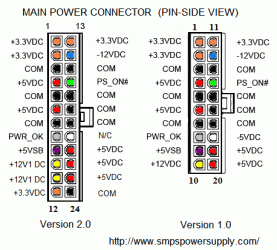
Would this 'blank' on your PSU correspond to the same position as this diagram (pin 20 N/C)?

connector_atx_pinout.GIF

If so, it's normal and unlikely to have anything to do with with the onboard LAN.

(I believe pin 20 is a largely unnecessary -5v 'standby' plug)


Silly question, but you haven't disabled the onboard LAN in the BIOS at all?
 

My Computer

Computer type
PC/Desktop
Computer Manufacturer/Model Number
Systems by SmartEyeball
OS
8 Pro x64
CPU
i7 3770K 4.6GHz
Motherboard
ASUS P8Z77 WS
Memory
16GB G.Skill Trident X 2666mhz
Graphics Card(s)
x2 EVGA 780 Ti Superclocked SLI
Sound Card
SB X-FI Surround 5.1 PRO USB / ATH-AD900 Headphones
Monitor(s) Displays
x3 Dell U2410 / 58" Samsung
Screen Resolution
5760*1200/ 1920*1200
Hard Drives
2x Intel 520 240GB (RAID 0) * 2x WD Caviar Blacks 2TB (RAID 0) * 2TB WD Caviar Black * Sony Optirac DVD
PSU
Silverstone Strider Evolution 1200W
Case
Thermaltake Level 10 GT Snow Edition
Cooling
Noctua NH-D14
Keyboard
Topre Realforce // Ducky Shine MX Black // Filco Ninja TKL
Mouse
Thermaltake Theron (Highly Recommended) + Razer Imperator
Antivirus
MSE
Browser
IE, FF, WaterFox
Other Info
GT Extreme V2 Sim Racing Cockpit + 40" LCD and K/B Mouse stand ▼
Fanatec CSR Elite Wheel + Clubsport V1 Pedals + CSR shifter/7G-H ▼Saitek X52 Pro ▼ TrackIR 5 Pro
Buttkicker v2 Seat Rumbler with Dedicated 5.1 and Sub Woofer attached to frame ▼
=
Bloody Big Grin
i did not disable it but i will check ,did not even know you could do that
 

My Computer

OS
win 7
CPU
amd
Motherboard
asus m2n68
Memory
2gb
Graphics Card(s)
8600gt
PSU
antec 525w
For correct air circulation Fans on the Front and Side blow air IN and fans on the Top and Back blow air OUT
 

My Computer

Computer type
PC/Desktop
Computer Manufacturer/Model Number
Self Built Custom Computer.
OS
Windows 10 Pro x64
CPU
i7-4770K
Motherboard
Asus Z87 Sabertooth
Memory
16Gig DDR3-2400
Graphics Card(s)
Gigabyte GT740
Sound Card
Onboard
Monitor(s) Displays
Benq 27" - Dell 23' - Benq 22"
Screen Resolution
1680x1050
Hard Drives
Samsung 840 Pro 128g SSD
1xWestern Digital Caviar Green 1tb
2xWestern Digital Caviar Green 2 tb
PSU
Seasonic 760 watt Platinum
Case
Coolermaster Haf - X
Cooling
Noctua NH-C12P CPU Cooler
Keyboard
Logitech illuminated keyboard
Mouse
Logitech Perfomance MX
Internet Speed
Cable = speeds to 20Mbps downsteam and 512kbps upsteam
Antivirus
Avast Internet Security
Browser
Firefox
Smarteyeball

in the bios it says lan enabled but lan boot rom disabled is that correct or should it be enabled
 

My Computer

OS
win 7
CPU
amd
Motherboard
asus m2n68
Memory
2gb
Graphics Card(s)
8600gt
PSU
antec 525w
Back
Top