What is a backdoor? help

yadielfeliciano

New member
Local time
12:10 PM
Messages
107
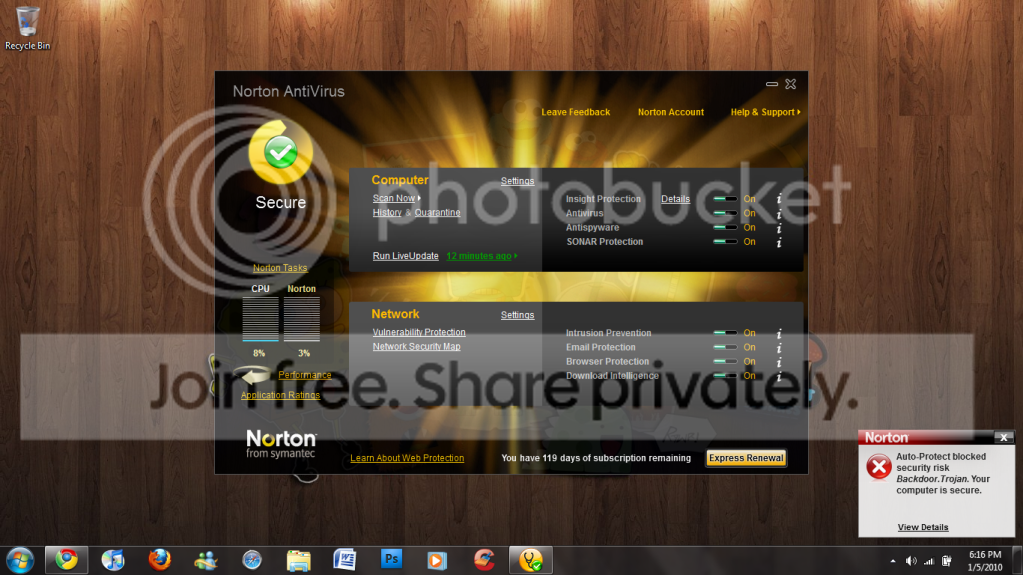
Ok so I have Norton Antivirus 2010 Installed, and I keep getting a notification from norton that it has blocked a backdoor.trojan, but I get it like every 10 minutes, I don't know what to do O.o, what is a backdoor?

I'm not going into dangerous websites or anything, I'm just in facebook..
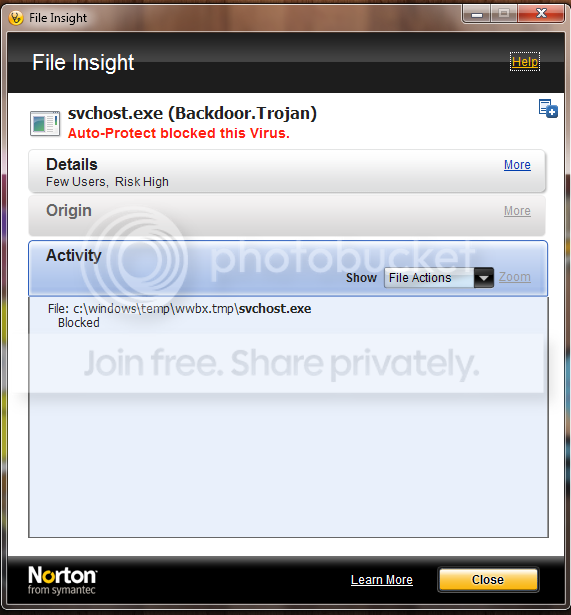
the location of the backdoor is windows/tmp/svchost.exe
 

My Computer

Computer Manufacturer/Model Number
Dell Dimension 9200
OS
Windows 7 Ultimate
Memory
512mb ram runs GREAT
Graphics Card(s)
NVIDIA GeForce 7300le
A backdoor trojan differs from a trojan in that it also opens a backdoor to your system. They’re also sometimes call Remote Access Trojans (RAT). These are the most widespread and also the most dangerous type of trojan. They are so dangerous because the have the potential to allow remote adminstration of your system. As if a hacker were sitting at your keyboard, only worse. There’s almost no limit to what they can do. Some common uses:


  • Use your system and Internet connection to send spam (yes, the majority of spam is now generated by infected systems).
  • Steal your online and offline passwords, credit card numbers, address, phone number, and other information stored on your computer that could be used for identity theft, or other financial fraud.
  • Log your activity, read email, view and download contents of documents, pictures, videos and other private data.
  • Use your computer and Internet connection, in conjunction with others to launch Distributed Denial of Service (DDoS) attacks.
  • Modify system files, disable antivirus, delete files, change system settings, to cover tracks, or just to wreak havoc.
If you suspect you’re infected with a backdoor trojan, the first thing you should do is disconnect from the Internet to protect yourself, and others.

Here is the Symantec tutorial on how to remove BackDoor Triojan:

Backdoor.Trojan | Symantec

Cheers ♥
 

My Computer

Computer Manufacturer/Model Number
Dell Inspiron N5010
OS
Windows 7 Ultimate x64 SP1
CPU
Intel Core i3
Memory
4 GB DDR3
Screen Resolution
1366 X 768
Hard Drives
Seagate 500 GB
Internet Speed
4 MBPS
  • Like
Reactions: JMH
Ok Thanks :S so I'm infected with a backdoor.trojan O.o, I'm runnign a full scan to see if it gets something.
 

My Computer

Computer Manufacturer/Model Number
Dell Dimension 9200
OS
Windows 7 Ultimate
Memory
512mb ram runs GREAT
Graphics Card(s)
NVIDIA GeForce 7300le
Ok Thanks :S so I'm infected with a backdoor.trojan O.o, I'm runnign a full scan to see if it gets something.

Need not worry. Follow the instructions in the symantc link. Your computer will be fine :)
 

My Computer

Computer Manufacturer/Model Number
Dell Inspiron N5010
OS
Windows 7 Ultimate x64 SP1
CPU
Intel Core i3
Memory
4 GB DDR3
Screen Resolution
1366 X 768
Hard Drives
Seagate 500 GB
Internet Speed
4 MBPS
I'm getting really tired of this notifications! :( I'm still getting them and the full system scan says I'm virus free
NORTONSUCKS.png


Any solutions? :o
 

My Computer

Computer Manufacturer/Model Number
Dell Dimension 9200
OS
Windows 7 Ultimate
Memory
512mb ram runs GREAT
Graphics Card(s)
NVIDIA GeForce 7300le
Click the file actions and see what options does it has ?

Heal, FIX or something like that? Sorry I have used Norton long back and so I don't remember the options :sarc:
 

My Computer

Computer Manufacturer/Model Number
Dell Inspiron N5010
OS
Windows 7 Ultimate x64 SP1
CPU
Intel Core i3
Memory
4 GB DDR3
Screen Resolution
1366 X 768
Hard Drives
Seagate 500 GB
Internet Speed
4 MBPS
It depends on which backdoor trojan is on your computer. There are some that are not easily removed. If you do any banking or other financial transactions on the PC or if it should contain any other sensitive information, please get to a known clean computer and change all passwords where applicable. If the trojan is easily removed, keep an eye on any bank/credit card statements. Otherwise, it would be wise to contact those same financial institutions to apprise them of your situation.

As to the Symantec instructions, I do not agree with the recommendation that you disable System Restore. Clean the computer first, then create a fresh restore point and use Disk Cleanup to remove all but the last restore point.

If you have an anti-malware software installed, I suggest updating and scanning with that as well. Follow that up with an on-line scan.

Let us know if you need additional assistance.

Edit: Since you posted while I was composing, before scanning with another software, etc., I suggest you clear Temp Files. A simple program for that is ATF cleaner. The instructions are simple:

Download ATF Cleaner by Atribune from http://www.atribune.org/index.php?option=com_content&task=view&id=25&Itemid=25 . Save it to your Desktop.

Run ATF Cleaner
  • Double-click ATF-Cleaner.exe to run the program.
  • Click Select All found at the bottom of the list.
  • Click the Empty Selected button.
  • Click Exit on the Main menu to close the program.
  • Shutdown/restart the computer.


Follow that with further scans.
 

My Computer

OS
Windows 7 & Windows Vista Ultimate
Well the file actions do not show anything, it says blocked but I keep getting this annoying notification
note: in only happens when I'm online...
PNGpic.png


Edit: I really don't know what's wrong :/
 

My Computer

Computer Manufacturer/Model Number
Dell Dimension 9200
OS
Windows 7 Ultimate
Memory
512mb ram runs GREAT
Graphics Card(s)
NVIDIA GeForce 7300le
Ok, downloaded the software and cleaned all temp files, I'm gonna restart and I will let you know.
 

My Computer

Computer Manufacturer/Model Number
Dell Dimension 9200
OS
Windows 7 Ultimate
Memory
512mb ram runs GREAT
Graphics Card(s)
NVIDIA GeForce 7300le
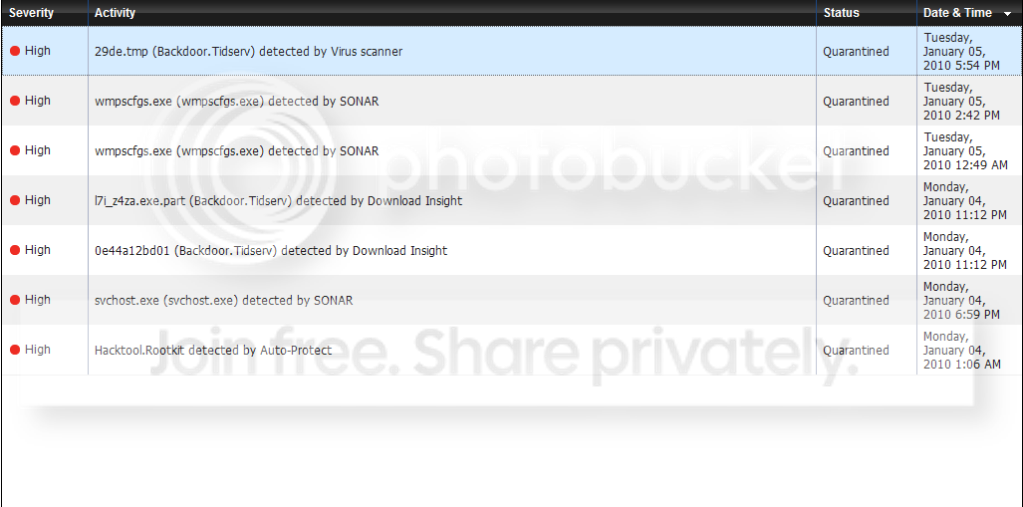
:( fail, I'm still getting the notification from the second screenshot, ugh.. so annoying..
 

My Computer

Computer Manufacturer/Model Number
Dell Dimension 9200
OS
Windows 7 Ultimate
Memory
512mb ram runs GREAT
Graphics Card(s)
NVIDIA GeForce 7300le
what's svchost.exe? is it a virus?
 

My Computer

Computer Manufacturer/Model Number
Dell Dimension 9200
OS
Windows 7 Ultimate
Memory
512mb ram runs GREAT
Graphics Card(s)
NVIDIA GeForce 7300le
VIrusReport.png

WTF o.O This was today and yesterday, look at all the attack attempts and I have just been in facebook
 

My Computer

Computer Manufacturer/Model Number
Dell Dimension 9200
OS
Windows 7 Ultimate
Memory
512mb ram runs GREAT
Graphics Card(s)
NVIDIA GeForce 7300le
hi !


A backdoor trojan...
There’s almost no limit to what they can do. Some common uses:


  • Steal your online and offline passwords, credit card numbers, address, phone number, and other information stored on your computer that could be used for identity theft, or other financial fraud.

this is one IMPORTANT reason to have a good firewall that blocks OUTGOING connections, so that the trojan can´t "call home" !

take a look at fx. Results and comments - www.matousec.com

i have done some test on firewalls, but i have not tested norton´s firewall, but it´s #13 a bit down at that list, so it looks like it doesn´t do a very good job at blocking incoming either.

i recommend that you install one of the FREE firewalls at the top of the list, fx. Comodo or PC-Tools.

i have not tried PC-Tools, since it had problems with Firefox in earlier versions.

BUT, if you choose Comodo, do *NOT* install the "hopsurf-toolbar" !
it´s considered a security risk by experts, (Corrine) and since it´s prechecked when you install, you *MUST* uncheck those 3 "options".

i really recommend it, have used it on Windows 7 since Windows 7-beta,
works great and also has Defence+, that keeps an eye on every program that wants to run.

also get Winpatrol, which is a "must have-program", it´s a free program that also monitors your PC.
it´s recommended by experts, (Corrine).

BillP Studios - WinPatrol 2010
 

My Computer

Computer Manufacturer/Model Number
Dell
OS
W7-Enterprise + WS-2008 (Converted to Workstation)
CPU
P4 2,4GHz (at 1,8GHz, "slow" RDRAM, only 400MHz FSB...)
Motherboard
Intel 850E
Memory
2GB
Graphics Card(s)
NVIDIA QUADRO2 PRO 64MB
Sound Card
Yes
Monitor(s) Displays
Dell 1702FP
Screen Resolution
1280x1024
Hard Drives
Yes
PSU
Yes
Case
Yes
Cooling
Yes
Keyboard
Yes
Mouse
Yes, and i also have Cats...
Internet Speed
University: 100 MBit/s, Home: UMTS 7,2 MBit/s
Other Info
W7 on a DINOSAUR: P2 with 266MHz CPU & 160MB RAM
I'm uninstalling norton, it sucks!, I'm going to try comodo software..
 

My Computer

Computer Manufacturer/Model Number
Dell Dimension 9200
OS
Windows 7 Ultimate
Memory
512mb ram runs GREAT
Graphics Card(s)
NVIDIA GeForce 7300le
hi !

svchost.exe is a systemfile.

i have many of them running right now...

I'm uninstalling norton, it sucks!, I'm going to try comodo software..

what do you expect ?

it seems to be working, protecting your PC....
 

My Computer

Computer Manufacturer/Model Number
Dell
OS
W7-Enterprise + WS-2008 (Converted to Workstation)
CPU
P4 2,4GHz (at 1,8GHz, "slow" RDRAM, only 400MHz FSB...)
Motherboard
Intel 850E
Memory
2GB
Graphics Card(s)
NVIDIA QUADRO2 PRO 64MB
Sound Card
Yes
Monitor(s) Displays
Dell 1702FP
Screen Resolution
1280x1024
Hard Drives
Yes
PSU
Yes
Case
Yes
Cooling
Yes
Keyboard
Yes
Mouse
Yes, and i also have Cats...
Internet Speed
University: 100 MBit/s, Home: UMTS 7,2 MBit/s
Other Info
W7 on a DINOSAUR: P2 with 266MHz CPU & 160MB RAM
Now that I have uninstalled norton everything seems to be working fine ;), I have comodo now
 

My Computer

Computer Manufacturer/Model Number
Dell Dimension 9200
OS
Windows 7 Ultimate
Memory
512mb ram runs GREAT
Graphics Card(s)
NVIDIA GeForce 7300le
Now that I have uninstalled norton everything seems to be working fine ;), I have comodo now

no, Actually Norton was doing his job, and it was doing it very good.

I don't think you are safe now, as you think.
In simple terms, You had backdoor that's why you get more infection as backdoor opened door to malware enter your PC.

What is the settings of Comodo now?
Firewall settings level and Defence+ settings level (if you installed it)?
And did you install Comodo Anti virus aswell? :sarc:
 

My Computer

OS
Windows 7 Ultimate x86 SP1
Comodo is junk. It installs hundreds of registry entries. Use Microsoft Security Essentials. You also should have used the Norton Removal tool. Scan your PC with malwarebytes in safe mode after updating. Before scanning, press the win key+r and type %TMP%. Enter, then Ctrl+A and Shift+Delete. Skip anything that won't delete. Reboot into safe mode and scan again.
 

My Computer

Computer Manufacturer/Model Number
Sony Vaio Z46GDU
OS
Windows 7 Ultimate x86-64
CPU
[email protected] 1066MHz FSB
Motherboard
Sony branded
Memory
6GB DDR3 1066MHz
Graphics Card(s)
9300M GS 256MB Dedicated (Speed) + Intel4500MHD (Stamina)
Sound Card
Realtek HD Audio
Monitor(s) Displays
13.1' WXGA
Screen Resolution
1600x900
Hard Drives
320GB 7200RPM w/ 16MB cache
Internet Speed
1MB/s
Hi, yadielfeliciano.

I'm not going to tell you which antivirus software to use. That is your choice. However, I would suggest that if Norton was detecting a problem, it is not likely gone merely by installing a different program. Not every vendor has the same rate of updating definitions.

If you would like to perform a scan with Malwarebytes, please do the following:

Please download Malwarebytes' Anti-Malware to your desktop.


  • Double-click mbam-setup.exe and follow the prompts to install the program.
  • At the end, be sure a checkmark is placed next to Update Malwarebytes' Anti-Malware and Launch Malwarebytes' Anti-Malware, then click Finish.
  • If an update is found, it will download and install the latest version.
  • Once the program has loaded, be sure Quick scan is selected, then click Scan.
  • When the scan is complete, click OK, then Show Results to view the results.
  • Be sure that everything is checked, EXCEPT items in System Restore as shown in this sample:
    MBAM_SR.png
  • Click Remove Selected.
 

My Computer

OS
Windows 7 & Windows Vista Ultimate
Back
Top