What is a safe/normal temp for CPU?

ExNavy11

Member
Power User
Local time
10:12 PM
Messages
256
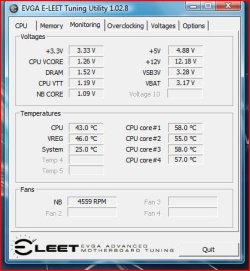
I just put together my cp. I used the standard heatsink for the Intel I7 920 cpu. Right now when not doing much the CPU reads about 50 C. The cores are all at 60 C.

Seems high to me. Should I be concerned? Right now I am using Adobe Media Encoder and the CPU goes up to mid 70s and cores go to over 80.
 

My Computer

Computer Manufacturer/Model Number
Built
OS
Windows 7 RTM
CPU
Intel I7 920 2.67 ghz
Motherboard
EVGA X58
Memory
6GB CORSAIR DOMINATOR
Graphics Card(s)
GeForce GTX 260 Core 216 896MB 448-bit GDDR3 PCI Express 2.0
That does seem high for stock temps, make sure you have mounted the heat sink firmly and that there was adequate thermal paste applied, another thing to consider is the ambient temps, as they will also effect your CPU.

This was taken from the Tom's Hardware forum just to give some perspective.

1. Core i7 920 @ Stock HSF is 35C at 23C room temperature. Temperature is steady

Case: Coolermaster HAF 932 with preinstalled fans
Motherboard: Gigabyte GA-EX58-UD5


2. Core i7 965@ Stock HSF is 35C at 25C room temperature but the individual core temperatures raises up to 47C without doing much. I did some video rendering using adobe premiere pro cs4 which makes good use of the processor while HWMonitor (used to measure temperature) was running parallely, the highest temperature went up to 67C not on the processor but on the individual cores and so the average cpu temperature would have been lot higher.

Case: CoolerMaster Stacker 832 with 3 intake running@1500 rpm approximately outputting 40-50CFM each with 3 exhaust. 1 on the side fan tray at the top close the front door as the intel stock HSF pushes air inside the cpu, should not place an exhaust fan in line to the HSF, 1 on the back and 1 on the top.
Motherboard: Same as above


3. Core i7 965@ Thermalright Ultra 120 Extreme 1366RT @ 25C average room temperature. The BIOS temperature is around 25C for the processor with the coolermaster stacker 832 with a different fan arrangement as follows:

--> Side fan tray removed completely
-->Fixed a intake fan (akasa @ 1500 rpm blowing 50 cfm approx.) at the bottom front where the air mesh is. Remove 2 screws from the bottom mesh from the sides towards the centre, drill through the mesh in the front to match the holes below to accomodate a bottom intake fan. This fan blows air directly into my ATI Radeon 3970X2, which cools it down to 46C as idle temperature.

--> Clear up the front 5.25 bays, 4th,5th and 6th from the top, use the air mesh and one of the fan frame from the side fan tray and fix a intake fan (mine is sanyo denkin @ 1500rpm avg. This blows air directly towards the fan intake of thermalright ultra 120 extreme. My thermalright ultra 120 extreme has only one fan and there is no fan on the side facing the exhaust fan (thermalright 120mm fan @ 2000 rpm).

Results:

HWMonitor - all the cores temperatures are between 30-40C while just surfing the internet
EVEREST Ultimate - CPU temp. is 48 while the individual cores are showing between 30-40C
Gigabyte Easy Tune 6 shows CPU is 28C while the system is 30C

It is lot cooler than the stock HSF and with 2 less no. of fans.


It may be bit high but remember it also depends on your room temperature and the amount of fans in the case. Too many fans blowing air in that the out fans can also cause heat build up. Also, improper heat sink installation, too much or too less thermal paste can also cause problem.

I remember while installing the core i7 920 stock HSF, I ended up breaking the plastic push clips, it didn't lock in properly and the temperature was going up by 1degree every 2 seconds in BIOS.

Check the back of the motherboard, see if you can see the black tips of the push pins of Heat sink. If so, then your room temperature is high or too many or too less fans or too much or too less thermal paste.

Taken from here. High temp for i7 Running @ Stock
 

My Computer

Computer Manufacturer/Model Number
Home Brew
OS
Windows 7 Ultimate Vista Ultimate x64
CPU
Core 2 Duo E8500 3.16Ghz @ 3.8Ghz
Motherboard
eVGA 750i FTW
Memory
2x2Gigs Patriot PC2-6400 LL
Graphics Card(s)
Inno3D GeForce GTX260 216 SP
Monitor(s) Displays
ASUS VW222U 22" 2ms Response time
Screen Resolution
1680x1050
Hard Drives
SATA 150GB
SATA II 250GB
USB IDE 750GB Ext.
PSU
HYTEC 600W & Thermaltake 650W Toughpower Power Exp
Case
Thermaltake Armor LCS (Liquid Cooling System)
Cooling
Liquid Cooling System
Keyboard
Logitech G15 Gaming Keyboard
Mouse
Logitech G9 Gaming Mouse
Thanks for that info.

Looks like I should get an after market heat sink. Right now I am only running Utorrent and surfing the net and temps seem high to me.
 

Attachments

  • Capture.JPG
    Capture.JPG
    40.3 KB · Views: 1,276

My Computer

Computer Manufacturer/Model Number
Built
OS
Windows 7 RTM
CPU
Intel I7 920 2.67 ghz
Motherboard
EVGA X58
Memory
6GB CORSAIR DOMINATOR
Graphics Card(s)
GeForce GTX 260 Core 216 896MB 448-bit GDDR3 PCI Express 2.0
Thanks for that info.

Looks like I should get an after market heat sink. Right now I am only running Utorrent and surfing the net and temps seem high to me.

Just to be sure of those temps it would be worth checking the temps in the Bios to see if they are the same, it might be that your software is not reading it right.
 

My Computer

Computer Manufacturer/Model Number
Home Brew
OS
Windows 7 Ultimate Vista Ultimate x64
CPU
Core 2 Duo E8500 3.16Ghz @ 3.8Ghz
Motherboard
eVGA 750i FTW
Memory
2x2Gigs Patriot PC2-6400 LL
Graphics Card(s)
Inno3D GeForce GTX260 216 SP
Monitor(s) Displays
ASUS VW222U 22" 2ms Response time
Screen Resolution
1680x1050
Hard Drives
SATA 150GB
SATA II 250GB
USB IDE 750GB Ext.
PSU
HYTEC 600W & Thermaltake 650W Toughpower Power Exp
Case
Thermaltake Armor LCS (Liquid Cooling System)
Cooling
Liquid Cooling System
Keyboard
Logitech G15 Gaming Keyboard
Mouse
Logitech G9 Gaming Mouse
just curious if you have an exhaust case fan? And maybe one mounted on the front pulling fresh air in?
 

My Computer

Computer Manufacturer/Model Number
myself
OS
Windows 7 Ultimate 64bit
CPU
Intel Core 2 Duo E8400 3.0ghz Wolfdale
Motherboard
ASUS P5Q Pro ATX LGA775
Memory
OCZ Gold XTC PC2-6400 4GB
Graphics Card(s)
BFG Geforce 8800GT OC
Sound Card
onboard (HD)
Monitor(s) Displays
HP w2207h
Screen Resolution
1680x1050
Hard Drives
Western Digital Caviar SE16 640GB
PSU
Antec Earthwatts 500w
Case
Antec Sonata III
Cooling
Arctic Cooling Accelero S1 Rev 2 Passive VGA Cooler
Keyboard
Logitech
Mouse
Ocz equalizer
Internet Speed
750+
You should have no worries with that case, it has more than enough fans, can you please check what your bios temps are telling you, I think that your temp monitor may be out by about 5c.
 

My Computer

Computer Manufacturer/Model Number
Home Brew
OS
Windows 7 Ultimate Vista Ultimate x64
CPU
Core 2 Duo E8500 3.16Ghz @ 3.8Ghz
Motherboard
eVGA 750i FTW
Memory
2x2Gigs Patriot PC2-6400 LL
Graphics Card(s)
Inno3D GeForce GTX260 216 SP
Monitor(s) Displays
ASUS VW222U 22" 2ms Response time
Screen Resolution
1680x1050
Hard Drives
SATA 150GB
SATA II 250GB
USB IDE 750GB Ext.
PSU
HYTEC 600W & Thermaltake 650W Toughpower Power Exp
Case
Thermaltake Armor LCS (Liquid Cooling System)
Cooling
Liquid Cooling System
Keyboard
Logitech G15 Gaming Keyboard
Mouse
Logitech G9 Gaming Mouse
yeah let me restart and see what it says
 

My Computer

Computer Manufacturer/Model Number
Built
OS
Windows 7 RTM
CPU
Intel I7 920 2.67 ghz
Motherboard
EVGA X58
Memory
6GB CORSAIR DOMINATOR
Graphics Card(s)
GeForce GTX 260 Core 216 896MB 448-bit GDDR3 PCI Express 2.0
Okay so I realized i did in fact do something stupid. When I first noticed the problem I wanted to check the seating of my heat sink. It did in fact seem lose. Not a big fan of how the snap downs work on those. It is now secure. However, when I first checked that, which was after I started this thread, I some how forgot to plug the cpu fan power back in.
Which is why the screen shot I posted before showed what it did.

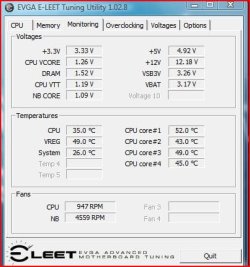
This screen shot is updated.

In the BIOS it now shows
CPU 34
NB 47
VREG 50
Sys 27

I guess these seem acceptable. Ill have to watch it if I start to use some heavy programs and see how high the temps get. Are the 4 cores just normally high?
 

Attachments

  • Capture2.JPG
    Capture2.JPG
    38.4 KB · Views: 399

My Computer

Computer Manufacturer/Model Number
Built
OS
Windows 7 RTM
CPU
Intel I7 920 2.67 ghz
Motherboard
EVGA X58
Memory
6GB CORSAIR DOMINATOR
Graphics Card(s)
GeForce GTX 260 Core 216 896MB 448-bit GDDR3 PCI Express 2.0
LOL at least you found out sooner rather than later, those temps seem allot better now and they are about as good as you get from the stock heat sink, if you are thinking of overclocking I would suggest something better and as you have an enthusiast MB I am guessing you will.

Personally I like water cooling as temps will rarely go 10c over idle temps under full load and as soon as it backs off the temp drops back almost instantly, ATM the ambient temp is 30c and my CPU is at 32c so that is about as good as it gets, CPU is a E8500 3.16Ghz OC @ 3.8Ghz.
 

My Computer

Computer Manufacturer/Model Number
Home Brew
OS
Windows 7 Ultimate Vista Ultimate x64
CPU
Core 2 Duo E8500 3.16Ghz @ 3.8Ghz
Motherboard
eVGA 750i FTW
Memory
2x2Gigs Patriot PC2-6400 LL
Graphics Card(s)
Inno3D GeForce GTX260 216 SP
Monitor(s) Displays
ASUS VW222U 22" 2ms Response time
Screen Resolution
1680x1050
Hard Drives
SATA 150GB
SATA II 250GB
USB IDE 750GB Ext.
PSU
HYTEC 600W & Thermaltake 650W Toughpower Power Exp
Case
Thermaltake Armor LCS (Liquid Cooling System)
Cooling
Liquid Cooling System
Keyboard
Logitech G15 Gaming Keyboard
Mouse
Logitech G9 Gaming Mouse
Is it hard to add water cooling to a case? Ill have to look into it. Ive heard good things about it before just never thought of doing it.
 

My Computer

Computer Manufacturer/Model Number
Built
OS
Windows 7 RTM
CPU
Intel I7 920 2.67 ghz
Motherboard
EVGA X58
Memory
6GB CORSAIR DOMINATOR
Graphics Card(s)
GeForce GTX 260 Core 216 896MB 448-bit GDDR3 PCI Express 2.0
....and yes core temps are always higher than than the CPU (tcase) temps.
 

My Computer

Computer type
PC/Desktop
Computer Manufacturer/Model Number
Systems by SmartEyeball
OS
8 Pro x64
CPU
i7 3770K 4.6GHz
Motherboard
ASUS P8Z77 WS
Memory
16GB G.Skill Trident X 2666mhz
Graphics Card(s)
x2 EVGA 780 Ti Superclocked SLI
Sound Card
SB X-FI Surround 5.1 PRO USB / ATH-AD900 Headphones
Monitor(s) Displays
x3 Dell U2410 / 58" Samsung
Screen Resolution
5760*1200/ 1920*1200
Hard Drives
2x Intel 520 240GB (RAID 0) * 2x WD Caviar Blacks 2TB (RAID 0) * 2TB WD Caviar Black * Sony Optirac DVD
PSU
Silverstone Strider Evolution 1200W
Case
Thermaltake Level 10 GT Snow Edition
Cooling
Noctua NH-D14
Keyboard
Topre Realforce // Ducky Shine MX Black // Filco Ninja TKL
Mouse
Thermaltake Theron (Highly Recommended) + Razer Imperator
Antivirus
MSE
Browser
IE, FF, WaterFox
Other Info
GT Extreme V2 Sim Racing Cockpit + 40" LCD and K/B Mouse stand ▼
Fanatec CSR Elite Wheel + Clubsport V1 Pedals + CSR shifter/7G-H ▼Saitek X52 Pro ▼ TrackIR 5 Pro
Buttkicker v2 Seat Rumbler with Dedicated 5.1 and Sub Woofer attached to frame ▼
=
Bloody Big Grin
Is 44 C right for Pentium Dual-Core CPU E5300 @ 2.60GHz
is that the right temp?

Thanks Jack
 

My Computer

Computer Manufacturer/Model Number
7600
OS
Windows 7 Home Premium
CPU
Pentium(R) Dual-Core E5300 @ 2.60GHz
Motherboard
ASUS P5KPL-AM/PS
Memory
4GB RAM
Graphics Card(s)
NVIDIA GeForce 9500 GT
Monitor(s) Displays
Benq 22"
Screen Resolution
1920 x 1080
Hard Drives
600GB NTFS HDD WD, 1TB External HDD HP simple save , 1TB External WD HDD, 250GB External WD HDD.
Case
Cooler Master Scout
Keyboard
Razer Lycosa
Mouse
Razer Imperator
Other Info
Windows®. Life without Walls™.

Love Steam
Back
Top