What is causing to overheat/freeze during Steam Game play?

MDRI

New member
Member
VIP
Local time
12:03 AM
Messages
163
Thanks for looking into my issue and helping in my past posts. :cool:

I am having a weird issue. My Lenovo Z580 works OK normally. As I play video game using Steam for 3+ hours, my laptop is heating up. It freeze subsequently. I need to hard re-boot .

I am not able to upload the output as is, so I am uploading the speccy output (as win7 zip folder) for your review. What are the areas to look into?:geek:

Thanks for helping.

** If this is not a right forum, let me know, where to post this thread. :)
 

Attachments

My Computer My Computer

At a glance

Win 7 64 bit, 6.1.7601 Service Pack 1 Build 76011 Processor(s) Installed. [01]: Intel64 Famil...8,056 MBIntel HD 4000
Computer type
Laptop
Computer Manufacturer/Model Number
Lenovo IdeaPad Z580, x64-based PC
OS
Win 7 64 bit, 6.1.7601 Service Pack 1 Build 7601
CPU
1 Processor(s) Installed. [01]: Intel64 Family 6 Model 58 St
Memory
8,056 MB
Graphics Card(s)
Intel HD 4000
Antivirus
Windows Security Essential
Browser
FireFox, Chrome
If it is overheating only thing you can do is try clean the vents and get a laptop cooler :) The other thing to do requires somewhat experience with opening the laptop and re-applying thermal paste. Best done by a professional if you are not proficient with the inners of a laptop.

Get HWInfo (run with sensors-only) and benchmark with FurMark. See if it will lock up.
Then run Prime95 for max heat torture test. (stop from menu when/if needed, not from x in the corner)
Don't leave your PC unattended while running these tests as they will stress/induce a lot of heat.
 

My Computer My Computer

At a glance

Windows 7 Ultimate x64 SP1AMD Phenom 2 1090T2x8GB Kingston HyperX Fury Black 1600Mhz Unga...MSI GTX 970 Gaming 4G
Computer type
PC/Desktop
Computer Manufacturer/Model Number
Custom Build
OS
Windows 7 Ultimate x64 SP1
CPU
AMD Phenom 2 1090T
Motherboard
Gigabyte GA-890FXA-UD5
Memory
2x8GB Kingston HyperX Fury Black 1600Mhz Unganged
Graphics Card(s)
MSI GTX 970 Gaming 4G
Sound Card
Realtek On-Board HD 7.1 Audio / Logitech G35
Monitor(s) Displays
3xAcer GD245HQ
Screen Resolution
1920x1080
Hard Drives
Samsung 850 Pro 512GB SSD - OS /
WD Caviar Black SATA 3 - 1 TBx2 - Dynamic RAID 0 /
WD Caviar Green SATA 2 - 640GBx2 - Dynamic RAID 0 /
WD Caviar Green SATA 2 - 640GB - Internal Backup /
Seagate Barracude SATA 3 - 3TB - External Backup/ Sync
PSU
HighPower 1000W
Case
Cooler Master HAF 932
Cooling
Noctua NH-D14
Keyboard
Logitech G19
Mouse
Logitech G500
Internet Speed
100/4 Mbit Cable (100GB quota)
Antivirus
ZoneAlarm Extreme Security / MBAM Pro / MBAE Free / SAS Free
Browser
IE 11 - Firefox - Chrome
Other Info
Logitech F710/ G27/ G940/ Z5500 // TrackIR 5 // Nvidia 3D Surround Vision
Can't help, but I have a suggestion. A lot of people won't open zip files. Find the "Image" icon in the toolbar and insert your speccy that way. I think that works. Also check out the Hardware sub-forum. Good Luck -Vet
 

My Computer My Computer

At a glance

Windows 7 Professional 64-bit (6.1, Build 7601)AMD Athlon(tm) II X2 215 Processor (2 CPUs), ...4,094 MB, Page File Size 8,000 MB, L2 Cache S...ATI All-in-Wonder HD, 512 MB RAM, 1920 x 1080...
Computer type
PC/Desktop
Computer Manufacturer/Model Number
HP-Pavilion
OS
Windows 7 Professional 64-bit (6.1, Build 7601)
CPU
AMD Athlon(tm) II X2 215 Processor (2 CPUs), ~2.7GHz
Motherboard
PEGATRON CORPORATION NARRA5, Phoenix - AwardBIOS v6.00PG
Memory
4,094 MB, Page File Size 8,000 MB, L2 Cache Size 1,024 KB
Graphics Card(s)
ATI All-in-Wonder HD, 512 MB RAM, 1920 x 1080 x 4294967296
Sound Card
On-board Realtek High Definition
Monitor(s) Displays
VIZIO 35" Smart HDTV; ATI All-in-Wonder HD card
Screen Resolution
1920 x 1080P x 60 Hz
Hard Drives
WDC WD50 00AAKS-65A7B SCSI 466 GB Disk, TSSTcorp CD/DVDW TS-H653R SCSI CD ROM, Compact 64 GB Flash USB2, MS/MS-Pro USB, SD/MMC USB, SM/xD-USB
PSU
The biggest I could afford.
Case
Midi Tower
Cooling
Fans
Keyboard
HP OEM
Mouse
Logitech Laser
Internet Speed
13 Mb/sec 12 Mb Down x 1 Mb Up
Antivirus
Primary - Nortone 360, Malwarebytes Anti-Malware, and others
Browser
Internet Explorer 11 v9.11.9600.17801
Other Info
Malwarebytes Anti-Rootkit, TDSS rootkit removal tool, Microsoft Windows Malicious Software Removal Tool, Windows Defender, Emsisoft Emergency Kit, CCleaner, Junkware Removal Tool, Auslogics Defrag
Thanks for looking into my issue. Where can I find image icon? Is it in manage attachment on this forum or Speccy?

I am able to publish Speccy snapshot

Will it help?

I am not sure, whether it is good idea to replicate this thread in Hardware sub-forum. I may violate forum guidelines.

Is someone can move this thread to Hardware sub-forum then?

Thanks for helping.
 
Last edited:

My Computer My Computer

At a glance

Win 7 64 bit, 6.1.7601 Service Pack 1 Build 76011 Processor(s) Installed. [01]: Intel64 Famil...8,056 MBIntel HD 4000
Computer type
Laptop
Computer Manufacturer/Model Number
Lenovo IdeaPad Z580, x64-based PC
OS
Win 7 64 bit, 6.1.7601 Service Pack 1 Build 7601
CPU
1 Processor(s) Installed. [01]: Intel64 Family 6 Model 58 St
Memory
8,056 MB
Graphics Card(s)
Intel HD 4000
Antivirus
Windows Security Essential
Browser
FireFox, Chrome
Thanks for looking into my issue. Where can I find image icon? Is it in manage attachment on this forum or Speccy?

I am able to publish Speccy snapshot

Will it help?

I am not sure, whether it is good idea to replicate this thread in Hardware sub-forum. I may violate forum guidelines.

Is someone can move this thread to Hardware sub-forum then?

Thanks for helping.

The Image icon is in the toolbar that comes with the "Reply to Thread" at the top of the screen. Just run your cursor over them to see their names. Image happens to be under the Undo icon. Let me give it a try here :

http://speccy.piriform.com/results/wnVrAdMmqSmPLsT86EruBcg

Here I have published the URL leading to my speccy output. Hopefully it does something. lol = Vet
 

My Computer My Computer

At a glance

Windows 7 Professional 64-bit (6.1, Build 7601)AMD Athlon(tm) II X2 215 Processor (2 CPUs), ...4,094 MB, Page File Size 8,000 MB, L2 Cache S...ATI All-in-Wonder HD, 512 MB RAM, 1920 x 1080...
Computer type
PC/Desktop
Computer Manufacturer/Model Number
HP-Pavilion
OS
Windows 7 Professional 64-bit (6.1, Build 7601)
CPU
AMD Athlon(tm) II X2 215 Processor (2 CPUs), ~2.7GHz
Motherboard
PEGATRON CORPORATION NARRA5, Phoenix - AwardBIOS v6.00PG
Memory
4,094 MB, Page File Size 8,000 MB, L2 Cache Size 1,024 KB
Graphics Card(s)
ATI All-in-Wonder HD, 512 MB RAM, 1920 x 1080 x 4294967296
Sound Card
On-board Realtek High Definition
Monitor(s) Displays
VIZIO 35" Smart HDTV; ATI All-in-Wonder HD card
Screen Resolution
1920 x 1080P x 60 Hz
Hard Drives
WDC WD50 00AAKS-65A7B SCSI 466 GB Disk, TSSTcorp CD/DVDW TS-H653R SCSI CD ROM, Compact 64 GB Flash USB2, MS/MS-Pro USB, SD/MMC USB, SM/xD-USB
PSU
The biggest I could afford.
Case
Midi Tower
Cooling
Fans
Keyboard
HP OEM
Mouse
Logitech Laser
Internet Speed
13 Mb/sec 12 Mb Down x 1 Mb Up
Antivirus
Primary - Nortone 360, Malwarebytes Anti-Malware, and others
Browser
Internet Explorer 11 v9.11.9600.17801
Other Info
Malwarebytes Anti-Rootkit, TDSS rootkit removal tool, Microsoft Windows Malicious Software Removal Tool, Windows Defender, Emsisoft Emergency Kit, CCleaner, Junkware Removal Tool, Auslogics Defrag
Thanks for looking into my issue. Where can I find image icon? Is it in manage attachment on this forum or Speccy?

I am able to publish Speccy snapshot

Will it help?

I am not sure, whether it is good idea to replicate this thread in Hardware sub-forum. I may violate forum guidelines.

Is someone can move this thread to Hardware sub-forum then?

Thanks for helping.

The Image icon is in the toolbar that comes with the "Reply to Thread" at the top of the screen. Just run your cursor over them to see their names. Image happens to be under the Undo icon. Let me give it a try here :

http://speccy.piriform.com/results/wnVrAdMmqSmPLsT86EruBcg

Here I have published the URL leading to my speccy output. Hopefully it does something. lol = Vet

Yep, I think that's how you do it. Most will open the Piriform link. Speccy good for Mongo. - Vet
 

My Computer My Computer

At a glance

Windows 7 Professional 64-bit (6.1, Build 7601)AMD Athlon(tm) II X2 215 Processor (2 CPUs), ...4,094 MB, Page File Size 8,000 MB, L2 Cache S...ATI All-in-Wonder HD, 512 MB RAM, 1920 x 1080...
Computer type
PC/Desktop
Computer Manufacturer/Model Number
HP-Pavilion
OS
Windows 7 Professional 64-bit (6.1, Build 7601)
CPU
AMD Athlon(tm) II X2 215 Processor (2 CPUs), ~2.7GHz
Motherboard
PEGATRON CORPORATION NARRA5, Phoenix - AwardBIOS v6.00PG
Memory
4,094 MB, Page File Size 8,000 MB, L2 Cache Size 1,024 KB
Graphics Card(s)
ATI All-in-Wonder HD, 512 MB RAM, 1920 x 1080 x 4294967296
Sound Card
On-board Realtek High Definition
Monitor(s) Displays
VIZIO 35" Smart HDTV; ATI All-in-Wonder HD card
Screen Resolution
1920 x 1080P x 60 Hz
Hard Drives
WDC WD50 00AAKS-65A7B SCSI 466 GB Disk, TSSTcorp CD/DVDW TS-H653R SCSI CD ROM, Compact 64 GB Flash USB2, MS/MS-Pro USB, SD/MMC USB, SM/xD-USB
PSU
The biggest I could afford.
Case
Midi Tower
Cooling
Fans
Keyboard
HP OEM
Mouse
Logitech Laser
Internet Speed
13 Mb/sec 12 Mb Down x 1 Mb Up
Antivirus
Primary - Nortone 360, Malwarebytes Anti-Malware, and others
Browser
Internet Explorer 11 v9.11.9600.17801
Other Info
Malwarebytes Anti-Rootkit, TDSS rootkit removal tool, Microsoft Windows Malicious Software Removal Tool, Windows Defender, Emsisoft Emergency Kit, CCleaner, Junkware Removal Tool, Auslogics Defrag
Ok mate one more thing you can do if we haven't done it before is take a look at the power supply so run this if you can and posting shots what you can do is take a digital photo of the screen and save it in Pics and then attach that.

Using HW Info

PART A:

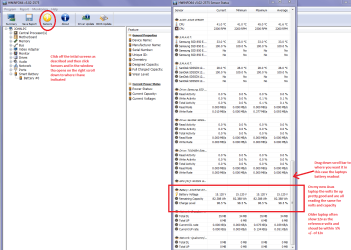
You can test the volts onthe PSU with HW Info HWiNFO,HWiNFO32/64 - Download <download the right bit version and close the right hand window select Sensorsand scroll down to the power section where you will see what the volts aredoing see my pic. In my pic the section (Nuvoton)with VBATT is a dead give away you are in the section for the rail voltages.There are other section titles and one that pops up often is ITE

Now the voltage on thedifferent rails have to be within 5% =+/- of what is required or the machinewill not work properly if at all.

See this for the railvoltage info

http://www.tomshardware.com/reviews/power-supply-specifications-atx-reference,3061.html (Section 2.)

The original right handwindow shows the machine running and is handy for that but for looking at thecomponents in some detail close it and use the main left hand side panel

FOR OTHER COMPONENTS

PART B:

Open each small squarewith + in it on the section the components are in and then click on theindividual component/s (it willhighlight in blue) - in the right hand side will appear all sorts of detailsincluding brands speeds and other essential info that particular device. Seepic for example.


For making sure of the air flow see this too

CLEANING A LAPTOP FAN & COOLER RAD

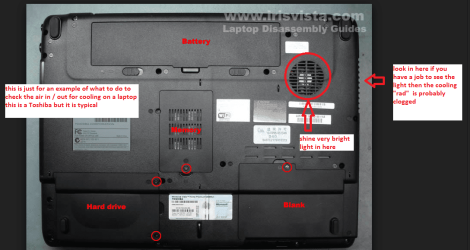
The thing you do is to turnover the laptop and shine a very bright light into the air intake aperture (youwill see the fan there) and then while doing that look at the outlet vent onthe end of the laptop you should see the light quite clearly shining throughthe cooling " radiator" if not - it is clogged and will need cleaningas will probably the fan opening.

You can do this by blowingit out using a compressed air can in short bursts.

BUT ONE WORD OF WARNING DO NOT blow the air into the fan opening withoutinserting say a plastic rod or large cable tie to stop the fan from spinning asthe air blast will spin the fan at a very high speed that it is not designed totake and may wreck the bearing!!

To clean the slots in the radiator use a pipecleaner or one of those craft covered wire sticks - they are referred to aschinelle sticks - see pic. But do be very careful not to be overly heavy handedyou will find it might take a second or two or a few minutes to clear theheavier build ups.
 

Attachments

  • LAPTOP BATTERY.PNG
    LAPTOP BATTERY.PNG
    55.4 KB · Views: 1
  • CHINELLE.PNG
    CHINELLE.PNG
    65.6 KB · Views: 23
  • LAPTOP VENTING.PNG
    LAPTOP VENTING.PNG
    171.1 KB · Views: 1

My Computer My Computer

At a glance

Desk1 7 Home Prem / Desk2 10 Pro / Main lap A...Desk1 i5 3750K / Laptop i7 GTX 860M / Desk2 i...Desk1 8GB (1866) / Desk2 16GB (1333) / Laptop...Desk 1& 2NVidia GTX 650 & Laptops on board Intel
Computer type
PC/Desktop
Computer Manufacturer/Model Number
Own build (new) Desk1 / Asus ROG Win 7 / Desk2 1st build
OS
Desk1 7 Home Prem / Desk2 10 Pro / Main lap Asus ROG 10 Pro 2 laptop Toshiba 7 Pro Asus P2520 7 & 10
CPU
Desk1 i5 3750K / Laptop i7 GTX 860M / Desk2 i5 2500
Motherboard
Desk1 Asus P877-V / Desk2 Gigabyte H67 UD3H / Laptop ?
Memory
Desk1 8GB (1866) / Desk2 16GB (1333) / Laptop 8Gb DDR3
Graphics Card(s)
Desk 1& 2NVidia GTX 650 & Laptops on board Intel
Sound Card
Desk 1 & 2 -XONAR DG Realtek High Def audio Laptop
Monitor(s) Displays
Desk 1 Benq HD 2450 / Desk2 Philips 24" / Laptop 17.5"
Screen Resolution
1920x1080 D1 & D2 & Laptop 1
Hard Drives
Desk1 Samsung 120GB 830 SSD
Asus ROG 256GB 850 Pro SSD
Desk2 Samsung 840 256 SSD
Toshiba 120GB EVO
PSU
Desk 1 Corsair HX 1050/ Laptop ? / Desk 2 Corsair HX 650
Case
Desk 1 Cooler HAF XM ? Toshiba laptop / Desk2 Coolermaster
Cooling
Fans on all Desk1 -2 Desk2 - all Coolermasters 5 Laptop ?
Keyboard
Desk 1 MS Sidewinder X6 Desk 2 MS Sidewinder X 4
Mouse
Desk 1&2 - Gigabyte MS 900 gamer - laptop - Logitec wireless
Internet Speed
ADSL2+
Other Info
One other Desktop (tester) and spare Toshba laptop both with SSD's
Running Kaspersky 2016 ISS on all machines config'd identically
Logitec audio stereo systems on each machine (x3)
Canon MG5250MFC
Router/modem TP-Link running WPA2SK
Thanks for chiming in. I downloaded HWiNFO,HWiNFO32/64 - Download from HWiNFO, HWiNFO32/64 - Download. As I run this program, I am getting the following ERROR (Cannot install HWinFO64 driver! Check user rights & antivirus filters). I have only windows security essentials.

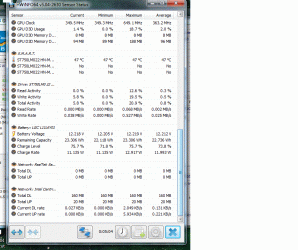
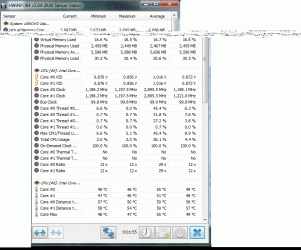
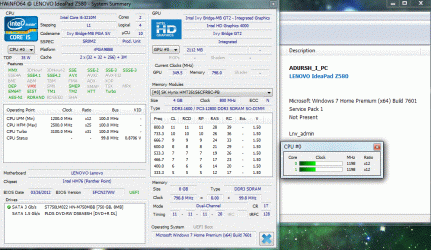
I tried again with running as admin. It worked. I am attaching the results as screen shots attachments. I run this i normal condition. The Stream Game was not running at this time. If you need additional options to look into. I will be glad to post those screen shots as well.


Let me know, what to do.

Thanks for helping.
 

Attachments

  • Winfo64SS3.gif
    Winfo64SS3.gif
    87 KB · Views: 1
  • Winfo64SS2.gif
    Winfo64SS2.gif
    76.4 KB · Views: 1
  • Winfo64SS1.gif
    Winfo64SS1.gif
    73.2 KB · Views: 2
  • Winfo64SS.gif
    Winfo64SS.gif
    162.4 KB · Views: 1
  • MDRI_PC.LOG
    MDRI_PC.LOG
    105.1 KB · Views: 1
Last edited:

My Computer My Computer

At a glance

Win 7 64 bit, 6.1.7601 Service Pack 1 Build 76011 Processor(s) Installed. [01]: Intel64 Famil...8,056 MBIntel HD 4000
Computer type
Laptop
Computer Manufacturer/Model Number
Lenovo IdeaPad Z580, x64-based PC
OS
Win 7 64 bit, 6.1.7601 Service Pack 1 Build 7601
CPU
1 Processor(s) Installed. [01]: Intel64 Family 6 Model 58 St
Memory
8,056 MB
Graphics Card(s)
Intel HD 4000
Antivirus
Windows Security Essential
Browser
FireFox, Chrome
Ok mate the battery looks fine so we shall just have to keep on looking. I suppose the cooling looked ok using my little ditty?
 

My Computer My Computer

At a glance

Desk1 7 Home Prem / Desk2 10 Pro / Main lap A...Desk1 i5 3750K / Laptop i7 GTX 860M / Desk2 i...Desk1 8GB (1866) / Desk2 16GB (1333) / Laptop...Desk 1& 2NVidia GTX 650 & Laptops on board Intel
Computer type
PC/Desktop
Computer Manufacturer/Model Number
Own build (new) Desk1 / Asus ROG Win 7 / Desk2 1st build
OS
Desk1 7 Home Prem / Desk2 10 Pro / Main lap Asus ROG 10 Pro 2 laptop Toshiba 7 Pro Asus P2520 7 & 10
CPU
Desk1 i5 3750K / Laptop i7 GTX 860M / Desk2 i5 2500
Motherboard
Desk1 Asus P877-V / Desk2 Gigabyte H67 UD3H / Laptop ?
Memory
Desk1 8GB (1866) / Desk2 16GB (1333) / Laptop 8Gb DDR3
Graphics Card(s)
Desk 1& 2NVidia GTX 650 & Laptops on board Intel
Sound Card
Desk 1 & 2 -XONAR DG Realtek High Def audio Laptop
Monitor(s) Displays
Desk 1 Benq HD 2450 / Desk2 Philips 24" / Laptop 17.5"
Screen Resolution
1920x1080 D1 & D2 & Laptop 1
Hard Drives
Desk1 Samsung 120GB 830 SSD
Asus ROG 256GB 850 Pro SSD
Desk2 Samsung 840 256 SSD
Toshiba 120GB EVO
PSU
Desk 1 Corsair HX 1050/ Laptop ? / Desk 2 Corsair HX 650
Case
Desk 1 Cooler HAF XM ? Toshiba laptop / Desk2 Coolermaster
Cooling
Fans on all Desk1 -2 Desk2 - all Coolermasters 5 Laptop ?
Keyboard
Desk 1 MS Sidewinder X6 Desk 2 MS Sidewinder X 4
Mouse
Desk 1&2 - Gigabyte MS 900 gamer - laptop - Logitec wireless
Internet Speed
ADSL2+
Other Info
One other Desktop (tester) and spare Toshba laptop both with SSD's
Running Kaspersky 2016 ISS on all machines config'd identically
Logitec audio stereo systems on each machine (x3)
Canon MG5250MFC
Router/modem TP-Link running WPA2SK
Thanks for looking into my thread/issue. I checked cooling. It looked ok using your little ditty. Does this heating caused by graphic driver? What are the other potential areas to look into?

Thanks for helping.
 

My Computer My Computer

At a glance

Win 7 64 bit, 6.1.7601 Service Pack 1 Build 76011 Processor(s) Installed. [01]: Intel64 Famil...8,056 MBIntel HD 4000
Computer type
Laptop
Computer Manufacturer/Model Number
Lenovo IdeaPad Z580, x64-based PC
OS
Win 7 64 bit, 6.1.7601 Service Pack 1 Build 7601
CPU
1 Processor(s) Installed. [01]: Intel64 Family 6 Model 58 St
Memory
8,056 MB
Graphics Card(s)
Intel HD 4000
Antivirus
Windows Security Essential
Browser
FireFox, Chrome
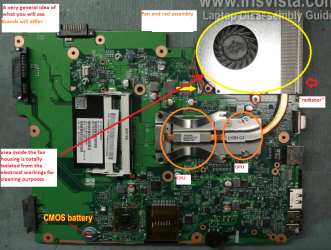
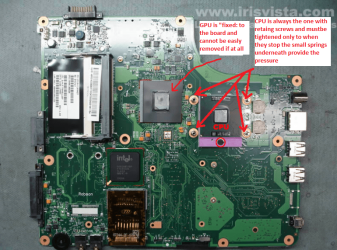
Now the heat is actually generated by the CPU and GPU in my pic is a rough idea of how the cooling is set up albeit in a Toshiba.

I am now wondering just how old is the machine - and sorry if you have said so already but I cannot see it - I am now thinking hard drive and RAM perhaps causing this freezing both are easy to test for but if the machine is new then most likely still ok - though not impossible that either could have gone or be going south already.
 

Attachments

  • LAPBOARD.PNG
    LAPBOARD.PNG
    372.4 KB · Views: 1
  • CPU1.PNG
    CPU1.PNG
    259.7 KB · Views: 1

My Computer My Computer

At a glance

Desk1 7 Home Prem / Desk2 10 Pro / Main lap A...Desk1 i5 3750K / Laptop i7 GTX 860M / Desk2 i...Desk1 8GB (1866) / Desk2 16GB (1333) / Laptop...Desk 1& 2NVidia GTX 650 & Laptops on board Intel
Computer type
PC/Desktop
Computer Manufacturer/Model Number
Own build (new) Desk1 / Asus ROG Win 7 / Desk2 1st build
OS
Desk1 7 Home Prem / Desk2 10 Pro / Main lap Asus ROG 10 Pro 2 laptop Toshiba 7 Pro Asus P2520 7 & 10
CPU
Desk1 i5 3750K / Laptop i7 GTX 860M / Desk2 i5 2500
Motherboard
Desk1 Asus P877-V / Desk2 Gigabyte H67 UD3H / Laptop ?
Memory
Desk1 8GB (1866) / Desk2 16GB (1333) / Laptop 8Gb DDR3
Graphics Card(s)
Desk 1& 2NVidia GTX 650 & Laptops on board Intel
Sound Card
Desk 1 & 2 -XONAR DG Realtek High Def audio Laptop
Monitor(s) Displays
Desk 1 Benq HD 2450 / Desk2 Philips 24" / Laptop 17.5"
Screen Resolution
1920x1080 D1 & D2 & Laptop 1
Hard Drives
Desk1 Samsung 120GB 830 SSD
Asus ROG 256GB 850 Pro SSD
Desk2 Samsung 840 256 SSD
Toshiba 120GB EVO
PSU
Desk 1 Corsair HX 1050/ Laptop ? / Desk 2 Corsair HX 650
Case
Desk 1 Cooler HAF XM ? Toshiba laptop / Desk2 Coolermaster
Cooling
Fans on all Desk1 -2 Desk2 - all Coolermasters 5 Laptop ?
Keyboard
Desk 1 MS Sidewinder X6 Desk 2 MS Sidewinder X 4
Mouse
Desk 1&2 - Gigabyte MS 900 gamer - laptop - Logitec wireless
Internet Speed
ADSL2+
Other Info
One other Desktop (tester) and spare Toshba laptop both with SSD's
Running Kaspersky 2016 ISS on all machines config'd identically
Logitec audio stereo systems on each machine (x3)
Canon MG5250MFC
Router/modem TP-Link running WPA2SK
Thanks for your reply. I understand. My Lenovo Z580 is 3 years old.

It works good for normal workings. The machine is heating up, as we play video game using Steam/Blackops for 1.5+ Hours. It heats up and freeze. :sick:

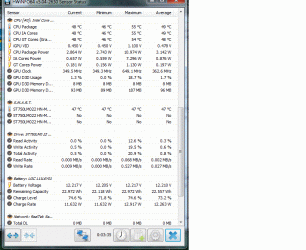
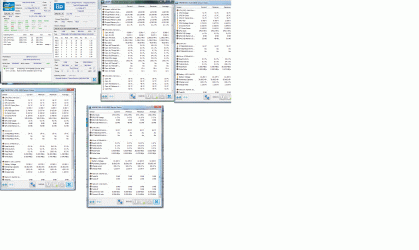
As It happened, I got the snapshot of Speccy and HWINFO64. I am attaching those for this for your review. It shows most of the temprature reading in RED color.

Are there any special settings required for game play to keep the temperature under control? :geek:

Let me know, what else to look into?:geek:

Thanks for helping.
 

Attachments

  • HWinfo64SS.gif
    HWinfo64SS.gif
    421 KB · Views: 3

My Computer My Computer

At a glance

Win 7 64 bit, 6.1.7601 Service Pack 1 Build 76011 Processor(s) Installed. [01]: Intel64 Famil...8,056 MBIntel HD 4000
Computer type
Laptop
Computer Manufacturer/Model Number
Lenovo IdeaPad Z580, x64-based PC
OS
Win 7 64 bit, 6.1.7601 Service Pack 1 Build 7601
CPU
1 Processor(s) Installed. [01]: Intel64 Family 6 Model 58 St
Memory
8,056 MB
Graphics Card(s)
Intel HD 4000
Antivirus
Windows Security Essential
Browser
FireFox, Chrome
Hmm well like I said the battery volts and the rest of HW Info looks fine. The 59C of the CPU is within limits in my mind for running games as the Tjunction for that CPU is 105C Intel® Coreâ„¢ i5-3210M Processor (3M Cache, up to 3.10 GHz, rPGA Specifications

Thinking a little left field I am wondering what updating the HD graphics might do and get it from Intel not the Lenovo site. I have an Asus ROG laptop that runs the latest Intel graphics and they are brilliant even compared to the NVidia GTX860M I have on board too.
I am pretty sure this is the site you need https://downloadcenter.intel.com/do...phics-Driver-for-Windows-7-8-1-10-3rd-Gen-BYT-
 

My Computer My Computer

At a glance

Desk1 7 Home Prem / Desk2 10 Pro / Main lap A...Desk1 i5 3750K / Laptop i7 GTX 860M / Desk2 i...Desk1 8GB (1866) / Desk2 16GB (1333) / Laptop...Desk 1& 2NVidia GTX 650 & Laptops on board Intel
Computer type
PC/Desktop
Computer Manufacturer/Model Number
Own build (new) Desk1 / Asus ROG Win 7 / Desk2 1st build
OS
Desk1 7 Home Prem / Desk2 10 Pro / Main lap Asus ROG 10 Pro 2 laptop Toshiba 7 Pro Asus P2520 7 & 10
CPU
Desk1 i5 3750K / Laptop i7 GTX 860M / Desk2 i5 2500
Motherboard
Desk1 Asus P877-V / Desk2 Gigabyte H67 UD3H / Laptop ?
Memory
Desk1 8GB (1866) / Desk2 16GB (1333) / Laptop 8Gb DDR3
Graphics Card(s)
Desk 1& 2NVidia GTX 650 & Laptops on board Intel
Sound Card
Desk 1 & 2 -XONAR DG Realtek High Def audio Laptop
Monitor(s) Displays
Desk 1 Benq HD 2450 / Desk2 Philips 24" / Laptop 17.5"
Screen Resolution
1920x1080 D1 & D2 & Laptop 1
Hard Drives
Desk1 Samsung 120GB 830 SSD
Asus ROG 256GB 850 Pro SSD
Desk2 Samsung 840 256 SSD
Toshiba 120GB EVO
PSU
Desk 1 Corsair HX 1050/ Laptop ? / Desk 2 Corsair HX 650
Case
Desk 1 Cooler HAF XM ? Toshiba laptop / Desk2 Coolermaster
Cooling
Fans on all Desk1 -2 Desk2 - all Coolermasters 5 Laptop ?
Keyboard
Desk 1 MS Sidewinder X6 Desk 2 MS Sidewinder X 4
Mouse
Desk 1&2 - Gigabyte MS 900 gamer - laptop - Logitec wireless
Internet Speed
ADSL2+
Other Info
One other Desktop (tester) and spare Toshba laptop both with SSD's
Running Kaspersky 2016 ISS on all machines config'd identically
Logitec audio stereo systems on each machine (x3)
Canon MG5250MFC
Router/modem TP-Link running WPA2SK
Looking at the first photo in #11, I've seen a number of Notebooks where the finned part mated/fitted to the fan housing was plugged up and blowing out with compressed air didn't unplug it. Most times there were fine-haired pets in the house.
 

My Computer My Computer

At a glance

Windows 7 Ultimate 64-bit, Windows 8.1 64-bit...
Computer type
PC/Desktop
Computer Manufacturer/Model Number
Customs, Dell, Gateway, HP, Toshiba, Acer, ASUS
OS
Windows 7 Ultimate 64-bit, Windows 8.1 64-bit, Mac OS X 10.10, Linux Mint 17, Windows 10 Pro TP
Keyboard
Microsoft
Mouse
Microsoft
Looking at the first photo in #11, I've seen a number of Notebooks where the finned part mated/fitted to the fan housing was plugged up and blowing out with compressed air didn't unplug it. Most times there were fine-haired pets in the house.
Yep mate that is why I posted the stuff in post #7 and it came up clean if the cleaning process was followed that I use with those chinelle craft wires and while blowing with the air at the same time ;)
 

My Computer My Computer

At a glance

Desk1 7 Home Prem / Desk2 10 Pro / Main lap A...Desk1 i5 3750K / Laptop i7 GTX 860M / Desk2 i...Desk1 8GB (1866) / Desk2 16GB (1333) / Laptop...Desk 1& 2NVidia GTX 650 & Laptops on board Intel
Computer type
PC/Desktop
Computer Manufacturer/Model Number
Own build (new) Desk1 / Asus ROG Win 7 / Desk2 1st build
OS
Desk1 7 Home Prem / Desk2 10 Pro / Main lap Asus ROG 10 Pro 2 laptop Toshiba 7 Pro Asus P2520 7 & 10
CPU
Desk1 i5 3750K / Laptop i7 GTX 860M / Desk2 i5 2500
Motherboard
Desk1 Asus P877-V / Desk2 Gigabyte H67 UD3H / Laptop ?
Memory
Desk1 8GB (1866) / Desk2 16GB (1333) / Laptop 8Gb DDR3
Graphics Card(s)
Desk 1& 2NVidia GTX 650 & Laptops on board Intel
Sound Card
Desk 1 & 2 -XONAR DG Realtek High Def audio Laptop
Monitor(s) Displays
Desk 1 Benq HD 2450 / Desk2 Philips 24" / Laptop 17.5"
Screen Resolution
1920x1080 D1 & D2 & Laptop 1
Hard Drives
Desk1 Samsung 120GB 830 SSD
Asus ROG 256GB 850 Pro SSD
Desk2 Samsung 840 256 SSD
Toshiba 120GB EVO
PSU
Desk 1 Corsair HX 1050/ Laptop ? / Desk 2 Corsair HX 650
Case
Desk 1 Cooler HAF XM ? Toshiba laptop / Desk2 Coolermaster
Cooling
Fans on all Desk1 -2 Desk2 - all Coolermasters 5 Laptop ?
Keyboard
Desk 1 MS Sidewinder X6 Desk 2 MS Sidewinder X 4
Mouse
Desk 1&2 - Gigabyte MS 900 gamer - laptop - Logitec wireless
Internet Speed
ADSL2+
Other Info
One other Desktop (tester) and spare Toshba laptop both with SSD's
Running Kaspersky 2016 ISS on all machines config'd identically
Logitec audio stereo systems on each machine (x3)
Canon MG5250MFC
Router/modem TP-Link running WPA2SK
Thanks for your reply. I did update the HD graphics from intel site before reinstall of win 7 (Long story). The installed HD graphics from intel site, did not go well with video games . It caused frequent crashes.

Is there a way to back up current HD Graphics before updating with Intel site HD Graphics?

Any thoughts?

Thanks for helping.
 

My Computer My Computer

At a glance

Win 7 64 bit, 6.1.7601 Service Pack 1 Build 76011 Processor(s) Installed. [01]: Intel64 Famil...8,056 MBIntel HD 4000
Computer type
Laptop
Computer Manufacturer/Model Number
Lenovo IdeaPad Z580, x64-based PC
OS
Win 7 64 bit, 6.1.7601 Service Pack 1 Build 7601
CPU
1 Processor(s) Installed. [01]: Intel64 Family 6 Model 58 St
Memory
8,056 MB
Graphics Card(s)
Intel HD 4000
Antivirus
Windows Security Essential
Browser
FireFox, Chrome
Well not really I thought it would be the cure to be honest as the Intel graphics on my Asus is perfect but I guess it is a much later version of their graphics.:(
 

My Computer My Computer

At a glance

Desk1 7 Home Prem / Desk2 10 Pro / Main lap A...Desk1 i5 3750K / Laptop i7 GTX 860M / Desk2 i...Desk1 8GB (1866) / Desk2 16GB (1333) / Laptop...Desk 1& 2NVidia GTX 650 & Laptops on board Intel
Computer type
PC/Desktop
Computer Manufacturer/Model Number
Own build (new) Desk1 / Asus ROG Win 7 / Desk2 1st build
OS
Desk1 7 Home Prem / Desk2 10 Pro / Main lap Asus ROG 10 Pro 2 laptop Toshiba 7 Pro Asus P2520 7 & 10
CPU
Desk1 i5 3750K / Laptop i7 GTX 860M / Desk2 i5 2500
Motherboard
Desk1 Asus P877-V / Desk2 Gigabyte H67 UD3H / Laptop ?
Memory
Desk1 8GB (1866) / Desk2 16GB (1333) / Laptop 8Gb DDR3
Graphics Card(s)
Desk 1& 2NVidia GTX 650 & Laptops on board Intel
Sound Card
Desk 1 & 2 -XONAR DG Realtek High Def audio Laptop
Monitor(s) Displays
Desk 1 Benq HD 2450 / Desk2 Philips 24" / Laptop 17.5"
Screen Resolution
1920x1080 D1 & D2 & Laptop 1
Hard Drives
Desk1 Samsung 120GB 830 SSD
Asus ROG 256GB 850 Pro SSD
Desk2 Samsung 840 256 SSD
Toshiba 120GB EVO
PSU
Desk 1 Corsair HX 1050/ Laptop ? / Desk 2 Corsair HX 650
Case
Desk 1 Cooler HAF XM ? Toshiba laptop / Desk2 Coolermaster
Cooling
Fans on all Desk1 -2 Desk2 - all Coolermasters 5 Laptop ?
Keyboard
Desk 1 MS Sidewinder X6 Desk 2 MS Sidewinder X 4
Mouse
Desk 1&2 - Gigabyte MS 900 gamer - laptop - Logitec wireless
Internet Speed
ADSL2+
Other Info
One other Desktop (tester) and spare Toshba laptop both with SSD's
Running Kaspersky 2016 ISS on all machines config'd identically
Logitec audio stereo systems on each machine (x3)
Canon MG5250MFC
Router/modem TP-Link running WPA2SK
Back
Top