What is IOS Devices

FD611V

Banned
Local time
2:19 AM
Messages
19
For some three years I have been watching live Denver 9news online. 9NEWS.com | Denver | Colorado's online news leader | Breaking This is done by clicking on their Live News Link and a live video comes up. Now there is a "Message" stating...The video you are trying to watch is using the HTTP Live streaming protocol which is only supported in IOS devices.
Anyone know what this is, and how I can remedy this as I have a HP Pavilion p6750f desktop with Windows 7 Home running Internet Explorer 11?
 

My Computer

Computer type
PC/Desktop
Computer Manufacturer/Model Number
HP
OS
Windows 7 Home -64-bit
IOS is the Operating System used by Apple Computer mobile devices such as the iPhone and iPad.

What browser are you using to try to view the video? I followed your link and could not view the video with Internet Explorer but it worked fine with Chrome.
 

My Computer

Computer type
PC/Desktop
Computer Manufacturer/Model Number
Custom Build
OS
Windows 7 Home Premium x64
CPU
Intel Core i7 5960X @3.0 GHz
Motherboard
Gigabyte GA-X99-SOC Force
Memory
4 x 4 GB G.Skill Ripjaws4 DDR4-2400
Graphics Card(s)
PNY GTX 780
Sound Card
Realtek on-board ALC1150
Monitor(s) Displays
HP Z30i + Asus PA246Q + Dell U2412M
Screen Resolution
2560x1600 + 1920x1200 + 1920x1200
Hard Drives
Samsung 830 256GB
PSU
Antec EarthWatts 650W
Case
Cooler Master HAF 932
Cooling
Corsair Hydro Series H105
Keyboard
Razer BlackWidow Tournament Edition Stealth
Mouse
Razer Naga
IOS is the Operating System used by Apple Computer mobile devices such as the iPhone and iPad.

What browser are you using to try to view the video? I followed your link and could not view the video with Internet Explorer but it worked fine with Chrome.


I have Internet Explorer 11. Denver 9 News must have switched this morning as I was watching their new last night. Something new I would guess for the Ipod, etc users.
 

My Computer

Computer type
PC/Desktop
Computer Manufacturer/Model Number
HP
OS
Windows 7 Home -64-bit

My Computer

Computer type
PC/Desktop
Computer Manufacturer/Model Number
Custom Build
OS
Windows 7 Home Premium 32-Bit - Build 7600 SP1
CPU
Intel Core i3-2120 3.30Ghz
Motherboard
Asus P8Z68-V LX Intel Z68 Socket H2 ATX
Memory
Kingston 4 GB DDR3 1333 mhz
Graphics Card(s)
AMD Radeon HD6670
Sound Card
Sound Blaster Audigy SE 24-Bit
Monitor(s) Displays
Asus VE228
Screen Resolution
1440 X 900
Hard Drives
OCZ Vertex 3 120 GB Sata 3 SSD ==
Kingston SH103/S3 120 G Hyper X 120 GB SSD ==
Western Digital 500 GB Caviar Green 7200 RPM ==
PSU
Corsair CX600M == 600 Watt
Case
NZXT Apollo - Silver with Clear Side Panel
Cooling
Three 120 mm Fans
Keyboard
Microsoft Natural 4000
Mouse
Microsoft Custom Optical 3000
Internet Speed
AT&T Fiber Optic Wireless Network
Antivirus
Microsoft Security Essentials
Browser
Chrome
Other Info
120 mm Blue LED Fan -- Three Blue LED Lazer Light Sticks
I have IE v10 and the link in your message was OK. It appears that IE v11 is the culprit. It has caused problems for me in other ways. Download IE v10 and see if that works for you. If it does you can go to this link and get a program that blocks IE v11 from installing on your PC. Download Toolkit to Disable Automatic Delivery of Internet Explorer 11 from Official Microsoft Download Center


I just read on the Internet how to get IOS by removing Microsoft Internet Explorer 11, as it is not supported for IOS features. I uninstalled it and now back to Internet Explorer 10 which works great.

Thanks for the info. Must made a note not to use Explorer 11.. Shame on you Microsoft.
 

My Computer

Computer type
PC/Desktop
Computer Manufacturer/Model Number
HP
OS
Windows 7 Home -64-bit
I have IE v10 and the link in your message was OK. It appears that IE v11 is the culprit. It has caused problems for me in other ways. Download IE v10 and see if that works for you. If it does you can go to this link and get a program that blocks IE v11 from installing on your PC. Download Toolkit to Disable Automatic Delivery of Internet Explorer 11 from Official Microsoft Download Center

I just read on the Internet how to get IOS by removing Microsoft Internet Explorer 11, as it is not supported for IOS features. I uninstalled it and now back to Internet Explorer 10 which works great.

Thanks for the info. Must made a note not to use Explorer 11.. Shame on you Microsoft.

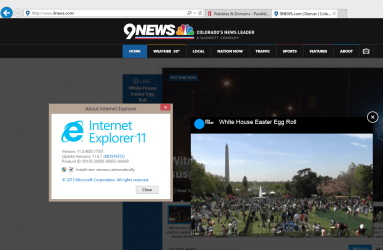
Decided to check this out, I have absolutely no issues in following Live News or any other video content from that site with IE 11:

2014-04-21_17h19_20.png

Hear Live Video from White House Easter Egg Roll.
 

My Computer

Computer type
Laptop
Computer Manufacturer/Model Number
HP ENVY 17-1150eg
OS
Windows 10 Pro x64 EN-GB
CPU
1.6 GHz Intel Core i7-720QM Processor
Memory
6 GB
Graphics Card(s)
ATI Mobility Radeon HD 5850 Graphics
Sound Card
Beats sound system with integrated subwoofer
Monitor(s) Displays
17" laptop display, 22" LED and 32" Full HD TV through HDMI
Screen Resolution
1600*900 (1), 1920*1080 (2&3)
Hard Drives
Internal: 2 x 500 GB SATA Hard Disk Drive 7200 rpm
External: 2TB for backups, 3TB USB3 network drive for media
Cooling
As Envy runs a bit warm, I have it on a Cooler Master pad
Keyboard
Logitech diNovo Media Desktop Laser (bluetooth)
Mouse
Logitech Performance Mouse MX
Internet Speed
50/10 Mbps VDSL
Antivirus
Windows Defender 4.3.9431.0
Browser
Maxthon 3.5.2., IE11
I have IE v10 and the link in your message was OK. It appears that IE v11 is the culprit. It has caused problems for me in other ways. Download IE v10 and see if that works for you. If it does you can go to this link and get a program that blocks IE v11 from installing on your PC. Download Toolkit to Disable Automatic Delivery of Internet Explorer 11 from Official Microsoft Download Center

I just read on the Internet how to get IOS by removing Microsoft Internet Explorer 11, as it is not supported for IOS features. I uninstalled it and now back to Internet Explorer 10 which works great.

Thanks for the info. Must made a note not to use Explorer 11.. Shame on you Microsoft.

Decided to check this out, I have absolutely no issues in following Live News or any other video content from that site with IE 11:
Hear Live Video from White House Easter Egg Roll.


That isn't what we are referring to. It's the Live Streaming of Denver 9News morning, noon, evening News casts. What you see is a rerun on a video. I can get that with Explorer 11, but not the Live Streaming by IOS. So, to see if you can, go to the 9news.com at 12PM Denver time and click on Live news at the left top side bar and if you get the message about HTTP Protocol only being supported by IOS, you know you have Explorer 11.
 

My Computer

Computer type
PC/Desktop
Computer Manufacturer/Model Number
HP
OS
Windows 7 Home -64-bit
That isn't what we are referring to. It's the Live Streaming of Denver 9News morning, noon, evening News casts. What you see is a rerun on a video. I can get that with Explorer 11, but not the Live Streaming by IOS. So, to see if you can, go to the 9news.com at 12PM Denver time and click on Live news at the left top side bar and if you get the message about HTTP Protocol only being supported by IOS, you know you have Explorer 11.

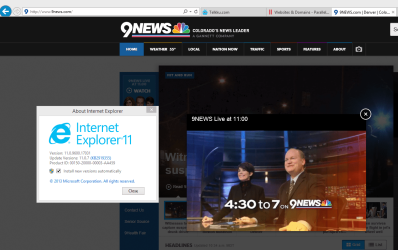
Watching live news now using IE11:

2014-04-21_19h19_44.png
 

My Computer

Computer type
Laptop
Computer Manufacturer/Model Number
HP ENVY 17-1150eg
OS
Windows 10 Pro x64 EN-GB
CPU
1.6 GHz Intel Core i7-720QM Processor
Memory
6 GB
Graphics Card(s)
ATI Mobility Radeon HD 5850 Graphics
Sound Card
Beats sound system with integrated subwoofer
Monitor(s) Displays
17" laptop display, 22" LED and 32" Full HD TV through HDMI
Screen Resolution
1600*900 (1), 1920*1080 (2&3)
Hard Drives
Internal: 2 x 500 GB SATA Hard Disk Drive 7200 rpm
External: 2TB for backups, 3TB USB3 network drive for media
Cooling
As Envy runs a bit warm, I have it on a Cooler Master pad
Keyboard
Logitech diNovo Media Desktop Laser (bluetooth)
Mouse
Logitech Performance Mouse MX
Internet Speed
50/10 Mbps VDSL
Antivirus
Windows Defender 4.3.9431.0
Browser
Maxthon 3.5.2., IE11
That isn't what we are referring to. It's the Live Streaming of Denver 9News morning, noon, evening News casts. What you see is a rerun on a video. I can get that with Explorer 11, but not the Live Streaming by IOS. So, to see if you can, go to the 9news.com at 12PM Denver time and click on Live news at the left top side bar and if you get the message about HTTP Protocol only being supported by IOS, you know you have Explorer 11.

Watching live news now using IE11:


I would guess you are running Windows 8.1 with the Internet Explorer 11 update version 11.07 (KB2919355) which I don't have as I'm running Windows 7.
 

My Computer

Computer type
PC/Desktop
Computer Manufacturer/Model Number
HP
OS
Windows 7 Home -64-bit
Video stream plays in Firefox.
 
Last edited:

My Computer

Computer type
PC/Desktop
Computer Manufacturer/Model Number
Home Built - Jan 2013
OS
Windows 7 64 Bit Home Premium SP1
CPU
i7-3820
Motherboard
Asus P9X79-PRO - Bios 4608
Memory
GSkill F3-14900CL9Q - 16GB
Graphics Card(s)
EVGA GeForce GTX660 - Driver 352.86
Sound Card
On board Realtek ALC898
Monitor(s) Displays
Acer S271HL
Screen Resolution
1920 x 1080
Hard Drives
#1- Samsung 840 Pro Series
#2- Western Digital WD1002FAEX Sata3 Black
#3- Western Digital WD1002FAEX Sata3 Black
PSU
Corsair CMPSU-850TX-V2 - 850 watt (by Seasonic)
Case
Corsair Obsidian 550D
Cooling
Standard 3 120mm case fans, Cooler Master Hyper 212 EVO
Keyboard
MS KC-0405
Mouse
Intellimouse 5-button
Internet Speed
56 Mbits/Sec (on a good day)
Antivirus
Avast & Malwarebytes
Browser
Firefox
Other Info
Asus DVD - DRW-24B1ST 24X
Back
Top