Just food for thought...
Back in the old days when Ccleaner came out (think 2007 or thereabouts) it was pretty nifty and got the job done. Now-a-days with its massively popularity it seem to have turned into a full on marketing overblown "crap" software. Also, because of that a hacker hacked into the Ccleaner downloads server and swapped the good version for an infected version. Then when the masses downloaded it no one was the wiser. This is why you want to check any and all SHA256 or MD5 hashes for all downloads if provided and/or scan downloads at VirusTotal. The general consensus is four hits and you toss. But it depends on what you have.
I use an old version of Ccleaner (5.14.5493) with a file in its directory that expands upon Ccleaner's cleaning ability routines. You can get this older version of Ccleaner here:
Download Old Versions of CCleaner for Windows - OldVersion.com And that file I talked about that I added to Ccleaner's directory to expand upon its cleaning? It's here:
GitHub - MoscaDotTo/Winapp2: A database of extended cleaning routines for popular Windows PC based maintenance software.
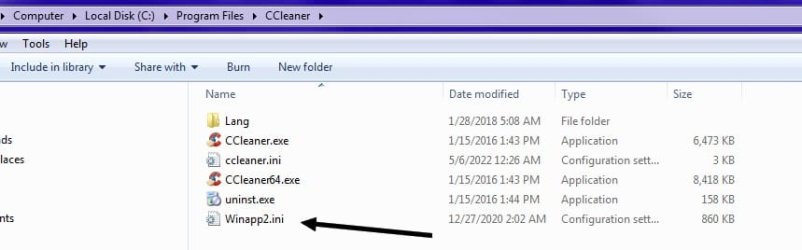
Right click the Winapp2.ini link and save as Winapp2.ini. Now place that file in the directory of Ccleaner. Typically C:\Program Files\CCleaner
Looks like this:
I also use SystemNinja and it already has its own Winapp2.ini. Both Systemninja and Ccleaner will work hand in hand and find things differently then the other. You only need these two programs and not other snake oil. Also, do not touch the registry with Ccleaner or what ever. It will mess things up sooner or latter. The registry is like a database and if you mess it up the computer will mess up. If you use Revouninstaller, it offers registry cleaning. That is fine, just make sure you delete things you know are relevant to the program being uninstalled. Sometimes shared values from other programs ride with the program being uninstalled so the risk of unintentional removal of the wrong registry values is there. That's why you want to use the system restore option in Revouninstaller.
PS:
When the Winapp2.ini file is added to Ccleaner it will undoubtedly make launching Ccleaner slower. Just want to tell you that. The program is just searching all of those extra paths for things that it can remove. And having said that, be sure you don't remove things you shouldn't or would like to keep. Ccleaner and SystemNinja are not some "cure all" programs. They do exactly what they say, delete temp files and other stuff that
may not be needed. Some people go so far as to thinking they'll remove malware. I don't think so...
PPS: If anyone is wondering why Ccleaner keeps finding Internet Explorer files, it's because things like Window Media Player use IE. IE is a built-in component of Windows so shouldn't ever be messed with or uninstalled. Also, I've run across many programs using IE for its features.
Tip
#351
Before a full HDD clone, it would be wise to run Ccleaner and SystemNinja...



