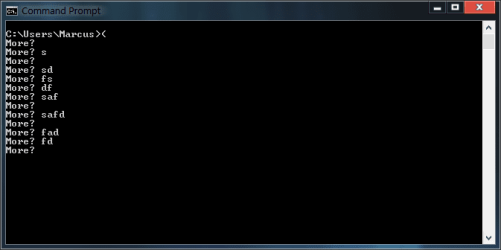
Just noticed something interesting while typing an opening parenthesis in the command prompt (left curved bracket)
I haven't been able to find out what it is, does anyone know what it is exactly? It just says "more?" and doesn't really seem to react to input at first glance. Screenshot is attached.
As Kari said, it doesn't have anything to do with the More command which is separate. Here's an example of using the More command:
It causes output to be displayed a screen at a time by pausing and waiting for user interaction. Pressing the spacebar will display the next screen, pressing Return will display the next line.
My Computer
Computer type
PC/Desktop
Computer Manufacturer/Model Number
Home Built desktop, Dell G15 5511 Gaming laptop,MS Surface Pro 7 tablet
OS
W10 Pro desktop, W11 laptop, W11 Pro tablet (all 64-bit)
CPU
3.7Ghz 8700K i7, i7-11800H, i7-1065G7
Motherboard
ASUS TUF Z370-Pro Gaming in desktop
Memory
16G desktop, 16G laptop, 4G tablet
Graphics Card(s)
AMD Radeon RX580, RTX 3060, Intel Iris Plus
Sound Card
High Definition Audio (Built-in to mobo)
Monitor(s) Displays
Samsung U32J59 32" (2x), 15.6", 12"
Screen Resolution
3840x2160, 3840x2160, 1920x1080, 2160x1440
Hard Drives
500G SSD for OS; 2T, 10T & 15T HDDs for Data on Desktop, 1TB SSD laptop, 128G SSD tablet.
PSU
Corsair CX 750M
Case
Antec 100
Cooling
CM 212+
Keyboard
IBM Model M - used continuously since 1986
Mouse
Microsoft Pro IntelliMouse
Internet Speed
400M down 8M up
Antivirus
Windows Defender
Browser
FireFox
Other Info
Built my first computer (8Mhz 8088cpu, 640K RAM, 20MB HDD, 2 360K floppy drives) in 1985 and have been building them for myself, relatives and friends ever since.
But if you see More ?, it means the command is incomplete, Windows does not understand it.
I notice that I did explain this quite poorly, so here's a bit more information.
You can give several commands in one command line sentence as far as the commands are separated with an ampersand (&) and put within the parenthesis. This is useful in batch files, especially when doing FOR ... DO loops.
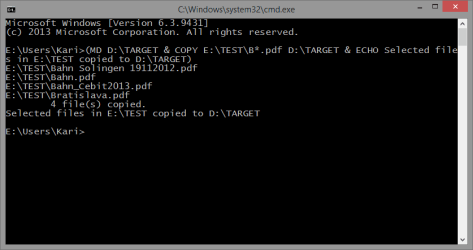
Following command sentence would first create a folder called D:\TARGET, then copy all PDF files starting with the letter B from folder E:\TEST to D:\TARGET and finally show message "Selected files in E:\TEST copied to D:\TARGET":
(MD D:\TARGET & COPY E:\TEST\B*.pdf D:\TARGET & ECHO Selected files in E:\TEST copied to D:\TARGET)
Notice the ampersand (&) signs between the commands, command sentence within the parenthesis.
The output in command prompt window would look like this:
Kari
Last edited:
My Computer
Computer type
Laptop
Computer Manufacturer/Model Number
HP ENVY 17-1150eg
OS
Windows 10 Pro x64 EN-GB
CPU
1.6 GHz Intel Core i7-720QM Processor
Memory
6 GB
Graphics Card(s)
ATI Mobility Radeon HD 5850 Graphics
Sound Card
Beats sound system with integrated subwoofer
Monitor(s) Displays
17" laptop display, 22" LED and 32" Full HD TV through HDMI
Screen Resolution
1600*900 (1), 1920*1080 (2&3)
Hard Drives
Internal: 2 x 500 GB SATA Hard Disk Drive 7200 rpm
External: 2TB for backups, 3TB USB3 network drive for media
Cooling
As Envy runs a bit warm, I have it on a Cooler Master pad
Thanks for More? information on the subject.
Unfortunately I've let my command skills wither to the point that I would have to burn some serious midnight oil to get back into it, but I've always enjoyed working with the command prompt.
I saved vanderwoude's link.
My Computer
Computer type
PC/Desktop
Computer Manufacturer/Model Number
Gateway DX4831-01e (Mid-Tower Desktop)
OS
Originally Win 7 Hm Prem x64 Ver 6.1.7600 Build 7601-SP1 | Upgraded to Windows 10 December 14, 2019
The command line and batching / scripting options in Windows cover a lot more, can do a lot more than an average user or even quite geeky user usually knows, not to mention how complex things you can do with Windows PowerShell.
With modern operating systems it is of course possible to use the PC almost solely by pointing and clicking but IMO it is worth for every advanced Windows user to learn command line and PowerShell.
Just my 2 Euro cents...
Kari
My Computer
Computer type
Laptop
Computer Manufacturer/Model Number
HP ENVY 17-1150eg
OS
Windows 10 Pro x64 EN-GB
CPU
1.6 GHz Intel Core i7-720QM Processor
Memory
6 GB
Graphics Card(s)
ATI Mobility Radeon HD 5850 Graphics
Sound Card
Beats sound system with integrated subwoofer
Monitor(s) Displays
17" laptop display, 22" LED and 32" Full HD TV through HDMI
Screen Resolution
1600*900 (1), 1920*1080 (2&3)
Hard Drives
Internal: 2 x 500 GB SATA Hard Disk Drive 7200 rpm
External: 2TB for backups, 3TB USB3 network drive for media
Cooling
As Envy runs a bit warm, I have it on a Cooler Master pad
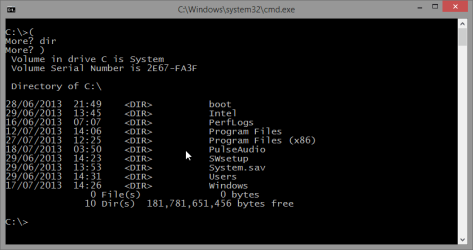
Yes. Using the opening parenthesis alone you can also input multiple commands into a buffer, to be executed all one after another only when the closing parenthesis is given.
An example. Try this, input the characters and commands in command prompt as told here:
Type ( and hit Enter
This starts a multiple command sentence and asks more information
Type dir C: and hit Enter
No closing parenthesis ergo system asks more
Type Echo This was an example of multiple commands in one command sentence and hit Enter
Again, no closing parenthesis, system asks more
Type ) and hit Enter
Command sentence finished with closing parenthesis, being ready to be executed. As instructed, the system shows folder listing and thereafter the text "This was an example of multiple commands in one command sentence"
The above example in command prompt window would look like this:
Kari
Last edited:
My Computer
Computer type
Laptop
Computer Manufacturer/Model Number
HP ENVY 17-1150eg
OS
Windows 10 Pro x64 EN-GB
CPU
1.6 GHz Intel Core i7-720QM Processor
Memory
6 GB
Graphics Card(s)
ATI Mobility Radeon HD 5850 Graphics
Sound Card
Beats sound system with integrated subwoofer
Monitor(s) Displays
17" laptop display, 22" LED and 32" Full HD TV through HDMI
Screen Resolution
1600*900 (1), 1920*1080 (2&3)
Hard Drives
Internal: 2 x 500 GB SATA Hard Disk Drive 7200 rpm
External: 2TB for backups, 3TB USB3 network drive for media
Cooling
As Envy runs a bit warm, I have it on a Cooler Master pad






 information on the subject.