

As we dive into 2019, we’re bringing new updates to Google Fi subscribers. Starting today, we’re upgrading default messaging on eligible phones to RCS, and in the coming weeks, if you’re using a phone designed for Fi, you’ll get faster data coverage in more places around the world.
Richer messaging with RCS
With RCS in Messages, you can do and share more when you message friends, family members, groups, and even businesses who are on RCS. You’ll be able to see typing indicators and read receipts, share high-resolution videos, and message over Wi-Fi or data with others that have RCS enabled.

RCS will be available on phones designed for Fi and compatible Android phones. If you’re using a phone designed for Fi, RCS will be automatically enabled. If you’re on a compatible Android phone, you’ll need to download Messages and set it as your default messaging app. Then you’ll see some simple prompts to enable RCS.
Faster coverage abroad
When you travel with Google Fi, you already have automatic data coverage for the same price you pay at home in 200+ countries and territories. Over the next few weeks we’ll upgrade 33 of these countries to faster 4G LTE coverage on phones designed for Fi. So whether you’re looking for directions to your grandma’s place in Hong Kong or sharing scenic photos of your adventures in Iceland with friends back home, you’ll enjoy even faster data speeds while you travel.
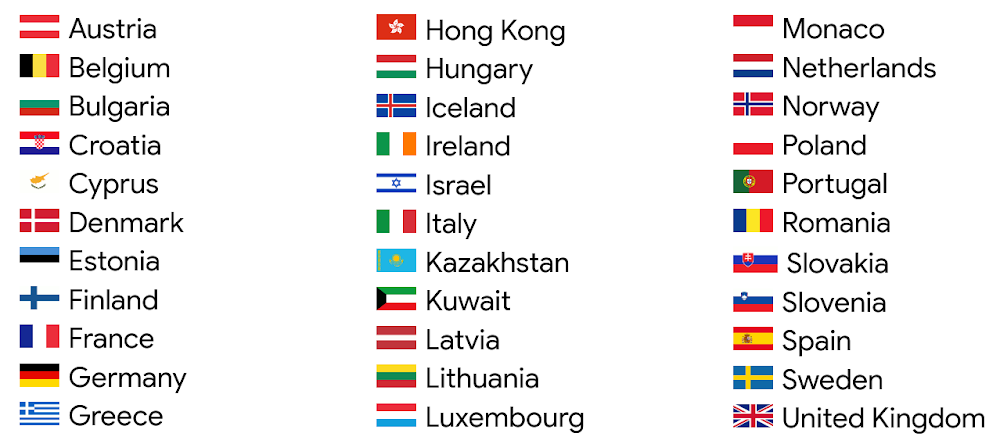
We can’t wait for you to try these new features, and we look forward to bringing you even more from Google Fi in the new year.
Source: Whats new with Google Fi in 2019
My Computer
At a glance
64-bit Windows 11 Pro for WorkstationsIntel i7-8700K OC'd to 5 GHz64 GB (4x16GB) G.SKILL TridentZ RGB DDR4 3600...ASUS ROG-STRIX-GTX1080TI-O11G-GAMING
- Computer type
- PC/Desktop
- Computer Manufacturer/Model Number
- Self built custom
- OS
- 64-bit Windows 11 Pro for Workstations
- CPU
- Intel i7-8700K OC'd to 5 GHz
- Motherboard
- ASUS ROG Maximus XI Formula Z390
- Memory
- 64 GB (4x16GB) G.SKILL TridentZ RGB DDR4 3600 MHz
- Graphics Card(s)
- ASUS ROG-STRIX-GTX1080TI-O11G-GAMING
- Sound Card
- Integrated
- Monitor(s) Displays
- 2 x Samsung Odyssey G7 27"
- Screen Resolution
- 2560x1440
- Hard Drives
- 1TB Samsung 990 PRO M.2,
4TB Samsung 990 PRO PRO M.2,
TerraMaster F8 SSD Plus NAS
- PSU
- Seasonic Prime Titanium 850W
- Case
- Thermaltake Core P3
- Cooling
- Corsair Hydro H115i
- Keyboard
- Logitech wireless K800
- Mouse
- Logitech MX Master 4
- Internet Speed
- 2 Gb/s Download and 100 Mb/s Upload
- Antivirus
- Malwarebyte Anti-Malware Premium
- Browser
- Google Chrome
- Other Info
- Logitech Z625 speaker system,
Logitech BRIO 4K Pro webcam,
HP Color LaserJet Pro MFP M477fdn,
APC SMART-UPS RT 1000 XL - SURT1000XLI,
Galaxy S23 Plus phone
