AlbinoPanda,
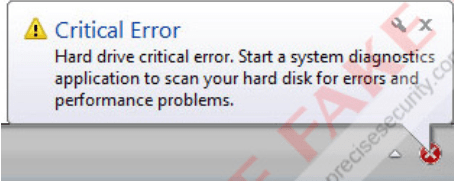
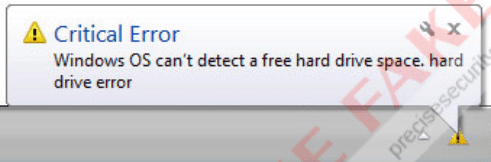
Is one of the images at the
end of this post similar to what you are getting?
If so, please restart your computer, and tap the F8 key before Windows shows up.
At the
Advanced Options Menu, select:
Safe Mode with Networking
Press:
Enter
See if you can download the programs that follow in
Safe Mode with Networking:
Please download
RogueKiller:
Tlcharger RogueKiller (Site Officiel)
When you get to the website, go to where it says:
(Download link) Lien de téléchargement
Select the version that applies to your system: 32-bit or 64-bit
Click the applicable dark-blue button to download.
Save to the Desktop.
Close all windows and browsers.
Right-click and select:
Run as Administrator
At the program console, wait for the prescan to finish. (Under Status, it says: Prescan finished.)
Press:
SCAN
When done, a report opens on the Desktop:
RKreport.txt
Please provide the
RKreport.txt (Mode: Scan) in your reply.
~~~~
Also download the
Farbar Recovery Scan Tool
Select the version that applies to your system: 32-bit or 64-bit
Save it to your
Desktop.
- Double-click the downloaded file to run it.
- When the tool opens click Yes to disclaimer.
- Press the Scan button.
- FRST64 makes a log (FRST.txt) in the same directory from which the tool is run (Desktop).
Please provide the
FRST.txt in your reply.
<<---
The first time the tool is run, it also makes another log:
Addition.txt
Also post the
Addition.txt in your reply.
<<---
Error Message:




 An my computer only has one user, so I can't check.