What is the best free defragger?

Here's a real world scenario where a defragger with a disk map and boot time defrag capability was necessary:
I decided to install/dual boot Windows 7 on my Vista laptop, but when I tried to shrink the primary partition it would only allow a few hundred megabytes. I figured there must be data at the end of the partition preventing it from being re-sized, so I tried Disk Cleanup and deleted everything including shadow copies/restore points, but this didn't help. Then I loaded Perfectdisk to analyzed the drive and sure enough there was "locked" data at the end of the partition. I did a few repetitions of boot-time defrag and defragging in the GUI. Afterward there was still one file left that wouldn't move, but Perfectdisk identified it and Google produced instructions for deleting it. Then I was able to shrink the partition sufficiently to install Windows 7. Long story short; I wouldn't have been able to do this with the Vista or Win 7 defragger.

I can't disagree really, as there are times when the Windows defrag really needs to give users more options to customize the way it works, so there is a time where 3rd party tools are very needed. But after that I would allow the native defrag to maintain the disks.

It's not disk defrag'rs that are a waste of time, it's the reg defrag and cleaner apps that are, and also can be system fatal in many cases. Anyone who DOeS use these cleaners better have a good understanding of what each hive is used for, and what kind of key strings are important because these things throw up false positives all the time and if users simply "trust" the app and delete whatever it flags, they're in for surprises.
 

My Computer My Computer

At a glance

Vista Ult 64bit - Windows 7 Ult 7264 64bitIntel Core 2 Duo E67504 G's Crucial Ballistix TracerBFG Nvidia 8800 GTS 340
Computer Manufacturer/Model Number
Personal Build
OS
Vista Ult 64bit - Windows 7 Ult 7264 64bit
CPU
Intel Core 2 Duo E6750
Motherboard
Asus Commando
Memory
4 G's Crucial Ballistix Tracer
Graphics Card(s)
BFG Nvidia 8800 GTS 340
Sound Card
Creative Sound Blaster X-FI Platinum FATAL1TY
Monitor(s) Displays
2-22" HP W2207 LCD
Screen Resolution
1920 x 1080
Hard Drives
3 x 500G WD Caviar SATA II
PSU
Enermax Noise Taker II 600W
Case
NZXT Lexa Classic (dual doored & windowed)
Cooling
Zalman 9700 CPU cooler - 4 x 120mm, 1 x 90mm fans
Keyboard
Logitech MX 5500
Mouse
Logitech MX Revolution
Internet Speed
Blazing...
Thank you for your example - But XP is not Win 7, so I'm a little confused why you chose that. I'm simply pointing out that the Windows Engineering Team are saying that for Win 7 the best practice is to do nothing.
While I don't disagree with the Win 7 Engineering Team, I do miss the visual aspect of the XP version. OTOH, maybe it's possible they may do certain things that make sense from the Windows 7 use of the filesystem, but may look odd to the normal user, so they save themselves a bunch of questions by not showing it ... :huh:
 

My Computer My Computer

At a glance

Windows 7 RTM x64Core i7 980X @ 4.04GHz OC /// Core Duo L7500 ...12GB G. Skill @ DDR-1600 OC /// 4GBSaphire HD4870 Toxic 1GB /// Intel Mobile GMA...
Computer Manufacturer/Model Number
Custom workstation /// Lenovo X61t tablet notebook
OS
Windows 7 RTM x64
CPU
Core i7 980X @ 4.04GHz OC /// Core Duo L7500 @ 1.6GHz
Motherboard
Asus P6T6 WS Revolution ///
Memory
12GB G. Skill @ DDR-1600 OC /// 4GB
Graphics Card(s)
Saphire HD4870 Toxic 1GB /// Intel Mobile GMA X3100
Monitor(s) Displays
Dual Eizo 24" SX2461W /// 12"
Screen Resolution
1920x1200 /// 1400x1050
Hard Drives
Workstation:
5x 750GB Barracuda-11 on Areca ARC-1220;
4x 1.5TB Barracuda-11 on Intel ICH10R;
Volumes:
300GB RAID 0, 2.7TB RAID 10 on Intel;
100GB RAID 0, 1.4TB RAID 10 on Areca ///
Notebook: G.Skill Titan 256GB SSD
PSU
Tagan ITZ 1100
Case
GHS-1500 ///
Cooling
Thermalright IFX-14 + a slew of stealth fans ///
Keyboard
Logitech Edge ///
Mouse
Logitech Wireless Optical Trackball
Internet Speed
5Mbps down / 820Kbps up
Other Info
Main use: photography;
DVD Drive: L.G GGW-H20L Blu-Ray / DVD;
OC: QPI/DRAM @ 1.33v, CPU @ 1.293v, DRAM Bus @ 1.65v, CPU PLL @ 1.88v, CPU mult = 25x, BCLK = 160, DDR3-1604 @ 7-8-7-24
I have a different problem. I use a SSD as boot-disk and I'm adviced NOT to defrag it ever, because of the very fast seektimes in SSD's. But it seems like Windows 7 does not know that my drive is a SSD, and therefore I have manually to switch off scheduled defragmention. When I rightclick on the drive in Explorer, I can still choose "defragmention".
Other people with other SSD's, like the OCZ-ones write, that Windows 7 do know these drives as SSD's and therefore there is no scheduled defragmention in their setups, and when they rightclick the drive, they can't select Defragmentation in the tools-tab.

So is there anything else I should know to keep my SSD up and running? As Windows 7 does not know it as a SSD, the system can of course not implement anything to do maintenence.

About the different you write about between XP and Windows 7 ... well, it is the exactly the same filesystem, so same algorithm should properly be used. I do hope, that MS some day will give us WinFS, or something similar. Or at least a filesystem optimized for SSD's :)
 

My Computer My Computer

At a glance

Windows 7 Ultimate x64Intel E6850 3,0 running 3,6 Ghz2x2 and Gb Corsair PC6400 CAS5 - 4GB totalNvidia Geforce 260GTX
OS
Windows 7 Ultimate x64
CPU
Intel E6850 3,0 running 3,6 Ghz
Motherboard
Gigabyte DS4 P35
Memory
2x2 and Gb Corsair PC6400 CAS5 - 4GB total
Graphics Card(s)
Nvidia Geforce 260GTX
Sound Card
Creative X-Fi Fata1ty Gamer Extreme
Monitor(s) Displays
Samsung 2493hm
Screen Resolution
1920*1200
Hard Drives
Intel X25-M SSD for system
2x 1Tb Samsung F1 as seperate discs
PSU
Zahlman 850HP
Case
Shg
Cooling
Evo 120
Keyboard
Logitech G15 (blue backlight)
Mouse
Logitech G5 laser
Internet Speed
25/25 mbit
Other Info
1 Samsung SATA dvd-burner
1 LiteOn SATA dvd-burner
Hi Sven

Hmm...I wonder if the system does recognize it as SSD, but doesn't grey out that option for some reason. I wonder if you clicked it, if it would actually do a defrag or tell you it can't do that for this device. Of course the problem is,if it actually started to defrag it would you be able to stop it quick enough...I can't say that I'd tell you to try it..
I haven't delved too deep into the defrag scheduler, I wonder if you can turn it off for selected drives, say your "F:" drive, if that's what your SSD is recognized as.

Edit - Sven, it seems that SSD recognition is in the works for a future W7 update

Anandtech said:
First, a TRIM-supporting OS (e.g. Windows 7 will support TRIM at some point) queries the hard drive for its rotational speed. If the drive responds by saying 0, the OS knows it’s a SSD and turns off features like defrag. It also enables the use of the TRIM command

I guess with the popularity of SSD drives on the rise, they had to do something like this pretty soon, I wonder if it will be in the final RTM or maybe even a sooner leak build ;)
 

My Computer My Computer

At a glance

Vista Ult 64bit - Windows 7 Ult 7264 64bitIntel Core 2 Duo E67504 G's Crucial Ballistix TracerBFG Nvidia 8800 GTS 340
Computer Manufacturer/Model Number
Personal Build
OS
Vista Ult 64bit - Windows 7 Ult 7264 64bit
CPU
Intel Core 2 Duo E6750
Motherboard
Asus Commando
Memory
4 G's Crucial Ballistix Tracer
Graphics Card(s)
BFG Nvidia 8800 GTS 340
Sound Card
Creative Sound Blaster X-FI Platinum FATAL1TY
Monitor(s) Displays
2-22" HP W2207 LCD
Screen Resolution
1920 x 1080
Hard Drives
3 x 500G WD Caviar SATA II
PSU
Enermax Noise Taker II 600W
Case
NZXT Lexa Classic (dual doored & windowed)
Cooling
Zalman 9700 CPU cooler - 4 x 120mm, 1 x 90mm fans
Keyboard
Logitech MX 5500
Mouse
Logitech MX Revolution
Internet Speed
Blazing...
Then I loaded Perfectdisk to analyzed the drive and sure enough there was "locked" data at the end of the partition. and Google produced instructions for deleting it. AFAICT.

I'm interested as to how you actually were able to move the "locked data". Always wanted to know what that is and why it needs to be "locked" to a certain part of the disk and which programs do that?
 

My Computer My Computer

At a glance

Windows 7 Ultimate, UbuntuDDR 2Gb (!)6600GT
Computer Manufacturer/Model Number
AMD Athlon 64 3200+, Lenovo G560 i3
OS
Windows 7 Ultimate, Ubuntu
Motherboard
Gigabyte K8T8000
Memory
DDR 2Gb (!)
Graphics Card(s)
6600GT
Monitor(s) Displays
MultiMonitor (2) LCD
Hard Drives
Old Seagate 75
Big Western Digital
Samsung 500Gb pulled out of an external drive and installed
Ext: Maxtor (Firewire), 1Gb Lacie (Samsung)
Mouse
Logitech MX620 Cordless
While I don't disagree with the Win 7 Engineering Team, I do miss the visual aspect of the XP version. OTOH, maybe it's possible they may do certain things that make sense from the Windows 7 use of the filesystem, but may look odd to the normal user, so they save themselves a bunch of questions by not showing it ... :huh:

I believe that is the case too, from what I've read they simply don't want users to mess with things as it's set up except for the scheduling aspect.
I too missed the visuals originally, but after awhile in Vista I didn't even think about it anymore, and now hardly ever. Now & then I look at the report and see a max of 1 or 2% fragmentation on a drive, which is bugger all really, so I'm very confident that the built in utility does what's best for the file system.
 

My Computer My Computer

At a glance

Vista Ult 64bit - Windows 7 Ult 7264 64bitIntel Core 2 Duo E67504 G's Crucial Ballistix TracerBFG Nvidia 8800 GTS 340
Computer Manufacturer/Model Number
Personal Build
OS
Vista Ult 64bit - Windows 7 Ult 7264 64bit
CPU
Intel Core 2 Duo E6750
Motherboard
Asus Commando
Memory
4 G's Crucial Ballistix Tracer
Graphics Card(s)
BFG Nvidia 8800 GTS 340
Sound Card
Creative Sound Blaster X-FI Platinum FATAL1TY
Monitor(s) Displays
2-22" HP W2207 LCD
Screen Resolution
1920 x 1080
Hard Drives
3 x 500G WD Caviar SATA II
PSU
Enermax Noise Taker II 600W
Case
NZXT Lexa Classic (dual doored & windowed)
Cooling
Zalman 9700 CPU cooler - 4 x 120mm, 1 x 90mm fans
Keyboard
Logitech MX 5500
Mouse
Logitech MX Revolution
Internet Speed
Blazing...
I'm interested as to how you actually were able to move the "locked data". Always wanted to know what that is and why it needs to be "locked" to a certain part of the disk and which programs do that?

System critical files and the MFT/MBR are usually the Locked data types.
Keeping critical files contiguous is pretty important as the system may not boot correctly otherwise.
 

My Computer My Computer

At a glance

Vista Ult 64bit - Windows 7 Ult 7264 64bitIntel Core 2 Duo E67504 G's Crucial Ballistix TracerBFG Nvidia 8800 GTS 340
Computer Manufacturer/Model Number
Personal Build
OS
Vista Ult 64bit - Windows 7 Ult 7264 64bit
CPU
Intel Core 2 Duo E6750
Motherboard
Asus Commando
Memory
4 G's Crucial Ballistix Tracer
Graphics Card(s)
BFG Nvidia 8800 GTS 340
Sound Card
Creative Sound Blaster X-FI Platinum FATAL1TY
Monitor(s) Displays
2-22" HP W2207 LCD
Screen Resolution
1920 x 1080
Hard Drives
3 x 500G WD Caviar SATA II
PSU
Enermax Noise Taker II 600W
Case
NZXT Lexa Classic (dual doored & windowed)
Cooling
Zalman 9700 CPU cooler - 4 x 120mm, 1 x 90mm fans
Keyboard
Logitech MX 5500
Mouse
Logitech MX Revolution
Internet Speed
Blazing...
Thanx Chappy. Knew about the MBR which usually appears near the "front' of a disk - but often other locked files are in awkward positions as Victek reports. Also they seem unusually large blocks. They may well be system critical but they don't seem to be "system created". Not running PerfectDisk anymore or any other 3rd party defraggers so can't check to see whether I've got any locked files or what they are.
 

My Computer My Computer

At a glance

Windows 7 Ultimate, UbuntuDDR 2Gb (!)6600GT
Computer Manufacturer/Model Number
AMD Athlon 64 3200+, Lenovo G560 i3
OS
Windows 7 Ultimate, Ubuntu
Motherboard
Gigabyte K8T8000
Memory
DDR 2Gb (!)
Graphics Card(s)
6600GT
Monitor(s) Displays
MultiMonitor (2) LCD
Hard Drives
Old Seagate 75
Big Western Digital
Samsung 500Gb pulled out of an external drive and installed
Ext: Maxtor (Firewire), 1Gb Lacie (Samsung)
Mouse
Logitech MX620 Cordless
They may well be system critical but they don't seem to be "system created"

They should be, remember in XP when they had a GUI to view fragmentation...all the green "Unmovable" stuff were system files & tagged critical. Immediately after an install, there they were, large blocks and many times in weird places, just like you remember ;). There never seemed to be any logic about their placement, I completely agree with you guys on that one...heheh.
 

My Computer My Computer

At a glance

Vista Ult 64bit - Windows 7 Ult 7264 64bitIntel Core 2 Duo E67504 G's Crucial Ballistix TracerBFG Nvidia 8800 GTS 340
Computer Manufacturer/Model Number
Personal Build
OS
Vista Ult 64bit - Windows 7 Ult 7264 64bit
CPU
Intel Core 2 Duo E6750
Motherboard
Asus Commando
Memory
4 G's Crucial Ballistix Tracer
Graphics Card(s)
BFG Nvidia 8800 GTS 340
Sound Card
Creative Sound Blaster X-FI Platinum FATAL1TY
Monitor(s) Displays
2-22" HP W2207 LCD
Screen Resolution
1920 x 1080
Hard Drives
3 x 500G WD Caviar SATA II
PSU
Enermax Noise Taker II 600W
Case
NZXT Lexa Classic (dual doored & windowed)
Cooling
Zalman 9700 CPU cooler - 4 x 120mm, 1 x 90mm fans
Keyboard
Logitech MX 5500
Mouse
Logitech MX Revolution
Internet Speed
Blazing...
They should be, remember in XP when they had a GUI to view fragmentation...all the green "Unmovable" stuff were system files & tagged critical. Immediately after an install, there they were, large blocks and many times in weird places, just like you remember ;). There never seemed to be any logic about their placement, I completely agree with you guys on that one...heheh.

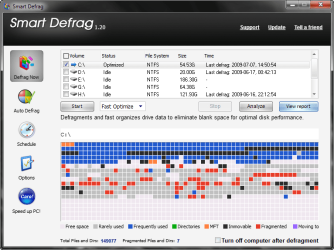
Not kidding - dragged out Smart Defrag (image below) and as you can see MFT is where it should be - then the black boxes represent "Immovable" HA! WTF! SmartDefrag is too basic to tell me what files they are but it looks like 52 pickup!

immovable.png

(Didn't do a great job at "Eliminating blank space" either!)
 

My Computer My Computer

At a glance

Windows 7 Ultimate, UbuntuDDR 2Gb (!)6600GT
Computer Manufacturer/Model Number
AMD Athlon 64 3200+, Lenovo G560 i3
OS
Windows 7 Ultimate, Ubuntu
Motherboard
Gigabyte K8T8000
Memory
DDR 2Gb (!)
Graphics Card(s)
6600GT
Monitor(s) Displays
MultiMonitor (2) LCD
Hard Drives
Old Seagate 75
Big Western Digital
Samsung 500Gb pulled out of an external drive and installed
Ext: Maxtor (Firewire), 1Gb Lacie (Samsung)
Mouse
Logitech MX620 Cordless
I'm interested as to how you actually were able to move the "locked data". Always wanted to know what that is and why it needs to be "locked" to a certain part of the disk and which programs do that?
.
My understanding is some system data is locked when Windows is running because the OS can't deal with the impact of changing it's location. For instance when changes are made to the page file size or location Windows says the changes will not take effect until the system is restarted. PerfectDisk (and a number of other defraggers such as Diskeeper) have a boot-time defrag option that moves system files before the GUI is loaded (it runs in a text screen like chkdsk.exe). This makes it possible to defrag the page file, the MFT and other "meta data". Sometimes this is necessary, as when I needed to shrink my partition.
 

My Computer My Computer

At a glance

Windows 7 x64Intel Core2 Extreme Q6850 3.00GHz8 GBRadeon R7 260X
Computer type
PC/Desktop
OS
Windows 7 x64
CPU
Intel Core2 Extreme Q6850 3.00GHz
Motherboard
EVGA 132-CK-NF79
Memory
8 GB
Graphics Card(s)
Radeon R7 260X
Sound Card
Xonar DS
Hard Drives
Hitachi Deskstar 1 tb
Hi Sven

Hmm...I wonder if the system does recognize it as SSD, but doesn't grey out that option for some reason. I wonder if you clicked it, if it would actually do a defrag or tell you it can't do that for this device. Of course the problem is,if it actually started to defrag it would you be able to stop it quick enough...I can't say that I'd tell you to try it..
I haven't delved too deep into the defrag scheduler, I wonder if you can turn it off for selected drives, say your "F:" drive, if that's what your SSD is recognized as.

Edit - Sven, it seems that SSD recognition is in the works for a future W7 update


I guess with the popularity of SSD drives on the rise, they had to do something like this pretty soon, I wonder if it will be in the final RTM or maybe even a sooner leak build ;)

Thank you very much for this info. In "time schedule" for defrag there is a button that lets you select the discs you wants to be part of defragging. In earlier builds all my drives was there including my SSD, but from 7264 (allmost just installed) SSD-drive is NOT in this list, but it still shows op in main window, and I can still manually defragment it (of course I don't), so some improvement has been done.

BTW: What is TRIM, and where can I read more about it?

+rep for your answer :)
 

My Computer My Computer

At a glance

Windows 7 Ultimate x64Intel E6850 3,0 running 3,6 Ghz2x2 and Gb Corsair PC6400 CAS5 - 4GB totalNvidia Geforce 260GTX
OS
Windows 7 Ultimate x64
CPU
Intel E6850 3,0 running 3,6 Ghz
Motherboard
Gigabyte DS4 P35
Memory
2x2 and Gb Corsair PC6400 CAS5 - 4GB total
Graphics Card(s)
Nvidia Geforce 260GTX
Sound Card
Creative X-Fi Fata1ty Gamer Extreme
Monitor(s) Displays
Samsung 2493hm
Screen Resolution
1920*1200
Hard Drives
Intel X25-M SSD for system
2x 1Tb Samsung F1 as seperate discs
PSU
Zahlman 850HP
Case
Shg
Cooling
Evo 120
Keyboard
Logitech G15 (blue backlight)
Mouse
Logitech G5 laser
Internet Speed
25/25 mbit
Other Info
1 Samsung SATA dvd-burner
1 LiteOn SATA dvd-burner
Yes Victek, that's the case from my understanding too.

@Charles..LOL! Since we never really know what kind of system each one is applying to the file system, we'll never really know if what it did actually was of any use.
One thing I know is that all contiguous free space isn't really the "ultimate" for performance. Having things in different spaces on the disk can reduce seek times, but it's such a complicated process nowadays.

Thanx Sven!
I'm not sure exactly what TRIM is myself, I have to do some reading on it I guess. So, I guess we both need to Google that. Anandtech is a web site well known for their expertise in hardware tech, maybe start there...AnandTech: your source for hardware analysis and news
 

My Computer My Computer

At a glance

Vista Ult 64bit - Windows 7 Ult 7264 64bitIntel Core 2 Duo E67504 G's Crucial Ballistix TracerBFG Nvidia 8800 GTS 340
Computer Manufacturer/Model Number
Personal Build
OS
Vista Ult 64bit - Windows 7 Ult 7264 64bit
CPU
Intel Core 2 Duo E6750
Motherboard
Asus Commando
Memory
4 G's Crucial Ballistix Tracer
Graphics Card(s)
BFG Nvidia 8800 GTS 340
Sound Card
Creative Sound Blaster X-FI Platinum FATAL1TY
Monitor(s) Displays
2-22" HP W2207 LCD
Screen Resolution
1920 x 1080
Hard Drives
3 x 500G WD Caviar SATA II
PSU
Enermax Noise Taker II 600W
Case
NZXT Lexa Classic (dual doored & windowed)
Cooling
Zalman 9700 CPU cooler - 4 x 120mm, 1 x 90mm fans
Keyboard
Logitech MX 5500
Mouse
Logitech MX Revolution
Internet Speed
Blazing...
  • Like
Reactions: t41
I think victec is right - all of my unmovable files simply relate to the fact that I continued using my system - Even I recommended in this thread that jkdefrag (and obviously others) can be set to do a boot time defrag.

Still doesn't answer how he moved his locked files.
 

My Computer My Computer

At a glance

Windows 7 Ultimate, UbuntuDDR 2Gb (!)6600GT
Computer Manufacturer/Model Number
AMD Athlon 64 3200+, Lenovo G560 i3
OS
Windows 7 Ultimate, Ubuntu
Motherboard
Gigabyte K8T8000
Memory
DDR 2Gb (!)
Graphics Card(s)
6600GT
Monitor(s) Displays
MultiMonitor (2) LCD
Hard Drives
Old Seagate 75
Big Western Digital
Samsung 500Gb pulled out of an external drive and installed
Ext: Maxtor (Firewire), 1Gb Lacie (Samsung)
Mouse
Logitech MX620 Cordless
Defraggler is best for Windows 7 as its free and take very less resource !

But I personally prefer to use paid one, that is Diskeeper Pro 2009 !
 

My Computer My Computer

At a glance

Windows 74 GBNvidia
OS
Windows 7
Memory
4 GB
Graphics Card(s)
Nvidia
I think victec is right - all of my unmovable files simply relate to the fact that I continued using my system - Even I recommended in this thread that jkdefrag (and obviously others) can be set to do a boot time defrag.

Still doesn't answer how he moved his locked files.
.
Sorry if this wasn't clear in my first post. Basically, files that are locked while the Windows GUI is running are not locked while Windows is booting, so during a boot-time defrag PerfectDisk (and others such as Diskeeper) can move them. It's as simple as that. If you want to see this in action just install PerfectDisk which is fully functional trial-ware for thirty days.
 

My Computer My Computer

At a glance

Windows 7 x64Intel Core2 Extreme Q6850 3.00GHz8 GBRadeon R7 260X
Computer type
PC/Desktop
OS
Windows 7 x64
CPU
Intel Core2 Extreme Q6850 3.00GHz
Motherboard
EVGA 132-CK-NF79
Memory
8 GB
Graphics Card(s)
Radeon R7 260X
Sound Card
Xonar DS
Hard Drives
Hitachi Deskstar 1 tb

My Computer My Computer

At a glance

Windows 7 7600.16384 x64Intel Core i7 OC'd to 3.20 GHz6GB GSkillz Triple Channel DDR3 OC'd to 1600 MHzNvidia GTX 280
Computer Manufacturer/Model Number
Built Myself
OS
Windows 7 7600.16384 x64
CPU
Intel Core i7 OC'd to 3.20 GHz
Motherboard
Gigabyte
Memory
6GB GSkillz Triple Channel DDR3 OC'd to 1600 MHz
Graphics Card(s)
Nvidia GTX 280
Sound Card
X-Fi Platinum
Monitor(s) Displays
Dual 2001FWP
Screen Resolution
1680x1050 x 2
Hard Drives
System - Dual 150GB Raptors Raid0
Doc Storage - 1TB SATA 32MB cache Samsung
TV Recordings - 1TB SATA 32MB cache Samsung
PSU
Gigawatt Antec
Case
Antec 900
Keyboard
Saitek
Mouse
logitech MX 10000
Internet Speed
30 mb/s
I downloaded and tried "MyDefrag" (the latest version of JKDefrag). Nice GUI but I am trying to run it from command prompt (via a batch file). If I call a script, then all it dos is it opens that script. If I call the MyDefrag.exe, then it opens the GUI and I have to click on the START button. Their answers on their help forum are quite confusing. Anybody could help me with this? (Just a line in a batch file specifying 'fast', slow', and the drives, etc.) that I could invoke from the Task Scheduler (and include other command, e.g. activate the sleep mode, etc...). Thank you, Laci.
 

My Computer My Computer

At a glance

windows 7 64 bit professionalIntel Core i7 930Corsair Core i7 XMS3 24 GB PC 12800 DDR3ASUS GTX480
Computer type
PC/Desktop
Computer Manufacturer/Model Number
Self built
OS
windows 7 64 bit professional
CPU
Intel Core i7 930
Motherboard
ASUS P6X58D
Memory
Corsair Core i7 XMS3 24 GB PC 12800 DDR3
Graphics Card(s)
ASUS GTX480
Sound Card
Integrated
Monitor(s) Displays
SAMSUNG SyncMaster 2443bwx
Hard Drives
5x SAMSUNG F3 (1 TB)
PSU
Cooler Master Silent Pro 1000 W
Case
Lian Li PC=A77B
Cooling
Noctua NH-D14
For MyDefrag I've only used the GUI that comes with it and let it add the schedules for me.
 

My Computer My Computer

At a glance

MS Windows 7 Home Premium 64-bit SP1Intel Core 2 Quad Q6600 @ 2.40GHzCorsair PC2-6400 (400 MHz) 4.00 GB DDR2GeForce 9600 GT 1024 MB
OS
MS Windows 7 Home Premium 64-bit SP1
CPU
Intel Core 2 Quad Q6600 @ 2.40GHz
Motherboard
ASUSTeK Computer INC. P5B-VM SE (LGA775)
Memory
Corsair PC2-6400 (400 MHz) 4.00 GB DDR2
Graphics Card(s)
GeForce 9600 GT 1024 MB
Sound Card
SB Audigy
Monitor(s) Displays
LG W2252
Screen Resolution
1680x1050 @ 60Hz
Hard Drives
977GB Seagate ST31000528AS ATA Device (SATA)
488GB Seagate ST3500630AS ATA Device (SATA)
PSU
Corsair HX750W
Case
Antec 900
Cooling
Thermaltake fans
Keyboard
Microsoft Sidewinder X6
Mouse
Microsoft Sidewinder Mouse
Internet Speed
2 Mbps
Other Info
D-Link DIR-655 router
WD My Book 1.0 TB
Buffalo NAS LS-CHL v2 2 TB
Back
Top