what is the best maintenance/repair/etc software for hard drive

nfsworldpinoy

New member
Member
VIP
Local time
7:45 PM
Messages
117
what is the best software for fixing errors, fixing bad sectors, maintenance, defragging, analysis and etc
for maintenace and detecting if theres something wrong

just the best software for hard drive maintenance
 

My Computer My Computer

At a glance

windows xp pro 32-bit
OS
windows xp pro 32-bit
The built-in tools work fine---Windows Defrag, Windows Disk Cleanup, Checkdisk, for ordinary maintenance.

If you suspect hard drive problems, you can also use the drive manufacturer's downloadable utility. The SMART values can indicate impending problems.

The more obsessive you are, the less likely you are to be satisfied with the built-in tools---regardless of whether they provide any measurable improvement.
 

My Computer My Computer

At a glance

Windows 7 Home Premium SP1, 64-bitIntel Skylake i5-6600K, not overclocked8 GB HyperX DDR4-2666 (2 x 4 GB)none; graphics are integrated on CPU
Computer type
PC/Desktop
Computer Manufacturer/Model Number
Ignatz Special; 4 speed manual gearbox; factory air conditioning; one of one
OS
Windows 7 Home Premium SP1, 64-bit
CPU
Intel Skylake i5-6600K, not overclocked
Motherboard
AsRock Z170M Extreme 4, micro ATX
Memory
8 GB HyperX DDR4-2666 (2 x 4 GB)
Graphics Card(s)
none; graphics are integrated on CPU
Sound Card
onboard: Realtek ALC1150; external: USB Behringer UF0-202
Monitor(s) Displays
Dell S2340M 23 inch IPS
Screen Resolution
1600 x 900
Hard Drives
System: Crucial MX100 series SSD, 128 GB;
Data: Samsung Spinpoint 103SJ, 1 TB;
Backup: WD Caviar Green WD30EZRX-00D8PB0, 3 TB
PSU
Rosewill SilentNight 500 watt fanless, semi-modular
Case
Antec Solo II
Cooling
Noctua NH-U12S; Noctua F12 intake, Noctua S12A exhaust
Keyboard
Microsoft 200 6JH-00001 USB
Mouse
Dell or Microsoft optical wired; USB
Antivirus
Microsoft Security Essentials and Malwarebytes Premium
Browser
Pale Moon
Other Info
All fans PWM; speeds at idle: CPU circa 500 rpm; intake circa 600 rpm; exhaust circa 600 rpm; CPU temps 27 idle and 47 C load in a warm room (27 C/81 F) when running Intel Extreme Tuning Utility stress test.
no im not really satisfied with the built in tools
is there any software that is better than these which has almost complete maintenance ,tuning, etc for hard drive
 

My Computer My Computer

At a glance

windows xp pro 32-bit
OS
windows xp pro 32-bit
What is wrong with the built-in tools? They do the job that they were designed for, they can be set to run on a schedule as well as on demand and since they are included with Windows they are able to do so without causing problems with the OS. In fact, some (but not all) of the 3rd party programs actually use the Windows routines to do the work, whilst merely providing a different graphical interface.

If setup properly, i.e. set to run on a weekly schedule (or less/more often if required), they can generally be left to their own devices and will carry out their jobs according to the schedule. If you schedule them to run when you are not using the computer (say overnight), then this might be more beneficial.
 

My Computer My Computer

At a glance

Windows 8.1 Pro RTM x64Intel Core-i5-3570K 4-core @ 3.4GHz (Ivy Brid...4 x 4GB DDR3-1600 Corsair Vengeance CMZ8GX3M2...MSI GeForce GTX770 Gaming OC 2GB
Computer type
PC/Desktop
Computer Manufacturer/Model Number
Dwarf Dwf/11/2012 r09/2013
OS
Windows 8.1 Pro RTM x64
CPU
Intel Core-i5-3570K 4-core @ 3.4GHz (Ivy Bridge) (OC 4.4GHz)
Motherboard
ASRock Z77 Extreme4-M
Memory
4 x 4GB DDR3-1600 Corsair Vengeance CMZ8GX3M2A1600C9B (16GB)
Graphics Card(s)
MSI GeForce GTX770 Gaming OC 2GB
Sound Card
Realtek High Definition on board solution (ALC 898)
Monitor(s) Displays
ViewSonic VA1912w Widescreen (VGA)
Screen Resolution
1440x900
Hard Drives
OCZ Agility 3 SSD 120GB SATA III x2 (RAID 0)
Samsung HD501LJ 500GB SATA II x2
Hitachi HDS721010CLA332 1TB SATA II
Iomega 1.5TB Ext USB 2.0
WD 2.0TB Ext USB 3.0
PSU
XFX Pro Series 850W Semi-Modular
Case
Gigabyte IF233
Cooling
1 x 120mm Front Inlet 1 x 120mm Rear Exhaust
Keyboard
Microsoft Comfort Curve Keyboard 3000 (USB)
Mouse
Microsoft Comfort Mouse 3000 for Business (USB)
Internet Speed
NetGear DG834Gv3 ADSL Modem/Router (Ethernet) ~4.0 Mb/s (O2)
Antivirus
Avast! 8.0.1497
Browser
IE 11
Other Info
Optical Drive: HL-DT-ST BD-RE BH10LS30 SATA Bluray
Lexmark S305 Printer/Scanner/Copier (USB)
WEI Score: 8.1/8.1/8.5/8.5/8.25
Asus Eee PC 1011PX Netbook (Windows 7 x86 Starter)
I dont know of any all in one tools.

certianly for checking bad sectors, filesystem etc. I would trust the built in chkdsk the most as its made by the people who made the OS microsoft.

for defrag thats open for debate, the defrag in this evrsion of windows seems much improved over previous windows versions tho and its the one that will probably work the most well on prefetch files.

Other defrag tools I have tried which on paper sound good, like the gaps made to catch new files, reordering of types of files, dirs etc. But ultimately the system didnt feel any faster over the default defrag.
 

My Computer My Computer

At a glance

windows 8.1 Pro x64intel i5 4670k @ 4.3ghz16 gig ram ddr3 @ 1600 corsair vengeanceevga 970 GTX 4 GIG FTW ACX 2.0
Computer type
PC/Desktop
Computer Manufacturer/Model Number
home built
OS
windows 8.1 Pro x64
CPU
intel i5 4670k @ 4.3ghz
Motherboard
asus z87-plus
Memory
16 gig ram ddr3 @ 1600 corsair vengeance
Graphics Card(s)
evga 970 GTX 4 GIG FTW ACX 2.0
Sound Card
asus xonar D2X
Monitor(s) Displays
benq gw2765ht
Screen Resolution
2560x1440
Hard Drives
Samsung 850 pro SSD 512gig - boot device wooosh
WD black cavalier 640gig WD6401AALS
Seagate 500gig ST3500630AS
WD 2TB Green WDC20EARS
2 x WD Red 3TB WD30EFRX
Samsung 750gig HD753LG - on asmedia controller
PSU
coolermaster silent pro 600watt modular
Case
fractal define R4
Cooling
artic freezer i30, 3 case fans
Keyboard
microsoft business ps2 keyboard
Mouse
microsoft optical black mouse
Internet Speed
80/20 FTTC SkyBB
Antivirus
Nod32 AV v8, HitmanProAlert, SRP, System Hardening
Browser
Chrome x64
Other Info
Intel controller is in AHCI mode currently using IaSTOR 12.8.0.1016 drivers
What is wrong with the built-in tools? They do the job that they were designed for, they can be set to run on a schedule as well as on demand and since they are included with Windows they are able to do so without causing problems with the OS. In fact, some (but not all) of the 3rd party programs actually use the Windows routines to do the work, whilst merely providing a different graphical interface.

If setup properly, i.e. set to run on a weekly schedule (or less/more often if required), they can generally be left to their own devices and will carry out their jobs according to the schedule. If you schedule them to run when you are not using the computer (say overnight), then this might be more beneficial.

for the error-checking i got a problem, it says: disk check could not perform because disk check utility needs acces to some windows files on the disk. these files can be accessed only by restarting windows.

then i restarted it then nothing happens, i also check it again then that message appears again

how do i schedule for error-checking and i only want it to run for one time not everyday
 
Last edited:

My Computer My Computer

At a glance

windows xp pro 32-bit
OS
windows xp pro 32-bit
You can install free Partition Wizard to right click on each partition to Check File System and choose HD Surface Scan with both boxes checked.

However you want to know why Disk Check wont' run, so try it from Elevated Command Prompt or System Recovery Options Command line.

I would also run SFC -SCANNOW Command as you may have damaged System files.

Other Troubleshooting Steps for Windows 7 include some other tools that are popular here, too including all of the HD maker's specialized HD Diagnostics bootable scans.
 
Last edited:

My Computer My Computer

At a glance

MS Windows 7 Ultimate SP1 64-bitAMD A10-4600M6.00 GB Dual-Channel DDR3 @ 798MHz (11-11-12-28)AMD Radeon HD 7660G
Computer Manufacturer/Model Number
Toshiba Satellite S875D-S7239 laptop
OS
MS Windows 7 Ultimate SP1 64-bit
CPU
AMD A10-4600M
Motherboard
AMD Pumori (Socket FT1)
Memory
6.00 GB Dual-Channel DDR3 @ 798MHz (11-11-12-28)
Graphics Card(s)
AMD Radeon HD 7660G
Sound Card
High Definition Audio Device
Monitor(s) Displays
Generic PnP Monitor (1600x900@60Hz)
Screen Resolution
1600x900@60Hz
Hard Drives
SSD 119GB Corsair CSSD-V128GB2 ATA Device
Keyboard
Standard PS/2 Keyboard
Mouse
HP Wireless Optical Mobile Mouse Model FHA-3410
Internet Speed
What the local pub, local coffee shop offers.
Other Info
Optical Drive:MATSHITA BD-CMB UJ160B ATA Device


Also have an Asus ha1002xp netbook with Win 7 Ultimate installed.
My recommendation: Hard Disk Sentinel Pro Hard Disk Sentinel - HDD health and temperature monitoring

"Hard Disk Sentinel (HDSentinel) is a multi-OS SSD and HDD monitoring and analysis software. Its goal is to find, test, diagnose and repair hard disk drive problems, report and display SSD and HDD health, performance degradations and failures. Hard Disk Sentinel gives complete textual description, tips and displays/reports the most comprehensive information about the hard disks and solid state disks inside the computer and in external enclosures (USB hard disks / e-SATA hard disks). Many different alerts and report options are available to ensure maximum safety of your valuable data.
No need to use separate tools to verify internal hard disks, external hard disks, SSDs, disks in RAID arrays as these are all included in a single software.
Hard Disk Sentinel monitors hard disk drive / HDD status including health, temperature and all S.M.A.R.T. (Self-Monitoring, Analysis and Reporting Technology) values for all hard disks. Also it measures the disk transfer speed in real time which can be used as a benchmark or to detect possible hard disk failures, performance degradations.
HDSentinel is the perfect data protection solution: it can be effectively used to prevent HDD failure and SSD / HDD data loss because it has the most sensitive disk health rating system which is extremely sensitive to disk problems. This way even a small HDD problem can't be missed. The Professional version has scheduled and automatic (on-problem) disk backup options to prevent data loss caused by not only failure but by malware or accidental delete also."

It is on day-one on my Zotac Mini-PC and I am impressed.( Regular price USD 35; currently available at 40% discount with coupon code. I paid INR 1267 as against 2112)

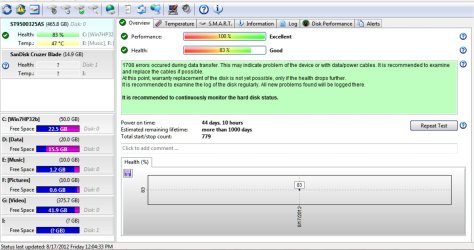
A screenshot:

1itsme.jpg


(When I tried to image it (new HDD) after a fresh install of Windows7 Home premium with Paragon, it refused saying the HDD had errors and I should run the manufacturer's utility to diagnose/repair - by contrast Shadowprotect Desktop indicated that there were "non-fatal" errors but all the same imaged it. Jolted, I ran SeaTools for DOS and it indeed found countless errors and repaired it. Paragon then imaged the HDD without any problem. Now two years on the HDD is still going strong with periodical imaging with Paragon. I am impressed because HDSentinel brought out a problem report on its first run. Health 83% but not a concern as long as the HDD continues to maintain it.)


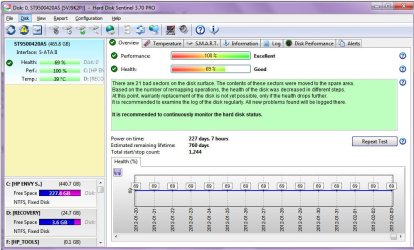
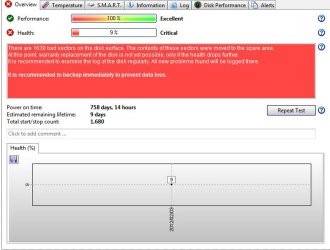
Two screenshots plugged out from two users:

2User1.jpg

3user 2.jpg


A complete run-through on this software Hard Disk Sentinel Professional can Monitor, Inspect, Fix Errors in HDD and SSD: Review & Giveaway - Insights in Technology
(I really like Sujoy's reviews which deals with all the features of any software and his own personal conceptions on these.)


Note:The software may not work with its full potential with RAID. The author says that most RAID controllers/drivers hide the information. If you intend to use it with your RAID, download the trial software and check before putting your money on it. I think a compatibility list is also available on the author's website.
 
Last edited:

My Computer My Computer

At a glance

Windows 7 Home Premium 32 bit
OS
Windows 7 Home Premium 32 bit
My recommendation: Hard Disk Sentinel Pro Hard Disk Sentinel - HDD health and temperature monitoring

"Hard Disk Sentinel (HDSentinel) is a multi-OS SSD and HDD monitoring and analysis software. Its goal is to find, test, diagnose and repair hard disk drive problems, report and display SSD and HDD health, performance degradations and failures. Hard Disk Sentinel gives complete textual description, tips and displays/reports the most comprehensive information about the hard disks and solid state disks inside the computer and in external enclosures (USB hard disks / e-SATA hard disks). Many different alerts and report options are available to ensure maximum safety of your valuable data.
No need to use separate tools to verify internal hard disks, external hard disks, SSDs, disks in RAID arrays as these are all included in a single software.
Hard Disk Sentinel monitors hard disk drive / HDD status including health, temperature and all S.M.A.R.T. (Self-Monitoring, Analysis and Reporting Technology) values for all hard disks. Also it measures the disk transfer speed in real time which can be used as a benchmark or to detect possible hard disk failures, performance degradations.
HDSentinel is the perfect data protection solution: it can be effectively used to prevent HDD failure and SSD / HDD data loss because it has the most sensitive disk health rating system which is extremely sensitive to disk problems. This way even a small HDD problem can't be missed. The Professional version has scheduled and automatic (on-problem) disk backup options to prevent data loss caused by not only failure but by malware or accidental delete also."

It is on day-one on my Zotac Mini-PC and I am impressed.( Regular price USD 35; currently available at 40% discount with coupon code. I paid INR 1267 as against 2112)

A screenshot:

View attachment 226857


(When I tried to image it (new HDD) after a fresh install of Windows7 Home premium with Paragon, it refused saying the HDD had errors and I should run the manufacturer's utility to diagnose/repair - by contrast Shadowprotect Desktop indicated that there were "non-fatal" errors but all the same imaged it. Jolted, I ran SeaTools for DOS and it indeed found countless errors and repaired it. Paragon then imaged the HDD without any problem. Now two years on the HDD is still going strong with periodical imaging with Paragon. I am impressed because HDSentinel brought out a problem report on its first run. Health 83% but not a concern as long as the HDD continues to maintain it.)


Two screenshots plugged out from two users:

View attachment 226858

View attachment 226859


A complete run-through on this software Hard Disk Sentinel Professional can Monitor, Inspect, Fix Errors in HDD and SSD: Review & Giveaway - Insights in Technology
(I really like Sujoy's reviews which deals with all the features of any software and his own personal conceptions on these.)


Note:The software may not work with its full potential with RAID. The author says that most RAID controllers/drivers hide the information. If you intend to use it with your RAID, download the trial software and check before putting your money on it. I think a compatibility list is also available on the author's website.
I recommand this tutorurial : https://youtu.be/uowem8TAq0k
Is the best !
 

My Computer My Computer

At a glance

Windows 7 x64 ultimate
Computer type
PC/Desktop
OS
Windows 7 x64 ultimate
Is this a laptop or desktop? If desktop, enter UEFI or BIOS and if possible - set fans to run at max speed all the time.
If laptop, consider using an ext USB-powered notebook cooling assembly [either with two twin fans or one big fan].
During backups, I often kick on a regular room fan just to keep air moving even more so. Heat is an enemy.
 

My Computer My Computer

At a glance

Windows 7 Professional 64-bitDesktop i5; Acers i5 & i7desktop 16GB; 1 Acer 8GB & 1 Acer 16GB
Computer type
PC/Desktop
Computer Manufacturer/Model Number
Antec desktop; Acer Aspire laptops
OS
Windows 7 Professional 64-bit
CPU
Desktop i5; Acers i5 & i7
Memory
desktop 16GB; 1 Acer 8GB & 1 Acer 16GB
Hard Drives
1TB split into 2 equal partitions [OS and data] usable by RJS
Internet Speed
AT&T DSL
Browser
FF, GChrome, msIE
Other Info
Windows 7 Firewall, Emsisoft AM/AV, MSE [scan-only], SpywareBlaster, Ruiware/BillP combine
Back
Top