what is the best out and out media player

Hi all

Two BIG problem with Windows Media player.

1) Can't play FLAC - at least not with a lot of "tweaking". -- I am not a fan of hideously "compressed" mp3 files - nasty artifacts etc. FLAC although compressed is a LOSSLESS compresstion (rather like a digital camera RAW file - highly compressed - but LOSSLESS - the image program like photojob converts this into your printable and viewable picture).

2) Database organisation for media files is HORRIBLE.

I tend to use Winamp for playing and ripping CD's to FLAC (still old fashioned enoughto have CD's - I don't like compressed downloaded music - especially when its riddled with DRM so you have problems on where you play it.

The winamp ripper makes decent playlists - which I keep in a link to a mySQL database -- note not the actual file but just the link. This means I can have multimedia stored on ANY disk / portable device etc etc.

Every so often I just run a perl script to update the MySQL db with any playlists I've moved, deleted - updated.

MediaMonkey is another good one - I have tried it and its fine but I don't need several different players.

The latest VLC is great for Video -- HD content will certainly appear in beta before long - but why in any case would I be bothered with HD on a computer -- for that quality movie what's wrong with a nice large Plasma TV with a good drink in your hand.

Cheers
jimbo
 

My Computer My Computer

At a glance

Linux CENTOS 7 / various Windows OS'es and se...Intel i7 Intel i58GB, 16GBOn Motherboard
Computer type
PC/Desktop
Computer Manufacturer/Model Number
Custom built, several laptops HP/ASUS
OS
Linux CENTOS 7 / various Windows OS'es and servers
CPU
Intel i7 Intel i5
Memory
8GB, 16GB
Graphics Card(s)
On Motherboard
Sound Card
Realtek HD audio
Monitor(s) Displays
Apple Cinema display, Samsung LCD
Screen Resolution
1920 X 1080
Hard Drives
4 X 1TB SATA
Mouse
Toshiba wireless laser
Internet Speed
> 20MB up
for movies i use kmplayer, similar to vlc, it's free and plays near-enough everything without needing (but can use if required) external codecs.
agreed. i've come across 3 different file types vlc didn't play but km player did. 2 were differently encoded mkvs and some flv files don't play with vlc either. so if it's about being able to play anything i'd say kmplayer. but apparently the picture quality in kmplayer isn't as good as on other players. so i've read and now noticed myself.
 

My Computer My Computer

At a glance

Windows 7 (Ultimate 64)Intel Core Quad Q66004GB Ram
OS
Windows 7 (Ultimate 64)
CPU
Intel Core Quad Q6600
Memory
4GB Ram
Hard Drives
1T 7200 RPM
2x500 GB 7200 RPM
1x250GB 7200 RPM
I have foobar2000 and Winamp. Foobar is easy to add encoders to, to rip into mp3 or FLAC for free, and Winamp is easier to arrange a library in. I usually just play my videos in Winamp as well. The only issue I've had with that is in fullscreen mode, changing the volume from the keyboard doesn't work.
I've used Divx player, but it is actually much slower than winamp. The same video will jerk in divx, and lay smoothly in winamp. And I have iTunes on my XP laptop for my iPod and I hate it lol.
 

My Computer My Computer

At a glance

Windows 7 Proi7 9206GB ddr3 1600mhzATI HD4870
Computer Manufacturer/Model Number
Self Built
OS
Windows 7 Pro
CPU
i7 920
Motherboard
EVGA
Memory
6GB ddr3 1600mhz
Graphics Card(s)
ATI HD4870
Sound Card
HT Omega Striker
Monitor(s) Displays
22" Acer Ferrari
Screen Resolution
1680x1050
PSU
850W
Case
Osiris
Internet Speed
Cable
Still using the latest RC version of AIMP2 for audio. I think it's very cool. The app also notifies you when there is a new RC version available and it is being aggressively developed.

One can use winamp plugins too if you copy the right .dll from your winamp install over to the AIMP2 program folder.

I think winamp users might find it interesting.

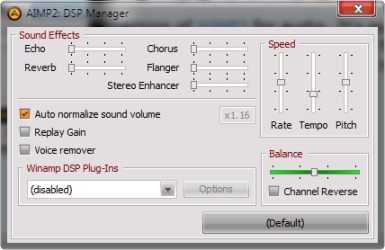
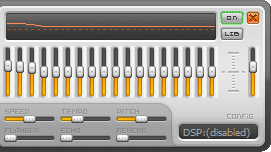
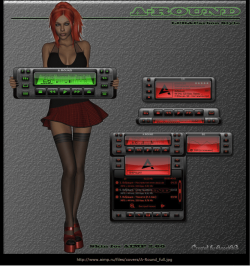
Hard to capture the player well in screen shots but the first screen shot shows the player (default skin with VU meter visualization) and playlist mgr attached below, second is the DSP mgr, third is the EQ that flies out from the side of the player. And finally, another of many skins (the one with the girl). (Adding the one with the girl messed up the original order a bit.)
The main advantages

  • Support for a large number of music formats:
    MP1, MP2, MP3, MPC / MP+, AAC, AC3, Ogg, FLAC,APE, WavPack, Speex, WAV, CDA, WMA, S3M, XM, MOD, IT, MO3, MTM, UMX
  • The great functionality and intuitive interface
  • 18-band EQ and built-in sound effects
    Reverb, Flanger, Chorus, Pitch, Tempo, Echo, Speed
  • 32-bit audio processing
    to achieve the best quality
  • Work with multiple playlists at once
  • Support of modules for functionality enhancement
    You can add new utilities and expand existing, connect such plugins as Input, Gen, DSP from Winamp
  • Shutting down the computer
    You can sleep under favorite music, setting the timer to switch off the computer.
  • Online radio
    Listen and save!
  • Creation of bookmarks and playback queue
  • Hot keys
    Set up local and global hotkeys to your taste!
  • Multilingual interface
  • Multiuser mode
    Several users are working with one computer? No problem.
  • Full Unicode support
  • File search
    Search files on all open playlists
  • Flexible program settings
  • Small size of program distribution
  • Audio Converter
    Allows you to convert music from a variety of formats to wma, mp3, wav, ogg
  • Audio Grabber
    You can convert AudioCD (CDA) in MP3, OGG, WAV or WMA
  • Soung recording
    Allows you to write the sound from any audio device in the system and save in mp3, ogg, wav and wma format
  • Tag Editor
    You can easily edit tags of audio files, rename group of files, sort out by required template or apply tags' values to a group of files.
  • Audio Library
    Represents the organizer of music files, which will allow you to easily sort your music, mark listened audios.
 

Attachments

  • Aimp2.png
    Aimp2.png
    19.9 KB · Views: 48
  • Aimp2 DSP mgr.png
    Aimp2 DSP mgr.png
    10.2 KB · Views: 24
  • Aimp2 eqflyout.png
    Aimp2 eqflyout.png
    4 KB · Views: 752
  • Aimp2skinb.png
    Aimp2skinb.png
    259.9 KB · Views: 141
Last edited:

My Computer My Computer

At a glance

Windows 7 Ultimate x64 (Retail)i7-Q 7206 GBnVidia GeForce GT 230M (1GB)
Computer Manufacturer/Model Number
HP DV8t quad
OS
Windows 7 Ultimate x64 (Retail)
CPU
i7-Q 720
Motherboard
Motherboard Chipset Intel Ibex Peak-M PM55, Intel Lynnfield
Memory
6 GB
Graphics Card(s)
nVidia GeForce GT 230M (1GB)
Sound Card
IDT High Definition Audio CODEC
Monitor(s) Displays
18.4 inch HP Infinity FHD (Samsung 184HT03-001)
Screen Resolution
1920 x 1080
Hard Drives
Hitachi 500GB 7200 rpm (x2)
Seagate FreeAgent 1.5 TB External USB (x2)
Thermaltake BlacX eSATA/USB 2.0 3.5/2.5 HD dock
Cooling
Zalman NC-2000 notebook cooling pad
Keyboard
laptop
Mouse
Logitech VX Revolution
Other Info
Backup Unit: Lenovo T61p
A little recap of mine guys: my multimedia battery is as follows:

I'm on 7 x64, before I was on Vista x64.
1. Sharks codecs packs. I must say that BEFORE shark I was a fan of "install what you use", but since (on vista and now on 7) I started using sharks packs I havn't had ANY problems because of the pack.
2. AUDIO: JRiver Media Center on my main PC, JRiver Media Jukebox (free) on the netbook and my wife´s and children PC's. JRiver plays any audio format. I have a lot of FLAC and WavPack lossless files. It´s also very good for tagging, but I prefer Tag&Rename for massive tagging.
3. DVD & Video Files: Till now for quality: PowerDVD, both video and sound quality are awesome. BUT: does not play mkv :sarc:. So I use Media Player Classic Home Cinema x64 (http://xvidvideo.ru/) for those. Also MPC can play ANY format
4.For Quick Browsing INSIDE Total Commander 7.50 I use the media show plugin. This plug can play any format the system (via codec pack) can play and in total commanders quick view mode (ctrl+q) it lets you quickly preview and browse and manage any video or audio media files.

I´m toying around with mplayer (SMPlayer or MPUI interfaces) but I dont have a veredict yet :shock:. The idea is to see if I can replace mediashow inside total commander, using the mplayer4tc plugin. Because mediashow is quite out dated and on win7 it plays ok, but shows black borders on the player commands. That plug seems not to be mantained. BUT the player4tc plug is quite old also so.... I'll see.

Hope all this is useful for somebody
 

My Computer My Computer

At a glance

Windows 7 x64 SP1 - Ubuntu 10.10 x64 - Linux ...AMD Phenom II 945Kingston DDR2 800 6GBNVidia GForce 8600GT
Computer Manufacturer/Model Number
ASUS M2N32-SLI Deluxe
OS
Windows 7 x64 SP1 - Ubuntu 10.10 x64 - Linux Mint 10 (dual boot + Virtual Box)
CPU
AMD Phenom II 945
Motherboard
ASUS M2N32-SLI Deluxe
Memory
Kingston DDR2 800 6GB
Graphics Card(s)
NVidia GForce 8600GT
Sound Card
OnBoard SoundMax Integrated HD
Monitor(s) Displays
LCD Samsung SyncMaster 2033
Screen Resolution
1600*900
Hard Drives
1.0 TB RAID 0 + 2 internal sata 320 GB + external e-sata 500 Gb
PSU
650
Internet Speed
cable 3mb
Winamp for Music

Gom Player for Video's

if the player can't play the Video it goes off an searches for the Codec :D
 

My Computer My Computer

At a glance

Windows 7 64 RTMAMD2+ 2.80ghz Kuma Core4 GIG Corsair DDR2 800 400MHzXFX ATI HD5770
Computer Manufacturer/Model Number
Home Build
OS
Windows 7 64 RTM
CPU
AMD2+ 2.80ghz Kuma Core
Motherboard
ASUS M3N78-VM
Memory
4 GIG Corsair DDR2 800 400MHz
Graphics Card(s)
XFX ATI HD5770
Sound Card
Motherboard Chipset
Monitor(s) Displays
LCD TV 32"
Screen Resolution
1360 -768
Hard Drives
1 x 500 GIG Maxtor Partitioned 200gig/300gig 7.400rpm
PSU
STEALTH 400W
Case
ANTEC
Windows Media Player 12. :cool:
 

My Computer My Computer

At a glance

7 Home Premium x86AMD Turion 64 X2 Mobille Technology TL-60 2.0GHz3GBNVIDIA GeForce 7150M / nForce630M
Computer Manufacturer/Model Number
HP Pavilion dv6815nr Notebook
OS
7 Home Premium x86
CPU
AMD Turion 64 X2 Mobille Technology TL-60 2.0GHz
Memory
3GB
Graphics Card(s)
NVIDIA GeForce 7150M / nForce630M
Sound Card
Conexant High Definition SmartAudio 221
Screen Resolution
1280 x 800
Hard Drives
Samsung 147GB
Mouse
Synaptics TouchPad
Other Info
Norton Security Suite (360)
I use kmplayer to watch movies , and use vlc to play flv files.:D
 

My Computer My Computer

At a glance

window 7
OS
window 7
VLC media player. :)
 

My Computer My Computer

At a glance

Windows® 8 Pro (64-bit)Intel® Core™ i5 Processor 2467M (1.60GHz, 3MB...6GB DDR3 System Memory at 1,333MHz (on BD 4GB...AMD Radeon™ HD7550M 1GB DDR3 (Ext. Graphic)
Computer Manufacturer/Model Number
Samsung NP530U4B-S02IN
OS
Windows® 8 Pro (64-bit)
CPU
Intel® Core™ i5 Processor 2467M (1.60GHz, 3MB L3 Cache)
Motherboard
Samsung Electronics
Memory
6GB DDR3 System Memory at 1,333MHz (on BD 4GB + 2GB x 1)
Graphics Card(s)
AMD Radeon™ HD7550M 1GB DDR3 (Ext. Graphic)
Sound Card
Realtek High Definition Audio
Monitor(s) Displays
35.56cm (14.0) SuperBright 300nit HD LED Display
Screen Resolution
1366x768
Hard Drives
1TB S-ATA II Hard Drive (5400RPM) with ExpressCache 16GB SSD
Internet Speed
sucks
Antivirus
Microsoft Security Essentials
Browser
Google Chrome (Sync enabled)
The perfect player just simply doesn't exist.

For audio files, all players have one problem in common: they don't let you tag and modify the Now Playing playlist directly.
WMP used to let you do it, with the Now Playing automatic playlist and the advanced edit options, but obviously - since it was actually a clever solution - they've taken it out in WMP12.
batch editing is almost impossible, and in general its media library capabilities are prehistorical.

Winamp doesn't have a decent dynamic library, and it doesn't even show ratings for the songs you're playing. it's pretty hopeless.

Don't know about mediamonkey, the old version was appalling but they must've improved it in the past few years.

Itunes.... ....never mind, just stay safe and don't buy an ipod :D

I just wish someone would come out with a good plugin for winamp, it's certainly got the best potential.
WMP has fallen back a long way by removing the edit options and the now playing feature... which is unfortunate, since the program is fast and well integrated in Win7.
 

My Computer My Computer

At a glance

Windows 7Intel Dual Core E84004GB DDRII 800mhzAti Radeon 4850 Toxic
OS
Windows 7
CPU
Intel Dual Core E8400
Motherboard
Asus P5Qpro
Memory
4GB DDRII 800mhz
Graphics Card(s)
Ati Radeon 4850 Toxic
Monitor(s) Displays
Acer 22" HD
Hard Drives
2x 500GB Samsung
Case
CoolerMaster 550
I heard people really love Foobar, I haven't tried tho.
 

My Computer My Computer

At a glance

Windows 7 Ultimate x64AMD Athlon X2 6400+XFX GeForce 7600GS
OS
Windows 7 Ultimate x64
CPU
AMD Athlon X2 6400+
Motherboard
Gigabyte MA-790X-UD4P
Graphics Card(s)
XFX GeForce 7600GS
Sound Card
E-MU 1212M
PSU
Antec Earthwatts 500
The perfect player just simply doesn't exist.

For audio files, all players have one problem in common: they don't let you tag and modify the Now Playing playlist directly.

I believe Aimp2 latest RC does allow this.

WMP used to let you do it, with the Now Playing automatic playlist and the advanced edit options, but obviously - since it was actually a clever solution - they've taken it out in WMP12.
batch editing is almost impossible, and in general its media library capabilities are prehistorical.

Winamp doesn't have a decent dynamic library, and it doesn't even show ratings for the songs you're playing. it's pretty hopeless.
Aimp2 shows ratings in the system tray if you hover over the icon.
Don't know about mediamonkey, the old version was appalling but they must've improved it in the past few years.

Itunes.... ....never mind, just stay safe and don't buy an ipod :D

I just wish someone would come out with a good plugin for winamp, it's certainly got the best potential.
WMP has fallen back a long way by removing the edit options and the now playing feature... which is unfortunate, since the program is fast and well integrated in Win7.
Check out Aimp2 rc, if you haven't already.
 

My Computer My Computer

At a glance

Windows 7 Ultimate x64 (Retail)i7-Q 7206 GBnVidia GeForce GT 230M (1GB)
Computer Manufacturer/Model Number
HP DV8t quad
OS
Windows 7 Ultimate x64 (Retail)
CPU
i7-Q 720
Motherboard
Motherboard Chipset Intel Ibex Peak-M PM55, Intel Lynnfield
Memory
6 GB
Graphics Card(s)
nVidia GeForce GT 230M (1GB)
Sound Card
IDT High Definition Audio CODEC
Monitor(s) Displays
18.4 inch HP Infinity FHD (Samsung 184HT03-001)
Screen Resolution
1920 x 1080
Hard Drives
Hitachi 500GB 7200 rpm (x2)
Seagate FreeAgent 1.5 TB External USB (x2)
Thermaltake BlacX eSATA/USB 2.0 3.5/2.5 HD dock
Cooling
Zalman NC-2000 notebook cooling pad
Keyboard
laptop
Mouse
Logitech VX Revolution
Other Info
Backup Unit: Lenovo T61p
I use kmplayer for videos, and it plays .flv files for me just fine

Use winamp, along with CDArt display, or jriver media player, media monkey is also very good.
I use orangecd for my music library along with winamp for the most part. I must say that if your music is properly tagged most any player that's been listed in this thread will work fine.

Surpised to see no-one mention neuview - here it makes a huge difference in viewing avi files if they are in need of some extra help. I sometimes use it to watch some downloaded TV shows on my 24" dell monitor and it makes the picture almost twice as clean.

music players - ones I've tried in past
winamp
media monkey
orangecd
Aimp2
Xeon
Jet-Audio
Helium
foobar2000
windows media player
mp3toys
musikcube
albumplayer

harpua and belveder - try that neuview see what you guys think,
 
Last edited:

My Computer My Computer

At a glance

windows7 7600 x86itel pentium 43.00 GBdiamond radion x1050
Computer Manufacturer/Model Number
dell optiplex - 2003
OS
windows7 7600 x86
CPU
itel pentium 4
Memory
3.00 GB
Graphics Card(s)
diamond radion x1050
Sound Card
SoundMax
Monitor(s) Displays
dell 2408wfp dell e172fp
Screen Resolution
1920 x 1200 1280 x 1024
Hard Drives
2 - 80 GB internals WD
1 - 01 TB ext
2 - 750 GB ext
1- 500 GB ext
all running on system no problems
Keyboard
old logitech cordless
Mouse
logitech wireless
Internet Speed
16 / 4
Other Info
networked into my sbs2003 server running sp1 still
it's a wonder I could even get windows 7 to connect to it
The perfect player just simply doesn't exist.

For audio files, all players have one problem in common: they don't let you tag and modify the Now Playing playlist directly.

I believe Aimp2 latest RC does allow this.

WMP used to let you do it, with the Now Playing automatic playlist and the advanced edit options, but obviously - since it was actually a clever solution - they've taken it out in WMP12.
batch editing is almost impossible, and in general its media library capabilities are prehistorical.

Winamp doesn't have a decent dynamic library, and it doesn't even show ratings for the songs you're playing. it's pretty hopeless.
Aimp2 shows ratings in the system tray if you hover over the icon.
Don't know about mediamonkey, the old version was appalling but they must've improved it in the past few years.

Itunes.... ....never mind, just stay safe and don't buy an ipod :D

I just wish someone would come out with a good plugin for winamp, it's certainly got the best potential.
WMP has fallen back a long way by removing the edit options and the now playing feature... which is unfortunate, since the program is fast and well integrated in Win7.
Check out Aimp2 rc, if you haven't already.

I hadn't tried it yet, but it does not have the option I'm looking for.
Basically, it's simply an automatic "current playlist" that one can edit from the Audio Library.

WMP had it (but now they've got rid of it together with the advanced tag editor), winamp doesn't seem to, and neither does Aimp2 (unless I've missed something).

...maybe mediamonkey?

I dunno, it just seems such an obvious feature to include... if you want to edit some info, chances are you're also listening to it right? so why not have the feature? :sarc:
 

My Computer My Computer

At a glance

Windows 7Intel Dual Core E84004GB DDRII 800mhzAti Radeon 4850 Toxic
OS
Windows 7
CPU
Intel Dual Core E8400
Motherboard
Asus P5Qpro
Memory
4GB DDRII 800mhz
Graphics Card(s)
Ati Radeon 4850 Toxic
Monitor(s) Displays
Acer 22" HD
Hard Drives
2x 500GB Samsung
Case
CoolerMaster 550
tried Mediamonkey.
It's definitely the best player out there for audio.
It has the most complete media library, it supports most winamp plugins, and especially adopts scripting.
if anyone, like me, isn't 100% happy with the player he's using, I would definitely advise to try out mediamonkey.
 

My Computer My Computer

At a glance

Windows 7Intel Dual Core E84004GB DDRII 800mhzAti Radeon 4850 Toxic
OS
Windows 7
CPU
Intel Dual Core E8400
Motherboard
Asus P5Qpro
Memory
4GB DDRII 800mhz
Graphics Card(s)
Ati Radeon 4850 Toxic
Monitor(s) Displays
Acer 22" HD
Hard Drives
2x 500GB Samsung
Case
CoolerMaster 550
Winamp for my audio, and Windows Media Player for video, because with a codec pack installed, it plays pretty much everything.

What CODEC pack you use?
 

My Computer My Computer

At a glance

Windows 7 Home Premium x64AMD Phenom II X4 9458 GB G-Skill 1.5v DDR 3 1333Mhz(2) MSI 512MB GTS 250 SLI
Computer Manufacturer/Model Number
Home built
OS
Windows 7 Home Premium x64
CPU
AMD Phenom II X4 945
Motherboard
ASUS M4N98TD EVO AM3 NVIDIA nForce 980a SLI
Memory
8 GB G-Skill 1.5v DDR 3 1333Mhz
Graphics Card(s)
(2) MSI 512MB GTS 250 SLI
Sound Card
Soundblaster Audigy 2 platinum
Monitor(s) Displays
Samsung 2255BW 22"
Screen Resolution
1650 x 1050
Hard Drives
2 WD 250GB 7500RPM
PSU
Antec TP-750. The ultimate bang for the buck PSU
Case
Raidmax
Cooling
Sycthe Slipstream cooling fans(4)
Keyboard
Zboard Merc
Mouse
Logitech MX-518
Internet Speed
3MB
Other Info
LG Blu-Ray/DVD combo drive/LG DVD-RW w/ lightscribe
Jet Audio has had player control buttons in Aero Peek for some time now, and they work great.
 

My Computer My Computer

At a glance

Windows 7 x64 Ultimate SP1Core i7-2630QM6 GB DDR3Nvidia GT 540M / Intel HD 3000 - Optimus swit...
Computer Manufacturer/Model Number
Asus N73SV
OS
Windows 7 x64 Ultimate SP1
CPU
Core i7-2630QM
Motherboard
Intel HM 65
Memory
6 GB DDR3
Graphics Card(s)
Nvidia GT 540M / Intel HD 3000 - Optimus switching
Sound Card
HD Audio (Intel Azalia/Realtek) ALC269
Monitor(s) Displays
LED flat panel
Screen Resolution
1920 x 1080
Hard Drives
2x Seagate Momentus 640 GB - 1,28 TB in total
Internet Speed
4 MB/256 kbps
Other Info
External HDs

WD Elements 1,5 TB
WD MyBook 500 GB
Windows Media Player is the best. :D
 

My Computer My Computer

At a glance

nothing
OS
nothing
For movies i use BS Player
 

My Computer My Computer

At a glance

Windows 7 64bitInterl Core 2 Duo6GBNVidia GForce 8600
OS
Windows 7 64bit
CPU
Interl Core 2 Duo
Memory
6GB
Graphics Card(s)
NVidia GForce 8600
Hard Drives
1 Internal 500 GB, 1 External 500 GB, 1 External 1TB
Case
Antec 9000
Hi there
"Horses for Courses" I think the Brits say.

I like VLC myself as it can play almost anything I want these days.

I use Winamp for Ripping CD's to FLAC -- not actually for playing the music as I stream it.

I've found however I'm bothering less and less with Multimedia on a computer since I now use a dedicated "Music server" with Hi-FI studio quality speakers and 24 bit sampling @ 96 khz (better than CD quality - 16 Bit @ 44.1 Khz) for streaming music all over the property

If I'm on a desktop I don't need to play music any more -- and Computer speakers are usually geared more for Games or DVD movies rather than very high quality music - especially when the source is LOSSLESS FLAC / WAV at very high bit rates.

Even for Video - I prefer to watch on a large HD screen rather than on a computer.

I'm currently "modding" the music server to serve Video content as well so the issue of multi-media on a computer becomes less and less of an issue for me.

Now if I'm travelling -- I do a lot of free lance assignments -- then using a Laptop in a hotel - then VLC is fine for playing standard DVD's -- on a 10 inch or so screen on a typical laptop the visual difference in quality between a standard amd a Blu Ray DVD isn't worth it.


I think with more and more people coming around to the idea of dedicated Music and Video servers the Multimedia issue on computers will be a non issue -- at least in areas where you have a decent reliable FAST broadband connection.


Cheers
jimbo
 

My Computer My Computer

At a glance

Linux CENTOS 7 / various Windows OS'es and se...Intel i7 Intel i58GB, 16GBOn Motherboard
Computer type
PC/Desktop
Computer Manufacturer/Model Number
Custom built, several laptops HP/ASUS
OS
Linux CENTOS 7 / various Windows OS'es and servers
CPU
Intel i7 Intel i5
Memory
8GB, 16GB
Graphics Card(s)
On Motherboard
Sound Card
Realtek HD audio
Monitor(s) Displays
Apple Cinema display, Samsung LCD
Screen Resolution
1920 X 1080
Hard Drives
4 X 1TB SATA
Mouse
Toshiba wireless laser
Internet Speed
> 20MB up
Back
Top