A

You are using an out of date browser. It may not display this or other websites correctly.
You should upgrade or use an alternative browser.
You should upgrade or use an alternative browser.

Screensavers don't protect anything on modern monitors. On older monitors, a screen image that was displayed for a long time could "burn" itself in to the screen phosphor. Modern monitors are made differently so this can't happen.
The built-in screen blanker on Win 7 is all I use and it' not really to save the screen it's to reduce power consumption.
The built-in screen blanker on Win 7 is all I use and it' not really to save the screen it's to reduce power consumption.
My Computer
- Computer type
- PC/Desktop
- Computer Manufacturer/Model Number
- Home Built desktop, Dell G15 5511 Gaming laptop,MS Surface Pro 7 tablet
- OS
- W10 Pro desktop, W11 laptop, W11 Pro tablet (all 64-bit)
- CPU
- 3.7Ghz 8700K i7, i7-11800H, i7-1065G7
- Motherboard
- ASUS TUF Z370-Pro Gaming in desktop
- Memory
- 16G desktop, 16G laptop, 4G tablet
- Graphics Card(s)
- AMD Radeon RX580, RTX 3060, Intel Iris Plus
- Sound Card
- High Definition Audio (Built-in to mobo)
- Monitor(s) Displays
- Samsung U32J59 32" (2x), 15.6", 12"
- Screen Resolution
- 3840x2160, 3840x2160, 1920x1080, 2160x1440
- Hard Drives
- 500G SSD for OS; 2T, 10T & 15T HDDs for Data on Desktop, 1TB SSD laptop, 128G SSD tablet.
- PSU
- Corsair CX 750M
- Case
- Antec 100
- Cooling
- CM 212+
- Keyboard
- IBM Model M - used continuously since 1986
- Mouse
- Microsoft Pro IntelliMouse
- Internet Speed
- 400M down 8M up
- Antivirus
- Windows Defender
- Browser
- FireFox
- Other Info
- Built my first computer (8Mhz 8088cpu, 640K RAM, 20MB HDD, 2 360K floppy drives) in 1985 and have been building them for myself, relatives and friends ever since.
A
Advice Pro
Guest
Thread Starter
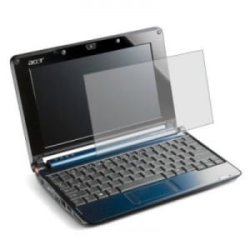

There really isn't a need for those on a netbook or laptop like there is on smartphones/tablets. As long as you don't drop the computer (which would crack the screen internally which a screen protector wouldn't help at all) then you will be fine.The screen protectors that I meant are plastic and go over the screen:
My Computer
- Computer type
- PC/Desktop
- Computer Manufacturer/Model Number
- HP Pavilion P7-1010
- OS
- Windows 7 Professional x64 Service Pack 1
- CPU
- AMD Athlon X4 645
- Motherboard
- Foxxcon N-Alvorix RS880
- Memory
- 6GB DDR3 1066
- Graphics Card(s)
- Sapphire Radeon HD 5670 512MB GDDR5
- Sound Card
- Realtek Integrated Audio
- Monitor(s) Displays
- HP 2011x
- Screen Resolution
- 1600x900
- Hard Drives
- 1. Crucial M4 128GB SSD
2. 1TB Seagate Barracuda 7200.12 RPM
3. 1TB Western Digital Caviar Green 5400RPM
- PSU
- Seasonic S12 II Bronze 380 Watt
- Case
- HP OEM
- Cooling
- Coolermaster Heatsink, AVC Case Fan
- Keyboard
- HP OEM- Made by Chicony
- Mouse
- HP OEM- Made by Logitech
- Internet Speed
- 20MBit Down/4 Up
- Antivirus
- Microsoft Security Essentials
- Browser
- Internet Explorer 10

Those are just useless dust collectors
I have not seen those being used for some time
Best protection from the screen is You !
Meaning don't rub your fingers on the screen or eat while using it because those little plastic covers are harder to see through so you might as well invest in glasses too you will get eye strain !
If you are a person that Value's your stuff just take care of it better
What i have done with my wife's laptop when I or She Shut down i put a thin piece of foam between the screen and keys close it put another foam on top of the unit while in the bag then seal it up the foam cushins impact that is the best i can tell you on taking care of the screen
Get yourself some thin foam the size of the screen and use it when you have put it away to save it from scratches
I have not seen those being used for some time
Best protection from the screen is You !
Meaning don't rub your fingers on the screen or eat while using it because those little plastic covers are harder to see through so you might as well invest in glasses too you will get eye strain !
If you are a person that Value's your stuff just take care of it better
What i have done with my wife's laptop when I or She Shut down i put a thin piece of foam between the screen and keys close it put another foam on top of the unit while in the bag then seal it up the foam cushins impact that is the best i can tell you on taking care of the screen
Get yourself some thin foam the size of the screen and use it when you have put it away to save it from scratches
My Computer
- Computer type
- PC/Desktop
- Computer Manufacturer/Model Number
- CoreI7-6700K MrFingerIII Special Builds
- OS
- Windows 10 Home Premium 64bit sp1
- CPU
- Intel I7-6700K @ 4.6 Ghz 1.344 volts everyday OC
- Motherboard
- Asrock Fatality K6 Z170 Socket 1151
- Memory
- 32GB G-Skill TridentZ 3200mhz 16-18-18-38 DDR4
- Graphics Card(s)
- Sli Gigabyte Windforce GTX 980 G1
- Sound Card
- AC97 Creative Rage Tactic 3D Headphones Bluetooth
- Monitor(s) Displays
- 27" Asus ROG Swift PG278Q G-Sync 48" Vizio Smart HD TV
- Screen Resolution
- 2560x1440p 27"- 48" Currently Gaming at 2560x1440p Res 2K
- Hard Drives
- 250GB Samsung Evo840SSD Seagate baracuda 500 GB WD Mybook 500Gb 1TB Seagate Barracuda
- PSU
- HX1050w Corsair Silver 80plus certified crosfire/sli
- Case
- Enthod Pro Full Tower
- Cooling
- Corsair H110i GT 280 mm High Performance WaterBlock
- Keyboard
- Logitech wireless keyboard
- Mouse
- Logitech wireless mouse
- Internet Speed
- Cox Cable 100+ mb
- Antivirus
- WebRoot Spysweeper with Antivirus
- Browser
- IE-10, Chrome, Opera
- Other Info
- My Other Rig is a AMD FX8320E @4.6Ghz 16GB Ballistic Sport Ram
Mobo Asrock Fatality 990FX 120GB OCZ SSD 1TB Seagate Barracuda Corsair H75 Cooling PSU Corsair CX750
GPU GTX Gigabyte 970G1