
What is the pdf.exploit that my scanner keeps talking about

computergeekguy

New member
Pro User
Local time
10:26 AM
Messages
334
Whatever it is i have been cleaning it of my machine every time i scan my machine.

I did get i virus a month or so ago but i got it of relatively quick.

Should i be concerned about these?

Also according to avg it found it while it was trying to turn on or something.

Is it like tracking cookies always there being a pest but never doing real damage or is it something bad

Thanks for replies also here is a pic

P.s also what are those java things
 

Attachments
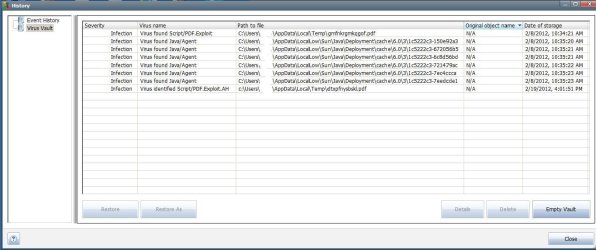
  • more virus.jpg
    more virus.jpg
    96.9 KB · Views: 19

My Computer My Computer

At a glance

7 home premium 64 bitAMD Phenom II X6 1055TDDR3 1333 6144 MBytes each modual 2048 mbPower Color ATI R9 270x bluescreen edition
Computer type
PC/Desktop
Computer Manufacturer/Model Number
self build
OS
7 home premium 64 bit
CPU
AMD Phenom II X6 1055T
Motherboard
Asus M4A785TD-M EVO
Memory
DDR3 1333 6144 MBytes each modual 2048 mb
Graphics Card(s)
Power Color ATI R9 270x bluescreen edition
Sound Card
s/pdif part of my motherboard
Monitor(s) Displays
It is a 42" lcd tv :D
Screen Resolution
1920 X 1080
Hard Drives
Samsung 120gb SSD (EVO 840)
Hitachi 500gb 3gb\s sata hard drive, slow boring but gets the job done
PSU
Orion 585w psu Model# HP585D (updated to EVGA 600W)
Case
A shoebox
Cooling
Box fan....
Keyboard
I telepathically convay what I want said.
Mouse
Cat
Internet Speed
Loading...
Antivirus
A facial mask
Browser
Firefail, Internet Exploder
Other Info
I love my gaming rig, FreeCell and Solitaire never looked so good.
Hi computergeekguy.

Firstly I would remove AVG and replace it with Microsoft Security Essentials & Malwarebytes. Why? Because Microsoft Security Essentials has better detection, is lighter and doesn't cause BSOD's.

I would then run a Scan using Microsoft Security Essentials and Malwarebytes to see if it can detect and remove it.

Next if none of this helps, I would either Disable or Update Java on every Browser or uninstall it completely until the infection is gone.

If Malwarebytes or MSE finds and removes the infection, run an SFC Scan to repair any files the virus could have corrupted.
 

My Computer My Computer

At a glance

Windows 7 Ultimate SP1 - 64 BitIntel Core i5 2500k2x4GB DDR3 1333HzAti Radeon 6770
Computer type
PC/Desktop
Computer Manufacturer/Model Number
Novatech iRush Pro
OS
Windows 7 Ultimate SP1 - 64 Bit
CPU
Intel Core i5 2500k
Motherboard
Foxconn H67M-S/H67M-V/H67
Memory
2x4GB DDR3 1333Hz
Graphics Card(s)
Ati Radeon 6770
Sound Card
None
Monitor(s) Displays
Samsung S22B150
Screen Resolution
1920x1080
Hard Drives
2x500GB
PSU
500W
Cooling
Fan
Keyboard
HP KU0316
Mouse
Wireless Logitech M185
Internet Speed
20MB/s
Antivirus
Avast Free
Browser
Google Chrome
Other Info
Logitech M185 Mouse
KU-M316 Keyboard
PDF exploit is Adobe ... it's in a temporary file location

Please download TFC by Old Timer TFC - Temp File Cleaner by OldTimer - Geeks to Go Forums and save it to your desktop.
Save any unsaved work. TFC will close ALL open programs including your browser!
Double-click on TFC.exe to run it. If you are using Vista/Windows 7 right-click on the file and choose Run As Administrator.
Click the Start button to begin the cleaning process and let it run uninterrupted to completion.
Important! If TFC prompts you to reboot, please do so immediately. If not prompted, manually reboot the machine anyway to ensure a complete clean.

TFC (Temp File Cleaner) will clear out all temp folders for all user accounts (temp, IE temp, java, FF, Opera, Chrome, Safari), including Administrator, All Users, LocalService, NetworkService, and any other accounts in the user folder. It also cleans out the %systemroot%\temp folder and checks for .tmp files in the %systemdrive% root folder, %systemroot%, and the system32 folder (both 32bit and 64bit on 64bit OSs). It shows the amount removed for each location found (in bytes) and the total removed (in MB). Before running, it will stop Explorer and all other running apps. When finished, if a reboot is required the user must reboot to finish clearing any in-use temp files.

Your Java is out of date. Older versions have vulnerabilities that malware can use to infect your system. Please follow these steps to remove older version Java components and update.
Updating Java:
  • Download the latest version of Java Runtime Environment (JRE) 7.
    Java SE Downloads
  • Scroll down to where it says "Java Runtime Environment (JRE) 7u2 allows end-users to run Java applications".
  • Click the "Download" button to the right.
  • Check the box that says: "Accept License Agreement".
  • The page will refresh.
  • Click on the link to download Windows Offline Installation with or without Multi-language and save to your desktop.
  • Close any programs you may have running - especially your web browser.
  • Go to Start > Control Panel double-click on Add/Remove programs and remove all older versions of Java.
  • Check any item with Java Runtime Environment (JRE or J2SE) in the name.
  • Click the Remove or Change/Remove button.
  • Repeat as many times as necessary to remove each Java versions.
  • Reboot your computer once all Java components are removed.
  • Then from your desktop double-click on jre-7u2-windows-i586-p.exe to install the newest version.

After you have done the above, update your version of Adobe
Adobe - Adobe Reader download - All versions
 

My Computer My Computer

At a glance

Windows 7 Ultimate 32bit SP1Intel(R) Core(TM)2 Quad CPU @ 2.40GHz, 2400 MHz4 GBATI Radeon HD 2600 Pro
Computer type
PC/Desktop
Computer Manufacturer/Model Number
Bruce ... somewhere in his 40's
OS
Windows 7 Ultimate 32bit SP1
CPU
Intel(R) Core(TM)2 Quad CPU @ 2.40GHz, 2400 MHz
Motherboard
INTEL/D975XBX2
Memory
4 GB
Graphics Card(s)
ATI Radeon HD 2600 Pro
Monitor(s) Displays
Samsung SyncMaster 914v
Screen Resolution
1280 x 1024
Hard Drives
2/500GB each ... ST3500630AS ATA Device.
One is not connected
PSU
Rocketfish 700 W
Case
G.Skill Gigabyte Chassis
Keyboard
Standard PS/2 Keyboard
Mouse
Microsoft PS/2 Mouse
Internet Speed
DSL
Antivirus
Avira Internet Security
Browser
IE 11
Other Info
ATI HDMI Audio
Back
Top