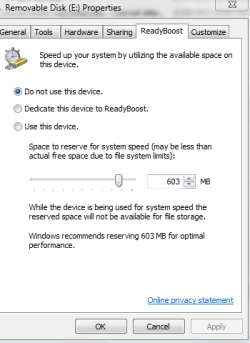
I am just enquirying as to what the option is on some generic External USB Flash Drives and Hard Drives for storage that it has an option in the properties section that there is a ReadyBoost option.
When I initially trialled the option it created a folder on the drive. I do not know what it does with the storage space or if it alters anything else.
Does anyone know the purpose of the Readyboost option.
Attachments
READYBOOST E DRIVE.PNG
11.6 KB
· Views: 6
My Computer
At a glance
Windows 7 Home Premium 64bitWindows 7 Service Pack 1 x86 NTFS4 GB
Readyboost is a Windows function, that allows a USB pen drive to augment the system memory for speeding up the system start.
The reason it does not appear on all devices is that there is a set of criteria, that has to be met before windows will consider using a particular device for readyboost, it has to be formated in a certain way and also of sufficient speed to make the option worthwhile
Windows 11 Pro x64 [Latest Release and Releas...Ryzen 9 5950X, 3.8 - 5.2 MHz64GB [2 x 32GB] DDR4 3200MHz4GB NVIDIA GEFORCE GTX 1650 Ti
Computer type
PC/Desktop
Computer Manufacturer/Model Number
ChillBlast - Custom to my design
OS
Windows 11 Pro x64 [Latest Release and Release Preview]
CPU
Ryzen 9 5950X, 3.8 - 5.2 MHz
Motherboard
Asus Prime X570-Pro
Memory
64GB [2 x 32GB] DDR4 3200MHz
Graphics Card(s)
4GB NVIDIA GEFORCE GTX 1650 Ti
Sound Card
On-board SPDIF to 5.1 System + HDMI [5.1 system]
Monitor(s) Displays
32" UHD 32 Bit HDR Monitor + 43" UHD 4K 32Bit HDR TV
Screen Resolution
2 x 3840 x 2160 @60Hz
Hard Drives
1TB M2 SSD OS, 500GB Fast Access SSD, 2 x 8TB Data + Various Externals from 1TB to 4TB, 10TB NAS
PSU
NZXT C750 80 PLUS Gold 750W Modular PSU
Case
Workstation Case [Matt Black]
Cooling
NZXT Kraken X63 280mm CPU Cooler +2x Quiet Case fans
Keyboard
Logitech Wireless MX Keys & K400 + others
Mouse
Logitech Wireless MX Master 3S
Internet Speed
920 MB Down 50 MB Up
Antivirus
BitDefender Total Security Pro
Browser
Chrome (always run latest Non-Beta)
Other Info
Also run ...
Laptop - Quad 8GB - Windows 10 Pro x64
Nexus 7 Android tablet x2
Samsung 10.2" tablet
Blackview TAB 8 4G Android Tablet c/w Keyboard
Wacom Intuos Pro Medium Pen Pad
Wacom Intuos Pro Small Pen Pad
Wacom Expresskeys Remote
Loopdeck+ Graphics Controller
Shuttle Pro v2 Control
At a glance
Windows 11 Pro x64 Latest RPIntel I7 10750H 5.0GHz32GB [2x16GB] DDR4 2933 MHznVidia GTX1650Ti 4 GB GDDR6
Computer type
Laptop
System Manufacturer/Model Number
Dell XPS 17 10750H
OS
Windows 11 Pro x64 Latest RP
CPU
Intel I7 10750H 5.0GHz
Motherboard
Dell XPS
Memory
32GB [2x16GB] DDR4 2933 MHz
Graphics Card(s)
nVidia GTX1650Ti 4 GB GDDR6
Sound Card
Stock [Realtek] 4 Speaker
Monitor(s) Displays
17" IPS UHD+ Infinity Edge Touchscreen
Screen Resolution
3840 x 2400
Hard Drives
2TB M2 NVMe, 4TB External + various 500GB & 1TB External NVMe (also have access to spinner HDD from
PSU
Stock
Case
Stock XPS Aluminium & Carbon Fibre
Cooling
Stock - Active Fan Control
Keyboard
Backlit + Various Logitech
Mouse
Stock Track Pad + Logitech MX Trackball
Internet Speed
72 MB Down 18MB Up
Browser
Chrome
Other Info
Also run ...
Laptop - Quad 8GB - Windows 10 Pro x64
Nexus 7 Android tablet x2
10.2" tablet
Sony Z3 Android Smartphone
Wacom Intuos Pro Medium Pen Pad
Wacom Intuos Pro Small Pen Pad
Wacom Expresskeys Remote
Loopdeck+ Graphics Controller
Shuttle Pro v2 Control Pad
10TB NAS
ReadyBoost uses the flash drive as a cache for the hard drive. The OS already uses RAM as a cache but on systems with limited memory there often isn't enough of it for efficient caching. Flash drives have much faster seek times than conventional drives so if their other performance characteristics are adequate they make a good cache. Not as good as RAM but not bad.
ReadyBoost has the greatest benefits on systems with slow hard drives and limited RAM. With 4 GB RAM (usually more than enough for a good cache) and a reasonably fast hard drive ReadyBoost is unlikely to be of much benefit.
My Computer
At a glance
Windows 7 Pro 64 bitXeon W35208 GBNvidia Geforce 210
"On laptop computers, the performance shifts more in favor of flash memory because laptop memory is more expensive than desktop memory and many laptops have relatively slow 4200 RPM and 5400 RPM hard drives."
This is no longer true. Laptop drives are mostly 5400rpm & some are 7200rpm (same as desktop). If you have an SSD, there is no benefit at all. If you have a 7200rpm drive, there may be a measurable but no noticeable benefit.
Also, DDR3 memory is not expensive, anymore. You could probably add a 4GB module for $25. According to Sony specs, you may have already upgraded RAM? http://www.sony-asia.com/product/vpcyb16kg
Just noticed you are using Win7-32bit, so RAM over 4GB is not recognized. It may not actually see over 3GB.
My Computer
At a glance
Windows 7 Home Premium 64bitIntel Core i3-32408GB DDR3 SDRAMEVGA GeForce GT 620
I actually have additional 2GB added and had the computer looked at back in December. I am not too sure how to check for the extra memory.
I will in future Google as perhaps it may be easier. I just wondered how it worked. I have it on the flash drive - just wondering if you have the same option on Expansion drives etc.
My computer is running slow. So I am going through process of elimination and see if my so called friend fixed my computer - lap top I should say
My Computer
At a glance
Windows 7 Home Premium 64bitWindows 7 Service Pack 1 x86 NTFS4 GB