What is the Wake from hibernation sequence after sleep mode activated?

iko22

New member
Pro User
VIP
Local time
4:45 PM
Messages
2,031
Does someone know what is the wake from hibernation sequence is? I am experiencing Wakeup failure on resume and having problems diagnosing where the difficulty lies. Could someone help me diagnose the wake from hibernation sequence after wakeup failure on resume?

The computer successfully powers down into sleep mode, either by power plan configuration setting or by user selection of sleep.

After I press keyboard orr mouse to resume working where I left off, I can hear the fans rev up to speed and see the Mobo lights switch on but Windows never gets starts.

Instead of Windows resuming, the monitor screen remains blank, and computer's motherboard and fans powers back down, then re-start up again. The computer gets trapped in a loop powering-up briefly before powering down again. The only way I have found of dealing with this is to switch power off or hold power button for 5 seconds, and let Windows start-up normally.
 

My Computer My Computer

At a glance

Windows 7 x64, Vista x64, 8.1 smartphoneIntel E8400 65W 64-bitDDR2 2 x 2GB, 1GB x 2XFX Radeon HD5750
Computer type
PC/Desktop
OS
Windows 7 x64, Vista x64, 8.1 smartphone
CPU
Intel E8400 65W 64-bit
Motherboard
Gigabyte EP45-UD3LR
Memory
DDR2 2 x 2GB, 1GB x 2
Graphics Card(s)
XFX Radeon HD5750
Sound Card
AMD High Definition Audio; Realtek High Definition Audio
Monitor(s) Displays
iiyama prolite X2377HDS
Screen Resolution
1920 x 1080
Hard Drives
500GB 7200 rpm Seagate ST3500413AS 16MB, 500GB 5400 rpm Toshiba MQ02ABF050H 32MB, 200GB 7200 rpm Seagate ST3200820AS 8MB, 2TB 7200 rpm Western Digital WD20EZRX 64MB
PSU
Enermax Liberty Modular
Case
Antec P193 Midi Tower
Keyboard
Mionix ZIBAL 60
Mouse
Razer USB 2.0 Diamondback Mouse or Huion Graphics Tablet
Browser
Internet Explorer, Lunascape, Firefox, Opera, Avast Safezone
You really ought to power down each time. shame shame shame...

x2power.png.pagespeed.gp+jp+jw+pj+ws+js+rj+rp+rw+ri+cp+md.ic.sesjFjNLNZ.png

Click on Choose what the power button does and you can tweak several options such as Requiring a password on wakeup and what the power button on the computer does. If you set When I press the power button to Do nothing, you won’t have a problem with the PC shutting down when you accidentally hit the power button.
x11power.png.pagespeed.gp+jp+jw+pj+ws+js+rj+rp+rw+ri+cp+md.ic.8wPirEWhkr.png

3power.png
 

My Computer My Computer

At a glance

Both Windows 7 64 & Windows 10 LTSBIntel 2.8Ghz,8GB DDR2Nvidia 260+
Computer type
PC/Desktop
Computer Manufacturer/Model Number
Custom
OS
Both Windows 7 64 & Windows 10 LTSB
CPU
Intel 2.8Ghz,
Motherboard
Gigabyte
Memory
8GB DDR2
Graphics Card(s)
Nvidia 260+
Monitor(s) Displays
42" Samsung Plasma Display
Screen Resolution
1080
Hard Drives
Too many to list!
Case
Custom
Cooling
Custom
Keyboard
MS Sidewinder
Mouse
2 dollar ali-express mouse! It is the best ever!
Internet Speed
100MB
Antivirus
Avast
Browser
Firefox & Opera
Other Info
Helpdesk Technician
Thanks John, that is the customization features of Power Options.
 

My Computer My Computer

At a glance

Windows 7 x64, Vista x64, 8.1 smartphoneIntel E8400 65W 64-bitDDR2 2 x 2GB, 1GB x 2XFX Radeon HD5750
Computer type
PC/Desktop
OS
Windows 7 x64, Vista x64, 8.1 smartphone
CPU
Intel E8400 65W 64-bit
Motherboard
Gigabyte EP45-UD3LR
Memory
DDR2 2 x 2GB, 1GB x 2
Graphics Card(s)
XFX Radeon HD5750
Sound Card
AMD High Definition Audio; Realtek High Definition Audio
Monitor(s) Displays
iiyama prolite X2377HDS
Screen Resolution
1920 x 1080
Hard Drives
500GB 7200 rpm Seagate ST3500413AS 16MB, 500GB 5400 rpm Toshiba MQ02ABF050H 32MB, 200GB 7200 rpm Seagate ST3200820AS 8MB, 2TB 7200 rpm Western Digital WD20EZRX 64MB
PSU
Enermax Liberty Modular
Case
Antec P193 Midi Tower
Keyboard
Mionix ZIBAL 60
Mouse
Razer USB 2.0 Diamondback Mouse or Huion Graphics Tablet
Browser
Internet Explorer, Lunascape, Firefox, Opera, Avast Safezone
Does this help you?

You can change the power settings to always on and then set your power button to sleep mode option. Then see if you continue to have "wake up" problems.
 

My Computer My Computer

At a glance

Both Windows 7 64 & Windows 10 LTSBIntel 2.8Ghz,8GB DDR2Nvidia 260+
Computer type
PC/Desktop
Computer Manufacturer/Model Number
Custom
OS
Both Windows 7 64 & Windows 10 LTSB
CPU
Intel 2.8Ghz,
Motherboard
Gigabyte
Memory
8GB DDR2
Graphics Card(s)
Nvidia 260+
Monitor(s) Displays
42" Samsung Plasma Display
Screen Resolution
1080
Hard Drives
Too many to list!
Case
Custom
Cooling
Custom
Keyboard
MS Sidewinder
Mouse
2 dollar ali-express mouse! It is the best ever!
Internet Speed
100MB
Antivirus
Avast
Browser
Firefox & Opera
Other Info
Helpdesk Technician
you won’t have a problem with the PC shutting down when you accidentally hit the power button.

The only way I have found of dealing with this is to switch power off or hold power button for 5 seconds, and let Windows start-up normally.

The Power Buttons behavior is acceptable.
 

My Computer My Computer

At a glance

Windows 7 x64, Vista x64, 8.1 smartphoneIntel E8400 65W 64-bitDDR2 2 x 2GB, 1GB x 2XFX Radeon HD5750
Computer type
PC/Desktop
OS
Windows 7 x64, Vista x64, 8.1 smartphone
CPU
Intel E8400 65W 64-bit
Motherboard
Gigabyte EP45-UD3LR
Memory
DDR2 2 x 2GB, 1GB x 2
Graphics Card(s)
XFX Radeon HD5750
Sound Card
AMD High Definition Audio; Realtek High Definition Audio
Monitor(s) Displays
iiyama prolite X2377HDS
Screen Resolution
1920 x 1080
Hard Drives
500GB 7200 rpm Seagate ST3500413AS 16MB, 500GB 5400 rpm Toshiba MQ02ABF050H 32MB, 200GB 7200 rpm Seagate ST3200820AS 8MB, 2TB 7200 rpm Western Digital WD20EZRX 64MB
PSU
Enermax Liberty Modular
Case
Antec P193 Midi Tower
Keyboard
Mionix ZIBAL 60
Mouse
Razer USB 2.0 Diamondback Mouse or Huion Graphics Tablet
Browser
Internet Explorer, Lunascape, Firefox, Opera, Avast Safezone
Does this help you?

You can change the power settings to always on and then set your power button to sleep mode option. Then see if you continue to have "wake up" problems.

Well, I gather wont be able to use sleep mode if I accepted those changes.
 

My Computer My Computer

At a glance

Windows 7 x64, Vista x64, 8.1 smartphoneIntel E8400 65W 64-bitDDR2 2 x 2GB, 1GB x 2XFX Radeon HD5750
Computer type
PC/Desktop
OS
Windows 7 x64, Vista x64, 8.1 smartphone
CPU
Intel E8400 65W 64-bit
Motherboard
Gigabyte EP45-UD3LR
Memory
DDR2 2 x 2GB, 1GB x 2
Graphics Card(s)
XFX Radeon HD5750
Sound Card
AMD High Definition Audio; Realtek High Definition Audio
Monitor(s) Displays
iiyama prolite X2377HDS
Screen Resolution
1920 x 1080
Hard Drives
500GB 7200 rpm Seagate ST3500413AS 16MB, 500GB 5400 rpm Toshiba MQ02ABF050H 32MB, 200GB 7200 rpm Seagate ST3200820AS 8MB, 2TB 7200 rpm Western Digital WD20EZRX 64MB
PSU
Enermax Liberty Modular
Case
Antec P193 Midi Tower
Keyboard
Mionix ZIBAL 60
Mouse
Razer USB 2.0 Diamondback Mouse or Huion Graphics Tablet
Browser
Internet Explorer, Lunascape, Firefox, Opera, Avast Safezone
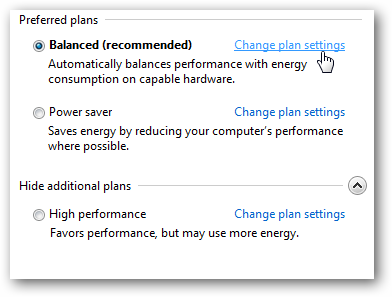
Yes, you would simply "press the power button" to put the computer to sleep. It will be as it has been without AUTOMATICALLY going to sleep mode (you WILL need to press the power button).
 

My Computer My Computer

At a glance

Both Windows 7 64 & Windows 10 LTSBIntel 2.8Ghz,8GB DDR2Nvidia 260+
Computer type
PC/Desktop
Computer Manufacturer/Model Number
Custom
OS
Both Windows 7 64 & Windows 10 LTSB
CPU
Intel 2.8Ghz,
Motherboard
Gigabyte
Memory
8GB DDR2
Graphics Card(s)
Nvidia 260+
Monitor(s) Displays
42" Samsung Plasma Display
Screen Resolution
1080
Hard Drives
Too many to list!
Case
Custom
Cooling
Custom
Keyboard
MS Sidewinder
Mouse
2 dollar ali-express mouse! It is the best ever!
Internet Speed
100MB
Antivirus
Avast
Browser
Firefox & Opera
Other Info
Helpdesk Technician
Hi Iko
sleep and hibernation are 2 different settings!!
and they both have there own USER options

Which one are you talking about?

Do you have any tune-up type programs installed
they can also affect both of the above "restart" options


note
John's screenshots did not drill down far enough for you to see them

Roy
 

My Computer My Computer

At a glance

W7 home premium 32bit/W7HP 64bit/w10 tp insid...E5300 dual core3gbNvidia Geforce 7100 Nforce 630i
Computer type
PC/Desktop
Computer Manufacturer/Model Number
medionl/Aspire 6930G/acer x55a
OS
W7 home premium 32bit/W7HP 64bit/w10 tp insider ring
CPU
E5300 dual core
Motherboard
medion MS7366
Memory
3gb
Graphics Card(s)
Nvidia Geforce 7100 Nforce 630i
Monitor(s) Displays
avixc
Internet Speed
n (isp resticted to 72)
Antivirus
mse/pands
Browser
palemoon
Other Info
Belkin Fd7050 n USB using Railink RT2870 drivers, more upto date
"Does someone know what is the wake from hibernation sequence is"

Yes. And they should not call it "wake". They should call it "rebirth"

First, here's what happens at boot-up. You power on your machine and the bios takes over and does a quick check of basic hardware and counts up the memory, then checks your boot drive to see that it can boot, then turns over control to the boot drive and gives it the basic hardware info it has gathered, then the boot drive loads the operating system kernel, then loads EVERY driver one-by-one based on the basic info it was given by bios, then loads services and settings, then loads startup programs, then takes you to your desktop. That's how everything gets progressively into ram in an orderly manner, and the result is, virtually every time, that you are now up and running cleanly. Whew.

But when you "wake" from hibernation, EVERYTHING that was in ram back when you hibernated (i.e. everything in that first paragraph!) which was stuffed into one giant file and stored on a hard drive, is INSTANTLY reloaded back into ram in the hope that it will pick up exactly where it left off. That all drivers will simultaneously become reaquainted without conflict, that all programs will resume interacting with the operating system without error. It is a giant task of cooperation, and shows you why the Power On Boot Process that loads everything sequentially and slowly has been in effect for decades. Do a search on "computer won't wake from hibernation" and you'll get the same number of hits as if you searched on "why can't I meet a nice girl/guy". Its a complex question with a million possible answers and one practical path to take is to just admit you're probably never going to meet anyone and your computer is probably never going to come out of hibernation either.

Hibernation is kind of necessary on laptops because a hibernated system uses virtually no power, but since I see your motherboard is a desktop motherboard, I assume your system is always plugged in. If so, you might just disable hibernation altogether and use normal sleep mode instead. To do so just click Start, and then type cmd in the Start Search box. Then in the search results list, right-click Command Prompt, and then click Run as Administrator. When (if) you are prompted by User Account Control, click Continue. At the command prompt, type powercfg.exe /hibernate off, and then press Enter.
 

My Computer My Computer

At a glance

Win7 pro x64stock i7 7700kCorsair Vengeance LPX 16GB (2x8GB) DDR4 @ 320...integrated Intel HD 630
Computer type
PC/Desktop
Computer Manufacturer/Model Number
diy
OS
Win7 pro x64
CPU
stock i7 7700k
Motherboard
Gigabyte Z270N-WIFI mini-ITX
Memory
Corsair Vengeance LPX 16GB (2x8GB) DDR4 @ 3200MHz
Graphics Card(s)
integrated Intel HD 630
Sound Card
onboard Realtek ALC1220
Monitor(s) Displays
two vertically mounted samsung 55" 4k un55mu8000
Screen Resolution
1920x1280
Hard Drives
256GB Samsung EVO 960 M.2 pci-e NVMe SSD
PSU
SilverStone Nightjar ST45NF 450Watt Fanless
Case
No case. Motherboard is mounted directly onto power supply
Cooling
Evercool low profile 815EP with Panaflow 12L fan at 7v
Keyboard
Ortek MCK-86 mini
Mouse
Belkin 5-button USB
Internet Speed
spectrum 400mbps
Does someone know what is the wake from hibernation sequence is? I am experiencing Wakeup failure on resume and having problems diagnosing where the difficulty lies. Could someone help me diagnose the wake from hibernation sequence after wakeup failure on resume?

If i had this problem and couldn't solve it, i would get a trace and see if i can find the problem.
Here is a tutorial:
Gathering a Startup, Shutdown, Sleep, Hibernate, or Reboot Trace

For me it would be a learning experience and take a lot of time to do and understand, i never had to go this far to fix sleep issues (i use hybrid sleep).
 

My Computer My Computer

At a glance

Multi-Boot W7_Pro_x64 W8.1_Pro_x64 W10_Pro_x6...AMD Athlon II x4 6206GB GSkill DDR2 800AMD 4670 GPU + AMD 4200 IGP
Computer type
PC/Desktop
Computer Manufacturer/Model Number
home built
OS
Multi-Boot W7_Pro_x64 W8.1_Pro_x64 W10_Pro_x64 +Linux_VMs +Chromium_VM
CPU
AMD Athlon II x4 620
Motherboard
Gigabyte GA-MA785G-UD3H
Memory
6GB GSkill DDR2 800
Graphics Card(s)
AMD 4670 GPU + AMD 4200 IGP
Sound Card
on board Realtek ALC889A
Monitor(s) Displays
RCA 40" LCD TV, Insignia 32" LCD TV, HP 15" LCD monitor
Screen Resolution
1680 x 1050
Hard Drives
OCZ Vertex 3 120GB,
Samsung F3 1TB (3),
Several others - WD, Seagate, Hitachi, ...
PSU
Corsair 500 W
Case
Rosewill mid tower
Cooling
CM 90mm rifle
Keyboard
Gyration wireless, Logitech wireless, Dell USB wired
Mouse
Gyration wireless, Logitech wireless, V7 USB wired
Internet Speed
Spectrum - 100Mbps D / 10Mbps U
Antivirus
Avast, MBAM3, EMET, WinPatrol
Browser
Pale Moon, Firefox, IE
Other Info
2 multi-boot PC's
Mainly HTPC/Office/Gen purpose (no gaming).
Trendnet USB KVM.
LG DVD burner/Blue Ray Player.
Tray system for removable SATA backup drives.

Not currently OCd, under-volted.
I use Hybrid sleep, rarely re-boot or shutdown.

Hauppauge HD-PVR, Avermedia PCIe TV Tuner, Hauppauge PCI TV Tuner.
Mobo BIOS S3 Suspend to RAM

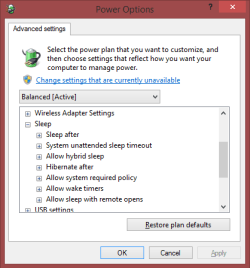
Power Plan options set to "sleep" sleep. Hibernate option seems missing (see photo).

power plan option.JPG

I removed case side panel and watched more closely as computer tried to resume from wake. There is vibration from the main disk drive device. The Graphics card fan switch on, but the CPU fan doesn't. Or rather the CPU fan kind of jolts half a cycle or one cycle only at the point computer powers down again.

I used to use the optimisation feature from Norton antivirus. This problem occurred nearly a month before subscription ended. I think the Norton did disk optimisations.

I also have PowerTools jv16. That does more startup optimisations and registry compaction, if enabled.

If I were to gather a sleep trace, which trace flags would I enable?
 

My Computer My Computer

At a glance

Windows 7 x64, Vista x64, 8.1 smartphoneIntel E8400 65W 64-bitDDR2 2 x 2GB, 1GB x 2XFX Radeon HD5750
Computer type
PC/Desktop
OS
Windows 7 x64, Vista x64, 8.1 smartphone
CPU
Intel E8400 65W 64-bit
Motherboard
Gigabyte EP45-UD3LR
Memory
DDR2 2 x 2GB, 1GB x 2
Graphics Card(s)
XFX Radeon HD5750
Sound Card
AMD High Definition Audio; Realtek High Definition Audio
Monitor(s) Displays
iiyama prolite X2377HDS
Screen Resolution
1920 x 1080
Hard Drives
500GB 7200 rpm Seagate ST3500413AS 16MB, 500GB 5400 rpm Toshiba MQ02ABF050H 32MB, 200GB 7200 rpm Seagate ST3200820AS 8MB, 2TB 7200 rpm Western Digital WD20EZRX 64MB
PSU
Enermax Liberty Modular
Case
Antec P193 Midi Tower
Keyboard
Mionix ZIBAL 60
Mouse
Razer USB 2.0 Diamondback Mouse or Huion Graphics Tablet
Browser
Internet Explorer, Lunascape, Firefox, Opera, Avast Safezone
I've never needed the trace log, no experience here.
I would try the boot flags and see what i get.
Maybe there are other flags not listed in the tutorial.

I never use optimizers or registry cleaners (tune up programs as asked by torchwood).
No telling what they changed.
You might want to consider a Repair Install or Clean Install.
Repair Install
Clean Install Windows 7
 

My Computer My Computer

At a glance

Multi-Boot W7_Pro_x64 W8.1_Pro_x64 W10_Pro_x6...AMD Athlon II x4 6206GB GSkill DDR2 800AMD 4670 GPU + AMD 4200 IGP
Computer type
PC/Desktop
Computer Manufacturer/Model Number
home built
OS
Multi-Boot W7_Pro_x64 W8.1_Pro_x64 W10_Pro_x64 +Linux_VMs +Chromium_VM
CPU
AMD Athlon II x4 620
Motherboard
Gigabyte GA-MA785G-UD3H
Memory
6GB GSkill DDR2 800
Graphics Card(s)
AMD 4670 GPU + AMD 4200 IGP
Sound Card
on board Realtek ALC889A
Monitor(s) Displays
RCA 40" LCD TV, Insignia 32" LCD TV, HP 15" LCD monitor
Screen Resolution
1680 x 1050
Hard Drives
OCZ Vertex 3 120GB,
Samsung F3 1TB (3),
Several others - WD, Seagate, Hitachi, ...
PSU
Corsair 500 W
Case
Rosewill mid tower
Cooling
CM 90mm rifle
Keyboard
Gyration wireless, Logitech wireless, Dell USB wired
Mouse
Gyration wireless, Logitech wireless, V7 USB wired
Internet Speed
Spectrum - 100Mbps D / 10Mbps U
Antivirus
Avast, MBAM3, EMET, WinPatrol
Browser
Pale Moon, Firefox, IE
Other Info
2 multi-boot PC's
Mainly HTPC/Office/Gen purpose (no gaming).
Trendnet USB KVM.
LG DVD burner/Blue Ray Player.
Tray system for removable SATA backup drives.

Not currently OCd, under-volted.
I use Hybrid sleep, rarely re-boot or shutdown.

Hauppauge HD-PVR, Avermedia PCIe TV Tuner, Hauppauge PCI TV Tuner.
As hibernation is NOT showing,
something has dissabled it, ive only ever done it using a command line entry. (powercfg -h off)

Roy
 

My Computer My Computer

At a glance

W7 home premium 32bit/W7HP 64bit/w10 tp insid...E5300 dual core3gbNvidia Geforce 7100 Nforce 630i
Computer type
PC/Desktop
Computer Manufacturer/Model Number
medionl/Aspire 6930G/acer x55a
OS
W7 home premium 32bit/W7HP 64bit/w10 tp insider ring
CPU
E5300 dual core
Motherboard
medion MS7366
Memory
3gb
Graphics Card(s)
Nvidia Geforce 7100 Nforce 630i
Monitor(s) Displays
avixc
Internet Speed
n (isp resticted to 72)
Antivirus
mse/pands
Browser
palemoon
Other Info
Belkin Fd7050 n USB using Railink RT2870 drivers, more upto date
if you selected S3 in bios that disables hibernation at the bios level therefore windows knows you cannot hibernate and does not give you the option. Having said that, it would still be best if you told windows to disable hibernation as discussed in posts #9 and #13.

Problems coming out of sleep are usually a failure on windows part to re-establish a driver, so first check your device manager (start > run > devmgmt.msc > enter) to make sure there are no checkmarks indicating bad drivers

Next upplug any usb devices other than your keyboard and mouse. USB devices are sometimes the culprit in this situation. Our goal here is to identify the component that is the cause here, cuz its probably just one component that is causing this issue.

It sounds like your cpu fan starts very briefly then shuts down when coming out of sleep. Makes me wonder if your system is shutting down on purpose. I would go into bios and disable chassis intrusion detect (if you have it), also put the cpu fan mode on full instead of auto, or pwm. I kind of doubt its either of these, but we're just trying things here until we find the culprit.

If none of the above fixes the issue, your hard drives are the next possibility. Since hard drives take a few seconds to start spinning when coming out of sleep, windows can get hung up in trying to detect them. So in order to rule this out as your problem, I would try disabling them from entering sleep in the first place to see if that makes a difference. Note that it might just be one of the drives that is the issue, so you might try this with each drive one at a time. This link will tell you how to keep them from spinning down at sleep time.

Prevent Hard Drive from going to sleep in Windows 10 / 8 / 7
 

My Computer My Computer

At a glance

Win7 pro x64stock i7 7700kCorsair Vengeance LPX 16GB (2x8GB) DDR4 @ 320...integrated Intel HD 630
Computer type
PC/Desktop
Computer Manufacturer/Model Number
diy
OS
Win7 pro x64
CPU
stock i7 7700k
Motherboard
Gigabyte Z270N-WIFI mini-ITX
Memory
Corsair Vengeance LPX 16GB (2x8GB) DDR4 @ 3200MHz
Graphics Card(s)
integrated Intel HD 630
Sound Card
onboard Realtek ALC1220
Monitor(s) Displays
two vertically mounted samsung 55" 4k un55mu8000
Screen Resolution
1920x1280
Hard Drives
256GB Samsung EVO 960 M.2 pci-e NVMe SSD
PSU
SilverStone Nightjar ST45NF 450Watt Fanless
Case
No case. Motherboard is mounted directly onto power supply
Cooling
Evercool low profile 815EP with Panaflow 12L fan at 7v
Keyboard
Ortek MCK-86 mini
Mouse
Belkin 5-button USB
Internet Speed
spectrum 400mbps
iko22
You're getting a lot of good help and suggestions.
Try everything suggested.

if you selected S3 in bios that disables hibernation at the bios level therefore windows knows you cannot hibernate and does not give you the option.

My PC's/motherboards don't work that way.
I can select S3 sleep in bios and still use S4 hibernate in Windows.
Here's a snip from a powercfg -energy report:
SleepSettings-02.png
Source instructions for the energy report:
Power Options and Sleep Mode Problems

I don't think this will help the OP issue, but for anyone interested, additional Sleep Options can be enabled:
SleepSettings-01.png
 

My Computer My Computer

At a glance

Multi-Boot W7_Pro_x64 W8.1_Pro_x64 W10_Pro_x6...AMD Athlon II x4 6206GB GSkill DDR2 800AMD 4670 GPU + AMD 4200 IGP
Computer type
PC/Desktop
Computer Manufacturer/Model Number
home built
OS
Multi-Boot W7_Pro_x64 W8.1_Pro_x64 W10_Pro_x64 +Linux_VMs +Chromium_VM
CPU
AMD Athlon II x4 620
Motherboard
Gigabyte GA-MA785G-UD3H
Memory
6GB GSkill DDR2 800
Graphics Card(s)
AMD 4670 GPU + AMD 4200 IGP
Sound Card
on board Realtek ALC889A
Monitor(s) Displays
RCA 40" LCD TV, Insignia 32" LCD TV, HP 15" LCD monitor
Screen Resolution
1680 x 1050
Hard Drives
OCZ Vertex 3 120GB,
Samsung F3 1TB (3),
Several others - WD, Seagate, Hitachi, ...
PSU
Corsair 500 W
Case
Rosewill mid tower
Cooling
CM 90mm rifle
Keyboard
Gyration wireless, Logitech wireless, Dell USB wired
Mouse
Gyration wireless, Logitech wireless, V7 USB wired
Internet Speed
Spectrum - 100Mbps D / 10Mbps U
Antivirus
Avast, MBAM3, EMET, WinPatrol
Browser
Pale Moon, Firefox, IE
Other Info
2 multi-boot PC's
Mainly HTPC/Office/Gen purpose (no gaming).
Trendnet USB KVM.
LG DVD burner/Blue Ray Player.
Tray system for removable SATA backup drives.

Not currently OCd, under-volted.
I use Hybrid sleep, rarely re-boot or shutdown.

Hauppauge HD-PVR, Avermedia PCIe TV Tuner, Hauppauge PCI TV Tuner.
device manager (devmgmt.msc) results

Problems coming out of sleep are usually a failure on windows part to re-establish a driver, so first check your device manager (start > run > devmgmt.msc > enter) to make sure there are no checkmarks indicating bad drivers


Device Manager currently shows no check-marks against bad drivers.

It has sort of reported my mouse device driver description "wrong". Device Manager describes my device as Razer Diamondback 3G which is an 1800dpi device, and reports the device to be "working properly" .

However, mine is the 1600 dpi device - could it be that I've installed wrong driver file? I searched web to check what I had been given. Driver version 1.0.0.2 07/03/2007 seems to be the most recent file, according to several sites.
 

My Computer My Computer

At a glance

Windows 7 x64, Vista x64, 8.1 smartphoneIntel E8400 65W 64-bitDDR2 2 x 2GB, 1GB x 2XFX Radeon HD5750
Computer type
PC/Desktop
OS
Windows 7 x64, Vista x64, 8.1 smartphone
CPU
Intel E8400 65W 64-bit
Motherboard
Gigabyte EP45-UD3LR
Memory
DDR2 2 x 2GB, 1GB x 2
Graphics Card(s)
XFX Radeon HD5750
Sound Card
AMD High Definition Audio; Realtek High Definition Audio
Monitor(s) Displays
iiyama prolite X2377HDS
Screen Resolution
1920 x 1080
Hard Drives
500GB 7200 rpm Seagate ST3500413AS 16MB, 500GB 5400 rpm Toshiba MQ02ABF050H 32MB, 200GB 7200 rpm Seagate ST3200820AS 8MB, 2TB 7200 rpm Western Digital WD20EZRX 64MB
PSU
Enermax Liberty Modular
Case
Antec P193 Midi Tower
Keyboard
Mionix ZIBAL 60
Mouse
Razer USB 2.0 Diamondback Mouse or Huion Graphics Tablet
Browser
Internet Explorer, Lunascape, Firefox, Opera, Avast Safezone
As hibernation is NOT showing,
something has dissabled it, ive only ever done it using a command line entry. (powercfg -h off)

Roy

if you selected S3 in bios that disables hibernation at the bios level therefore windows knows you cannot hibernate and does not give you the option. Having said that, it would still be best if you told windows to disable hibernation as discussed in posts #9 and #13.


It's all floding back to me .. I disabled hibernation months ago when computer started responding extremely slowly waking on resume.

It might be that Windows installed updates not compatable with my machine. I have yet diagnosed that issue.

Maybe that earlier issue has become the problem right now

Lessons learned : Power Options DOES NOT gray out disabled hibernate option, as option is removed altogether from menu.
 

My Computer My Computer

At a glance

Windows 7 x64, Vista x64, 8.1 smartphoneIntel E8400 65W 64-bitDDR2 2 x 2GB, 1GB x 2XFX Radeon HD5750
Computer type
PC/Desktop
OS
Windows 7 x64, Vista x64, 8.1 smartphone
CPU
Intel E8400 65W 64-bit
Motherboard
Gigabyte EP45-UD3LR
Memory
DDR2 2 x 2GB, 1GB x 2
Graphics Card(s)
XFX Radeon HD5750
Sound Card
AMD High Definition Audio; Realtek High Definition Audio
Monitor(s) Displays
iiyama prolite X2377HDS
Screen Resolution
1920 x 1080
Hard Drives
500GB 7200 rpm Seagate ST3500413AS 16MB, 500GB 5400 rpm Toshiba MQ02ABF050H 32MB, 200GB 7200 rpm Seagate ST3200820AS 8MB, 2TB 7200 rpm Western Digital WD20EZRX 64MB
PSU
Enermax Liberty Modular
Case
Antec P193 Midi Tower
Keyboard
Mionix ZIBAL 60
Mouse
Razer USB 2.0 Diamondback Mouse or Huion Graphics Tablet
Browser
Internet Explorer, Lunascape, Firefox, Opera, Avast Safezone
Power down ... BIOS setup, reboot, sleep, ... <resume>?

It sounds like your cpu fan starts very briefly then shuts down when coming out of sleep. Makes me wonder if your system is shutting down on purpose. I would go into bios and disable chassis intrusion detect (if you have it), also put the cpu fan mode on full instead of auto, or pwm. I kind of doubt its either of these, but we're just trying things here until we find the culprit.

Yes that is fair assessment, the cpu fan just cuts out. Is it system automation on purpose?

I see your motherboard is a desktop motherboard, I assume your system is always plugged in. If so, you might just disable hibernation altogether and use normal sleep mode instead.

If none of the above fixes the issue, your hard drives are the next possibility. Since hard drives take a few seconds to start spinning when coming out of sleep, windows can get hung up in trying to detect them.

Well, I went into routine of powering down computer into it's BIOS, rebooting the machine, then trying resume sleep ... each time same symptoms ... tried cpu fan on full and tried prevent hard drive going sleep windows , also the chassis intrusion setting is disabled.
I see HPET was set to 32-bit, probably after I refreshed BIOS configuration to default one time. Setting HPET to 64-bit has no overriding change in this scenario.

I don't think I am able turn off hard drives individually (?). There is only one system HDD. I'll consider options to removing the others HDD from power supply.
 

My Computer My Computer

At a glance

Windows 7 x64, Vista x64, 8.1 smartphoneIntel E8400 65W 64-bitDDR2 2 x 2GB, 1GB x 2XFX Radeon HD5750
Computer type
PC/Desktop
OS
Windows 7 x64, Vista x64, 8.1 smartphone
CPU
Intel E8400 65W 64-bit
Motherboard
Gigabyte EP45-UD3LR
Memory
DDR2 2 x 2GB, 1GB x 2
Graphics Card(s)
XFX Radeon HD5750
Sound Card
AMD High Definition Audio; Realtek High Definition Audio
Monitor(s) Displays
iiyama prolite X2377HDS
Screen Resolution
1920 x 1080
Hard Drives
500GB 7200 rpm Seagate ST3500413AS 16MB, 500GB 5400 rpm Toshiba MQ02ABF050H 32MB, 200GB 7200 rpm Seagate ST3200820AS 8MB, 2TB 7200 rpm Western Digital WD20EZRX 64MB
PSU
Enermax Liberty Modular
Case
Antec P193 Midi Tower
Keyboard
Mionix ZIBAL 60
Mouse
Razer USB 2.0 Diamondback Mouse or Huion Graphics Tablet
Browser
Internet Explorer, Lunascape, Firefox, Opera, Avast Safezone
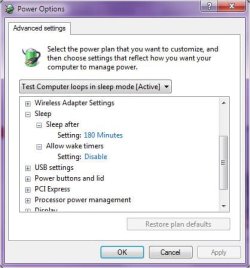
Diagnose <resume> fail

But when you "wake" from hibernation, EVERYTHING that was in ram back when you hibernated (i.e. everything in that first paragraph!) which was stuffed into one giant file and stored on a hard drive, is INSTANTLY reloaded back into ram in the hope that it will pick up exactly where it left off. That all drivers will simultaneously become reaquainted without conflict, that all programs will resume interacting with the operating system without error. It is a giant task of cooperation, and shows you why the Power On Boot Process that loads everything sequentially and slowly has been in effect for decades. Do a search on "computer won't wake from hibernation" and you'll get the same number of hits as if you searched on "why can't I meet a nice girl/guy". Its a complex question with a million possible answers and one practical path to take is to just admit you're probably never going to meet anyone and your computer is probably never going to come out of hibernation either.


At cmd command line, I typed:

Code:
powercfg -devicequery wake_from_S3_supported

Output:

Code:
Intel(R) 4 Series Chipset PCI Express Root Port - 2E21
Intel(R) ICH10 Family USB Universal Host Controller - 3A37
Intel(R) ICH10 Family PCI Express Root Port 6 - 3A4A
UMBus Enumerator
Communications Port (COM1)
USB Composite Device (003)
Intel(R) ICH10 Family USB Universal Host Controller - 3A38
HID-compliant consumer control device (001)
USB Root Hub
PCI bus
USB Root Hub (001)
Intel(R) ICH10 Family USB Universal Host Controller - 3A39
USB Root Hub (002)
USB Root Hub (003)
Intel(R) ICH10 Family USB Enhanced Host Controller - 3A3A
Razer Diamondback 3G
USB Root Hub (004)
USB Root Hub (005)
USB Input Device (010)
Realtek RTL8168B/8111B Family PCI-E Gigabit Ethernet NIC (NDIS 6.0)
Intel(R) ICH10 Family USB Enhanced Host Controller - 3A3C
HID Keyboard Device
USB Root Hub (006)
USB Root Hub (007)
Intel(R) ICH10 Family USB Universal Host Controller - 3A34
High Definition Audio Controller (001)
HID-compliant device (008)
Intel(R) 82801 PCI Bridge - 244E
Intel(R) ICH10 Family USB Universal Host Controller - 3A35
Intel(R) ICH10 Family PCI Express Root Port 1 - 3A40
HID-compliant mouse
USB Input Device (016)
Intel(R) ICH10 Family USB Universal Host Controller - 3A36
Intel(R) ICH10 Family PCI Express Root Port 5 - 3A48
Realtek High Definition Audio

Perhaps if I kneew what order these device drivers are reloaded, then I'd stand a better chance of diagnosing the resume fail. Maybe immediately before CPU fan, maybe thousandths of a second after CPU fan? Or maybe a giant juggernaut driver that is sluggish to load, like as you say, the disks.
 

My Computer My Computer

At a glance

Windows 7 x64, Vista x64, 8.1 smartphoneIntel E8400 65W 64-bitDDR2 2 x 2GB, 1GB x 2XFX Radeon HD5750
Computer type
PC/Desktop
OS
Windows 7 x64, Vista x64, 8.1 smartphone
CPU
Intel E8400 65W 64-bit
Motherboard
Gigabyte EP45-UD3LR
Memory
DDR2 2 x 2GB, 1GB x 2
Graphics Card(s)
XFX Radeon HD5750
Sound Card
AMD High Definition Audio; Realtek High Definition Audio
Monitor(s) Displays
iiyama prolite X2377HDS
Screen Resolution
1920 x 1080
Hard Drives
500GB 7200 rpm Seagate ST3500413AS 16MB, 500GB 5400 rpm Toshiba MQ02ABF050H 32MB, 200GB 7200 rpm Seagate ST3200820AS 8MB, 2TB 7200 rpm Western Digital WD20EZRX 64MB
PSU
Enermax Liberty Modular
Case
Antec P193 Midi Tower
Keyboard
Mionix ZIBAL 60
Mouse
Razer USB 2.0 Diamondback Mouse or Huion Graphics Tablet
Browser
Internet Explorer, Lunascape, Firefox, Opera, Avast Safezone

I thought I read thread starter removing a side panel -- is this a desktop or a laptop? Never mind: I read his specs -- a desktop; I thought a desktop will never hibernate.
If anyone ever gets a desktop to hibernate, please PM me with the solution, I want to save it onto my hard-drive.
 

My Computer My Computer

At a glance

Windows 7 Professional 64-bitDesktop i5; Acers i5 & i7desktop 16GB; 1 Acer 8GB & 1 Acer 16GB
Computer type
PC/Desktop
Computer Manufacturer/Model Number
Antec desktop; Acer Aspire laptops
OS
Windows 7 Professional 64-bit
CPU
Desktop i5; Acers i5 & i7
Memory
desktop 16GB; 1 Acer 8GB & 1 Acer 16GB
Hard Drives
1TB split into 2 equal partitions [OS and data] usable by RJS
Internet Speed
AT&T DSL
Browser
FF, GChrome, msIE
Other Info
Windows 7 Firewall, Emsisoft AM/AV, MSE [scan-only], SpywareBlaster, Ruiware/BillP combine
Back
Top