What is the Wake from hibernation sequence after sleep mode activated?

try this mouse driver

Razer Diamondback 3G Driver v1.01

if you see no change to the problem, try using the standard microsoft mouse driver just to see if it makes a difference. If not, the problem is probably not the mouse.

Try a different mouse and keyboard, if you have any others at hand

Have you tried physically disconnecting everything possible and just booting with keyboard, mouse, and one hard drive?

Also try a different display driver version, or even just the microsoft vga driver. The goal here is to get just ONE successful wake from sleep.

Also try a "clean boot"

https://support.microsoft.com/en-us/help/929135/how-to-perform-a-clean-boot-in-windows
 

My Computer My Computer

At a glance

Win7 pro x64stock i7 7700kCorsair Vengeance LPX 16GB (2x8GB) DDR4 @ 320...integrated Intel HD 630
Computer type
PC/Desktop
Computer Manufacturer/Model Number
diy
OS
Win7 pro x64
CPU
stock i7 7700k
Motherboard
Gigabyte Z270N-WIFI mini-ITX
Memory
Corsair Vengeance LPX 16GB (2x8GB) DDR4 @ 3200MHz
Graphics Card(s)
integrated Intel HD 630
Sound Card
onboard Realtek ALC1220
Monitor(s) Displays
two vertically mounted samsung 55" 4k un55mu8000
Screen Resolution
1920x1280
Hard Drives
256GB Samsung EVO 960 M.2 pci-e NVMe SSD
PSU
SilverStone Nightjar ST45NF 450Watt Fanless
Case
No case. Motherboard is mounted directly onto power supply
Cooling
Evercool low profile 815EP with Panaflow 12L fan at 7v
Keyboard
Ortek MCK-86 mini
Mouse
Belkin 5-button USB
Internet Speed
spectrum 400mbps

My Computer My Computer

At a glance

Multi-Boot W7_Pro_x64 W8.1_Pro_x64 W10_Pro_x6...AMD Athlon II x4 6206GB GSkill DDR2 800AMD 4670 GPU + AMD 4200 IGP
Computer type
PC/Desktop
Computer Manufacturer/Model Number
home built
OS
Multi-Boot W7_Pro_x64 W8.1_Pro_x64 W10_Pro_x64 +Linux_VMs +Chromium_VM
CPU
AMD Athlon II x4 620
Motherboard
Gigabyte GA-MA785G-UD3H
Memory
6GB GSkill DDR2 800
Graphics Card(s)
AMD 4670 GPU + AMD 4200 IGP
Sound Card
on board Realtek ALC889A
Monitor(s) Displays
RCA 40" LCD TV, Insignia 32" LCD TV, HP 15" LCD monitor
Screen Resolution
1680 x 1050
Hard Drives
OCZ Vertex 3 120GB,
Samsung F3 1TB (3),
Several others - WD, Seagate, Hitachi, ...
PSU
Corsair 500 W
Case
Rosewill mid tower
Cooling
CM 90mm rifle
Keyboard
Gyration wireless, Logitech wireless, Dell USB wired
Mouse
Gyration wireless, Logitech wireless, V7 USB wired
Internet Speed
Spectrum - 100Mbps D / 10Mbps U
Antivirus
Avast, MBAM3, EMET, WinPatrol
Browser
Pale Moon, Firefox, IE
Other Info
2 multi-boot PC's
Mainly HTPC/Office/Gen purpose (no gaming).
Trendnet USB KVM.
LG DVD burner/Blue Ray Player.
Tray system for removable SATA backup drives.

Not currently OCd, under-volted.
I use Hybrid sleep, rarely re-boot or shutdown.

Hauppauge HD-PVR, Avermedia PCIe TV Tuner, Hauppauge PCI TV Tuner.
DavidE, I tried a few REGs, BATs -- none worked. It might be my desktop. :)
 

My Computer My Computer

At a glance

Windows 7 Professional 64-bitDesktop i5; Acers i5 & i7desktop 16GB; 1 Acer 8GB & 1 Acer 16GB
Computer type
PC/Desktop
Computer Manufacturer/Model Number
Antec desktop; Acer Aspire laptops
OS
Windows 7 Professional 64-bit
CPU
Desktop i5; Acers i5 & i7
Memory
desktop 16GB; 1 Acer 8GB & 1 Acer 16GB
Hard Drives
1TB split into 2 equal partitions [OS and data] usable by RJS
Internet Speed
AT&T DSL
Browser
FF, GChrome, msIE
Other Info
Windows 7 Firewall, Emsisoft AM/AV, MSE [scan-only], SpywareBlaster, Ruiware/BillP combine
AVERT YOUR GAZE [unless confused about S3 or hibernate.]

DavidE, RowlandJS you are correct - THE THREAD STARTER WAS CONCERNING MY DESKTOP. Unlike many of you I have no laptop.

I don't have Hibernate now, it used to be on the Default Start Menu list after installing OS on this Desktop PC. "Hibernate" also is the name of the HIBERNATE.SYS file found on any Laptop or Desktop if sleep mode enabled.

The motherboard can support either S1 or S3. Currently mine is selected for S3 sleep mode. Well, it turns out that S3 is not hibernate sleep. THIS IS WHERE I GOT MY QUESTION WRONG!!: I say "what is the wake from hibernate sequence after sleep mode activated" THIS is so wrong as I am not using hibernate at all. Im using S3 sleep mode.

Question should therefore be WHAT IS THE RESUME FROM S3 SLEEP SEQUENCE? Much more straight forward.

Well Hibernate mode is the best sleep mode if you have a laptop - Why? Because laptops rely on batteries for their power. So <he, he> I have accidentally drawn the attention of all those Laptop users trying to sort their hibernate customization, completely by accident. So sorry, hibernate IS NOT really my question here. Sorry for getting you here.

My motherboard is currently configured for S3 sleep. So that is the mode what the question should be concerned about.

Now, if I look at DavidE's post (post #15) and do the same (ie run powerCFG -energy) then I get the same as David. S1 and S2 sleep support are false, while S3 and S4 sleep support are true. So it looks like powerCFG is only reading what the BIOS is allowing it to read. If I bother to set BIOS to S1 sleep, then powerCFG would give a different report analysis of the available states?

Now although powerCFG tells me that my mobo supports both S3 (sleep) and S4 (hibernate), the hibernate is disabled in the OS because I've done that in gpedit - and forgotten about it. That clears up my post (#11) So, my question is therefore only really about S3 resume from sleep - why is this mode failing?
 

My Computer My Computer

At a glance

Windows 7 x64, Vista x64, 8.1 smartphoneIntel E8400 65W 64-bitDDR2 2 x 2GB, 1GB x 2XFX Radeon HD5750
Computer type
PC/Desktop
OS
Windows 7 x64, Vista x64, 8.1 smartphone
CPU
Intel E8400 65W 64-bit
Motherboard
Gigabyte EP45-UD3LR
Memory
DDR2 2 x 2GB, 1GB x 2
Graphics Card(s)
XFX Radeon HD5750
Sound Card
AMD High Definition Audio; Realtek High Definition Audio
Monitor(s) Displays
iiyama prolite X2377HDS
Screen Resolution
1920 x 1080
Hard Drives
500GB 7200 rpm Seagate ST3500413AS 16MB, 500GB 5400 rpm Toshiba MQ02ABF050H 32MB, 200GB 7200 rpm Seagate ST3200820AS 8MB, 2TB 7200 rpm Western Digital WD20EZRX 64MB
PSU
Enermax Liberty Modular
Case
Antec P193 Midi Tower
Keyboard
Mionix ZIBAL 60
Mouse
Razer USB 2.0 Diamondback Mouse or Huion Graphics Tablet
Browser
Internet Explorer, Lunascape, Firefox, Opera, Avast Safezone

Very interesting johnhoh; I selected update driver from the Razer Customizer, and it gave me no new drivers. So perhaps you found driver that updater failed to locate? Or maybe update file not intended for my mouse?

I shall try your suggestions, one by one; treading carefully and slowly to prevent me making new mistake and forgetting where I am. I shall post again when I obtain useful results.
 

My Computer My Computer

At a glance

Windows 7 x64, Vista x64, 8.1 smartphoneIntel E8400 65W 64-bitDDR2 2 x 2GB, 1GB x 2XFX Radeon HD5750
Computer type
PC/Desktop
OS
Windows 7 x64, Vista x64, 8.1 smartphone
CPU
Intel E8400 65W 64-bit
Motherboard
Gigabyte EP45-UD3LR
Memory
DDR2 2 x 2GB, 1GB x 2
Graphics Card(s)
XFX Radeon HD5750
Sound Card
AMD High Definition Audio; Realtek High Definition Audio
Monitor(s) Displays
iiyama prolite X2377HDS
Screen Resolution
1920 x 1080
Hard Drives
500GB 7200 rpm Seagate ST3500413AS 16MB, 500GB 5400 rpm Toshiba MQ02ABF050H 32MB, 200GB 7200 rpm Seagate ST3200820AS 8MB, 2TB 7200 rpm Western Digital WD20EZRX 64MB
PSU
Enermax Liberty Modular
Case
Antec P193 Midi Tower
Keyboard
Mionix ZIBAL 60
Mouse
Razer USB 2.0 Diamondback Mouse or Huion Graphics Tablet
Browser
Internet Explorer, Lunascape, Firefox, Opera, Avast Safezone
DavidE, I tried a few REGs, BATs -- none worked. It might be my desktop. :)

If you want help with your problem, I think you should create your own new thread.
To me it sounds like you have a different issue than this thread is about for iko22.
:)
 

My Computer My Computer

At a glance

Multi-Boot W7_Pro_x64 W8.1_Pro_x64 W10_Pro_x6...AMD Athlon II x4 6206GB GSkill DDR2 800AMD 4670 GPU + AMD 4200 IGP
Computer type
PC/Desktop
Computer Manufacturer/Model Number
home built
OS
Multi-Boot W7_Pro_x64 W8.1_Pro_x64 W10_Pro_x64 +Linux_VMs +Chromium_VM
CPU
AMD Athlon II x4 620
Motherboard
Gigabyte GA-MA785G-UD3H
Memory
6GB GSkill DDR2 800
Graphics Card(s)
AMD 4670 GPU + AMD 4200 IGP
Sound Card
on board Realtek ALC889A
Monitor(s) Displays
RCA 40" LCD TV, Insignia 32" LCD TV, HP 15" LCD monitor
Screen Resolution
1680 x 1050
Hard Drives
OCZ Vertex 3 120GB,
Samsung F3 1TB (3),
Several others - WD, Seagate, Hitachi, ...
PSU
Corsair 500 W
Case
Rosewill mid tower
Cooling
CM 90mm rifle
Keyboard
Gyration wireless, Logitech wireless, Dell USB wired
Mouse
Gyration wireless, Logitech wireless, V7 USB wired
Internet Speed
Spectrum - 100Mbps D / 10Mbps U
Antivirus
Avast, MBAM3, EMET, WinPatrol
Browser
Pale Moon, Firefox, IE
Other Info
2 multi-boot PC's
Mainly HTPC/Office/Gen purpose (no gaming).
Trendnet USB KVM.
LG DVD burner/Blue Ray Player.
Tray system for removable SATA backup drives.

Not currently OCd, under-volted.
I use Hybrid sleep, rarely re-boot or shutdown.

Hauppauge HD-PVR, Avermedia PCIe TV Tuner, Hauppauge PCI TV Tuner.
try this mouse driver

Razer Diamondback 3G Driver v1.01

if you see no change to the problem, try using the standard microsoft mouse driver just to see if it makes a difference. If not, the problem is probably not the mouse.

https://support.microsoft.com/en-us/help/929135/how-to-perform-a-clean-boot-in-windows
Downloaded installer (Razer Diamondback 3G 1.01).
Installer pauses and requests confirm to install: "The install driver is the same as the current driver. Do you want to remove it?". So far I have only clicked no.


If I should try the standard microsoft mouse driver, how would I go about enabling the earlier driver? Delete the Razzer driver from the Driver Store File Repository, or is there easier way?

I get the same as David. S1 and S2 sleep support are false, while S3 and S4 sleep support are true. So it looks like powerCFG is only reading what the BIOS is allowing it to read. If I bother to set BIOS to S1 sleep, then powerCFG would give a different report analysis of the available states?

Wnet back into BIOS selected (S1) suspend mode. Ran powerCFG again. powerCFG now reports supported sleep states are S1 >>> true; S2 >>> false; S3 >>> false; S4 >>> true. Ie changed from (Post #24). Otherwise energy report same errors and warnings.

Ran powercfg -devicequery wake_from_S1_supported and found one line difference from powercfg -devicequery wake_from_S3_supported (Post #19). The line difference appears to be PCI bus is supported in (S3), and not (S1). Both reports say Razer Diamonback 3G and HID compliant mouse support resume from sleep.

Confirmed power plan now supports (S1), confirmed Suspended the computer into the low power mode state (S1), confirmed computer resumes from (S1) sleep state.

>>> Computer fails to resume from (S3) low power mode, Computer successfully resumes from (S1) low power mode (USB mouse, USB keyboard, DVI monitor, one disk drive, one Coax Ethernet).


Re-Configured BIOS to accept (S3) suspend mode.
Followed instructions "how to perform a clean boot in windows". And I'm afraid the configured clean boot computer failed to resume from the (S3) sleep state. What ever the issue is with resuming from sleep mode, the cause is unlikely third party startup services?
 

My Computer My Computer

At a glance

Windows 7 x64, Vista x64, 8.1 smartphoneIntel E8400 65W 64-bitDDR2 2 x 2GB, 1GB x 2XFX Radeon HD5750
Computer type
PC/Desktop
OS
Windows 7 x64, Vista x64, 8.1 smartphone
CPU
Intel E8400 65W 64-bit
Motherboard
Gigabyte EP45-UD3LR
Memory
DDR2 2 x 2GB, 1GB x 2
Graphics Card(s)
XFX Radeon HD5750
Sound Card
AMD High Definition Audio; Realtek High Definition Audio
Monitor(s) Displays
iiyama prolite X2377HDS
Screen Resolution
1920 x 1080
Hard Drives
500GB 7200 rpm Seagate ST3500413AS 16MB, 500GB 5400 rpm Toshiba MQ02ABF050H 32MB, 200GB 7200 rpm Seagate ST3200820AS 8MB, 2TB 7200 rpm Western Digital WD20EZRX 64MB
PSU
Enermax Liberty Modular
Case
Antec P193 Midi Tower
Keyboard
Mionix ZIBAL 60
Mouse
Razer USB 2.0 Diamondback Mouse or Huion Graphics Tablet
Browser
Internet Explorer, Lunascape, Firefox, Opera, Avast Safezone
Right click within device manager to install/uninstall drivers, unless you have the installation file like you do for the razorback. No need to delete any drivers when you try a new driver. The microsoft driver can always be found through device manager so as long as you have your razorback driver installation file you should be able to switch back and forth between them.

I agree that since a clean boot produced the same symptoms the issue is not likely due to a program. Note that a driver problem does not always mean a bad driver. Since a driver is the layer between the hardware and the rest of the system, failing hardware often produces exactly the same symptoms as a bad driver. So if you do nail this down at some point to a certain device, it maybe that device's fault or it may be its driver's fault. Just saying.

Try loading just the basic vga driver and seeing what that does, then go back to your normal graphics driver.

Also try the microsoft mouse driver then go back to razorback.

If the problem is your hard drive, there's not much to do here unless you have a second boot drive to try.

Try sleeping/waking with the ethernet unplugged.
 

My Computer My Computer

At a glance

Win7 pro x64stock i7 7700kCorsair Vengeance LPX 16GB (2x8GB) DDR4 @ 320...integrated Intel HD 630
Computer type
PC/Desktop
Computer Manufacturer/Model Number
diy
OS
Win7 pro x64
CPU
stock i7 7700k
Motherboard
Gigabyte Z270N-WIFI mini-ITX
Memory
Corsair Vengeance LPX 16GB (2x8GB) DDR4 @ 3200MHz
Graphics Card(s)
integrated Intel HD 630
Sound Card
onboard Realtek ALC1220
Monitor(s) Displays
two vertically mounted samsung 55" 4k un55mu8000
Screen Resolution
1920x1280
Hard Drives
256GB Samsung EVO 960 M.2 pci-e NVMe SSD
PSU
SilverStone Nightjar ST45NF 450Watt Fanless
Case
No case. Motherboard is mounted directly onto power supply
Cooling
Evercool low profile 815EP with Panaflow 12L fan at 7v
Keyboard
Ortek MCK-86 mini
Mouse
Belkin 5-button USB
Internet Speed
spectrum 400mbps
Thank you - I located relevant menu option on Device Manager for both Display adapter and Human Interface Device.

The Display went into VGA okay.

Only the Operating System hadn't responded very well to the mouse Diamondback being disabled, as the OS evidently had failed to find the Microsoft mouse driver. Subsequently, the pointing device lost any coordination while in Windows environment - I am wondering whether I chose the right menu option, as I chose 'disable' rather than 'uninstall'?

Without a usable mouse I resorted to pressing CTRL + ALT +DEL from keyboard, to restart the computer, and use CD-ROM to use System Repair recovery environment, then system restore got my mouse driver back enabled.

Retest of the Sleep state Resume failed, as I was unable to choose the right mouse driver for the test.

While it is straightforward updating a driver to the latest file, attempting to downgrade a driver to a more basic generic driver appears to have undesired complications. I think I must be missing something that would allow me to switch back and forth between mouse drivers easily.
 

My Computer My Computer

At a glance

Windows 7 x64, Vista x64, 8.1 smartphoneIntel E8400 65W 64-bitDDR2 2 x 2GB, 1GB x 2XFX Radeon HD5750
Computer type
PC/Desktop
OS
Windows 7 x64, Vista x64, 8.1 smartphone
CPU
Intel E8400 65W 64-bit
Motherboard
Gigabyte EP45-UD3LR
Memory
DDR2 2 x 2GB, 1GB x 2
Graphics Card(s)
XFX Radeon HD5750
Sound Card
AMD High Definition Audio; Realtek High Definition Audio
Monitor(s) Displays
iiyama prolite X2377HDS
Screen Resolution
1920 x 1080
Hard Drives
500GB 7200 rpm Seagate ST3500413AS 16MB, 500GB 5400 rpm Toshiba MQ02ABF050H 32MB, 200GB 7200 rpm Seagate ST3200820AS 8MB, 2TB 7200 rpm Western Digital WD20EZRX 64MB
PSU
Enermax Liberty Modular
Case
Antec P193 Midi Tower
Keyboard
Mionix ZIBAL 60
Mouse
Razer USB 2.0 Diamondback Mouse or Huion Graphics Tablet
Browser
Internet Explorer, Lunascape, Firefox, Opera, Avast Safezone
Confirmed power plan now supports (S1), confirmed Suspended the computer into the low power mode state (S1), confirmed computer resumes from (S1) sleep state.

>>> Computer fails to resume from (S3) low power mode, Computer successfully resumes from (S1) low power mode (USB mouse, USB keyboard, DVI monitor, one disk drive, one Coax Ethernet).

in post #27 are you saying S1 sleep works and S3 sleep doesn't work ?

check if you have the latest bios version, here's some links for the Gigabyte EP45-UD3LR
GA-EP45-UD3LR (rev. 1.0) | Motherboard | GIGABYTE
GIGABYTE GA-EP45-UD3P LGA 775 Intel P45 ATX Intel Motherboard-Newegg.com
 

My Computer My Computer

At a glance

Multi-Boot W7_Pro_x64 W8.1_Pro_x64 W10_Pro_x6...AMD Athlon II x4 6206GB GSkill DDR2 800AMD 4670 GPU + AMD 4200 IGP
Computer type
PC/Desktop
Computer Manufacturer/Model Number
home built
OS
Multi-Boot W7_Pro_x64 W8.1_Pro_x64 W10_Pro_x64 +Linux_VMs +Chromium_VM
CPU
AMD Athlon II x4 620
Motherboard
Gigabyte GA-MA785G-UD3H
Memory
6GB GSkill DDR2 800
Graphics Card(s)
AMD 4670 GPU + AMD 4200 IGP
Sound Card
on board Realtek ALC889A
Monitor(s) Displays
RCA 40" LCD TV, Insignia 32" LCD TV, HP 15" LCD monitor
Screen Resolution
1680 x 1050
Hard Drives
OCZ Vertex 3 120GB,
Samsung F3 1TB (3),
Several others - WD, Seagate, Hitachi, ...
PSU
Corsair 500 W
Case
Rosewill mid tower
Cooling
CM 90mm rifle
Keyboard
Gyration wireless, Logitech wireless, Dell USB wired
Mouse
Gyration wireless, Logitech wireless, V7 USB wired
Internet Speed
Spectrum - 100Mbps D / 10Mbps U
Antivirus
Avast, MBAM3, EMET, WinPatrol
Browser
Pale Moon, Firefox, IE
Other Info
2 multi-boot PC's
Mainly HTPC/Office/Gen purpose (no gaming).
Trendnet USB KVM.
LG DVD burner/Blue Ray Player.
Tray system for removable SATA backup drives.

Not currently OCd, under-volted.
I use Hybrid sleep, rarely re-boot or shutdown.

Hauppauge HD-PVR, Avermedia PCIe TV Tuner, Hauppauge PCI TV Tuner.
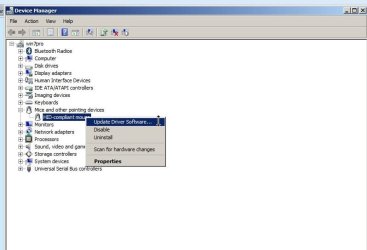
in device manager you want to choose update driver software instead of disable, then Browse my computer for driver software, then let me pick from a list of device drivers on my computer, then "uncheck" compatible hardware, then scroll down to microsoft where you'll find the generic hid-compliant driver. But it would be much better to just try a different mouse altogether, as its possible that your razorback will not work with anything but its own driver. By the way you can do all that with a keyboard in case your mouse is not working in the meantime.
 

Attachments

  • 1.jpg
    1.jpg
    31.5 KB · Views: 2

My Computer My Computer

At a glance

Win7 pro x64stock i7 7700kCorsair Vengeance LPX 16GB (2x8GB) DDR4 @ 320...integrated Intel HD 630
Computer type
PC/Desktop
Computer Manufacturer/Model Number
diy
OS
Win7 pro x64
CPU
stock i7 7700k
Motherboard
Gigabyte Z270N-WIFI mini-ITX
Memory
Corsair Vengeance LPX 16GB (2x8GB) DDR4 @ 3200MHz
Graphics Card(s)
integrated Intel HD 630
Sound Card
onboard Realtek ALC1220
Monitor(s) Displays
two vertically mounted samsung 55" 4k un55mu8000
Screen Resolution
1920x1280
Hard Drives
256GB Samsung EVO 960 M.2 pci-e NVMe SSD
PSU
SilverStone Nightjar ST45NF 450Watt Fanless
Case
No case. Motherboard is mounted directly onto power supply
Cooling
Evercool low profile 815EP with Panaflow 12L fan at 7v
Keyboard
Ortek MCK-86 mini
Mouse
Belkin 5-button USB
Internet Speed
spectrum 400mbps
Yes, thanks for correcting me, I should have selected Update Driver Software. This way, I could enable the Standard VGA Graphics Adapter and the HID compliant mouse.

Then, ... it seems sleep mode does not like the VGA driver! When VGA driver enabled, the sleep button is blanked out, and I am unable to power down into standy.

I compromised my efforts, and replaced VGA with ATI Radeon 8.961 (April 2012). It wasn't exactly the most basic driver, but I at least knew this earlier driver update caused no contention with sleep mode.

Yet, even with HID compliant mouse and graphics driver 8.961, the resume from sleep still fails.

I don't have another keyboard/mouse available. I might be able to find two PS/2-USB converters that would allow me to setup keyboard+mouse avoiding any USB. Then I could switch off USB support in BIOS and try that?
 

My Computer My Computer

At a glance

Windows 7 x64, Vista x64, 8.1 smartphoneIntel E8400 65W 64-bitDDR2 2 x 2GB, 1GB x 2XFX Radeon HD5750
Computer type
PC/Desktop
OS
Windows 7 x64, Vista x64, 8.1 smartphone
CPU
Intel E8400 65W 64-bit
Motherboard
Gigabyte EP45-UD3LR
Memory
DDR2 2 x 2GB, 1GB x 2
Graphics Card(s)
XFX Radeon HD5750
Sound Card
AMD High Definition Audio; Realtek High Definition Audio
Monitor(s) Displays
iiyama prolite X2377HDS
Screen Resolution
1920 x 1080
Hard Drives
500GB 7200 rpm Seagate ST3500413AS 16MB, 500GB 5400 rpm Toshiba MQ02ABF050H 32MB, 200GB 7200 rpm Seagate ST3200820AS 8MB, 2TB 7200 rpm Western Digital WD20EZRX 64MB
PSU
Enermax Liberty Modular
Case
Antec P193 Midi Tower
Keyboard
Mionix ZIBAL 60
Mouse
Razer USB 2.0 Diamondback Mouse or Huion Graphics Tablet
Browser
Internet Explorer, Lunascape, Firefox, Opera, Avast Safezone
in post #27 are you saying S1 sleep works and S3 sleep doesn't work ?

Yes, exactly: (S1) sleep mode functions correctly and successfully recovers from resume. Whereas (S3) sleep happens ... but it does not recover from resume anymore. I used to be able to do (S3) sleep and resume on my current computer specification.

I think I am pretty much updated as far as Gigabyte would go on this mobo. Nevertheless I tried your links. The support pages of US or Euro or UK website (s) are unresponsive today, from where I am located. I have visited these pages before and I am currently unawares as to the problem,that is not bringing back the search results.

In the meantime, typed "wmic bios get smbiosbiosversion" at cmd prompt, and this returns SMBIOS version F10.
 

My Computer My Computer

At a glance

Windows 7 x64, Vista x64, 8.1 smartphoneIntel E8400 65W 64-bitDDR2 2 x 2GB, 1GB x 2XFX Radeon HD5750
Computer type
PC/Desktop
OS
Windows 7 x64, Vista x64, 8.1 smartphone
CPU
Intel E8400 65W 64-bit
Motherboard
Gigabyte EP45-UD3LR
Memory
DDR2 2 x 2GB, 1GB x 2
Graphics Card(s)
XFX Radeon HD5750
Sound Card
AMD High Definition Audio; Realtek High Definition Audio
Monitor(s) Displays
iiyama prolite X2377HDS
Screen Resolution
1920 x 1080
Hard Drives
500GB 7200 rpm Seagate ST3500413AS 16MB, 500GB 5400 rpm Toshiba MQ02ABF050H 32MB, 200GB 7200 rpm Seagate ST3200820AS 8MB, 2TB 7200 rpm Western Digital WD20EZRX 64MB
PSU
Enermax Liberty Modular
Case
Antec P193 Midi Tower
Keyboard
Mionix ZIBAL 60
Mouse
Razer USB 2.0 Diamondback Mouse or Huion Graphics Tablet
Browser
Internet Explorer, Lunascape, Firefox, Opera, Avast Safezone
Video card drivers are more likely to be the issue than the mouse driver, so it might be good to start fresh here with a clean device manager and no driver errors. So re-install your normal video driver and mouse driver, and reboot and make sure your device manager has no exclamation marks, aka is "clean". Then boot into bios, select "load fail safe defaults" then go to the bios' power management page and select "power on by mouse" and "power on by keyboard" (these are for powering on from a shutdown state but select them anyway), also select "acpi suspend type" as S3, then boot into windows, go to device manager and next to mouse and keyboard select "allow this device to wake the computer". Then reboot and see if sleep works. Then go to a command prompt and try these two commands:

powercfg -DEVICEQUERY S1_supported

powercfg -DEVICEQUERY S3_supported

which will likely show you that your video card supports S3 but not S1, so I'm guessing that's why S1 works and S3 doesn't, pointing to the issue being your video card, because it never gets powered down in the first place when you use S1. It may be the card itself, or its driver. Only way to know for sure is to use a different video card. By the way,

powercfg -devicequery wake_from_S3_supported will show you what is enabled to wake you from S1 (when its selected in bios). Your mouse and keyboard should be on the list.
 

My Computer My Computer

At a glance

Win7 pro x64stock i7 7700kCorsair Vengeance LPX 16GB (2x8GB) DDR4 @ 320...integrated Intel HD 630
Computer type
PC/Desktop
Computer Manufacturer/Model Number
diy
OS
Win7 pro x64
CPU
stock i7 7700k
Motherboard
Gigabyte Z270N-WIFI mini-ITX
Memory
Corsair Vengeance LPX 16GB (2x8GB) DDR4 @ 3200MHz
Graphics Card(s)
integrated Intel HD 630
Sound Card
onboard Realtek ALC1220
Monitor(s) Displays
two vertically mounted samsung 55" 4k un55mu8000
Screen Resolution
1920x1280
Hard Drives
256GB Samsung EVO 960 M.2 pci-e NVMe SSD
PSU
SilverStone Nightjar ST45NF 450Watt Fanless
Case
No case. Motherboard is mounted directly onto power supply
Cooling
Evercool low profile 815EP with Panaflow 12L fan at 7v
Keyboard
Ortek MCK-86 mini
Mouse
Belkin 5-button USB
Internet Speed
spectrum 400mbps
In the meantime, typed "wmic bios get smbiosbiosversion" at cmd prompt, and this returns SMBIOS version F10.
There is a F11 Bios available.
Here's a snip from the support page:
GA-EP45-F11Bios.png

If S3 use to work for you with F10, I doubt F11 will help.
If you want to get F11, here's the download link for Europe:
http://download.gigabyte.eu/FileList/BIOS/motherboard_bios_ga-ep45-ud3lr_f11.exe

You could also consider a Bios reset as johnhoh suggested, with your F10 bios.
If you update or reset bios, make sure you know any custom settings you use, so you can re-apply them.

If you let Windows Update install driver updates, maybe an update broke S3.
 

My Computer My Computer

At a glance

Multi-Boot W7_Pro_x64 W8.1_Pro_x64 W10_Pro_x6...AMD Athlon II x4 6206GB GSkill DDR2 800AMD 4670 GPU + AMD 4200 IGP
Computer type
PC/Desktop
Computer Manufacturer/Model Number
home built
OS
Multi-Boot W7_Pro_x64 W8.1_Pro_x64 W10_Pro_x64 +Linux_VMs +Chromium_VM
CPU
AMD Athlon II x4 620
Motherboard
Gigabyte GA-MA785G-UD3H
Memory
6GB GSkill DDR2 800
Graphics Card(s)
AMD 4670 GPU + AMD 4200 IGP
Sound Card
on board Realtek ALC889A
Monitor(s) Displays
RCA 40" LCD TV, Insignia 32" LCD TV, HP 15" LCD monitor
Screen Resolution
1680 x 1050
Hard Drives
OCZ Vertex 3 120GB,
Samsung F3 1TB (3),
Several others - WD, Seagate, Hitachi, ...
PSU
Corsair 500 W
Case
Rosewill mid tower
Cooling
CM 90mm rifle
Keyboard
Gyration wireless, Logitech wireless, Dell USB wired
Mouse
Gyration wireless, Logitech wireless, V7 USB wired
Internet Speed
Spectrum - 100Mbps D / 10Mbps U
Antivirus
Avast, MBAM3, EMET, WinPatrol
Browser
Pale Moon, Firefox, IE
Other Info
2 multi-boot PC's
Mainly HTPC/Office/Gen purpose (no gaming).
Trendnet USB KVM.
LG DVD burner/Blue Ray Player.
Tray system for removable SATA backup drives.

Not currently OCd, under-volted.
I use Hybrid sleep, rarely re-boot or shutdown.

Hauppauge HD-PVR, Avermedia PCIe TV Tuner, Hauppauge PCI TV Tuner.
Video card drivers are more likely to be the issue than the mouse driver,

Would it be possible that the computer has received an update that had assumed the computer's graphics card supports the AMD ZeroCore power state, which has been on more recent GPU boards:

When a discrete GPU is in a static screen state it works to minimize idle power by enabling a host of active power saving functions including (but not limited to); clock gating, power gating, memory compression, and a host of other features. However, GPUs with AMD’s exclusive AMD ZeroCore Power technology can take energy savings to entirely new heights by completely powering down the core GPU while the rest of the system remains active. Nearly all PCs can be configured to turn off their displays after a long period of inactivity. This is known as the long idle state; where the screen is blanked but the rest of the system remains in an active and working power state (ACPI G0/S0).

As soon as the system goes into long idle state and applications are not actively changing the screen contents, the GPU enters the AMD ZeroCore power state. In the AMD ZeroCore power state, the GPU core (including the 3D engine / compute units, multimedia and audio engines, displays, memory interfaces, etc.) is completely powered down. However, one cannot simply remove the GPU and its associated device context completely; particularly when it is the
only GPU in the system as is the case in many enthusiast platforms. The operating system and SBIOS must still be aware that a GPU is still present in the system. For this reason, the AMD ZeroCore Power state maintains a very small bus control block to ensure that GPU context is still visible to the operating system and SBIOS. The AMD ZeroCore power state also manages the power sequencing of the GPU to ensure that the power up/down mechanism is self contained
and independent of the rest of the system.
https://www.vortez.net/articles_pages/

I am unable to test the video and mouse much further. The problem exhibits same undesirable symptoms when more earlier drivers are loaded. I see no warning triangles in device manager.

Tried switching off integrated USB and network controllers. Using keyboard and mouse without USB was difficult. I found only one PS/2 adapter, and was unable to piggyback both mouse and keyboard off same adapter.

Tried

powercfg -requests

I thought if I could configure the system to use

powercfg -requestsoverride

just before entering the sleep state, then I could show a device to be the cause.

However, there is not much documentation on use of powercfg -requests. Initially, it showed that the adio device was causing system requests, which in turn lead me to disable the audio device. Ha, no luck again.

IDE/SATA driver: I have now enabled AHCI mode to use the SATA driver. Again, no luck.
 
Last edited:

My Computer My Computer

At a glance

Windows 7 x64, Vista x64, 8.1 smartphoneIntel E8400 65W 64-bitDDR2 2 x 2GB, 1GB x 2XFX Radeon HD5750
Computer type
PC/Desktop
OS
Windows 7 x64, Vista x64, 8.1 smartphone
CPU
Intel E8400 65W 64-bit
Motherboard
Gigabyte EP45-UD3LR
Memory
DDR2 2 x 2GB, 1GB x 2
Graphics Card(s)
XFX Radeon HD5750
Sound Card
AMD High Definition Audio; Realtek High Definition Audio
Monitor(s) Displays
iiyama prolite X2377HDS
Screen Resolution
1920 x 1080
Hard Drives
500GB 7200 rpm Seagate ST3500413AS 16MB, 500GB 5400 rpm Toshiba MQ02ABF050H 32MB, 200GB 7200 rpm Seagate ST3200820AS 8MB, 2TB 7200 rpm Western Digital WD20EZRX 64MB
PSU
Enermax Liberty Modular
Case
Antec P193 Midi Tower
Keyboard
Mionix ZIBAL 60
Mouse
Razer USB 2.0 Diamondback Mouse or Huion Graphics Tablet
Browser
Internet Explorer, Lunascape, Firefox, Opera, Avast Safezone

My Computer My Computer

At a glance

Win7 pro x64stock i7 7700kCorsair Vengeance LPX 16GB (2x8GB) DDR4 @ 320...integrated Intel HD 630
Computer type
PC/Desktop
Computer Manufacturer/Model Number
diy
OS
Win7 pro x64
CPU
stock i7 7700k
Motherboard
Gigabyte Z270N-WIFI mini-ITX
Memory
Corsair Vengeance LPX 16GB (2x8GB) DDR4 @ 3200MHz
Graphics Card(s)
integrated Intel HD 630
Sound Card
onboard Realtek ALC1220
Monitor(s) Displays
two vertically mounted samsung 55" 4k un55mu8000
Screen Resolution
1920x1280
Hard Drives
256GB Samsung EVO 960 M.2 pci-e NVMe SSD
PSU
SilverStone Nightjar ST45NF 450Watt Fanless
Case
No case. Motherboard is mounted directly onto power supply
Cooling
Evercool low profile 815EP with Panaflow 12L fan at 7v
Keyboard
Ortek MCK-86 mini
Mouse
Belkin 5-button USB
Internet Speed
spectrum 400mbps
There is a F11 Bios available.
Here's a snip from the support page:
View attachment 397338


You could also consider a Bios reset

If you let Windows Update install driver updates, maybe an update broke S3.

Okay, thanks for covering for me :geek: Gigabyte download servers have returned back online again.


Yes, I remember finding F11 Bios now. I did not install, did not think it relevant as I had no Apple device. F11 is to do with Motherboard power, when in sleep state, so it could be applicable. Don't know why computers motherboard has taken until now to fall over: could be that windows update broke computer, or it could be I left camera on charge during period when computer entered sleep state? Both?
 
Last edited:

My Computer My Computer

At a glance

Windows 7 x64, Vista x64, 8.1 smartphoneIntel E8400 65W 64-bitDDR2 2 x 2GB, 1GB x 2XFX Radeon HD5750
Computer type
PC/Desktop
OS
Windows 7 x64, Vista x64, 8.1 smartphone
CPU
Intel E8400 65W 64-bit
Motherboard
Gigabyte EP45-UD3LR
Memory
DDR2 2 x 2GB, 1GB x 2
Graphics Card(s)
XFX Radeon HD5750
Sound Card
AMD High Definition Audio; Realtek High Definition Audio
Monitor(s) Displays
iiyama prolite X2377HDS
Screen Resolution
1920 x 1080
Hard Drives
500GB 7200 rpm Seagate ST3500413AS 16MB, 500GB 5400 rpm Toshiba MQ02ABF050H 32MB, 200GB 7200 rpm Seagate ST3200820AS 8MB, 2TB 7200 rpm Western Digital WD20EZRX 64MB
PSU
Enermax Liberty Modular
Case
Antec P193 Midi Tower
Keyboard
Mionix ZIBAL 60
Mouse
Razer USB 2.0 Diamondback Mouse or Huion Graphics Tablet
Browser
Internet Explorer, Lunascape, Firefox, Opera, Avast Safezone
Good thought. I'd try disabling zerocore to find out. Here's another thread that tells how...

Disable ATI Zero Core feature | Overclockers Forums

Radeon 5700 series dont support zerocore, as the zerocore feature only appeared on much later cards - could it be Windows is patched for zerocore, and that is affecting ('broken') my computers transition from state S3 to state S0?
 

My Computer My Computer

At a glance

Windows 7 x64, Vista x64, 8.1 smartphoneIntel E8400 65W 64-bitDDR2 2 x 2GB, 1GB x 2XFX Radeon HD5750
Computer type
PC/Desktop
OS
Windows 7 x64, Vista x64, 8.1 smartphone
CPU
Intel E8400 65W 64-bit
Motherboard
Gigabyte EP45-UD3LR
Memory
DDR2 2 x 2GB, 1GB x 2
Graphics Card(s)
XFX Radeon HD5750
Sound Card
AMD High Definition Audio; Realtek High Definition Audio
Monitor(s) Displays
iiyama prolite X2377HDS
Screen Resolution
1920 x 1080
Hard Drives
500GB 7200 rpm Seagate ST3500413AS 16MB, 500GB 5400 rpm Toshiba MQ02ABF050H 32MB, 200GB 7200 rpm Seagate ST3200820AS 8MB, 2TB 7200 rpm Western Digital WD20EZRX 64MB
PSU
Enermax Liberty Modular
Case
Antec P193 Midi Tower
Keyboard
Mionix ZIBAL 60
Mouse
Razer USB 2.0 Diamondback Mouse or Huion Graphics Tablet
Browser
Internet Explorer, Lunascape, Firefox, Opera, Avast Safezone
Back
Top