
what is this all about?

Summer4Ever

New member
Member
Local time
11:31 PM
Messages
36
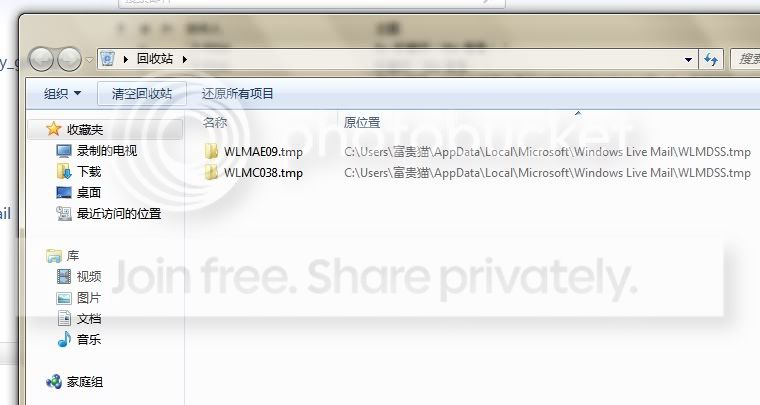
i know that in outlook express that it clean up old mails on a regular basis to free space.. but this Live Mail not just clean up but left something in the recycle bin (pic 1) and then i see a new folder in Mail Live which contains some of the unread old mails.. what's going on? should i deleted the folder?


pic 1 (something done by Live Mail)
wmail1.jpg


pic 2 (something created by Live Mail)

wmail2.jpg
 

My Computer

OS
Windows 7 Home Basic
Where are you from. The reason I ask is I see all that writing in what looks like Chinese and some in English.
 

My Computer

Computer type
PC/Desktop
Computer Manufacturer/Model Number
Home made Desktop
OS
Windows 10 Pro. 64/ version 1709 Windows 7 Pro/64
CPU
Intel i7-6800K @ 4.3
Motherboard
ASUS X-99 Deluxe II
Memory
Corsair Platinum 16 gig @2400
Graphics Card(s)
EVGA GTX 1070 OC
Monitor(s) Displays
Asus 27" LED LCD/VE278Q
Screen Resolution
1920-1080 or 1280-720 HDMI
Hard Drives
INTEL SSD 730-240 Gb Sata 3.0/
PSU
EVGA Platium 1200W
Case
Phanteks Luxe Tempered Glass 8 fans/ one radiator
Cooling
XSPC/ Water Cooled CPU
Keyboard
Das 4 Professional
Mouse
Logitech M705/MX Anywhere 2-S
Internet Speed
100 mbits
Antivirus
Microsoft Security Essentials/ Malwarebytes Premium 3.0/ SAS
Browser
I.E. 11 default/Firefox/ ISP Time Warner Cable/Spectrum
Other Info
LG BluRay Burner/
Sound system-KLipsch-THX/
Icy Dock ssd Hot Swap bays.
i'm using chinese windows but this has nothing to do with language issue.
i know this since i use win7 last year but i just couldn't figure out why a folder is added to the panel after regulary clean up (or compressed) by Live Mail
 

My Computer

OS
Windows 7 Home Basic
Are you using Windows Live Mail (part of Windows Live Essentials) or Hotmail via your web browser?

Your images have no title bar; is that a picture of Windows Explorer?
 

My Computer

Computer type
PC/Desktop
Computer Manufacturer/Model Number
OQO 2+
OS
Windows 8 Pro w/MC 32-bit
CPU
Intel Atom 1.86 GHz
Motherboard
OQO 2+
Memory
2 GB
Graphics Card(s)
Intel GMA 500
Sound Card
IDT
Monitor(s) Displays
LCD
Screen Resolution
800 x 480 (portable) 1280 x 1024 (docked)
Hard Drives
64 GB SSD
PSU
9 Ah Battery (portable) or OQO Brick (docked)
Case
Shirt Pocket Sized
Cooling
Tiny Fan
Keyboard
Slide out (portable) DiNovo Edge (docked)
Mouse
Eraser head (portable) Logitech Bluetooth (docked)
Internet Speed
WWAN or 802.11G (portable) T1 (docked)
Browser
IE 10
Other Info
DVD-RW OQO Docking Station
Are you using Windows Live Mail (part of Windows Live Essentials) or Hotmail via your web browser?

Your images have no title bar; is that a picture of Windows Explorer?

I use "Windows Live Mail" and use it to setup couple of hotmail accounts. Whenever there's a clean up (open Windows Live Mail every 100 times), it will then add that strange folder to the bottom of the panel.
 

My Computer

OS
Windows 7 Home Basic
Personally, I don't have a Hotmail account configured in WLM. And since I can't read Chinese I'm not sure in which folders the strange Hotmail stuff appears. However since it's at the bottom of the WLM window, I'm guessing it's within the "storage" folders (the place where IMAP accounts put their sent, draft, and deleted items). If the heading for the strange folders says "recovered items" then I have a similar situation with some read newsgroup postings. They wind up under Storage/Recovered Items. It's annoying so I just delete the entire "Recovered Items" folder without even looking at the contents. I haven't noticed the *.tmp files in Explorer but I'm sure any such files can be deleted since they are temporary.
 

My Computer

Computer type
PC/Desktop
Computer Manufacturer/Model Number
OQO 2+
OS
Windows 8 Pro w/MC 32-bit
CPU
Intel Atom 1.86 GHz
Motherboard
OQO 2+
Memory
2 GB
Graphics Card(s)
Intel GMA 500
Sound Card
IDT
Monitor(s) Displays
LCD
Screen Resolution
800 x 480 (portable) 1280 x 1024 (docked)
Hard Drives
64 GB SSD
PSU
9 Ah Battery (portable) or OQO Brick (docked)
Case
Shirt Pocket Sized
Cooling
Tiny Fan
Keyboard
Slide out (portable) DiNovo Edge (docked)
Mouse
Eraser head (portable) Logitech Bluetooth (docked)
Internet Speed
WWAN or 802.11G (portable) T1 (docked)
Browser
IE 10
Other Info
DVD-RW OQO Docking Station
Personally, I don't have a Hotmail account configured in WLM. And since I can't read Chinese I'm not sure in which folders the strange Hotmail stuff appears. However since it's at the bottom of the WLM window, I'm guessing it's within the "storage" folders (the place where IMAP accounts put their sent, draft, and deleted items). If the heading for the strange folders says "recovered items" then I have a similar situation with some read newsgroup postings. They wind up under Storage/Recovered Items. It's annoying so I just delete the entire "Recovered Items" folder without even looking at the contents. I haven't noticed the *.tmp files in Explorer but I'm sure any such files can be deleted since they are temporary.


yes, it is the "recovered items" folder and I don't know what kind of recovery it is and I just delete it whenever i see it.
 

My Computer

OS
Windows 7 Home Basic
Back
Top