What is this mouse pointer icon and how to I get rid of it?

bfriesen

New member
Local time
3:35 AM
Messages
2
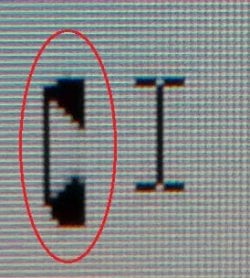
Ever since my work computer was updated to Windows 7, many of the mouse pointer icons include this thing to the left that I think looks like an old fashioned telephone receiver (see attached image file). It drives me mad, as I find it disorienting. I cannot find anyway of removing it through the mouse customization settings. I've become obsessed with finding out how to get rid of it.

Another interesting point is that I don't have this problem on my home version of Windows 7.

Thanks!
 

Attachments
  • MouseImage.jpg
    MouseImage.jpg
    26.6 KB · Views: 41

My Computer My Computer

At a glance

Windows 7
Computer type
PC/Desktop
OS
Windows 7
Right click on desktop, > Personalization > left hand side "Change mouse Pointers"
 

My Computer My Computer

At a glance

Windows 7 Ultimate 64-bitIntel G3420 3.2GHZ Dual CoreKingson 8GB 1600mhzMSI R7970 TF 3GD5/OC BE
Computer type
PC/Desktop
Computer Manufacturer/Model Number
Custom Build
OS
Windows 7 Ultimate 64-bit
CPU
Intel G3420 3.2GHZ Dual Core
Motherboard
Gigabyte H87-HD3
Memory
Kingson 8GB 1600mhz
Graphics Card(s)
MSI R7970 TF 3GD5/OC BE
Monitor(s) Displays
21" LG & "19 Vertical Samsung
Hard Drives
120GB SSD - Boot
1TB WD
350GB External
2TB External (Wireless)
PSU
Corsair CX 500 modular
Case
Zalman Z11 Plus (modified)
Cooling
Corsair H55, 2x 120mm SP Corsair, 1x 140 Coolermaster
Keyboard
Corsair K50
Mouse
CSL Gaming
Internet Speed
164Mbps
Antivirus
Avast, Malwarebytes
Browser
Google Chrome, IE, Firefox
Thank you, but that takes me to the mouse customization changes that I mentioned I'd already tried.
 

My Computer My Computer

At a glance

Windows 7
Computer type
PC/Desktop
OS
Windows 7
bfriesen,
Do you have IT support at work? If so, what we suggest might run counter to what your IT department desires.

e.g. I could suggest updating or rolling back your video drivers, but this might be disastrous for some specialized work related app.
 

My Computer My Computer

At a glance

W7 Pro SP1 64biti78GBIntel HD Graphics
Computer type
Laptop
Computer Manufacturer/Model Number
Employer provided Dell Latitude
OS
W7 Pro SP1 64bit
CPU
i7
Memory
8GB
Graphics Card(s)
Intel HD Graphics
Hard Drives
crappy SSD
Antivirus
Employer mandated Symantec Endpoint Protection
Browser
Pale Moon 64bit, IE11 64bit & Chrome 64bit
HI,I have a similar problem but mine is a blinking hour glass along side mouse pointer in F/F and now in I.E. and like its impossible to get rid of and nobody seems know how.
 

My Computer My Computer

At a glance

Windows 7 Home PremiumAMD ATHLON 64 X2 6000+,WINDSOR 90nm technology4GB ddr2@375 MNz (6-6-6-18)1024MB NVIDIA GEFORCE GT610 (EVGA)
Computer type
PC/Desktop
Computer Manufacturer/Model Number
DELL E521
OS
Windows 7 Home Premium
CPU
AMD ATHLON 64 X2 6000+,WINDSOR 90nm technology
Motherboard
DELL INC OCT 103 (SOCKET M2)
Memory
4GB ddr2@375 MNz (6-6-6-18)
Graphics Card(s)
1024MB NVIDIA GEFORCE GT610 (EVGA)
Sound Card
NVIDIA HD AUDIO
Monitor(s) Displays
PANASONIC HDTV
Screen Resolution
1920X1080@60Hz
Hard Drives
931GB Seagate ST1000DX 001-1CM162 SCSI Disk Device (SATA
PSU
500WATT ATX
Keyboard
LOGITECH
Mouse
M/S CORDED
Internet Speed
43.5 download/6.5 upload
Browser
FIREFOX
bfriesen Welcome to Seven forums.

Does the odd cursor blink as a text placement one does? It could be something your company has to track what employees type.
 

My Computer My Computer

At a glance

Windows 7 Ultimate X64 SP1Intel i5-2550K, Differing ~4.4-4.8GHz No buil...16GB G.Skill Sniper 1866MHz @ 2133MHz 2x8GBASUS GTX650TIB-DC2OC-2GD5, (650TI Boost)
Computer type
PC/Desktop
Computer Manufacturer/Model Number
Home Built Desktop By DataTech
OS
Windows 7 Ultimate X64 SP1
CPU
Intel i5-2550K, Differing ~4.4-4.8GHz No built in GPU
Motherboard
ASUS P8Z68-V PRO/GEN3
Memory
16GB G.Skill Sniper 1866MHz @ 2133MHz 2x8GB
Graphics Card(s)
ASUS GTX650TIB-DC2OC-2GD5, (650TI Boost)
Sound Card
Onboard Realtek 5-1
Monitor(s) Displays
Samsung P2570HD
Screen Resolution
1920x1080
Hard Drives
Samsung 840 Pro 256GB SSD for OS, 500GB Seagate Constellation (Enterprise drive) for Data
PSU
Corsair HX650W
Case
Inwin Dragon Rider
Cooling
Hyper 212 EVO w/two Noctua fans, push-pull, @1300 RPM
Keyboard
E-Z Eyes, bright yellow keys with large characters
Mouse
steelseries SENSEI Laser Pro Gaming
Internet Speed
48-51Mbs Mbs down, 11 Mbs up Xfinity Cable
Antivirus
Norton Internet Security 2013
Browser
IE 10, Opera, Pale Moon if needed
Other Info
4 case fans, LG BluRay-RE, ASUS DVD-RW, Mr. Fusion power supply, 1.21 gigawatts.
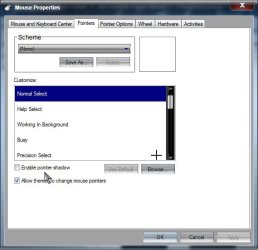
Welcome to Seven Forums bfriesen. See if Enable pointer shadow is selected. If so, uncheck it and see if that works.

Shawdow.jpg

A Guy
 

My Computer My Computer

At a glance

Windows 10 Home x64INTEL Core i5-750 Quad-Core 3.37GHzHyperX Fury Black Series 8GB (2 x 4GB) 1866MhzEVGA GeForce GTX 750 Superclocked 1GB 128-Bit...
Computer type
PC/Desktop
OS
Windows 10 Home x64
CPU
INTEL Core i5-750 Quad-Core 3.37GHz
Motherboard
ASUS P7P55D
Memory
HyperX Fury Black Series 8GB (2 x 4GB) 1866Mhz
Graphics Card(s)
EVGA GeForce GTX 750 Superclocked 1GB 128-Bit GDDR5
Monitor(s) Displays
LG 32MA68HY 32" IPS
Screen Resolution
1920 x 1080
Hard Drives
Samsung 840 Evo 120GB, SEAGATE 500GB Barracuda® 7200.12, SATA 3 Gb/s, 7200 RPM, 16MB cache
PSU
ANTEC TruePower New TP-550, 80 PLUS, 550W
Case
ANTEC Three Hundred Illusion
Cooling
COOLER MASTER Hyper 212 Plus, 4 x 120mm 1 x 140mm Noctua's
Internet Speed
85 + Mbps
Antivirus
Avast
Browser
Vivaldi
If I'm looking at the OP's screenshot correctly, the item to the right is the pointer. It looks like the normal text select pointer.

The left/circled item seems to be the blinking text cursor with some sort of modification or rendering problem. I wonder what the IT department (if there is one) has to say about this.

@ILDPCS,
You issue sounds a bit different in that it seems to be purely pointer related (as opposed to cursor related for the OP). You might want to start your own thread. (And please follow up on your existing threads :-)
 

My Computer My Computer

At a glance

W7 Pro SP1 64biti78GBIntel HD Graphics
Computer type
Laptop
Computer Manufacturer/Model Number
Employer provided Dell Latitude
OS
W7 Pro SP1 64bit
CPU
i7
Memory
8GB
Graphics Card(s)
Intel HD Graphics
Hard Drives
crappy SSD
Antivirus
Employer mandated Symantec Endpoint Protection
Browser
Pale Moon 64bit, IE11 64bit & Chrome 64bit
Back
Top