What is this?

maybe you activated it using keyboard shourtcut by mistake, i know to my knowledge that it something to do with with some kind of search.
 

My Computer

Computer Manufacturer/Model Number
Dell Studio XPS 8100
OS
Windows 7 Home Premium 64Bit
CPU
Intel Core i3 Processor 550 - 3.20GHz - 4MB
Memory
4 GB DDR3
Graphics Card(s)
ATI Radeon HD 5450 - 1GB
Hard Drives
1TB Serial ATA - 7200RPM
Open msconfig and click on the Startup Tab. You'll find an entry for this magnifying glass. Uncheck it if you wont need it.
 

My Computer

Computer Manufacturer/Model Number
Samsung NP530U4B-S02IN
OS
Windows® 8 Pro (64-bit)
CPU
Intel® Core™ i5 Processor 2467M (1.60GHz, 3MB L3 Cache)
Motherboard
Samsung Electronics
Memory
6GB DDR3 System Memory at 1,333MHz (on BD 4GB + 2GB x 1)
Graphics Card(s)
AMD Radeon™ HD7550M 1GB DDR3 (Ext. Graphic)
Sound Card
Realtek High Definition Audio
Monitor(s) Displays
35.56cm (14.0) SuperBright 300nit HD LED Display
Screen Resolution
1366x768
Hard Drives
1TB S-ATA II Hard Drive (5400RPM) with ExpressCache 16GB SSD
Internet Speed
sucks
Antivirus
Microsoft Security Essentials
Browser
Google Chrome (Sync enabled)
Open msconfig and click on the Startup Tab. You'll find an entry for this magnifying glass. Uncheck it if you wont need it.


It's not the magnifying glass, i suggested that before but he said its not that :)

this is a bit of of mystery :)
 

My Computer

Computer Manufacturer/Model Number
Dell Studio XPS 8100
OS
Windows 7 Home Premium 64Bit
CPU
Intel Core i3 Processor 550 - 3.20GHz - 4MB
Memory
4 GB DDR3
Graphics Card(s)
ATI Radeon HD 5450 - 1GB
Hard Drives
1TB Serial ATA - 7200RPM
maybe you activated it using keyboard shourtcut by mistake, i know to my knowledge that it something to do with with some kind of search.
I just pressed every key on my keyboard and nothing came up with a search or anything related to it.

Open msconfig and click on the Startup Tab. You'll find an entry for this magnifying glass. Uncheck it if you wont need it.
Nope. It's not there.
 

My Computer

Computer Manufacturer/Model Number
custom
OS
Windows 7 Ultimate 64-bit
CPU
AMD Phenom II X4 940 @ 3.0GHz
Motherboard
ECS A780GM-A
Memory
G.Skill 4.0GB Dual-Channel DDR2 @ 400MHz
Graphics Card(s)
EVGA GeForce GTX 550 Ti FPB 1GB
Sound Card
none
Monitor(s) Displays
AOC 22"
Screen Resolution
1680 x 1050
Hard Drives
300GB Western Digital
PSU
OCZ ZT Series 750W
Case
LOGISYS XBlade Mid Tower
Cooling
2x 120mm COUGAR CF-V12HP
Keyboard
Microsoft Digital Media Pro Keyboard
Mouse
Microsoft Comfort Optical Mouse 3000
Internet Speed
cable - 10MB connection
Can you open taskmgr and check what process is it?
 

My Computer

Computer Manufacturer/Model Number
Samsung NP530U4B-S02IN
OS
Windows® 8 Pro (64-bit)
CPU
Intel® Core™ i5 Processor 2467M (1.60GHz, 3MB L3 Cache)
Motherboard
Samsung Electronics
Memory
6GB DDR3 System Memory at 1,333MHz (on BD 4GB + 2GB x 1)
Graphics Card(s)
AMD Radeon™ HD7550M 1GB DDR3 (Ext. Graphic)
Sound Card
Realtek High Definition Audio
Monitor(s) Displays
35.56cm (14.0) SuperBright 300nit HD LED Display
Screen Resolution
1366x768
Hard Drives
1TB S-ATA II Hard Drive (5400RPM) with ExpressCache 16GB SSD
Internet Speed
sucks
Antivirus
Microsoft Security Essentials
Browser
Google Chrome (Sync enabled)
I don't know what process it is because I don't know what it is that's running. And nothing looks out of the ordinary.
 

My Computer

Computer Manufacturer/Model Number
custom
OS
Windows 7 Ultimate 64-bit
CPU
AMD Phenom II X4 940 @ 3.0GHz
Motherboard
ECS A780GM-A
Memory
G.Skill 4.0GB Dual-Channel DDR2 @ 400MHz
Graphics Card(s)
EVGA GeForce GTX 550 Ti FPB 1GB
Sound Card
none
Monitor(s) Displays
AOC 22"
Screen Resolution
1680 x 1050
Hard Drives
300GB Western Digital
PSU
OCZ ZT Series 750W
Case
LOGISYS XBlade Mid Tower
Cooling
2x 120mm COUGAR CF-V12HP
Keyboard
Microsoft Digital Media Pro Keyboard
Mouse
Microsoft Comfort Optical Mouse 3000
Internet Speed
cable - 10MB connection
could you post a screenshot of taskmgr window? Click on the Processes tab abd a the bottom, select Show Processes from all users, maximize task manager and post a screenshot here.
 

My Computer

Computer Manufacturer/Model Number
Samsung NP530U4B-S02IN
OS
Windows® 8 Pro (64-bit)
CPU
Intel® Core™ i5 Processor 2467M (1.60GHz, 3MB L3 Cache)
Motherboard
Samsung Electronics
Memory
6GB DDR3 System Memory at 1,333MHz (on BD 4GB + 2GB x 1)
Graphics Card(s)
AMD Radeon™ HD7550M 1GB DDR3 (Ext. Graphic)
Sound Card
Realtek High Definition Audio
Monitor(s) Displays
35.56cm (14.0) SuperBright 300nit HD LED Display
Screen Resolution
1366x768
Hard Drives
1TB S-ATA II Hard Drive (5400RPM) with ExpressCache 16GB SSD
Internet Speed
sucks
Antivirus
Microsoft Security Essentials
Browser
Google Chrome (Sync enabled)
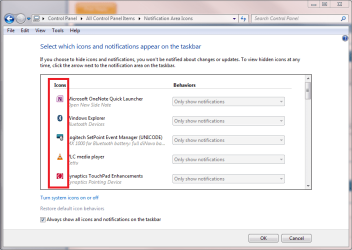
I replied too hastily, I can see now. The image in your first post does not show Taskbar, as I thought, it shows the notification area. In taskbar, that would be to show an open search window. But it looks some other app might be using the same icon in notification area.

Do this next time the symbol appears:

- Right click an empty spot in notification area
- Click Customize notification icons
- Scroll down the list to find to which program the icon belongs

Notification_Icons.png

Kari
 

My Computer

Computer type
Laptop
Computer Manufacturer/Model Number
HP ENVY 17-1150eg
OS
Windows 10 Pro x64 EN-GB
CPU
1.6 GHz Intel Core i7-720QM Processor
Memory
6 GB
Graphics Card(s)
ATI Mobility Radeon HD 5850 Graphics
Sound Card
Beats sound system with integrated subwoofer
Monitor(s) Displays
17" laptop display, 22" LED and 32" Full HD TV through HDMI
Screen Resolution
1600*900 (1), 1920*1080 (2&3)
Hard Drives
Internal: 2 x 500 GB SATA Hard Disk Drive 7200 rpm
External: 2TB for backups, 3TB USB3 network drive for media
Cooling
As Envy runs a bit warm, I have it on a Cooler Master pad
Keyboard
Logitech diNovo Media Desktop Laser (bluetooth)
Mouse
Logitech Performance Mouse MX
Internet Speed
50/10 Mbps VDSL
Antivirus
Windows Defender 4.3.9431.0
Browser
Maxthon 3.5.2., IE11
Search toolbar in Explorer.exe:
 

Attachments

  • search toolbar.jpg
    search toolbar.jpg
    5 KB · Views: 2

My Computer

Computer type
PC/Desktop
Computer Manufacturer/Model Number
Bruce ... somewhere in his 40's
OS
Windows 7 Ultimate 32bit SP1
CPU
Intel(R) Core(TM)2 Quad CPU @ 2.40GHz, 2400 MHz
Motherboard
INTEL/D975XBX2
Memory
4 GB
Graphics Card(s)
ATI Radeon HD 2600 Pro
Monitor(s) Displays
Samsung SyncMaster 914v
Screen Resolution
1280 x 1024
Hard Drives
2/500GB each ... ST3500630AS ATA Device.
One is not connected
PSU
Rocketfish 700 W
Case
G.Skill Gigabyte Chassis
Keyboard
Standard PS/2 Keyboard
Mouse
Microsoft PS/2 Mouse
Internet Speed
DSL
Antivirus
Avira Internet Security
Browser
IE 11
Other Info
ATI HDMI Audio
It randomly appears here and there. Like sometimes I won't see it for months and then it just comes out of nowhere.

wtf.png

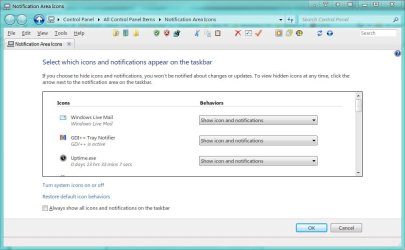
Since it is listed in the system tray, what does it show the app is under Customize. Click Start Orb, type Notification Area Icons in the Search Box, Click Notification Area Icons and see what it says for that icon.
 

My Computer

Computer Manufacturer/Model Number
Averatec 6130HS-20
OS
Windows 7 Professional 32-bit (6.1, Build 7600)
CPU
Intel(R) Pentium(R) 4 3.00 GHz HT
Memory
2.0 GB
Graphics Card(s)
ATI Mobility Radeon 9600 64MB
Sound Card
Realtek AC'97 Audio
Screen Resolution
1280 x 800
Hard Drives
Seagate 96023A 60GB 7200RPM -
Seagate FreeAgentDesktop 250GB
Cooling
20 Inch Box Fan
Mouse
Targus PAWM10 Wireless Optical Laptop Mouse
It randomly appears here and there. Like sometimes I won't see it for months and then it just comes out of nowhere.

wtf.png

Since it is listed in the system tray, what does it show the app is under Customize. Click Start Orb, type Notification Area Icons in the Search Box, Click Notification Area Icons and see what it says for that icon.
I'm not sure. It disappeared after I restarted explorer.exe

Anyways, here's the picture.

http://i818.photobucket.com/albums/zz105/DarkFang94/tasklist.png
 

My Computer

Computer Manufacturer/Model Number
custom
OS
Windows 7 Ultimate 64-bit
CPU
AMD Phenom II X4 940 @ 3.0GHz
Motherboard
ECS A780GM-A
Memory
G.Skill 4.0GB Dual-Channel DDR2 @ 400MHz
Graphics Card(s)
EVGA GeForce GTX 550 Ti FPB 1GB
Sound Card
none
Monitor(s) Displays
AOC 22"
Screen Resolution
1680 x 1050
Hard Drives
300GB Western Digital
PSU
OCZ ZT Series 750W
Case
LOGISYS XBlade Mid Tower
Cooling
2x 120mm COUGAR CF-V12HP
Keyboard
Microsoft Digital Media Pro Keyboard
Mouse
Microsoft Comfort Optical Mouse 3000
Internet Speed
cable - 10MB connection
It randomly appears here and there. Like sometimes I won't see it for months and then it just comes out of nowhere.

wtf.png

Since it is listed in the system tray, what does it show the app is under Customize. Click Start Orb, type Notification Area Icons in the Search Box, Click Notification Area Icons and see what it says for that icon.
I'm not sure. It disappeared after I restarted explorer.exe

Anyways, here's the picture.

http://i818.photobucket.com/albums/zz105/DarkFang94/tasklist.png

Next time it shows up in the systray, do as I have suggested. It should tell you what the icon is.

I'm referring to this

Untitled.jpg
 

My Computer

Computer Manufacturer/Model Number
Averatec 6130HS-20
OS
Windows 7 Professional 32-bit (6.1, Build 7600)
CPU
Intel(R) Pentium(R) 4 3.00 GHz HT
Memory
2.0 GB
Graphics Card(s)
ATI Mobility Radeon 9600 64MB
Sound Card
Realtek AC'97 Audio
Screen Resolution
1280 x 800
Hard Drives
Seagate 96023A 60GB 7200RPM -
Seagate FreeAgentDesktop 250GB
Cooling
20 Inch Box Fan
Mouse
Targus PAWM10 Wireless Optical Laptop Mouse
Will do. Thanks.
 

My Computer

Computer Manufacturer/Model Number
custom
OS
Windows 7 Ultimate 64-bit
CPU
AMD Phenom II X4 940 @ 3.0GHz
Motherboard
ECS A780GM-A
Memory
G.Skill 4.0GB Dual-Channel DDR2 @ 400MHz
Graphics Card(s)
EVGA GeForce GTX 550 Ti FPB 1GB
Sound Card
none
Monitor(s) Displays
AOC 22"
Screen Resolution
1680 x 1050
Hard Drives
300GB Western Digital
PSU
OCZ ZT Series 750W
Case
LOGISYS XBlade Mid Tower
Cooling
2x 120mm COUGAR CF-V12HP
Keyboard
Microsoft Digital Media Pro Keyboard
Mouse
Microsoft Comfort Optical Mouse 3000
Internet Speed
cable - 10MB connection
UPDATE: I've got the icon right now. Funny thing is when I try to open up my Windows Live Messenger, it waits a while and closes.

aur1290752590r.png
 

My Computer

Computer Manufacturer/Model Number
custom
OS
Windows 7 Ultimate 64-bit
CPU
AMD Phenom II X4 940 @ 3.0GHz
Motherboard
ECS A780GM-A
Memory
G.Skill 4.0GB Dual-Channel DDR2 @ 400MHz
Graphics Card(s)
EVGA GeForce GTX 550 Ti FPB 1GB
Sound Card
none
Monitor(s) Displays
AOC 22"
Screen Resolution
1680 x 1050
Hard Drives
300GB Western Digital
PSU
OCZ ZT Series 750W
Case
LOGISYS XBlade Mid Tower
Cooling
2x 120mm COUGAR CF-V12HP
Keyboard
Microsoft Digital Media Pro Keyboard
Mouse
Microsoft Comfort Optical Mouse 3000
Internet Speed
cable - 10MB connection
UPDATE: I've got the icon right now. Funny thing is when I try to open up my Windows Live Messenger, it waits a while and closes.

The Windows Live Messenger is correct but I'm doubtful as to the icon. Your system tray notification area icons could be corrupted. http://www.sevenforums.com/tutorials/13102-notification-area-icons-reset.html?ltr=N
Pay close attention to the warning to follow the steps. At first glance, one would think that clearing the reg entries and reboot would work, but it doesn't. Make sure you follow each step.
 

My Computer

Computer Manufacturer/Model Number
Averatec 6130HS-20
OS
Windows 7 Professional 32-bit (6.1, Build 7600)
CPU
Intel(R) Pentium(R) 4 3.00 GHz HT
Memory
2.0 GB
Graphics Card(s)
ATI Mobility Radeon 9600 64MB
Sound Card
Realtek AC'97 Audio
Screen Resolution
1280 x 800
Hard Drives
Seagate 96023A 60GB 7200RPM -
Seagate FreeAgentDesktop 250GB
Cooling
20 Inch Box Fan
Mouse
Targus PAWM10 Wireless Optical Laptop Mouse
Back
Top