- Local time
- 1:32 PM
- Messages
- 121
Hi, I have a very old program called Hemera Photo Objects volume 2. The company doesn't exist anymore (I think they were out of business even before vista)
Anyway, I do still use the program, so I tried loading it on windows 7 home premium. The program installs actually 2 programs, Hemera photo objects and some other part of the program I never use, called Photo font maker. After install Photo font maker opened and worked fine, but Photo objects gave error messages and said it couldnt open due to parameter problems.
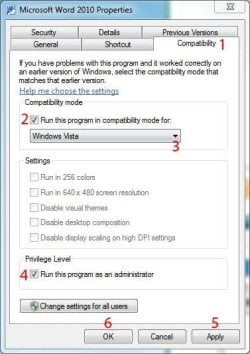
From the start menu I right clicked on the program and it gave me an option to test compatability thru some windows 7 troubleshooting thing. It had you fill in a question or 2 regarding what operating system the program last ran successfully. It had an option to try and fix the problem, and low and behold after being prompted to try and open the program in the wizard...It opened correctly.
It did say however that it was not compatable with windows 7.
So now each time I open the file I get a UAC dialog box (do you want to allow unknown program to make changes) Program name is PO.exe (I think this is the photo objects start file) I say yes and it opens...
My only question is should I be concerned with any issues since windows seems to be allowing me to open the program, but did say in the troubleshooting wizard that it wasn't compatable with win 7, and just out of curiosity, what did window 7 do behind the scenes (trouble shooting wizard) to allow me to open it? - Carl
Anyway, I do still use the program, so I tried loading it on windows 7 home premium. The program installs actually 2 programs, Hemera photo objects and some other part of the program I never use, called Photo font maker. After install Photo font maker opened and worked fine, but Photo objects gave error messages and said it couldnt open due to parameter problems.
From the start menu I right clicked on the program and it gave me an option to test compatability thru some windows 7 troubleshooting thing. It had you fill in a question or 2 regarding what operating system the program last ran successfully. It had an option to try and fix the problem, and low and behold after being prompted to try and open the program in the wizard...It opened correctly.
It did say however that it was not compatable with windows 7.
So now each time I open the file I get a UAC dialog box (do you want to allow unknown program to make changes) Program name is PO.exe (I think this is the photo objects start file) I say yes and it opens...
My only question is should I be concerned with any issues since windows seems to be allowing me to open the program, but did say in the troubleshooting wizard that it wasn't compatable with win 7, and just out of curiosity, what did window 7 do behind the scenes (trouble shooting wizard) to allow me to open it? - Carl
My Computer
- Computer type
- PC/Desktop
- Computer Manufacturer/Model Number
- SYX SG-103
- OS
- Windows 7 home premium 64 bit sp1
- CPU
- Intel Core I7-2600 3.4 Ghz 1155 8M 95W CPU
- Motherboard
- MSI P67A-C43 (B3) ATX
- Memory
- 16 gb DD3 1333MHZ
- Graphics Card(s)
- Nvidea Gforce GTX 550Ti
- Sound Card
- Realtek ALC892 integrated
- Monitor(s) Displays
- acer 23"
- Screen Resolution
- 1920 x 1080
- Hard Drives
- Hitachi 1 TB 3.5" SATA 3G 7200rpm
Seagate ST32000641AS baracuda XT , 2 TB 3.5" 7200 rpm
Western digital My Book 1 tb USB2 external
Western digital My Book 3 tb USB3 external
- PSU
- 500 Watt 80 plus
- Case
- Cooler Master Elite 310 RC-310-BWN1-GP
- Keyboard
- Logitech MK 200 Keybard
- Mouse
- Logitech MK200 mouse
- Other Info
- 24x DVDRW Dual Layer SATA optical drive