What is Windows Anytime Upgrade called on a French language Lenovo?

RenoHuskerDu

New member
Local time
10:51 PM
Messages
1
Location
France but we speak English
Hi,

I am introducing myself too. We live in France but we all speak English (I teach it). I searched the forum before posting this.

I bought my daughter a Lenovo laptop W7 Edition Familiale Premium (Home Premium). But she first-booted it in French before she realized that she could not change later to English. Ooops and merde.

Now I want to run Windows Anytime Upgrade to buy an Ultimate upgrade, but those wacky French seem to have changed its name such that W7 does see it.

I try to follow MS on-line instructions: "Open Windows Anytime Upgrade by clicking the Start button
4f6cbd09-148c-4dd8-b1f2-48f232a2fd33_818.jpg
. In the search box, type anytime upgrade, and then, in the list of results, click Windows Anytime Upgrade."

But Start does not find it, probably because it's been renamed to something French.

Any francophones out there who can help us?
 

My Computer

Computer type
Laptop
Computer Manufacturer/Model Number
Lenovo
OS
Windows 7 Family Premium
CPU
i3 2.4Ghz
Memory
4G
Hard Drives
700G
Antivirus
AVG 2013 free version
Browser
Mozilla Firefox
Hi RenoHuskerDu, welcome to the Seven Forums.

As all internal Windows commands are the same in any language, you should be able to run Anytime Upgrade from Command Prompt or Run dialog.

Try this:
  • Open Run dialog by pressing Win + R
  • Type following to the Run dialog:
    Code:
    %windir%\system32\WindowsAnytimeUpgradeUI.exe
  • Press Enter
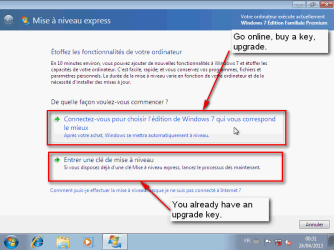
This should open Anytime Upgrade dialog, in French I'm afraid but I am sure you will manage it. It has two options, you should select the first one if you want to buy the key online, and the second one if you already have a key:
2013-04-23_233557.png

In the mean time I will install a French Windows 7 on a virtual machine to check exactly what and where you need to click and type in case this does not work for you.

Kari
 
Last edited:

My Computer

Computer type
Laptop
Computer Manufacturer/Model Number
HP ENVY 17-1150eg
OS
Windows 10 Pro x64 EN-GB
CPU
1.6 GHz Intel Core i7-720QM Processor
Memory
6 GB
Graphics Card(s)
ATI Mobility Radeon HD 5850 Graphics
Sound Card
Beats sound system with integrated subwoofer
Monitor(s) Displays
17" laptop display, 22" LED and 32" Full HD TV through HDMI
Screen Resolution
1600*900 (1), 1920*1080 (2&3)
Hard Drives
Internal: 2 x 500 GB SATA Hard Disk Drive 7200 rpm
External: 2TB for backups, 3TB USB3 network drive for media
Cooling
As Envy runs a bit warm, I have it on a Cooler Master pad
Keyboard
Logitech diNovo Media Desktop Laser (bluetooth)
Mouse
Logitech Performance Mouse MX
Internet Speed
50/10 Mbps VDSL
Antivirus
Windows Defender 4.3.9431.0
Browser
Maxthon 3.5.2., IE11
Got the French Home Premium installed.

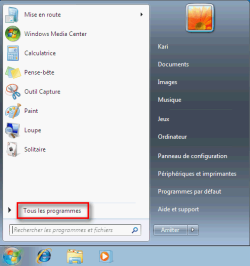
Click Start Menu > Tous les programmes

2013-04-24_002920.png

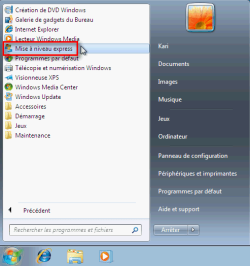
Click Mise à niveau express (Anytime Upgrade)

2013-04-24_003010.png

Select if you want to buy a key online or if you already have it

2013-04-24_003250.png

Follow instructions on screen.

Kari
 

My Computer

Computer type
Laptop
Computer Manufacturer/Model Number
HP ENVY 17-1150eg
OS
Windows 10 Pro x64 EN-GB
CPU
1.6 GHz Intel Core i7-720QM Processor
Memory
6 GB
Graphics Card(s)
ATI Mobility Radeon HD 5850 Graphics
Sound Card
Beats sound system with integrated subwoofer
Monitor(s) Displays
17" laptop display, 22" LED and 32" Full HD TV through HDMI
Screen Resolution
1600*900 (1), 1920*1080 (2&3)
Hard Drives
Internal: 2 x 500 GB SATA Hard Disk Drive 7200 rpm
External: 2TB for backups, 3TB USB3 network drive for media
Cooling
As Envy runs a bit warm, I have it on a Cooler Master pad
Keyboard
Logitech diNovo Media Desktop Laser (bluetooth)
Mouse
Logitech Performance Mouse MX
Internet Speed
50/10 Mbps VDSL
Antivirus
Windows Defender 4.3.9431.0
Browser
Maxthon 3.5.2., IE11
Isn`t it in control panel ?
 

My Computer

Computer type
PC/Desktop
Computer Manufacturer/Model Number
Skylake Special #666
OS
Windows 10 Pro x64
CPU
Intel Core i7 6700K
Motherboard
Asus Sabertooth Z170 Mark 1
Memory
GSkill TridentZ RGB 16GB 3600 16-16-16-36
Graphics Card(s)
EVGA GTX 980 Ti SC x2
Sound Card
Realtek High Definition
Monitor(s) Displays
AOC G2460PG
Screen Resolution
1920 x 1080 144Hz
Hard Drives
Samsung 860 Pro 256GB, Seagate Barracuda 4TB x2
PSU
EVGA 1000 P2, EVGA White Custom Braided Cables
Case
Corsair Vengeance C70 Gunmetal Black
Cooling
Corsair H100i v2, Corsair ML120 x2, Thermal Grizzly Kryonaut
Keyboard
Logitech G910 Orion Spectrum
Mouse
Logitech G700s
Internet Speed
Verizon Fios Quantum Gateway 75/75
Antivirus
Windows Defender, Malwarebytes Free 3.8.3
Browser
Chrome
Other Info
Corsair SP120 x4, LG Blu-ray Drive, Durabrand HT-395 100 Watt Dolby Digital Amp, Corsair H2100 Wireless 7.1 Headset
Isn`t it in control panel ?
Stupid me, of course it is. How didn't I think of that? Would you like to explain to OP how to start it from Control Panel in French Windows? By clicking Anytime Upgrade in Control Panel?

No? OK, let me do that.

Here's the Control Panel method, in case the easier method already described is not enough:
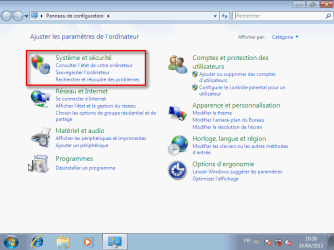
  • Start Menu > Panneau de configuration (Control Panel)
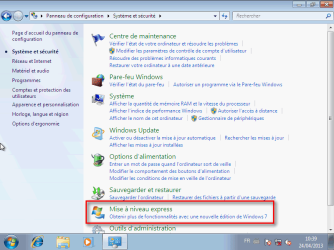
  • Category View: click Système et sécurité, click Mise à niveau express
    2013-04-24_104914.png

    2013-04-24_105003.png
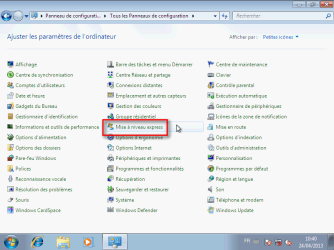
  • Icon View: click Mise à niveau express
    2013-04-24_105139.png
Kari
 

My Computer

Computer type
Laptop
Computer Manufacturer/Model Number
HP ENVY 17-1150eg
OS
Windows 10 Pro x64 EN-GB
CPU
1.6 GHz Intel Core i7-720QM Processor
Memory
6 GB
Graphics Card(s)
ATI Mobility Radeon HD 5850 Graphics
Sound Card
Beats sound system with integrated subwoofer
Monitor(s) Displays
17" laptop display, 22" LED and 32" Full HD TV through HDMI
Screen Resolution
1600*900 (1), 1920*1080 (2&3)
Hard Drives
Internal: 2 x 500 GB SATA Hard Disk Drive 7200 rpm
External: 2TB for backups, 3TB USB3 network drive for media
Cooling
As Envy runs a bit warm, I have it on a Cooler Master pad
Keyboard
Logitech diNovo Media Desktop Laser (bluetooth)
Mouse
Logitech Performance Mouse MX
Internet Speed
50/10 Mbps VDSL
Antivirus
Windows Defender 4.3.9431.0
Browser
Maxthon 3.5.2., IE11
I haven`t spoke French in a long time. :D
 

My Computer

Computer type
PC/Desktop
Computer Manufacturer/Model Number
Skylake Special #666
OS
Windows 10 Pro x64
CPU
Intel Core i7 6700K
Motherboard
Asus Sabertooth Z170 Mark 1
Memory
GSkill TridentZ RGB 16GB 3600 16-16-16-36
Graphics Card(s)
EVGA GTX 980 Ti SC x2
Sound Card
Realtek High Definition
Monitor(s) Displays
AOC G2460PG
Screen Resolution
1920 x 1080 144Hz
Hard Drives
Samsung 860 Pro 256GB, Seagate Barracuda 4TB x2
PSU
EVGA 1000 P2, EVGA White Custom Braided Cables
Case
Corsair Vengeance C70 Gunmetal Black
Cooling
Corsair H100i v2, Corsair ML120 x2, Thermal Grizzly Kryonaut
Keyboard
Logitech G910 Orion Spectrum
Mouse
Logitech G700s
Internet Speed
Verizon Fios Quantum Gateway 75/75
Antivirus
Windows Defender, Malwarebytes Free 3.8.3
Browser
Chrome
Other Info
Corsair SP120 x4, LG Blu-ray Drive, Durabrand HT-395 100 Watt Dolby Digital Amp, Corsair H2100 Wireless 7.1 Headset
Hi there
once you've got the Ultimate edition you can of course install English as the display language (same for Office if you use that too). Download Free Language Packs.

Hate the French AZERTY keyboards though. I've worked enough time in Paris and Brussels. !!!

Cheers
jimbo
 

My Computer

Computer type
PC/Desktop
Computer Manufacturer/Model Number
Custom built, several laptops HP/ASUS
OS
Linux CENTOS 7 / various Windows OS'es and servers
CPU
Intel i7 Intel i5
Memory
8GB, 16GB
Graphics Card(s)
On Motherboard
Sound Card
Realtek HD audio
Monitor(s) Displays
Apple Cinema display, Samsung LCD
Screen Resolution
1920 X 1080
Hard Drives
4 X 1TB SATA
Mouse
Toshiba wireless laser
Internet Speed
> 20MB up
Hi,

I am introducing myself too. We live in France but we all speak English (I teach it). I searched the forum before posting this.

I bought my daughter a Lenovo laptop W7 Edition Familiale Premium (Home Premium). But she first-booted it in French before she realized that she could not change later to English. Ooops and merde.

Now I want to run Windows Anytime Upgrade to buy an Ultimate upgrade, but those wacky French seem to have changed its name such that W7 does see it.

I try to follow MS on-line instructions: "Open Windows Anytime Upgrade by clicking the Start button
4f6cbd09-148c-4dd8-b1f2-48f232a2fd33_818.jpg
. In the search box, type anytime upgrade, and then, in the list of results, click Windows Anytime Upgrade."

But Start does not find it, probably because it's been renamed to something French.

Any francophones out there who can help us?


It's called "Mise à niveau Express". Start button -> right click on "Ordinateur" -> Propriétés -> Click on "Obtenir plus de fonctionnalité avec une nouvelle édition de Windows 7".
 

My Computer

Computer type
PC/Desktop
Computer Manufacturer/Model Number
Custom build
OS
Windows 10 Professional 64-bit
CPU
Ryzen 9 5900X
Motherboard
Gigabyte X570 Aorus Master
Memory
G.Skill 3600Mhz CL16 16GB × 4
Graphics Card(s)
EVGA GeForce RTX 3070 Ti FTW3 Ultra Gaming
Sound Card
On-board
Monitor(s) Displays
Dell Alienware AW3418DW
Screen Resolution
3440x1440
Hard Drives
1×Sabrent Rocket 4 Plus 2TB nvme SSD (System, internal)
2x4TB Western Digital Blue (Internal)
1x4TB HDST 7200RPM (Internal)
PSU
Seasonic Focus Plus 850W Platinum
Case
Corsair 680X
Cooling
Stock fans + 3× Corsair QL120, Corsair H100i Platinum
Keyboard
Logitech K350
Mouse
Logitech M510
Internet Speed
120Mbits dl - 20Mbits up
Antivirus
ESET NOD32 Antivirus
Browser
Firefox (latest version)
Other Info
Headphones : Audio-Technica ATH-M50x
Scanner : Canon Canoscan LiDE 220 + Plustek OptiBook 4800
Back
Top