Solved What is your Hardware ID for Samsung 850 Pro with EXM04B6Q firmware?

dsperber

New member
Guru
Gold Member
VIP
Local time
3:52 PM
Messages
2,752
Location
Marina Del Rey, CA
I had been running my 1TB Samsung 850 Pro with firmware EXM03B6Q ever since I built my desktop machine back in January 2017. No problems. I was also running Rapid Mode on it, using Samsung Magician 5.0.0 software (which I know is not the latest version 5.1, but I had no problems).

The other day I was gathering information to respond to a user's question on a Lenovo forum and I needed to look at something with Samsung Magician. When I launched the program it advised me there was a firmware upgrade available for both my 2.5" SATA 850 Pro as well as for the M.2 NVMe 960 Pro I was also running in the machine (and which was used for my Windows drive). I'm normally a bit skittish about just applying significant updates (i.e. "if it's not broke, don't fix it") but in fact I hadn't applied a firmware upgrade to either Samsung device in about a year. So I decided to go ahead with it.

Each firmware upgrade gets run individually (i.e. one at a time) followed by a re-boot. I let Magician run the 960 Pro upgrade first, it went fine, the re-boot went fine, and there was nothing unusual that happened. I'm now running with the latest firmware on that device.

I then let Magician run the 850 Pro upgrade next, and again everything seemed to go fine. However upon re-boot Windows appeared to "get stuck" trying to unsuccessfully install drivers for what obviously was "new hardware detected". It never actually finished and came back with "driver install attempt failed", it just never finished.

Now eventually I have determined what I believe to be the explanation for this "getting stuck" issue, which I will relate later. But for now I can only say that after several re-boot attempts (including a Safe Mode investigation of what that "disk drive" Hardware ID actually was), Windows finally seemed to "settle down", able to boot normally and not trying continually to install the driver, with simply a generic "disk drive" showing up in Device Manager. There was no Samsung device name as there should have been, obviously because there was no driver installed for it.

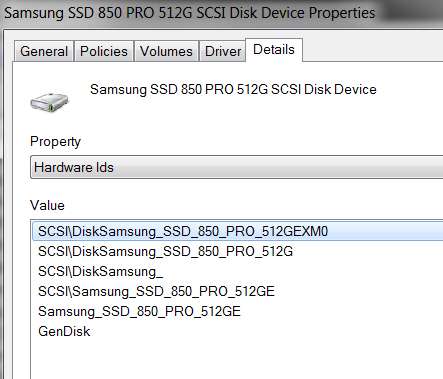
Now I have a Lenovo laptop that also has a 512GB 850 Pro in it (which is still running the previous EXM03B6Q firmware) so I was able to investigate the Hardware ID in that drive. And it is radically different from the Hardware ID now installed in my problem 850 Pro running new firmware EXM04B6Q. Apparently the newly installed Hardware ID is unknown to Win7 and the Microsoft Update Catalog, which explains why no appropriate driver was found. But I'm astonished that I'm the only person who's run into this, so there must be more to the story than meets the eye.

So, I'm asking somebody who is running a Samsung 850 Pro (of any size) and who is also running with the latest firmware EXM04B6Q to please tell me what your Device Manager Hardware ID value is. Also, in Device Manager, do you show the drive with a proper vendor-provided product name that is appropriate, or do you (like me) show only a generic "disk drive"?


(1) Here is what I show on my desktop machine with the problematic 850 Pro that has the latest EXM04B6Q firmware:

(a) Device Manager

Tk3Rpt.jpg


(b) Hardware ID

uNi1Nm.jpg


(2) In contrast, here is what I show on my laptop machine with an 850 Pro that is still running wih the older EXM03B6Q firmware:

(a) Device Manager
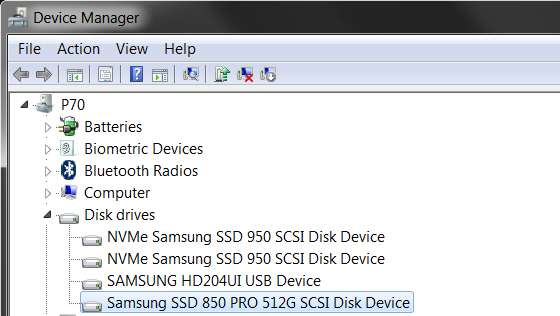
iftuAW.jpg


(b) Hardware ID

cHM7xf.jpg


Now as for my speculation about why Win7 got stuck trying to install drivers for this new hardware with the unrecognized Hardware ID, I believe it was really the Samsung Rapid Mode driver which was at fault. There apparently has to be a legitimate Samsung drive installed for which Rapid Mode can be applied (and there can only be one such drive activated for Rapid Mode in the machine, and if you have more than one eligible drive only one of them will be used for Rapid Mode).

If there are NO eligible drives in the machine Rapid Mode will ask to be uninstalled, but only if you run Samsung Magician. It appears if the Rapid Mode functionality is enabled (which attaches a Rapid Mode driver to each disk drive as can be seen with Device Manager -> Driver tab and details, with only the one eligible Samsung drive getting the activated functionality) but there are ZERO eligible drives, this prevents Win7 from installing drivers for other disk drives successfully.

Inexplicably, I also was unable to see my removable USB 3.0 drive. it wasn't showing up anywhere, because no driver was being installed... I now believe because the Samsung Rapid Mode driver was still installed.

When I finally stumbled back into Samsung Magician and it told me it wanted to uninstall Rapid Mode (which then required a re-boot), and I let it uninstall, well sure enough right after the re-boot my removable USB 3.0 drive was perfectly recognized and operational again.

==>> Do not use Rapid Mode if you don't have an eligible SATA Samsung SSD in the machine. You must use Samsung Magician to "disable" (i.e. uninstall the Rapid Mode driver) Rapid Mode in order to let Windows normal functionality for SATA drives work.


As a final comment, I have sent my 850 Pro with the EXM04B6Q firmware and the resulting mystical Hardware ID back to Samsung for RMA replacement. I'm hoping that the returned drive (which I should have by early next week) will have a recognizable Hardware ID again.
 

My Computer My Computer

At a glance

Windows 7 Pro x64 (1), Win7 Pro X64 (2)i5-3350p 3.1Ghz/6MB-cache (1); E8400 3.0Ghz/6...8GB PC3-12800 DDR3 (1); 4GB PC3-10600 DDR3 (2)ATI HD7750 (1), (see TV cards); ATI R7 250 (2)
Computer type
PC/Desktop
Computer Manufacturer/Model Number
Home-built, two systems (1) and (2)
OS
Windows 7 Pro x64 (1), Win7 Pro X64 (2)
CPU
i5-3350p 3.1Ghz/6MB-cache (1); E8400 3.0Ghz/6MB-cache (2)
Motherboard
ASUS P8Z77-V Pro (1); ASUS P5Q3 (2)
Memory
8GB PC3-12800 DDR3 (1); 4GB PC3-10600 DDR3 (2)
Graphics Card(s)
ATI HD7750 (1), (see TV cards); ATI R7 250 (2)
Sound Card
Realtek ALC892 HD Audio (1); Realtek ALC1200 HD Audio (2)
Monitor(s) Displays
Eizo HD2441W LCD, Eizo S2433W (1); Eizo 24" S2433W (2)
Screen Resolution
1920x1200, 1920x1200 (1); 1920x1200 (2)
Hard Drives
(1) 1TB SATA-II (7200RPM), 2x2TB SATA-III (7200RPM), 250GB SATA-III (10000RPM) for OS; 2x2TB external USB 3.0

(2) 320GB SATA-II (7200RPM), 750GB SATA-II (7200RPM), 150GB SATA-II (10000RPM) for OS; 2TB external USB 3.0
PSU
Nesteq ECS-6001 600W (1); Nesteq ECS-5001 500W (2)
Case
Acousti-Case 360 (1) and (2)
Cooling
Noctua NH-U12P SE2 for CPU, 2x120mm case fans (1) and (2)
Keyboard
IBM PS/2 (1) and (2)
Mouse
Logitech MX Revolution wireless (1); Microsoft wired (2)
Internet Speed
100mbps down / 10mbps up
Antivirus
Microsoft Security Essentials; Malwarebyte Anti-Malware Pro
Browser
Firefox
Other Info
Ceton InfiniTV 4-tuner cablecard-enabled TV card as well as Hauppauge HVR-2250 OTA/ATSC 2-tuner TV card in (1), running under Win7 WMC
Thank you for the information. I think you have definitely graduated with honors from the "school of hard knocks" in this situation, whose school motto is, "If it ain't broke, don't fix it!". A hard lesson learned.
 

My Computer My Computer

At a glance

Linux Mint 18.2 xfce 64-bit (VMWare host) / W...Haswell4 GB
Computer type
PC/Desktop
Computer Manufacturer/Model Number
Dell
OS
Linux Mint 18.2 xfce 64-bit (VMWare host) / Windows 8.1 Pro 32-bit (VMWare guest)
CPU
Haswell
Memory
4 GB
Monitor(s) Displays
Acer 23"
Screen Resolution
1920 x 1080
Hard Drives
Two hard drives, 1TB each: One for Linux, one for my data.
Keyboard
IBM Model M
Antivirus
Sophos (Linux), Trend Micro (Windows)
Browser
Firefox, Opera
Other Info
I use Samba to share my data drive with the other computers at my house and with my guest session in VMWare Workstation Player.
I have a Samsung 850 Pro (128G) but device manager shows as Samsung SSD SCSI Disk Device and has a complete different hardware ID.

Samsung Magician has had many problems in the past. It's more part of a problem than a solution. I don't use it.
On a Samsung site SSD Tools Software | Download | Samsung V-NAND SSD | Samsung Semiconductor Global Website
it has the firmware updates and there is a note:
* Notice: ISO files may be used only via DOS using a bootable CD/DVD.
 

My Computers My Computers

  • At a glance

    Windows 7 HP 64i5 6600K - 800MHz to 4200MHz4+4G GSkill DDR4 3000IG - Intel 530
    Computer type
    PC/Desktop
    Computer Manufacturer/Model Number
    custom build
    OS
    Windows 7 HP 64
    CPU
    i5 6600K - 800MHz to 4200MHz
    Motherboard
    GA-Z170-HD3P
    Memory
    4+4G GSkill DDR4 3000
    Graphics Card(s)
    IG - Intel 530
    Monitor(s) Displays
    Samsung 226BW
    Screen Resolution
    1680x1050
    Hard Drives
    (1) -1 SM951 – 128GB M.2 AHCI PCIe SSD drive for Windows 7 and Lubuntu
    (2) -1 WD SATA 3 - 1T for Data
    (3) -1 WD SATA 3 - 1T for backup
    PSU
    Thermaltake 450W TR2 gold
    Keyboard
    Old and good Chicony mechanical keyboard
    Mouse
    Logitech mX performance - 9 buttons (had to disable some)
    Internet Speed
    500Mb/s
    Browser
    Firefox 64
    Other Info
    TinyWall firewall
  • At a glance

    Windows 7 Proi7-4500U 800MHz to 3.0GHz(4+4)G DDR3 1600IG intel 4400 + NVIDIA GeForce GT 745M
    Computer type
    Laptop
    System Manufacturer/Model Number
    Asus Q550LF
    OS
    Windows 7 Pro
    CPU
    i7-4500U 800MHz to 3.0GHz
    Motherboard
    Asus Q550LF
    Memory
    (4+4)G DDR3 1600
    Graphics Card(s)
    IG intel 4400 + NVIDIA GeForce GT 745M
    Sound Card
    Realtek
    Monitor(s) Displays
    LG Display LP156WF4-SPH1
    Screen Resolution
    1920 x 1080
    Hard Drives
    BX500 120G SSD for Windows and programs +
    1T HDD for data
    Internet Speed
    500 Mb/s
    Browser
    Firefox
    Other Info
    TinyWall firewall
I have a Samsung 850 Pro (128G) but device manager shows as Samsung SSD SCSI Disk Device and has a complete different hardware ID.
And your SSD is upgraded to firmware version EXM04B6Q like mine?

I still want to know what is your Hardware ID which is "completely different"?


Samsung Magician has had many problems in the past. It's more part of a problem than a solution. I don't use it.
On a Samsung site SSD Tools Software | Download | Samsung V-NAND SSD | Samsung Semiconductor Global Website
it has the firmware updates and there is a note:
* Notice: ISO files may be used only via DOS using a bootable CD/DVD.
Actually, if you burn the ISO file it is bootable directly. It is a Linux disc with the firmware upgrading utility and binary file on it.

After the fact, I downloaded the original EXM03B6Q ISO and burned it, and booted to it, hoping I could just run it and restore the original firmware. However the upgrading utility will not back-level the firmware on the device. So it quit with a simple message about "no eligible devices found". A call to Samsung confirmed this behavior as designed, which is why they then just opened the RMA to have me send them my SSD.

My ticket on the Samsung site says the item was received by them on 12/27, and the "repair" was completed on 12/28, and it was shipped back to me today 12/29, 2nd day air. Can't complain other than that I really had wanted a new replacement cross-shipped so that I wouldn't have to be down for any time. Thankfully my machine can operate just fine for a few days without the non-critical "data" partitions I've got on the 850 Pro.

So I'll probably have it in my hands Monday or Tuesday at which time I will find out if they just sent me a brand new 850 Pro or if they actually "repaired" and forced a properly correct re-upgrade of EXM04B6Q which now has the correct Hardware ID in it which will once again be recognized successfully by Win7 so as to re-install the correct driver and resulting Device Manager device name.
 

My Computer My Computer

At a glance

Windows 7 Pro x64 (1), Win7 Pro X64 (2)i5-3350p 3.1Ghz/6MB-cache (1); E8400 3.0Ghz/6...8GB PC3-12800 DDR3 (1); 4GB PC3-10600 DDR3 (2)ATI HD7750 (1), (see TV cards); ATI R7 250 (2)
Computer type
PC/Desktop
Computer Manufacturer/Model Number
Home-built, two systems (1) and (2)
OS
Windows 7 Pro x64 (1), Win7 Pro X64 (2)
CPU
i5-3350p 3.1Ghz/6MB-cache (1); E8400 3.0Ghz/6MB-cache (2)
Motherboard
ASUS P8Z77-V Pro (1); ASUS P5Q3 (2)
Memory
8GB PC3-12800 DDR3 (1); 4GB PC3-10600 DDR3 (2)
Graphics Card(s)
ATI HD7750 (1), (see TV cards); ATI R7 250 (2)
Sound Card
Realtek ALC892 HD Audio (1); Realtek ALC1200 HD Audio (2)
Monitor(s) Displays
Eizo HD2441W LCD, Eizo S2433W (1); Eizo 24" S2433W (2)
Screen Resolution
1920x1200, 1920x1200 (1); 1920x1200 (2)
Hard Drives
(1) 1TB SATA-II (7200RPM), 2x2TB SATA-III (7200RPM), 250GB SATA-III (10000RPM) for OS; 2x2TB external USB 3.0

(2) 320GB SATA-II (7200RPM), 750GB SATA-II (7200RPM), 150GB SATA-II (10000RPM) for OS; 2TB external USB 3.0
PSU
Nesteq ECS-6001 600W (1); Nesteq ECS-5001 500W (2)
Case
Acousti-Case 360 (1) and (2)
Cooling
Noctua NH-U12P SE2 for CPU, 2x120mm case fans (1) and (2)
Keyboard
IBM PS/2 (1) and (2)
Mouse
Logitech MX Revolution wireless (1); Microsoft wired (2)
Internet Speed
100mbps down / 10mbps up
Antivirus
Microsoft Security Essentials; Malwarebyte Anti-Malware Pro
Browser
Firefox
Other Info
Ceton InfiniTV 4-tuner cablecard-enabled TV card as well as Hauppauge HVR-2250 OTA/ATSC 2-tuner TV card in (1), running under Win7 WMC
My Samsung 850 Pro (128G) has EXM03B6Q.
I've downloaded the EXM04B6Q but will wait your feed back (when you receive your SSD back).

So I ask you to give us your feed back as soon as you have your SSD installed.
 

My Computers My Computers

  • At a glance

    Windows 7 HP 64i5 6600K - 800MHz to 4200MHz4+4G GSkill DDR4 3000IG - Intel 530
    Computer type
    PC/Desktop
    Computer Manufacturer/Model Number
    custom build
    OS
    Windows 7 HP 64
    CPU
    i5 6600K - 800MHz to 4200MHz
    Motherboard
    GA-Z170-HD3P
    Memory
    4+4G GSkill DDR4 3000
    Graphics Card(s)
    IG - Intel 530
    Monitor(s) Displays
    Samsung 226BW
    Screen Resolution
    1680x1050
    Hard Drives
    (1) -1 SM951 – 128GB M.2 AHCI PCIe SSD drive for Windows 7 and Lubuntu
    (2) -1 WD SATA 3 - 1T for Data
    (3) -1 WD SATA 3 - 1T for backup
    PSU
    Thermaltake 450W TR2 gold
    Keyboard
    Old and good Chicony mechanical keyboard
    Mouse
    Logitech mX performance - 9 buttons (had to disable some)
    Internet Speed
    500Mb/s
    Browser
    Firefox 64
    Other Info
    TinyWall firewall
  • At a glance

    Windows 7 Proi7-4500U 800MHz to 3.0GHz(4+4)G DDR3 1600IG intel 4400 + NVIDIA GeForce GT 745M
    Computer type
    Laptop
    System Manufacturer/Model Number
    Asus Q550LF
    OS
    Windows 7 Pro
    CPU
    i7-4500U 800MHz to 3.0GHz
    Motherboard
    Asus Q550LF
    Memory
    (4+4)G DDR3 1600
    Graphics Card(s)
    IG intel 4400 + NVIDIA GeForce GT 745M
    Sound Card
    Realtek
    Monitor(s) Displays
    LG Display LP156WF4-SPH1
    Screen Resolution
    1920 x 1080
    Hard Drives
    BX500 120G SSD for Windows and programs +
    1T HDD for data
    Internet Speed
    500 Mb/s
    Browser
    Firefox
    Other Info
    TinyWall firewall
I am using a Samsung 850 Pro 256 GB with firmware EXM04B6Q. Here is the hardware ID:

SCSI\DiskSamsung_SSD_850_PRO_256GEXM0

It is listed as "Samsung SSD 850 PRO 256GB" under Disk Drives, in device manager.
 

My Computer My Computer

At a glance

Windows 10 Pro x64, Windows 8.1 Pro x64, Wind...INTEL i9-7920X LGA 206664 GB (4 X 16 GB) G-Skill V Series DDR4 3200 ...EVGA GTX 1060 SC 3 GB
Computer type
PC/Desktop
Computer Manufacturer/Model Number
Custom Built
OS
Windows 10 Pro x64, Windows 8.1 Pro x64, Windows 7 Ultimate x64 SP1,
CPU
INTEL i9-7920X LGA 2066
Motherboard
Gigabyte X299-WU8 F3
Memory
64 GB (4 X 16 GB) G-Skill V Series DDR4 3200 Quad Channel
Graphics Card(s)
EVGA GTX 1060 SC 3 GB
Sound Card
Realtek Onboard ALC1220
Monitor(s) Displays
2 x Samsung S27E310
Screen Resolution
1920x1080
Hard Drives
Samsung 2 x 970 EVO Plus 500 GB NVMe
1 x 6TB WD 6003FZBX SATA
1 x 6TB WD 60EFRX SATA
12 x 3TB WD 30EFRX SATA
PSU
Seasonic X-1050
Case
Thermaltake Armor+
Cooling
Corsair H80i V2 Liquid AOI Cooler
Keyboard
Logitech G510s
Mouse
Logitech MX Master 2S
Internet Speed
200 Mb/s
Antivirus
ESET NOD32 13.1
Browser
EDGE (Dev, Canary, Beta), Chrome
Other Info
ASUS RT-AC68U router
Malwarebytes 4.0.4
I tried Rapid Mode with my first Sammy that had that capability and found it to be vastly overrated. The benches looked good but real life performance improvement was negligible. I disabled it and never went back.
 

My Computer My Computer

At a glance

Win 7 Ultimate 64 bitIntel i7-3930KKingston HyperX Genesis 32GB Kit (8x4GB Modul...MSI R7850 Twin Frozr 2GD5/OC Radeon HD 7850 2...
Computer type
PC/Desktop
Computer Manufacturer/Model Number
Custom Build
OS
Win 7 Ultimate 64 bit
CPU
Intel i7-3930K
Motherboard
ASUS P9X79 WS
Memory
Kingston HyperX Genesis 32GB Kit (8x4GB Modules) 1600MHz DDR
Graphics Card(s)
MSI R7850 Twin Frozr 2GD5/OC Radeon HD 7850 2GB 256-bit GDDR
Sound Card
Asus Xonar Essence STX
Monitor(s) Displays
3x Asus VG248QE 24", Vizio 32" TV
Screen Resolution
1920 x 1080, ?
Hard Drives
Samsung 128GB 840 Pro SSD (1),
Samsung 4TB 850 EVO SSDs (4)
Samsung 4TB 850 EVO SSDs (16) external backup drives used in 2.5" hot swap bays in the computer.
PSU
Corsair HX750w
Case
Antec Two Hundred v2 (modified)
Cooling
Cooler Master GeminII S524 120mm (fan replaced with a 140mm)
Keyboard
Logitech G510s
Mouse
Logitech M525 (two in use)
Internet Speed
=< 32Mbps down, 8Mbps up
Antivirus
AVAST!, MBAM, SAS, Spybot S&D (all but MBAM free) Glary Util
Browser
IE11
Other Info
LSI 9211-8i HBA card (8 SATA III ports), 2.5" & 3.5" Hot Swap Bays, HooToo HT-CR001 PCI-E to USB 3.0 Internal Hub + 6 Slot Card Reader, and LG Model CH12LS28 BD-ROM Optical Drive. Also, ScanSnap S1500 ADF duplexing scanner, Canon 9000F flat bed scanner, Corsair SP2500 2.1 speakers, Samsung CLP 415nw laser color printer, Cyberpower PP2200SW UPS
I am using a Samsung 850 Pro 256 GB with firmware EXM04B6Q. Here is the hardware ID:

SCSI\DiskSamsung_SSD_850_PRO_256GEXM0

It is listed as "Samsung SSD 850 PRO 256GB" under Disk Drives, in device manager.
Thank you. This of course is what I would expect, and I'm sure if something similar had been installed into mine with the firmware upgrade I would not have had any subsequent driver-related issues.

I really can't imagine why the firmware upgrade installed the IDE-designated Hardware ID, but I do have a thought on the subject...

For some reason or oversight or lack of understanding, I believe I had originally thought the Intel RST driver was only pertinent for RAID configurations (which I'm not running) so I had never installed the Intel RST driver into Windows when I built the machine and installed Win7 last January. So the iaStorF.sys driver was not associated with any of the drives. Only the standard generic disk.sys and partmgr.sys drivers were connected.

In fact, the Intel RST driver turns out to be relevant even for ordinary SATA/AHCI situations not involving RAID configurations. So I SHOULD have installed it.

Now the fact that it had not been installed this made the Device Manager setup for the IDE/ATA ATAPI Controllers item show something very generic and basic for the six SATA controllers on my ASUS motherboard, supported strictly by generic MS drivers.

And this was the situation in effect when I let Samsung Magician apply the EXM04B6Q firmware upgrade. I suspect that because Intel's RST driver was not installed and the IDE/ATA ATAPI Controller details were not as Magician was probably looking for, it must have decided I didn't have a SATA-capable AHCI-enabled motherboard. Consequently it installed that IDE-etc. Hardware ID, instead of the correct SCSI-etc. Hardware ID that was appropriate. That is my suspicion.

Now as it turns out, when I bought this 850 Pro last January I actually applied the previous EXM03B6Q firmware upgrade via the ISO, not using Samsung Magician. So there was no Windows driver story to interrogate, and the ISO-driven firmware upgrade simply installed the appropriate and correct SCSI-etc. Hardware ID and associated firmware. I believe this explains how I've been running correctly for the past year, and how my 850 Pro previously had the correct SCSI-etc. Hardware ID and was detected correctly by Win7 and showed up in Device Manager properly as "Samsung SSD SCSI Disk Device".

Anyway, after my research into Intel RST driver a few days ago, I determined that I obviously SHOULD have installed it, and I now did... better late than never I supposed. And now the previous generic Device Manager items shown in IDE/ATA ATAPI Controller have all been replaced by a single item: Intel(R) 100 Series/C230 Chipset Family SATA AHCI Controller. And now all of my disk drives have another driver associated with them: iaStorF.sys, as would now be expected.

I now believe that had the Intel RST driver been present when Magician did its firmware upgrade on my 850 Pro last week, that the improper IDE-etc. flashing would not have occurred. I believe that the correct SCSI-etc. flashing would have occurred. So it really was my fault from back in January when I build the machine and failed to also install Intel RST driver that was responsible for my own problem.

That's my current theory.

Since tomorrow is New Year's day, UPS tracking shows the package arriving on Wednesday. So I will find out if Samsung simply re-flashed the correct firmware in my existing drive (so that my six partitions and data will still be there), or if they simply sent me back a blank new/refurb replacement with the correct firmware. But clearly I expect a SCSI-etc. Hardware ID to be present so there should be no issue with my Win7 installing proper drivers for this "new hardware detected", especially now that Intel RST is installed as it always should have been.

And lession learned: Intel RST should be installed, even for non-RAID configurations.
 

My Computer My Computer

At a glance

Windows 7 Pro x64 (1), Win7 Pro X64 (2)i5-3350p 3.1Ghz/6MB-cache (1); E8400 3.0Ghz/6...8GB PC3-12800 DDR3 (1); 4GB PC3-10600 DDR3 (2)ATI HD7750 (1), (see TV cards); ATI R7 250 (2)
Computer type
PC/Desktop
Computer Manufacturer/Model Number
Home-built, two systems (1) and (2)
OS
Windows 7 Pro x64 (1), Win7 Pro X64 (2)
CPU
i5-3350p 3.1Ghz/6MB-cache (1); E8400 3.0Ghz/6MB-cache (2)
Motherboard
ASUS P8Z77-V Pro (1); ASUS P5Q3 (2)
Memory
8GB PC3-12800 DDR3 (1); 4GB PC3-10600 DDR3 (2)
Graphics Card(s)
ATI HD7750 (1), (see TV cards); ATI R7 250 (2)
Sound Card
Realtek ALC892 HD Audio (1); Realtek ALC1200 HD Audio (2)
Monitor(s) Displays
Eizo HD2441W LCD, Eizo S2433W (1); Eizo 24" S2433W (2)
Screen Resolution
1920x1200, 1920x1200 (1); 1920x1200 (2)
Hard Drives
(1) 1TB SATA-II (7200RPM), 2x2TB SATA-III (7200RPM), 250GB SATA-III (10000RPM) for OS; 2x2TB external USB 3.0

(2) 320GB SATA-II (7200RPM), 750GB SATA-II (7200RPM), 150GB SATA-II (10000RPM) for OS; 2TB external USB 3.0
PSU
Nesteq ECS-6001 600W (1); Nesteq ECS-5001 500W (2)
Case
Acousti-Case 360 (1) and (2)
Cooling
Noctua NH-U12P SE2 for CPU, 2x120mm case fans (1) and (2)
Keyboard
IBM PS/2 (1) and (2)
Mouse
Logitech MX Revolution wireless (1); Microsoft wired (2)
Internet Speed
100mbps down / 10mbps up
Antivirus
Microsoft Security Essentials; Malwarebyte Anti-Malware Pro
Browser
Firefox
Other Info
Ceton InfiniTV 4-tuner cablecard-enabled TV card as well as Hauppauge HVR-2250 OTA/ATSC 2-tuner TV card in (1), running under Win7 WMC
You can just install the floppy (*,cat, *,sys and *,inf) drivers.
Those drivers should be added preferentially during installation (or after installation).
Intel RST software also installs the drivers, but you don't need to install RST software if you just want to install the drivers.

Just did the Samsung 850 Pro (128G) firmware update using a boot able drive. No problems.
The manager shows as Samsung SSD SCSI Disk Device and hardware ID is SCSI\DiskSamsung_SSD_____________EXM0
 

My Computers My Computers

  • At a glance

    Windows 7 HP 64i5 6600K - 800MHz to 4200MHz4+4G GSkill DDR4 3000IG - Intel 530
    Computer type
    PC/Desktop
    Computer Manufacturer/Model Number
    custom build
    OS
    Windows 7 HP 64
    CPU
    i5 6600K - 800MHz to 4200MHz
    Motherboard
    GA-Z170-HD3P
    Memory
    4+4G GSkill DDR4 3000
    Graphics Card(s)
    IG - Intel 530
    Monitor(s) Displays
    Samsung 226BW
    Screen Resolution
    1680x1050
    Hard Drives
    (1) -1 SM951 – 128GB M.2 AHCI PCIe SSD drive for Windows 7 and Lubuntu
    (2) -1 WD SATA 3 - 1T for Data
    (3) -1 WD SATA 3 - 1T for backup
    PSU
    Thermaltake 450W TR2 gold
    Keyboard
    Old and good Chicony mechanical keyboard
    Mouse
    Logitech mX performance - 9 buttons (had to disable some)
    Internet Speed
    500Mb/s
    Browser
    Firefox 64
    Other Info
    TinyWall firewall
  • At a glance

    Windows 7 Proi7-4500U 800MHz to 3.0GHz(4+4)G DDR3 1600IG intel 4400 + NVIDIA GeForce GT 745M
    Computer type
    Laptop
    System Manufacturer/Model Number
    Asus Q550LF
    OS
    Windows 7 Pro
    CPU
    i7-4500U 800MHz to 3.0GHz
    Motherboard
    Asus Q550LF
    Memory
    (4+4)G DDR3 1600
    Graphics Card(s)
    IG intel 4400 + NVIDIA GeForce GT 745M
    Sound Card
    Realtek
    Monitor(s) Displays
    LG Display LP156WF4-SPH1
    Screen Resolution
    1920 x 1080
    Hard Drives
    BX500 120G SSD for Windows and programs +
    1T HDD for data
    Internet Speed
    500 Mb/s
    Browser
    Firefox
    Other Info
    TinyWall firewall
Ok. My 850 Pro arrived back to me today, along with a "Service Repair Statement" describing what they had done. In fact they didn't need to physically replace mine and send me a brand new one.

They only needed to properly re-flash mine with a proper version of EXM04B6Q, perform a complete data erase to factory state, and then confirm through a series of read/write and performance diagnostic tests that the drive was working perfectly.

And I can confirm that the drive now reinstalled in my PC does, in fact, have the correct Hardware ID which now shows SCSI\DiskSamsung_SSD_____________EXM0.

Also, the drive now correctly shows up in Device Manager as "Samsung SSD SCSI Disk Device".

After reinstall of the drive I simply had to run Macrium Reflect to restore the image backups I had taken of the six partitions on that drive before sending it to Samsung, boot back to Windows and correctly reset the drive letters for these six partitions to what they should have been, and all is now back to normal.

Case closed.

P.S. - I still don't know exactly what caused the Magician-applied firmware upgrade to flash the drive with that IDE\ Hardware ID, rather than the correct SCSI\ value as it should have. But I still believe it was my own fault for not having Intel RST drivers installed, which somehow must have confused Magician into believing I didn't have a SATA controller handling the 850 Pro.

However I have since updated the firmware in my other 850 Pro to EXM04B6Q, in my Lenovo P70 laptop. But this time I burned the ISO to CD and then ran the firmware upgrade utility from this standalone Linux boot disc. And sure enough the correct SCSI\ Hardware ID appears, same as it did before.

==> Definitely the safest way to do a firmware upgrade is booting from the ISO, even though Magician is supposed to be able to do the same thing.
 

My Computer My Computer

At a glance

Windows 7 Pro x64 (1), Win7 Pro X64 (2)i5-3350p 3.1Ghz/6MB-cache (1); E8400 3.0Ghz/6...8GB PC3-12800 DDR3 (1); 4GB PC3-10600 DDR3 (2)ATI HD7750 (1), (see TV cards); ATI R7 250 (2)
Computer type
PC/Desktop
Computer Manufacturer/Model Number
Home-built, two systems (1) and (2)
OS
Windows 7 Pro x64 (1), Win7 Pro X64 (2)
CPU
i5-3350p 3.1Ghz/6MB-cache (1); E8400 3.0Ghz/6MB-cache (2)
Motherboard
ASUS P8Z77-V Pro (1); ASUS P5Q3 (2)
Memory
8GB PC3-12800 DDR3 (1); 4GB PC3-10600 DDR3 (2)
Graphics Card(s)
ATI HD7750 (1), (see TV cards); ATI R7 250 (2)
Sound Card
Realtek ALC892 HD Audio (1); Realtek ALC1200 HD Audio (2)
Monitor(s) Displays
Eizo HD2441W LCD, Eizo S2433W (1); Eizo 24" S2433W (2)
Screen Resolution
1920x1200, 1920x1200 (1); 1920x1200 (2)
Hard Drives
(1) 1TB SATA-II (7200RPM), 2x2TB SATA-III (7200RPM), 250GB SATA-III (10000RPM) for OS; 2x2TB external USB 3.0

(2) 320GB SATA-II (7200RPM), 750GB SATA-II (7200RPM), 150GB SATA-II (10000RPM) for OS; 2TB external USB 3.0
PSU
Nesteq ECS-6001 600W (1); Nesteq ECS-5001 500W (2)
Case
Acousti-Case 360 (1) and (2)
Cooling
Noctua NH-U12P SE2 for CPU, 2x120mm case fans (1) and (2)
Keyboard
IBM PS/2 (1) and (2)
Mouse
Logitech MX Revolution wireless (1); Microsoft wired (2)
Internet Speed
100mbps down / 10mbps up
Antivirus
Microsoft Security Essentials; Malwarebyte Anti-Malware Pro
Browser
Firefox
Other Info
Ceton InfiniTV 4-tuner cablecard-enabled TV card as well as Hauppauge HVR-2250 OTA/ATSC 2-tuner TV card in (1), running under Win7 WMC
Fascinating.

The 1TB 850 Pro that was returned to me from Samsung Repair with the re-flashed EXM04B6Q firmware shows the non-specific "generic" Hardware ID value of:

SCSI\DiskSamsung_SSD_____________EXM0

running on my ASUS Z170 desktop Win7 machine, which then results in a Win7 Device Manager disk drive name of: "Samsung SSD SCSI Disk Device". In contrast, this same disk drive shows up with HWINFO64 and CrystalDiskInfo as "Samsung SSD 850 Pro 1TB". Obviously these other two programs must be looking for something other than just the Hardware ID in order to determine the device name.

But as a result of the "generic" Hardware ID and "generic" Device Manager drive name, AIDA64 5.95.4500 running in Win7 seemingly does not recognize the device properly. No SMART data is retrieved, and consequently no drive temperature data is available for display.


Now I also have a Lenovo P70 laptop which has a 512GB 850 Pro in it, that I flashed myself to EXM04B6Q using the standalone bootable ISO CD.

The firmware upgrade went without a hitch, and the Hardware ID value is also the same "generic" value of: SCSI\DiskSamsung_SSD_____________EXM0 same as exists with my 1TB 850 Pro used on my Z170 desktop machine. Again, no "850 Pro" in the name, nor is there any indication of drive capacity in the drive name shown in Win7 Device Manager, which again shows a "generic" value of simply "Samsung SSD SCSI Disk Device".

And again, AIDA64 running in Win7 on the P70 fails to obtain SMART date, and thus fails to display drive temperature. And again in contrast, both HWINFO64 and CrystalDiskInfo correctly display the drive name as "Samsung SSD 850 Pro 512GB".

But I have both Win7 and Win10 available on my P70 laptop. Remarkably, in Win10 Device Manager running on that P70 laptop the drive name shows up as: Samsung SSD 850 Pro 512GB which is the same value shown by HWINFO64 and CrystalDiskInfo running in either Win7 or Win10. Apparently Win10 Device Manager must be looking for something else to identify the drive that way (same as HWINFO64 and CrystalDiskInfo apparently do), since it can't be uniquely recognized from the Hardware ID alone.


Now, one more data point here.

I have access to another machine, this time an M800 tower desktop machine running Win7 that has a 128GB 850 Pro SSD in it, along with a 1TB Western Digital HDD spinner. The 128GB 850 Pro has, again, been flashed with its EXM04B6Q firmware upgrade using the bootable CD ISO approach.

Remarkably, the resulting new Hardware ID on this 128GB 850 Pro is NOT that "generic" non-unique value it was on both my 512GB and 1TB models. Instead, the new Hardware ID on this 128GB model is:

SCSI\Disk_Samsun_SSD_850_Pro_128GEXM0

and it shows up in Win7 Device Manager as: "Samsun SSD 850 Pro 128G SCSI Disk Device".

And with HWINFO64 and CrystalDiskInfo it shows up as: "Samsung SSD 850 Pro 128GB".

Most importantly, the drive IS recognized for what it is by AIDA64, and SMART data is correctly obtained, and drive temperature is correctly reported.

Note that the Hardware ID value for the 128GB drive is very similar to that of the 256GB drive reported by PBCOPTER in this thread: SCSI\DiskSamsung_SSD_850_PRO_256GEXM0, which is very different than the "generic" value shown in my 512GB and 1TB models.

Also, note that the Device Manager name for the 128GB drive is again very similar to that of the 256GB drive reported by PBCOPTER: "Samsung SSD 850 PRO 256GB", which again is very different than the "generic" value shown in Device Manager for my 512GB and 1TB models.


Bottom line: clearly there is a problem with Win7 AIDA64 in that it fails to recognize the strangely "generic" new values of Hardware ID and resulting non-unique Device Manager name, for the larger 512GB and 1TB models, as both HWINFO64 and CrystalDiskInfo do correctly and as Win10 Device Manager apparently does.

Now as to why Samsung would choose to imbed a different "generic" Hardware ID in the 512GB and 1TB models, but a "unique" Hardware ID in the smaller 128GB and 256GB models... well, who knows?

Anyway, I have a ticket open with AIDA64 about this, since they are the only software that mis-recognizes the drive in Win7, no matter what the Hardware ID value and Device Manager name is. Obviously this new Hardware ID is not problematic for HWINFO64, CrystalDiskInfo, and Win10 Device Manager, nor is it a problem for AIDA64 running in Win10 (perhaps because of the correct value shown in Win10 Device Manager).

More to follow...
 

My Computer My Computer

At a glance

Windows 7 Pro x64 (1), Win7 Pro X64 (2)i5-3350p 3.1Ghz/6MB-cache (1); E8400 3.0Ghz/6...8GB PC3-12800 DDR3 (1); 4GB PC3-10600 DDR3 (2)ATI HD7750 (1), (see TV cards); ATI R7 250 (2)
Computer type
PC/Desktop
Computer Manufacturer/Model Number
Home-built, two systems (1) and (2)
OS
Windows 7 Pro x64 (1), Win7 Pro X64 (2)
CPU
i5-3350p 3.1Ghz/6MB-cache (1); E8400 3.0Ghz/6MB-cache (2)
Motherboard
ASUS P8Z77-V Pro (1); ASUS P5Q3 (2)
Memory
8GB PC3-12800 DDR3 (1); 4GB PC3-10600 DDR3 (2)
Graphics Card(s)
ATI HD7750 (1), (see TV cards); ATI R7 250 (2)
Sound Card
Realtek ALC892 HD Audio (1); Realtek ALC1200 HD Audio (2)
Monitor(s) Displays
Eizo HD2441W LCD, Eizo S2433W (1); Eizo 24" S2433W (2)
Screen Resolution
1920x1200, 1920x1200 (1); 1920x1200 (2)
Hard Drives
(1) 1TB SATA-II (7200RPM), 2x2TB SATA-III (7200RPM), 250GB SATA-III (10000RPM) for OS; 2x2TB external USB 3.0

(2) 320GB SATA-II (7200RPM), 750GB SATA-II (7200RPM), 150GB SATA-II (10000RPM) for OS; 2TB external USB 3.0
PSU
Nesteq ECS-6001 600W (1); Nesteq ECS-5001 500W (2)
Case
Acousti-Case 360 (1) and (2)
Cooling
Noctua NH-U12P SE2 for CPU, 2x120mm case fans (1) and (2)
Keyboard
IBM PS/2 (1) and (2)
Mouse
Logitech MX Revolution wireless (1); Microsoft wired (2)
Internet Speed
100mbps down / 10mbps up
Antivirus
Microsoft Security Essentials; Malwarebyte Anti-Malware Pro
Browser
Firefox
Other Info
Ceton InfiniTV 4-tuner cablecard-enabled TV card as well as Hauppauge HVR-2250 OTA/ATSC 2-tuner TV card in (1), running under Win7 WMC
Just to summarize what I've been able to collect (and PBCOPTER please double-check the Win7 Device Manager disk drive name you posted above, as well as the HWINFO64 and CrystalDiskInfo values if you can provide them)...


512GB with EXM04B6Q
(1) Hardware ID: SCSI\DiskSamsung_SSD_____________EXM0
(2) Win7 Device Manager disk drive name: "Samsung SSD SCSI Disk Device"
(3) Win10 Device Manager disk drive name: "Samsung SSD 850 Pro 512GB"
(4) HWINFO64 drive name: "Samsung SSD 850 Pro 512GB", world wide name: 50025388400576F2
(5) CrystalDiskInfo: "Samsung SSD 850 Pro 512GB"


1TB with EXM04B6Q
(1) Hardware ID: SCSI\DiskSamsung_SSD_____________EXM0
(2) Win7 Device Manager disk drive name: "Samsung SSD SCSI Disk Device"
(3) Win10 Device Manager disk drive name: n/a
(4) HWINFO64 drive name: "Samsung SSD 850 Pro 1TB", world wide name: 5002538C4043F52C
(5) CrystalDiskInfo: "Samsung SSD 850 Pro 1TB"


128GB with EXM04B6Q
(1) Hardware ID: SCSI\Disk_Samsun_SSD_850_Pro_128GEXM0
(2) Win7 Device Manager disk drive name: "Samsun SSD 850 Pro 128G SCSI Disk Device"
(3) Win10 Device Manager disk drive name: n/a
(4) HWINFO64 drive name: "Samsung SSD 850 Pro 128GB", world wide name: 50025388401AD82D
(5) CrystalDiskInfo: "Samsung SSD 850 Pro 128GB"


256GB with EXM04B6Q
(1) Hardware ID: SCSI\DiskSamsung_SSD_850_PRO_256GEXM0
(2) Win7 Device Manager disk drive name: "Samsung SSD 850 PRO 256GB"
(3) Win10 Device Manager disk drive name: n/a
(4) HWINFO64 drive name: n/a
(5) CrystalDiskInfo: n/a
 

My Computer My Computer

At a glance

Windows 7 Pro x64 (1), Win7 Pro X64 (2)i5-3350p 3.1Ghz/6MB-cache (1); E8400 3.0Ghz/6...8GB PC3-12800 DDR3 (1); 4GB PC3-10600 DDR3 (2)ATI HD7750 (1), (see TV cards); ATI R7 250 (2)
Computer type
PC/Desktop
Computer Manufacturer/Model Number
Home-built, two systems (1) and (2)
OS
Windows 7 Pro x64 (1), Win7 Pro X64 (2)
CPU
i5-3350p 3.1Ghz/6MB-cache (1); E8400 3.0Ghz/6MB-cache (2)
Motherboard
ASUS P8Z77-V Pro (1); ASUS P5Q3 (2)
Memory
8GB PC3-12800 DDR3 (1); 4GB PC3-10600 DDR3 (2)
Graphics Card(s)
ATI HD7750 (1), (see TV cards); ATI R7 250 (2)
Sound Card
Realtek ALC892 HD Audio (1); Realtek ALC1200 HD Audio (2)
Monitor(s) Displays
Eizo HD2441W LCD, Eizo S2433W (1); Eizo 24" S2433W (2)
Screen Resolution
1920x1200, 1920x1200 (1); 1920x1200 (2)
Hard Drives
(1) 1TB SATA-II (7200RPM), 2x2TB SATA-III (7200RPM), 250GB SATA-III (10000RPM) for OS; 2x2TB external USB 3.0

(2) 320GB SATA-II (7200RPM), 750GB SATA-II (7200RPM), 150GB SATA-II (10000RPM) for OS; 2TB external USB 3.0
PSU
Nesteq ECS-6001 600W (1); Nesteq ECS-5001 500W (2)
Case
Acousti-Case 360 (1) and (2)
Cooling
Noctua NH-U12P SE2 for CPU, 2x120mm case fans (1) and (2)
Keyboard
IBM PS/2 (1) and (2)
Mouse
Logitech MX Revolution wireless (1); Microsoft wired (2)
Internet Speed
100mbps down / 10mbps up
Antivirus
Microsoft Security Essentials; Malwarebyte Anti-Malware Pro
Browser
Firefox
Other Info
Ceton InfiniTV 4-tuner cablecard-enabled TV card as well as Hauppauge HVR-2250 OTA/ATSC 2-tuner TV card in (1), running under Win7 WMC
Ok. Finally got the problem with AIDA64 and the larger 512GB and 1TB models of the Samsung 850 Pro resolved, thanks to the author. I am not 100% satisfied with the explanation because there are so many other variables involved which bring other factors into play, but there's no question that the "solution" is in AIDA64 and it seemingly not tied to the Hardware ID value itself.

Turns out that because I had installed Intel Rapid Storage Technology (RST) supposedly to enhance pure SATA performance (even though I was not running RAID), this required that I also check two AIDA64 sensor options relating to RAID which I had un-checked since I don't have RAID. Turns out the presence of Intel RST causes SATA HDD/SSD drives under its control to have a Hardware ID that starts with "SCSI", and that corresponds to "RAID".

So the reason no SMART data was being obtained by AIDA64 for my SATA HDD/SSD devices was because I had neglected to check the two "RAID" options in AIDA64. Now as to why the smaller 128GB 850 Pro drive WAS interrogated for SMART data even though Intel RST was also installed on that machine and yet the two RAID options were NOT checked, well I don't know. Maybe because it had a "unique" Hardware ID value that identified it as a Samsung 850 Pro, maybe that was equally as important so that SMART data was retrieved. I don't know.

I only know that when I was instructed (by the author) that since SCSI was showing in the Hardware ID this meant it was like "RAID" (even though it wasn't true RAID), that this meant I needed to enable the RAID functionality of AIDA64 to get SMART data. I am sure it was the installation of Intel RST which is what caused this, and probably not the firmware upgrade to EXM04B6Q... although the timing of the two was coincidental, so it's hard to tell now after the fact.

Anyway, case closed. I now have gotten back my drive temperatures for all drives, NVMe and SATA (both HDD and SSD).

What a battle!
 

My Computer My Computer

At a glance

Windows 7 Pro x64 (1), Win7 Pro X64 (2)i5-3350p 3.1Ghz/6MB-cache (1); E8400 3.0Ghz/6...8GB PC3-12800 DDR3 (1); 4GB PC3-10600 DDR3 (2)ATI HD7750 (1), (see TV cards); ATI R7 250 (2)
Computer type
PC/Desktop
Computer Manufacturer/Model Number
Home-built, two systems (1) and (2)
OS
Windows 7 Pro x64 (1), Win7 Pro X64 (2)
CPU
i5-3350p 3.1Ghz/6MB-cache (1); E8400 3.0Ghz/6MB-cache (2)
Motherboard
ASUS P8Z77-V Pro (1); ASUS P5Q3 (2)
Memory
8GB PC3-12800 DDR3 (1); 4GB PC3-10600 DDR3 (2)
Graphics Card(s)
ATI HD7750 (1), (see TV cards); ATI R7 250 (2)
Sound Card
Realtek ALC892 HD Audio (1); Realtek ALC1200 HD Audio (2)
Monitor(s) Displays
Eizo HD2441W LCD, Eizo S2433W (1); Eizo 24" S2433W (2)
Screen Resolution
1920x1200, 1920x1200 (1); 1920x1200 (2)
Hard Drives
(1) 1TB SATA-II (7200RPM), 2x2TB SATA-III (7200RPM), 250GB SATA-III (10000RPM) for OS; 2x2TB external USB 3.0

(2) 320GB SATA-II (7200RPM), 750GB SATA-II (7200RPM), 150GB SATA-II (10000RPM) for OS; 2TB external USB 3.0
PSU
Nesteq ECS-6001 600W (1); Nesteq ECS-5001 500W (2)
Case
Acousti-Case 360 (1) and (2)
Cooling
Noctua NH-U12P SE2 for CPU, 2x120mm case fans (1) and (2)
Keyboard
IBM PS/2 (1) and (2)
Mouse
Logitech MX Revolution wireless (1); Microsoft wired (2)
Internet Speed
100mbps down / 10mbps up
Antivirus
Microsoft Security Essentials; Malwarebyte Anti-Malware Pro
Browser
Firefox
Other Info
Ceton InfiniTV 4-tuner cablecard-enabled TV card as well as Hauppauge HVR-2250 OTA/ATSC 2-tuner TV card in (1), running under Win7 WMC
Back
Top