What programs do you add to EMET?

A Guy

Righteous Dude
Guru
VIP
SF Team
Local time
3:36 PM
Messages
33,043
Location
Bay Area
I have installed EMET and imported the two lists (I skipped the certificate list). I have added Sumatra PDF, but nothing else yet. I'm not sure what other programs I might want to add, or if anyone has had issues when adding certain programs to EMET. I can see the logic behind having Java, Adobe products, browsers, file compression utilities and pdf viewers as these are the most common vectors. But should I be looking at internet facing programs only, or? What about Flash? I always update flash the day a new version is available as I see it mentioned here, and several areas I surf. I have no Java or Adobe reader. I likely don't need EMET, and have system images always, but it seems to add no overhead, and I like my fortress of security :D Any information would be appreciated. A Guy
 

My Computer

Computer type
PC/Desktop
OS
Windows 10 Home x64
CPU
INTEL Core i5-750 Quad-Core 3.37GHz
Motherboard
ASUS P7P55D
Memory
HyperX Fury Black Series 8GB (2 x 4GB) 1866Mhz
Graphics Card(s)
EVGA GeForce GTX 750 Superclocked 1GB 128-Bit GDDR5
Monitor(s) Displays
LG 32MA68HY 32" IPS
Screen Resolution
1920 x 1080
Hard Drives
Samsung 840 Evo 120GB, SEAGATE 500GB Barracuda® 7200.12, SATA 3 Gb/s, 7200 RPM, 16MB cache
PSU
ANTEC TruePower New TP-550, 80 PLUS, 550W
Case
ANTEC Three Hundred Illusion
Cooling
COOLER MASTER Hyper 212 Plus, 4 x 120mm 1 x 140mm Noctua's
Internet Speed
85 + Mbps
Antivirus
Avast
Browser
Vivaldi
EMET has been and is part of my security system, together with MSE (XP & 7) and Windows Defender(*) (8 & 8.1). I find this combination is enough for me, working well and using quite a little resources.

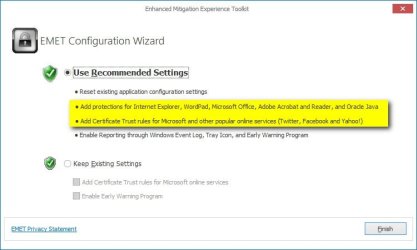
Using EMET, I recommend accepting and using the Recommend Settings i.e. adding protection for IE, WordPad, Office, Acrobat & Acrobat Reader and Java, and Trust Rules for MS online services (including Outlook.com / Live / Hotmail), Skype, Twitter, FB, Yahoo and such.

2013-11-17_140817.jpg

Additionally I add manually all browsers, email clients and programming applications (Visual Studio 2013, Windows Phone SDK and such).

This is of course only my personal way to use EMET, not necessarily the ideal or best way.

Kari

(*) = For those not familiar with Windows 8, the Windows Defender on 8 is not the same as Defender on 7. On 8 it is a complete AV program, replacing MSE which cannot be installed on 8.
 

My Computer

Computer type
Laptop
Computer Manufacturer/Model Number
HP ENVY 17-1150eg
OS
Windows 10 Pro x64 EN-GB
CPU
1.6 GHz Intel Core i7-720QM Processor
Memory
6 GB
Graphics Card(s)
ATI Mobility Radeon HD 5850 Graphics
Sound Card
Beats sound system with integrated subwoofer
Monitor(s) Displays
17" laptop display, 22" LED and 32" Full HD TV through HDMI
Screen Resolution
1600*900 (1), 1920*1080 (2&3)
Hard Drives
Internal: 2 x 500 GB SATA Hard Disk Drive 7200 rpm
External: 2TB for backups, 3TB USB3 network drive for media
Cooling
As Envy runs a bit warm, I have it on a Cooler Master pad
Keyboard
Logitech diNovo Media Desktop Laser (bluetooth)
Mouse
Logitech Performance Mouse MX
Internet Speed
50/10 Mbps VDSL
Antivirus
Windows Defender 4.3.9431.0
Browser
Maxthon 3.5.2., IE11
I've been thinking about EMET since this dang Crypto thing came about recently but most everything I read was over my head & confusing so was wondering if there was just a 'Recommended' setting that a n00b could get by with, Thanks Kari.
 

My Computer

Computer type
PC/Desktop
Computer Manufacturer/Model Number
emachines
OS
Microsoft Windows 7 Home Premium 64-bit 7601 Multiprocessor Free Service Pack 1
CPU
AMD Athlon(tm) II X2 220 Processor
Motherboard
eMachines EL1358G
Memory
3.00 GB
Graphics Card(s)
NVIDIA GeForce 6150SE nForce 430
Sound Card
Realtek High Definition Audio
Screen Resolution
1280 x 1024 x 32 bits (4294967296 colors) @ 60 Hz
Hard Drives
(1) WDC WD10 EADX-22TDHB0 SCSI Disk Device (2) Generic- Multi-Card USB Device
Keyboard
came with PC
Mouse
came with PC
Antivirus
Avast
Browser
IE 9
Other Info
don't know how to get info for the other 5 areas
Personally I add internet facing applications that are not covered by the default list - in my case these include Opera-USB, Cyberfox, NitroPDF, S-Player and VLC.

You're not supposed to add Flash Player as it's covered under the plugin container(s) for whatever browser(s) you are using.

Example for Cyberfox browser:

Add wildcard entries for the program and the plugin container like this:

*\Cyberfox\plugin-container.exe
*\Cyberfox\Cyberfox.exe

If you need a guide that explains why flash player should not be added try reading through the guide available here:

Protecting your Windows PC with Microsoft EMET 3.0 - rationallyPARANOID.com

Note: The guide is for EMET 3.0 rather than the latest version but the advice on adding programs remains relevant even though the user interface has changed.

Any issues? Yes. Opera-USB browser needed to have the EAF protection disabled before it would work.
 

My Computer

Computer type
Laptop
Computer Manufacturer/Model Number
ASUS
OS
Microsoft Windows 7 Home Premium 64-bit 7601 Multiprocessor Free Service Pack 1
CPU
AMD C-60 APU with Radeon(tm) HD Graphics
Motherboard
ASUSTeK COMPUTER INC. X501U
Memory
4.00 GB
Graphics Card(s)
AMD Radeon HD 6290 Graphics
Sound Card
(1) AMD High Definition Audio Device (2) Realtek High Defi
Screen Resolution
1366 x 768 x 32 bits (4294967296 colors) @ 60 Hz
Hard Drives
Hitachi HTS545050A7E380 SATA Disk Device
Antivirus
Comodo CIS & FW, SecureAplus App Whitelisting, Threatfire
Browser
Cyberfox 64bit, Opera 64bit, Airfox
Other Info
Spy-The-Spy, HitmanPro.Alert, Norton Connect Safe, MJRegWatcher, BitDefender TrafficLight, Voodoo Shield, Zemana AntiMalware
Thanks Kari. Welcome to Seven Forums Callender, thanks for the added info.

So far I am just running with the defaults, and Sumatra.

A Guy
 

My Computer

Computer type
PC/Desktop
OS
Windows 10 Home x64
CPU
INTEL Core i5-750 Quad-Core 3.37GHz
Motherboard
ASUS P7P55D
Memory
HyperX Fury Black Series 8GB (2 x 4GB) 1866Mhz
Graphics Card(s)
EVGA GeForce GTX 750 Superclocked 1GB 128-Bit GDDR5
Monitor(s) Displays
LG 32MA68HY 32" IPS
Screen Resolution
1920 x 1080
Hard Drives
Samsung 840 Evo 120GB, SEAGATE 500GB Barracuda® 7200.12, SATA 3 Gb/s, 7200 RPM, 16MB cache
PSU
ANTEC TruePower New TP-550, 80 PLUS, 550W
Case
ANTEC Three Hundred Illusion
Cooling
COOLER MASTER Hyper 212 Plus, 4 x 120mm 1 x 140mm Noctua's
Internet Speed
85 + Mbps
Antivirus
Avast
Browser
Vivaldi
Back
Top