

- Local time
- 2:54 AM
- Messages
- 231
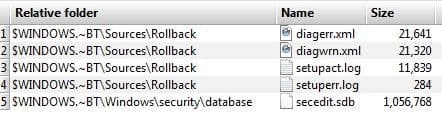
They are included in FreeFileSync's list of files to be updated. I have never seen them listed before for a backup. X: is my internal HD which contains only documents, Pictures etc. No programs or system files.
What do they do and why would they be included in a backup of a drive that has only docs, pictures etc?
The first image is representative of several similar files with different numbers.
Thanks.
What do they do and why would they be included in a backup of a drive that has only docs, pictures etc?
The first image is representative of several similar files with different numbers.
Thanks.
Attachments

My Computer
At a glance
Windows 7 Home Premium 64bitIntel Pentium Edition G3220 3.0 GHz8 GB DDR3 1600 MHz DIMMNot Known
- Computer type
- PC/Desktop
- Computer Manufacturer/Model Number
- Gigabyte ATX case with 500 W power supply GZ-M1
- OS
- Windows 7 Home Premium 64bit
- CPU
- Intel Pentium Edition G3220 3.0 GHz
- Motherboard
- Gigabyte Socket 1150 MicroATX Mot Ultra Durable, GA-H81M-S2H
- Memory
- 8 GB DDR3 1600 MHz DIMM
- Graphics Card(s)
- Not Known
- Sound Card
- Not known
- Monitor(s) Displays
- Samsung LS24D590 23.6"
- Screen Resolution
- 1920 x 1080
- Hard Drives
- 256 GB Solid State Drive (C: on which Windows 7 is installed)-
1 TB internal conventional HD (X:)-
Two WD "Elements" " 2TB USB drives as backups
- PSU
- 500 W
- Case
- Gigabyte ATX case
- Cooling
- Several fans!
- Keyboard
- Accuratus 301 USB Compact, white.
- Mouse
- Microsoft Basic Optical Mouse v2.0, two-button, tethered
- Internet Speed
- 10 to 12 Mb per second
- Antivirus
- Kaspersky Internet Security 2016, Malwarebytes (paid)
- Browser
- Firefox (ocassionally Safari)
- Other Info
- The 256 GB SSD (C:) also has Adobe Photoshop CS6 and InDesign CS6, MS Office, Adobe Lightroom, and other small programs.


