What startup programs are necessary?

famousken

Banned
Local time
8:07 AM
Messages
49
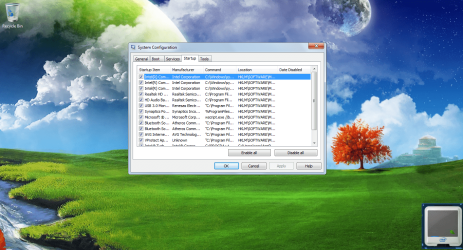
hello again. I can see that the bluetooth (Btvstack.exe & AthBtTray.exe) starts up with the pc. is it necessary? next thing is the USB3 (nusb3mon.exe) and many other. so i am asking what are the necessary startup progams?
 

My Computer

Computer Manufacturer/Model Number
Acer ASPIRE4750G-2412G64Mnkk
OS
Windows 7 Home Basic 32bit (6.1, Build 7600)
CPU
Intel® Core™ i5-2410M
Memory
2 GB of DDR3 system memory
Graphics Card(s)
NVIDIA® GeForce® GT 540M (2048MB of dedicated DDR3 VRAM
Sound Card
Optimized Dolby® Advanced Audio® v2 audio enhancement
Monitor(s) Displays
14" Acer CineCrystal™ LED-backlit TFT LCD
Screen Resolution
HD 1366 x 768 pixel resolution
Hard Drives
TOSHIBA MK6465GSX ATA (640gig)
Keyboard
Standard PS/2 Keyboard
Mouse
Synaptics TouchPad v7.4 on PS/2 Port
Internet Speed
1 MBPS
Best way to help you is to post a screenshot from startup tab in msconfig,and post it here. ;)
 

My Computer

Computer type
PC/Desktop
Computer Manufacturer/Model Number
Custom Build
OS
Windows 10 Pro x64
CPU
Intel Core i5 4440 @Stock
Motherboard
Gigabyte Z97 D3H
Memory
4 x 4GB HyperX Fury DDR3
Graphics Card(s)
Gigabyte GTX 1050Ti O4G
Sound Card
Integrated
Monitor(s) Displays
Dell P2417H
Screen Resolution
1920 x 1080
Hard Drives
Samsung EVO 850 120GB / Toshiba DT01ACA050 1TB 7200prm 32MB
PSU
Riotoro Onyx 750W
Case
NZXT H500 Black-Red
Cooling
Stock CPU + NZXT 120mm + 2x120mm red fans
Keyboard
Modecom Volcano Lanparty
Mouse
Asus ROG Gladius / DeepCool E-Pad Plus
Internet Speed
DOCSIS 50/3 Mbit
Browser
Google Chrome
Other Info
Asus K55VJ(i5 3210M, GT635M / 2GB, 8GB DDR3, 500GB HDD)
Generally speaking, a lot of folks disable all startup programs except for their antivirus suite and perhaps the touchpad if a laptop. One of our MSMVP forum members recommends just AV and gadgets.

gregrocker said:
Don't let any programs write themselves into msconfig>Startup as they slow startup, become freeloaders on your RAM/CPU and can spy on you. I only allow AV and gadgets. Startup Programs - Change

Source: http://www.sevenforums.com/installation-setup/151566-reinstalling-windows-7-a.html#post1300819

You could try a couple of methods to see what you need/don't need. Disable startup programs from msconfig and see how your machine acts. You can always enable a program again if necessary. Or, you could use a free tool called Soluto that suggests what you can safely remove from startup, what you might be able to remove (based on your own personal needs), and what you must not remove. If you uninstall Soluto, your computer goes back to its original default configuration. But you could install Soluto, see what it recommends, uninstall it, and then use msconfig to experiment with its recommendations.

Download Soluto | Soluto
 

My Computer

Computer type
Laptop
Computer Manufacturer/Model Number
Sony Vaio VPCEB47GM Laptop
OS
Win 7 Pro 64-bit
CPU
Intel i5 2.4 Ghz
Memory
8GB DDR3
Graphics Card(s)
Intel HD 3000
Sound Card
IDT High Definition
Monitor(s) Displays
15.6 WGXA Anti-Glare LED
Screen Resolution
1280x800
Hard Drives
640Gb 7200rpm
Antivirus
MSE
Browser
Opera (primary) with IE9 backup
this all
 

Attachments

  • Untitled.png
    Untitled.png
    338.9 KB · Views: 1,951
  • n1.png
    n1.png
    341.9 KB · Views: 1,098

My Computer

Computer Manufacturer/Model Number
Acer ASPIRE4750G-2412G64Mnkk
OS
Windows 7 Home Basic 32bit (6.1, Build 7600)
CPU
Intel® Core™ i5-2410M
Memory
2 GB of DDR3 system memory
Graphics Card(s)
NVIDIA® GeForce® GT 540M (2048MB of dedicated DDR3 VRAM
Sound Card
Optimized Dolby® Advanced Audio® v2 audio enhancement
Monitor(s) Displays
14" Acer CineCrystal™ LED-backlit TFT LCD
Screen Resolution
HD 1366 x 768 pixel resolution
Hard Drives
TOSHIBA MK6465GSX ATA (640gig)
Keyboard
Standard PS/2 Keyboard
Mouse
Synaptics TouchPad v7.4 on PS/2 Port
Internet Speed
1 MBPS
One of our MSMVP forum members recommends just AV and gadgets.
That's the way to go. And don't worry - All these processes will run when needed.

But if you have a lot of RAM (4GB or more), it does not matter one way or the other.
 

My Computer

Computer Manufacturer/Model Number
HP, Dell, Gateway, Toshiba - 4 laptops and 2 desktops
OS
Vista, Windows7, Mint Mate, Zorin, Windows 8
CPU
from 1.6GHz Duo to i7
Monitor(s) Displays
2x HP w2207
Hard Drives
5x HDD, 7x SSD, 12x Externals
Keyboard
with trackball - no mices
Mouse
Trackball mice
Internet Speed
DSL 6000
It looks good to me. You don't need to remove any items from startup.
 

My Computer

Computer type
PC/Desktop
Computer Manufacturer/Model Number
Custom Build
OS
Windows 10 Pro x64
CPU
Intel Core i5 4440 @Stock
Motherboard
Gigabyte Z97 D3H
Memory
4 x 4GB HyperX Fury DDR3
Graphics Card(s)
Gigabyte GTX 1050Ti O4G
Sound Card
Integrated
Monitor(s) Displays
Dell P2417H
Screen Resolution
1920 x 1080
Hard Drives
Samsung EVO 850 120GB / Toshiba DT01ACA050 1TB 7200prm 32MB
PSU
Riotoro Onyx 750W
Case
NZXT H500 Black-Red
Cooling
Stock CPU + NZXT 120mm + 2x120mm red fans
Keyboard
Modecom Volcano Lanparty
Mouse
Asus ROG Gladius / DeepCool E-Pad Plus
Internet Speed
DOCSIS 50/3 Mbit
Browser
Google Chrome
Other Info
Asus K55VJ(i5 3210M, GT635M / 2GB, 8GB DDR3, 500GB HDD)
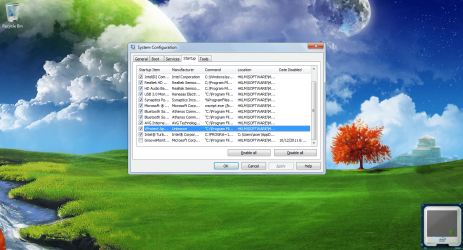
Personally I would uncheck everything except AV, then swap AVG for Avast 6 or MSE for better performance.

You may want to add back Synaptics if you miss the scrolling bar function on a laptop. I like mine gone.

Display software (Intel) never needs to start up unless you use special settings within that Control Panel. Same with Sound (Realtek). I never install that software myself.

Only if you lose desired Bluetooth function would I add back those listings one at a time.

I would want to know my USB 3.0 is working correctly once I uncheck that. I've never seen USB in Startup list - is this an add-on card?

If you don't use GrooveMonitor I'd also uninstall it at Control Panel>Programs and Features>Office>Change.

VProtect seems to come from VMWare so you should know if it's needed by now. If not uncheck it to find out.

Once you uncheck these and decide for sure, check back to make sure none of them write themselves back in - if so turn them off in their Program Preferences, e.g. under Updates or Start with Windows, etc., or Uninstall them.

To get an even cleaner boot, go into msconfig>Services, Hide All MS Services, then uncheck everything there except your AV. Some offenders sneak in here, so after reboots check back to make sure nothing is freeloading, if so turn it off in Program prefs or uninstall it.

You now have a clean boot.
 
Interesting
I have USB 3 as startup item

AV (NIS 2011- each their own) is not on the list but certainly starts. So why insist AV be on the startup list?

I have sidebar.exe. Is this the same as Gadget startup?
 

My Computer

Computer type
PC/Desktop
Computer Manufacturer/Model Number
Own build
OS
Windows 7x64 Home Premium SP1
CPU
Intel i7 2600k
Motherboard
ASUS P8Z68 Deluxe
Memory
G.Skill Ripjaws (DDR3-1600) 2x4GB
Graphics Card(s)
Nvidia GeForce GTS 450; Intel HD Graphics 3000(GT2+)
Monitor(s) Displays
Dell Ultrasharp IPS panel U2311H, Samsung SyncMaster P2350
Screen Resolution
1920x1080
Hard Drives
Samsung 850 Pro SSD 256GB, Samsung SSD 840 120GB, Seagates 1TB Barracuda ST31000528AS x2
PSU
Seasonic M12II 520W
Case
Lian Li Lancool PC-K60
Cooling
Case: 1x120mm, 3x140mm CPU: Hyper 212+
Keyboard
Logitech MK520 (wireless)
Mouse
Logitech MK520
Internet Speed
6-7 Mbps
Antivirus
Norton Security Premium, Malwarebytes on 2 (MSE on 3rd PC)
Browser
FireFox
Other Info
Audio: Logitech Z523 2.1
If it's a MS entry, yes it is.

I've not tried unchecking AV because it's not necessary or desired.

Can you test USB3 to see if you still get it if unchecked?
 
Personally I would uncheck everything except AV, then swap AVG for Avast 6 or MSE for better performance.

You may want to add back Synaptics if you miss the scrolling bar function on a laptop. I like mine gone.

Display software (Intel) never needs to start up unless you use special settings within that Control Panel. Same with Sound (Realtek). I never install that software myself.

Only if you lose desired Bluetooth function would I add back those listings one at a time.

I would want to know my USB 3.0 is working correctly once I uncheck that. I've never seen USB in Startup list - is this an add-on card?

If you don't use GrooveMonitor I'd also uninstall it at Control Panel>Programs and Features>Office>Change.

VProtect seems to come from VMWare so you should know if it's needed by now. If not uncheck it to find out.

Once you uncheck these and decide for sure, check back to make sure none of them write themselves back in - if so turn them off in their Program Preferences, e.g. under Updates or Start with Windows, etc., or Uninstall them.

To get an even cleaner boot, go into msconfig>Services, Hide All MS Services, then uncheck everything there except your AV. Some offenders sneak in here, so after reboots check back to make sure nothing is freeloading, if so turn it off in Program prefs or uninstall it.

You now have a clean boot.

+1 for this.
 

My Computer

Computer Manufacturer/Model Number
Toshiba Satellite S875D-S7239 laptop
OS
MS Windows 7 Ultimate SP1 64-bit
CPU
AMD A10-4600M
Motherboard
AMD Pumori (Socket FT1)
Memory
6.00 GB Dual-Channel DDR3 @ 798MHz (11-11-12-28)
Graphics Card(s)
AMD Radeon HD 7660G
Sound Card
High Definition Audio Device
Monitor(s) Displays
Generic PnP Monitor (1600x900@60Hz)
Screen Resolution
1600x900@60Hz
Hard Drives
SSD 119GB Corsair CSSD-V128GB2 ATA Device
Keyboard
Standard PS/2 Keyboard
Mouse
HP Wireless Optical Mobile Mouse Model FHA-3410
Internet Speed
What the local pub, local coffee shop offers.
Other Info
Optical Drive:MATSHITA BD-CMB UJ160B ATA Device


Also have an Asus ha1002xp netbook with Win 7 Ultimate installed.
Interesting
I have USB 3 as startup item

AV (NIS 2011- each their own) is not on the list but certainly starts. So why insist AV be on the startup list?

I have sidebar.exe. Is this the same as Gadget startup?
Right, NIS does not show up in the startups - it never did. But some other AV programs do show up. And sidebar is gadgets.
 

My Computer

Computer Manufacturer/Model Number
HP, Dell, Gateway, Toshiba - 4 laptops and 2 desktops
OS
Vista, Windows7, Mint Mate, Zorin, Windows 8
CPU
from 1.6GHz Duo to i7
Monitor(s) Displays
2x HP w2207
Hard Drives
5x HDD, 7x SSD, 12x Externals
Keyboard
with trackball - no mices
Mouse
Trackball mice
Internet Speed
DSL 6000
How can VProtect suddenly appear in my msconfig startup programmes without so much as a by your leave! How did it access my PC without my knowing or my permission?
 

My Computer

Computer Manufacturer/Model Number
packard/bell imedia s1300
OS
windows7 home premium 64 bit
How can VProtect suddenly appear in my msconfig startup programmes without so much as a by your leave! How did it access my PC without my knowing or my permission?
It could have come with some other program you installed. You have to always uncheck all those drag-along programs. But sometimes they are really hidden. Very common ones that come with other programs are toolbars for your browser.

Just uninstall the bugger. Use the advanced option of Revo to make sure it is completely gone.
 

My Computer

Computer Manufacturer/Model Number
HP, Dell, Gateway, Toshiba - 4 laptops and 2 desktops
OS
Vista, Windows7, Mint Mate, Zorin, Windows 8
CPU
from 1.6GHz Duo to i7
Monitor(s) Displays
2x HP w2207
Hard Drives
5x HDD, 7x SSD, 12x Externals
Keyboard
with trackball - no mices
Mouse
Trackball mice
Internet Speed
DSL 6000
How can VProtect suddenly appear in my msconfig startup programmes without so much as a by your leave! How did it access my PC without my knowing or my permission?

VProtect might be related to a remote monitoring/viewing/recording software package (providing it's not some kind of malware disguising itself as VProtect.)

VProtect

Did anybody access your computer remotely to help you troubleshoot a problem? Do you have any kind of security system with closed circuit cameras? If you've successfully uninstalled it as whs suggested, I'd run a full scan with your antimalware tool of choice. I'd also suggest using the free Malwarebytes as a supplemental scanner. (The link compares the free vs. the paid version and has a download button for either.) It seems to find things other tools miss. You could also use the free Hitman Pro and SuperAntispyware for additional supplemental scans.
 

My Computer

Computer type
Laptop
Computer Manufacturer/Model Number
Sony Vaio VPCEB47GM Laptop
OS
Win 7 Pro 64-bit
CPU
Intel i5 2.4 Ghz
Memory
8GB DDR3
Graphics Card(s)
Intel HD 3000
Sound Card
IDT High Definition
Monitor(s) Displays
15.6 WGXA Anti-Glare LED
Screen Resolution
1280x800
Hard Drives
640Gb 7200rpm
Antivirus
MSE
Browser
Opera (primary) with IE9 backup
VProtect

Thanks for your advice on the above. Nobody else has access to my computer and no outside trouble shooting. I have unchecked it but I cannot find it's location to uninstall it. I'm no expert but I have looked in regedit (only looked) and Malwarebytes and other scans show up clean. The file location is shown as "C:\Programme Files HKLM\SOFTWARE followed by; Wow 6432Node\Microsoft\Windows\CurrentVersion\Run
It doesn' seem to be a threat but I would like to have it gone. Thanks again.
 

My Computer

Computer Manufacturer/Model Number
packard/bell imedia s1300
OS
windows7 home premium 64 bit
I myself only have the the antivirus and the sidebar checked up on that list, however on someone else's HP netbook, I think I disabled some essential startup items in there that Wifi and Bluetooth did not work, only when the support guy enabled them again on the list did I see, those were needed to start the Wifi and Bluetooth. Remember, that was on a netbook. So there may be a different preference on the way someone should disable items in there on the laptop/netbook and on the desktop PC.

On the Desktop PC, its OK and even recommendable to leave only the antivirus and the sidebar enabled. One could disable the sidebar anyway if not wanted leaving only the antivirus enabled.

But on a Netbook/Laptop, you may have to leave a few more items ticked such as those labelled with "Intel", "Power", "Dell" or "HP" (depending on the manufacturer) because some devices or features on the netbook/laptop such as power and brightness control panels and wireless connectivity depended on these startup items.
 

My Computer

Computer Manufacturer/Model Number
Custom Built
OS
Windows 7 Ultimate 32 Bit, Windows Developer Preview, Linux Mint 9 Gnome 32 Bit
CPU
Intel Pentium Dual CPU E2180@2GHz
Motherboard
Elitegroup 671T-M3
Graphics Card(s)
NVIDIA GeForce 7200 GS
Monitor(s) Displays
AOC TFT1560 15" LCD Monitor
Screen Resolution
1024x768
Keyboard
Logitech USB Keyboard
The problem can be with HP Connection manager, crapware that adds 30 seconds to boot time and is buggy. It needs to be turned off first in its Preferences by selecting to use another manager. Then it can also be uninstalled so it doesn't come back to bother you.


Use Win7's superior built-in connection manager in system tray, including a Troubleshooter that actually fixes things.
 
Thanks for your advice on the above. Nobody else has access to my computer and no outside trouble shooting. I have unchecked it but I cannot find it's location to uninstall it. I'm no expert but I have looked in regedit (only looked) and Malwarebytes and other scans show up clean. The file location is shown as "C:\Programme Files HKLM\SOFTWARE followed by; Wow 6432Node\Microsoft\Windows\CurrentVersion\Run
It doesn' seem to be a threat but I would like to have it gone. Thanks again.

You can uninstall all mention of VProtect from the registry. But first back up your registry by creating a Restore Point.

http://www.sevenforums.com/tutorials/4230-registry-backup-restore.html

Since you've already located one instance of VProtect in the registry there could be more. You can delete it > click F3 (top row of keyboard) and the search will continue for any other mention of VProtect. If another is found, delete > F3. Continue until you get a prompt that the search has finished. I'd run a second search just to be sure. Sometimes you may get a prompt that the delete could not be done. Ignore and just click F3 to continue the search. You can always go back on a second or even third search to see if you can then delete it.
 

My Computer

Computer type
Laptop
Computer Manufacturer/Model Number
Sony Vaio VPCEB47GM Laptop
OS
Win 7 Pro 64-bit
CPU
Intel i5 2.4 Ghz
Memory
8GB DDR3
Graphics Card(s)
Intel HD 3000
Sound Card
IDT High Definition
Monitor(s) Displays
15.6 WGXA Anti-Glare LED
Screen Resolution
1280x800
Hard Drives
640Gb 7200rpm
Antivirus
MSE
Browser
Opera (primary) with IE9 backup
what programs need running at startup?

Hey, what programs are good to take away from your startup list on my Samsung 'netbook'/laptop?

And do i need to leave the 'Advanced' ones alone? I have windows 7 home premium, at the mo i have the avg tray monitor, Adobe acrobat speed launcher, ROC_roc_dec12, and vprotect application (which seems to be to do with AVG Secure Search), the rest i have unchecked, do i need any other programs running? And should i touch the advanced list?

Thanks :)
 

My Computer

OS
windows 7 home premium x64
I would uninstall the AVG bloatware and install free Microsoft Security Essentials.

Next type msconfig in Start Search box, rightclick to run as Admin, uncheck everything in Startup tab except MS listings for MSE and gadgets if you use them.

After several reboots check back that nothing has written itself back in - if so turn it off in it's Program Prefs or uninstall it. Then enter msconfig>Services, select Hide All MS Services then uncheck all but the AV listing.

There are other steps here to Clean up factory bloatware to gain back performance.http://www.sevenforums.com/installa...p-all-four-primary-partitions.html#post952573
 
Back
Top