I've used a number of the Free open source applications available for both Linux and Windows and I would not compare Gimp with the current version of Photoshop CC, in any way - If however you have a limited budget and need to work with older PSD Photoshop files, or you just need a higher level image editor, then Gimp is a good option.
If you want to do "intermediate" editing tasks (i.e. more complicated than the stuff you can do in Paint) GIMP is suitable.
It has a lot of the same tools that Photoshop has, however the Photoshop tools are better (and/or easier to use).
IMO, the main reasons are:
- Adobe has written tools for image experts (probably based on their feeedback/requests)
- There are lots of tutorials written by image experts explaining how to use the Photoshop tools
I use GIMP most of the time (99%+) but I occasionally start Photoshop CS6 if I need to use some "tricky" selection tools to achieve a result.
There are some things that are (IMO) better in GIMP than Photoshop CS6.
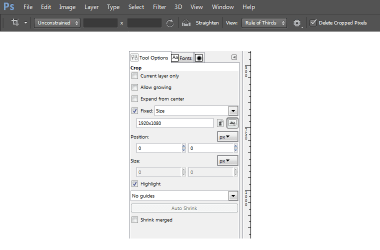
For example, you can directly type in coordinates (e.g. cropping) in GIMP.
Coordinate input is hidden in a sub-menu in Photoshop CS6.
I like the "Straighten" function.

One thing that I have found with LibreOffice, and other Office clones, is that although they can be used to create documents of quality as high as Office itself, they do not appear to play well in a mixed environment. If you have a group of users using Word and some using LibreOffice there will be slight layout differences between the documents last edited in "the Other application"
Apparently the LibreOffice 6 has a lot of improvements.
LibreOffice 6.0 - Goodness, Gracious, Great Fonts of Fire!
Some sites that I visit Require the use of microsoft technologies that only work in Microsoft Browsers. Just out of interest is there any way to achieve this under Linux - a particular one needs to run Silverlight which requires Internet Explorer to run. Microsoft is of course depreciating Silverlight and other proprietaries in favour of HTML5, but not every content provider has caught up yet
I've seen lots of complaining about Silverlight sites from people on Linux Forums.

As I've posted before (and as
Lady Fitzgerald also posted) I think the easiest solution would be to use a W7 VM for any "Windows Only" stuff (if you don't want to run W7, W8 or W10 as your main OS).
I've only come across a couple of things that don't like running in VMware.
It may be possible to tweak the configuration to get around those problems, but I haven't really looked into it.
I suspect that modern games won't run properly in a VM.
My old games run properly.
I have 1 game that will only run on an XP install (no VMs or newer versions of Windows).
DOSBox handles the really old games (i.e. from the 1990's, like Doom).
From what I've read (I haven't used Photoshop although I did use Elements, which came with my flatbed scanner, briefly before I went back to the far easier to use graphics editors I currently use), GIMP UI is radically different from Photoshop, hence the learning curve, but pretty much is capable of most things Photoshop is capable of doing. I haven't dabbled with GIMP much so far because I found it to be completely unintuitive and doing the simplest operations was what I felt was needless complex.
If you are used to Elements/Photoshop I guess GIMP would be more difficult to use.
As I've mostly used GIMP, I find the Photoshop GUI difficult.

For example, in GIMP you can show all of the tools in the toolbox, but in Photoshop CS6 you can only see about 1/3 of the tools (I'm not used to the sections so I have to hunt through them).
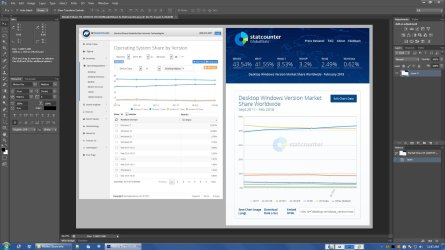
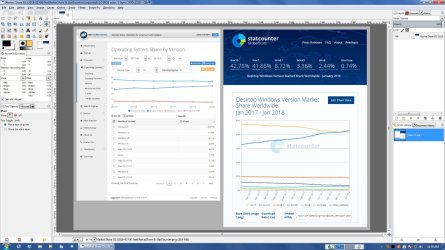
Both of the interfaces are a bit cramped for my liking, but I guess image experts use multiple high resolution monitors (so they can move the tools out of the way).



