Solved what to do if windows refuses to add an EXE to the default list?

TripleZero

New member
Local time
2:18 PM
Messages
6
When trying to add a default through open with> browse for your program > select the EXE, and then nothing happens it never gets added to the list, so my only guess is to manually add it though a reg edit, but not sure where to go in the reg for that. Anyone know where that would be located in the reg?
 

My Computer My Computer

At a glance

Windows 7 Home Premium, 64 bit 6.1
Computer type
PC/Desktop
Computer Manufacturer/Model Number
Custom
OS
Windows 7 Home Premium, 64 bit 6.1
What's the program? With some software you have to associate the file type from within the program's interface before you can set it as default.
 

My Computer My Computer

At a glance

Microsoft Windows 7 Home Premium 64-bit 7601 ...AMD C-60 APU with Radeon(tm) HD Graphics4.00 GBAMD Radeon HD 6290 Graphics
Computer type
Laptop
Computer Manufacturer/Model Number
ASUS
OS
Microsoft Windows 7 Home Premium 64-bit 7601 Multiprocessor Free Service Pack 1
CPU
AMD C-60 APU with Radeon(tm) HD Graphics
Motherboard
ASUSTeK COMPUTER INC. X501U
Memory
4.00 GB
Graphics Card(s)
AMD Radeon HD 6290 Graphics
Sound Card
(1) AMD High Definition Audio Device (2) Realtek High Defi
Screen Resolution
1366 x 768 x 32 bits (4294967296 colors) @ 60 Hz
Hard Drives
Hitachi HTS545050A7E380 SATA Disk Device
Antivirus
Comodo CIS & FW, SecureAplus App Whitelisting, Threatfire
Browser
Cyberfox 64bit, Opera 64bit, Airfox
Other Info
Spy-The-Spy, HitmanPro.Alert, Norton Connect Safe, MJRegWatcher, BitDefender TrafficLight, Voodoo Shield, Zemana AntiMalware
Cinema 4d r15, Ive already looked though the settings multiple times theres nothing about setting it as default in there
 

My Computer My Computer

At a glance

Windows 7 Home Premium, 64 bit 6.1
Computer type
PC/Desktop
Computer Manufacturer/Model Number
Custom
OS
Windows 7 Home Premium, 64 bit 6.1
Legit version

Is that a legit version?

Try START> Default Programs> Associate file type.....

You should see that the "Always use this program" checkbox is greyed out. This is because the Set Associations control panel is used make system-wide file association changes.

Other than that try:

FileTypesMan - Alternative to 'File Types' manager of Windows

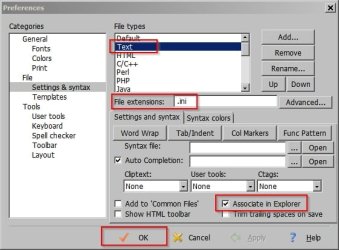
I don't know anything about the sotware you're using but check preferences etc to see if there's a way to set defaults. Here's a screenshot from another program that I had problems with. There was no way to set it as the default program without configuring the following settings first!

Preferences.jpg
 

My Computer My Computer

At a glance

Microsoft Windows 7 Home Premium 64-bit 7601 ...AMD C-60 APU with Radeon(tm) HD Graphics4.00 GBAMD Radeon HD 6290 Graphics
Computer type
Laptop
Computer Manufacturer/Model Number
ASUS
OS
Microsoft Windows 7 Home Premium 64-bit 7601 Multiprocessor Free Service Pack 1
CPU
AMD C-60 APU with Radeon(tm) HD Graphics
Motherboard
ASUSTeK COMPUTER INC. X501U
Memory
4.00 GB
Graphics Card(s)
AMD Radeon HD 6290 Graphics
Sound Card
(1) AMD High Definition Audio Device (2) Realtek High Defi
Screen Resolution
1366 x 768 x 32 bits (4294967296 colors) @ 60 Hz
Hard Drives
Hitachi HTS545050A7E380 SATA Disk Device
Antivirus
Comodo CIS & FW, SecureAplus App Whitelisting, Threatfire
Browser
Cyberfox 64bit, Opera 64bit, Airfox
Other Info
Spy-The-Spy, HitmanPro.Alert, Norton Connect Safe, MJRegWatcher, BitDefender TrafficLight, Voodoo Shield, Zemana AntiMalware
Is that a legit version?

Try START> Default Programs> Associate file type.....

You should see that the "Always use this program" checkbox is greyed out. This is because the Set Associations control panel is used make system-wide file association changes.

Other than that try:

FileTypesMan - Alternative to 'File Types' manager of Windows

I don't know anything about the sotware you're using but check preferences etc to see if there's a way to set defaults. Here's a screenshot from another program that I had problems with. There was no way to set it as the default program without configuring the following settings first!

View attachment 322177

Yes, just got it on a student discount. I was using an older version r12 but that's way outdated now, it however never had this problem. I will look into that 3rd party app now.

EDIT: Thanks that did the trick, just told it to set it on FiletypeMan and it worked.
 

My Computer My Computer

At a glance

Windows 7 Home Premium, 64 bit 6.1
Computer type
PC/Desktop
Computer Manufacturer/Model Number
Custom
OS
Windows 7 Home Premium, 64 bit 6.1
Fixed?

Great. Thanks for letting us know. It will help others if they have the same problem.
 

My Computer My Computer

At a glance

Microsoft Windows 7 Home Premium 64-bit 7601 ...AMD C-60 APU with Radeon(tm) HD Graphics4.00 GBAMD Radeon HD 6290 Graphics
Computer type
Laptop
Computer Manufacturer/Model Number
ASUS
OS
Microsoft Windows 7 Home Premium 64-bit 7601 Multiprocessor Free Service Pack 1
CPU
AMD C-60 APU with Radeon(tm) HD Graphics
Motherboard
ASUSTeK COMPUTER INC. X501U
Memory
4.00 GB
Graphics Card(s)
AMD Radeon HD 6290 Graphics
Sound Card
(1) AMD High Definition Audio Device (2) Realtek High Defi
Screen Resolution
1366 x 768 x 32 bits (4294967296 colors) @ 60 Hz
Hard Drives
Hitachi HTS545050A7E380 SATA Disk Device
Antivirus
Comodo CIS & FW, SecureAplus App Whitelisting, Threatfire
Browser
Cyberfox 64bit, Opera 64bit, Airfox
Other Info
Spy-The-Spy, HitmanPro.Alert, Norton Connect Safe, MJRegWatcher, BitDefender TrafficLight, Voodoo Shield, Zemana AntiMalware
Back
Top