what user groups am I in?

spiderplant0

New member
Local time
1:54 PM
Messages
14
Location
Scotland
Hi, I am unable to edit and save a file in c:\program files (x86)\ (e.g. if I open the file in UltraEdit, make changes and try to save the file).
After a bit of googleing, the problem might be down to me not having the correct permission for this folder. When I look at the folder properties - security, it list several groups but not my user name. So my question is, where can I view/change the list of groups that I am a member of.
Also, do I just give myself 'full control' of this folder to be able to save edits? Or should I set the 'read only' attribute for this folder off?
I am on Windows 7 home proffesional.
Thanks.
 

My Computer

Computer Manufacturer/Model Number
Packard Bell OneTwo X8020
OS
Windows 7 Home Premium (x64) (build 7600) English
CPU
2.33 gigahertz Intel Core2 Quad Q8200
Motherboard
Packard Bell ONETWO L5710
Memory
4094 Megabytes
Graphics Card(s)
ATI Mobility Radeon HD 4500 Series
Sound Card
Realtek High Definition Audio
Screen Resolution
1920x1080
Hi Spiderplant and Welcome to the Forum

First off it would be helpful if you completed your system specs then we would not need to ask for details every time you posted a thread.
Can I ask what file you want to edit in your Programs folder. Dabbling here can cause your programs not to function properly unless you know exactly what you are doing!
 

My Computer

Computer type
PC/Desktop
OS
Microsoft Windows 7 Home Premium 64-bit 7601 Multiprocessor Free Service Pack 1
CPU
Intel(R) Core(TM) i7-3770 CPU @ 3.40GHz
Motherboard
ASUSTeK COMPUTER INC. P8H77-M
Memory
8.00 GB
Graphics Card(s)
Intel(R) HD Graphics 4000
Sound Card
On Board
Monitor(s) Displays
Dell 24"
Screen Resolution
1920 x 1080
Hard Drives
(1) INTEL SSDSC2CT180A3 ATA Device (2) ST500DM002-1BD142 ATA Device (3) WDC WD3200AAKS-75L9A0 ATA Device (4) Generic- Compact Flash USB Device (5) Generic- MS/MS-Pro USB Device (6) Generic- SD/MMC USB Device (7) Generic- SM/xD-Picture USB
PSU
500w Corsair
Case
Cooler Master
Cooling
3 Fans
Keyboard
Logitech MK300
Mouse
Logitech WOM
Internet Speed
75Mb
Antivirus
Norton 360
Browser
Firefox, Opera, IE

My Computer

Computer Manufacturer/Model Number
Custom
OS
Windows 7 Professional x64
CPU
Intel i7 2600K OC'd @ 4620 MHz
Motherboard
Asus P8Z68-V Pro
Memory
16GB GSkill Sniper 2133 Mhz (4x4GB)
Graphics Card(s)
EVGA GeForce GTX 480 SuperClocked+
Sound Card
Realtek High Definition Audio
Monitor(s) Displays
2x Acer S273HLbmii 27"
Screen Resolution
2 x 1920x1080
Hard Drives
64GB Crucial M4 SSD

Storage: Hitachi 1TB 5400RPM, Samsung 1.5TB 5400RPM
PSU
Corsair HW Series 750w (modular)
Case
Cooler Master HAF 932 Advanced Blue Edition
Cooling
CM Hyper 212+ CPU cooler, 3x 230mm + 1x 140mm case fans
Keyboard
Logitech MK320 (wireless)
Mouse
Logitech MK320 (wireless)
Internet Speed
30 Mb/s : 2 Mb/s
Last edited by a moderator:

My Computer

OS
Windows 7 Ultimate x64 SP1
CPU
Intel Core i7-2600
Motherboard
Gigabyte GA-P67A-UD3P-B3
Memory
12 GB Patriot Extreme DDR3-1333
Graphics Card(s)
Nvidia GTX 470
Monitor(s) Displays
Dell UltraSharp 2209WA
Hard Drives
OCZ Agility3 240 GB, WD5001AALS, WD7501AALS
PSU
OCZ ModStream 700W
Case
CoolerMaster HAF 912 Advanced
Cooling
CoolerMaster Hyper 212 Plus
Hi, Thanks for the speedy replies.
I'm transferring stuff over from my old Windows XP machine and I need to edit some .ini files etc including some stuff for my own scripts and things. I appreciate that Windows 7 has these restrictions for a reason but I'm more interested in 'getting under the hood' and messing about as a way of learning how it all works. I regulary roll back to CloneZilla disk images so I'm not to bothered if I break my installation.
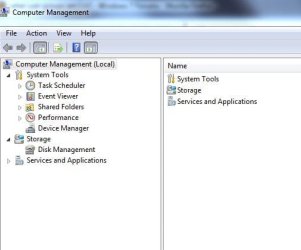
Anyway, I looked under: Start > Control Panel > Administration > Computer management
but there is no 'Local Users And Groups'. See screen capture attachment.
My Account is already an Administrator. (i.e. under Control Panel > UserAccounts).
I looked at the tutorial and 'netplwiz' did the trick. It turns out that I'm a member of 'Users', 'Administrators' & 'Home Users'.
For the programs folder properties the administrator group has all permissions ticked except for 'special permissions'.
I was just wondering if anyone knew the best way to allow editing of files in this folder before I go off experimenting.
Cheers.
 

Attachments

  • computerManagement.jpg
    computerManagement.jpg
    20.9 KB · Views: 12

My Computer

Computer Manufacturer/Model Number
Packard Bell OneTwo X8020
OS
Windows 7 Home Premium (x64) (build 7600) English
CPU
2.33 gigahertz Intel Core2 Quad Q8200
Motherboard
Packard Bell ONETWO L5710
Memory
4094 Megabytes
Graphics Card(s)
ATI Mobility Radeon HD 4500 Series
Sound Card
Realtek High Definition Audio
Screen Resolution
1920x1080

My Computer

Computer type
PC/Desktop
Computer Manufacturer/Model Number
Lenovo IdeaCenter 450
OS
Windows 10 Pro X64
CPU
Intel Quad Core i7-4770 @ 3.4Ghz
Memory
16.0GB PC3-12800 DDR3 SDRAM 1600 MHz
Graphics Card(s)
Intel Integrated HD Graphics
Sound Card
Realtek HD Audio
Monitor(s) Displays
HP 22" LCD
Screen Resolution
1680 x 1050
Hard Drives
250GB Samsung EVO SATA-3 SSD
2TB Seagate ST2000DM001 SATA-2
1.5TB Seagate ST3150041AS SATA
Keyboard
Dell USB
Mouse
Lenovo USB
Internet Speed
Cable via Road Runner 3MB Upload, 30MB Download
Antivirus
Windows Defender, MBAM Pro, MBAE
Browser
Seamonkey
Other Info
UEFI/GPT
PLDS DVD-RW DH16AERSH
Thanks Ztruker, that worked.
I also discovered that if I right mouse click over the 'UltraEdit' program shortcut and select 'run as administrator' it allows me to save the file. But this doesnt help when I want to open by launching UltraEdit by right-clicking over the file in windows explorer. So I think I just disable the UAC.
 

My Computer

Computer Manufacturer/Model Number
Packard Bell OneTwo X8020
OS
Windows 7 Home Premium (x64) (build 7600) English
CPU
2.33 gigahertz Intel Core2 Quad Q8200
Motherboard
Packard Bell ONETWO L5710
Memory
4094 Megabytes
Graphics Card(s)
ATI Mobility Radeon HD 4500 Series
Sound Card
Realtek High Definition Audio
Screen Resolution
1920x1080
Thanks Ztruker, that worked.
I also discovered that if I right mouse click over the 'UltraEdit' program shortcut and select 'run as administrator' it allows me to save the file. But this doesnt help when I want to open by launching UltraEdit by right-clicking over the file in windows explorer. So I think I just disable the UAC.
So if all is OK now will you mark this thread as "Solved". To do that just click the red triangle at the top of this post and type in "Resolved" and Admin will give it the green tick.
 

My Computer

Computer type
PC/Desktop
OS
Microsoft Windows 7 Home Premium 64-bit 7601 Multiprocessor Free Service Pack 1
CPU
Intel(R) Core(TM) i7-3770 CPU @ 3.40GHz
Motherboard
ASUSTeK COMPUTER INC. P8H77-M
Memory
8.00 GB
Graphics Card(s)
Intel(R) HD Graphics 4000
Sound Card
On Board
Monitor(s) Displays
Dell 24"
Screen Resolution
1920 x 1080
Hard Drives
(1) INTEL SSDSC2CT180A3 ATA Device (2) ST500DM002-1BD142 ATA Device (3) WDC WD3200AAKS-75L9A0 ATA Device (4) Generic- Compact Flash USB Device (5) Generic- MS/MS-Pro USB Device (6) Generic- SD/MMC USB Device (7) Generic- SM/xD-Picture USB
PSU
500w Corsair
Case
Cooler Master
Cooling
3 Fans
Keyboard
Logitech MK300
Mouse
Logitech WOM
Internet Speed
75Mb
Antivirus
Norton 360
Browser
Firefox, Opera, IE
Back
Top