What Will Extra RAM Do For Me?

PlasticTopHat

New member
Local time
10:24 PM
Messages
21
I opened up the bottom of my laptop yesterday, and noticed a place for an additional component that I didn't have. Apparently it's a place where I could put in an additional RAM card.

Now, I have tried many times to understand it, but I just can't understand what all of the different physical components of a computer do what. If I put in an additional RAM card, just for instance say another 4GB one like the one I have, what would that do for me?

Would loading screens on games end faster? Would games run more smoothly?

I have a program called LEGO Digital Designer, where I can build virtual models with realistic virtual bricks. When I have a lot of bricks in the model, and am adjusting my view or copying sections with lots of bricks, it slows down. Would RAM help with that?

If RAM won't help, (now this is probably a REALLY dumb question, but worth a shot) can something else like a graphics card fit into the same slot?

Thanks!
 

My Computer

Computer type
Laptop
Computer Manufacturer/Model Number
HP
OS
Windows 7 64-bit
Antivirus
Kaspersky
Browser
Firefox
Short lesson.
All the things about ram can get complicated but I'm not going to drag you there.

When you are doing things on your computer it is using ram. When your system runs low on ram because of high use your system starts using the hard drive if it can.

Hard drive are very much slower than ram so our system will slow down.
Adding more ram to your laptop is a good thing if needed. Adding more ram will not speed up your system if you don't do things on computer that request more ram than you have.

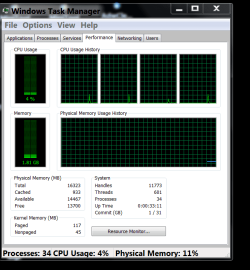
My system has 16 gig of ram.
At the present time it using a little over 2 gigs. Basically their is 14 gig doing nothing at this time.
Now if I put a demand on my system that requires more ram to work properly the 14 gig is there to be used and the system will not slow down.
--------------------------------------

From your post.
If RAM won't help, (now this is probably a REALLY dumb question, but worth a shot) can something else like a graphics card fit into the same slot
If the slot you are referring to is designed for ram nothing else will work there.

I'm not a gamer so I don't know how much ram is needed for games. Many members play games with 4 gig of ram.

If you would like to watch how much ram your system is using go to Task Manager/Performance.


Task Manager.PNG


Last edited:

My Computer

Computer type
PC/Desktop
Computer Manufacturer/Model Number
Home made Desktop
OS
Windows 10 Pro. 64/ version 1709 Windows 7 Pro/64
CPU
Intel i7-6800K @ 4.3
Motherboard
ASUS X-99 Deluxe II
Memory
Corsair Platinum 16 gig @2400
Graphics Card(s)
EVGA GTX 1070 OC
Monitor(s) Displays
Asus 27" LED LCD/VE278Q
Screen Resolution
1920-1080 or 1280-720 HDMI
Hard Drives
INTEL SSD 730-240 Gb Sata 3.0/
PSU
EVGA Platium 1200W
Case
Phanteks Luxe Tempered Glass 8 fans/ one radiator
Cooling
XSPC/ Water Cooled CPU
Keyboard
Das 4 Professional
Mouse
Logitech M705/MX Anywhere 2-S
Internet Speed
100 mbits
Antivirus
Microsoft Security Essentials/ Malwarebytes Premium 3.0/ SAS
Browser
I.E. 11 default/Firefox/ ISP Time Warner Cable/Spectrum
Other Info
LG BluRay Burner/
Sound system-KLipsch-THX/
Icy Dock ssd Hot Swap bays.
Okay, this post was extremely helpful. I guess what I'll do next is keep that performance monitor open and see if my RAM usage is hitting 4GB when my programs are slowing down.

Thanks!
 

My Computer

Computer type
Laptop
Computer Manufacturer/Model Number
HP
OS
Windows 7 64-bit
Antivirus
Kaspersky
Browser
Firefox
Adding 4 more GB of RAM will drain the battery a bit faster. So only add RAM if you really need it.

I'll toss in a bit more info:
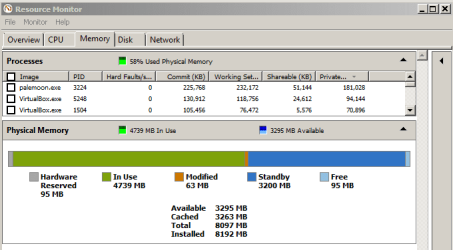
When you first start the computer, the operating system and some 3rd party apps will load in RAM to run. When you start another app, it takes time to get the info from the hard drive and into RAM. When you exit that app, the RAM that the app was using might be marked as standby (which means that other apps can use that RAM now). If you start the same app again, you might notice that it loads much quicker than it did the first time that you loaded it. That quick load time is probably due to the app still being in RAM in the standby category. The more RAM that you have, the more apps you can keep in that standby category.

mem.PNG

The image above shows that I have a lot of apps in the standby category. I'm using 4.7GB because of the apps that I have open.
 

My Computer

Computer type
Laptop
Computer Manufacturer/Model Number
Employer provided Dell Latitude
OS
W7 Pro SP1 64bit
CPU
i7
Memory
8GB
Graphics Card(s)
Intel HD Graphics
Hard Drives
crappy SSD
Antivirus
Employer mandated Symantec Endpoint Protection
Browser
Pale Moon 64bit, IE11 64bit & Chrome 64bit
Okay, this post was extremely helpful. I guess what I'll do next is keep that performance monitor open and see if my RAM usage is hitting 4GB when my programs are slowing down.

Thanks!

Actually you don't want the gauge to hit or even approach 4 GB. Once that happens you are already well past the point where performance is impaired. The situation can happen where the system is under heavy memory pressure and applications are desperate for more memory and the gauge will still be under 4 GB.

Memory usage is always under the control of the system memory manager with the goal of maximizing overall system performance. To accomplish this it will try to maintain a reasonable value of available memory. This is the part of the gauge that appears to be unused but that isn't really the case. Much of this (or even all) will be in the system cache (labeled as "Cached" in Task Manager) and contributes greatly to system performance. Memory labeled as "Free" should be as low as possible, zero being the optimum value. That isn't always possible with large amounts of memory.

This is all VERY complex.

For optimum performance I would like to see available memory at 50% or even higher. If the gauge is over 50% for much of the time performance is likely going to be at least somewhat impaired. 8GB RAM is about right for a 64 bit OS with typical workloads. With 4 GB RAM performance will likely be impaired at least some of the time. For particularly heavy workloads you would need more but that is unusual.

Edit: The screensnhot in post #4 is a good example of what you want. Standby memory is high and free memory is low. Not zero but close. Cached memory is also high and that is good. If usage was much higher than this performance would be impaired.
 

My Computer

Computer type
PC/Desktop
Computer Manufacturer/Model Number
HP
OS
Windows 7 Pro 64 bit
CPU
Xeon W3520
Memory
8 GB
Graphics Card(s)
Nvidia Geforce 210

My Computer

Computer type
PC/Desktop
Computer Manufacturer/Model Number
Custom assembled by me :}
OS
Win-7-Pro64bit 7-H-Prem-64bit
CPU
i7-5930K 2nd i9-9940x both water blocked VRM's too
Motherboard
ASUS SABERTOOTH X99 2nd ASUS x299 Apex
Memory
Trident-z 3200C14 2nd Trident-z 3600C16
Graphics Card(s)
EVGA 1080ti ftw3 2nd Titan Xp both water blocked
Sound Card
Built-in Realtek
Monitor(s) Displays
1-AOC G2460PG 24"G-Sync 144Hz/ 2nd 1-ASUS VG248QE 24" 144Hz
Screen Resolution
1920 x 1080 144Hz
Hard Drives
2-Samsung M.2 Evo & Evo Plus
2-Samsung 850 EVO 500GB SSD's/ 3-2.5 W.D. Black 1tb-&3-1tb/3-3.5 WD Black 1tb hdd's
PSU
EVGA SuperNOVA 1000-P2 2nd 1200-P2
Case
2-Corsair Obsidian Series 450D Black ATX Mid Tower
Cooling
Custom water loops
Keyboard
Logitech G710+/ 2nd Logitech G910
Mouse
2-RedDragon M901 Perdition 16400 dpi Gaming mouse = wired
Internet Speed
Comcast Ping 19ms 89.31mbps download speed 6.12mbps upload
Antivirus
Malwarebytes Pro/ Superantispyware Pro
Browser
FireFox & Pale moon
Other Info
2nd ASUS X299 Apex/Intel i9-9940x with Custom water loop/7H-Prem-x64/Corsair 450D case/Ram Trident-z 3600C16 4x8gb / Samsung970Evo plus 500gb SSD/Dual ssd EZ swap evo/PSU EVGA SuperNova 1200w-P2 80+Platinum/GPU Titan Xp /8-ML-140 on push-pull on 2-280GTX rads
Short answer: It depends

Long answer: In combination with Superfetch it could speed up the system
 

My Computer

Computer Manufacturer/Model Number
HP, Dell, Gateway, Toshiba - 4 laptops and 2 desktops
OS
Vista, Windows7, Mint Mate, Zorin, Windows 8
CPU
from 1.6GHz Duo to i7
Monitor(s) Displays
2x HP w2207
Hard Drives
5x HDD, 7x SSD, 12x Externals
Keyboard
with trackball - no mices
Mouse
Trackball mice
Internet Speed
DSL 6000
Post a shot of Resource Monitor, and we`ll go from there.

Make certain you are on the memory tab before you create the snip.
 
Last edited:

My Computer

Computer type
PC/Desktop
Computer Manufacturer/Model Number
Skylake Special #666
OS
Windows 10 Pro x64
CPU
Intel Core i7 6700K
Motherboard
Asus Sabertooth Z170 Mark 1
Memory
GSkill TridentZ RGB 16GB 3600 16-16-16-36
Graphics Card(s)
EVGA GTX 980 Ti SC x2
Sound Card
Realtek High Definition
Monitor(s) Displays
AOC G2460PG
Screen Resolution
1920 x 1080 144Hz
Hard Drives
Samsung 860 Pro 256GB, Seagate Barracuda 4TB x2
PSU
EVGA 1000 P2, EVGA White Custom Braided Cables
Case
Corsair Vengeance C70 Gunmetal Black
Cooling
Corsair H100i v2, Corsair ML120 x2, Thermal Grizzly Kryonaut
Keyboard
Logitech G910 Orion Spectrum
Mouse
Logitech G700s
Internet Speed
Verizon Fios Quantum Gateway 75/75
Antivirus
Windows Defender, Malwarebytes Free 3.8.3
Browser
Chrome
Other Info
Corsair SP120 x4, LG Blu-ray Drive, Durabrand HT-395 100 Watt Dolby Digital Amp, Corsair H2100 Wireless 7.1 Headset
I have upgraded 2 typical laptops bought from the high street, with extra ram and did not notice any performance benefit.
A SSD(new hard drive) will provide the performance boost you may be seeking.
 

My Computer

Computer type
PC/Desktop
Computer Manufacturer/Model Number
gigabyte z77-d3sh
OS
win 7 home premium 64 bit
CPU
intel I5 3470 3.2ghz
Motherboard
gigabyte z77-d3sh
Memory
12gb
Graphics Card(s)
asus radeon 5450 512mb
Sound Card
no
Monitor(s) Displays
viewsonic
Screen Resolution
1920*1080
Hard Drives
Crucial m4 sata 3 SSD
PSU
0cz
Case
corair carbide 200
Cooling
corsair h60
Keyboard
wireless logitech
Internet Speed
60 mbs
Back
Top