Solved What would cause RAM to be unusable?

bfollowell

New member
Local time
11:39 AM
Messages
20
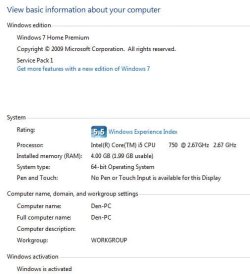
I recently started receiving lowwarnings on memory my Windows 7 64-bit gaming rig. I have 4 GB of RAM installed. I noticed that BIOS is only showing 2 GB of RAM. When I boot into Windows and go to the System screen, it correctly shows 4 GB of RAM installed but reports only 1.99 GB as usable. Until I booted into Windows, I thought maybe I should check and make certain both sticks are seated properly. Now that I see Windows is reporting 4 GB installed, I'm assuming both are fully seated. Short of a bad stick of RAM, or worse yet, a bad memory slot on my motherboard, does anyone have any idea what may cause this?

Thanks.
 

Attachments

  • System.JPG
    System.JPG
    35 KB · Views: 28
  • Resource.JPG
    Resource.JPG
    92.7 KB · Views: 1
Last edited:

My Computer My Computer

Computer type
PC/Desktop
Computer Manufacturer/Model Number
Self-Built Custom Rig
OS
Windows 7 Home Premium 64-bit SP1
CPU
Intel Core i5 750 @ 2.67GHz
Motherboard
EVGA P55 SLI 132-LF-E655-KR
Memory
G.SKILL 4GB (2 x 2GB) 240-Pin DDR3 SDRAM DDR3 1600-PC3 12800
Graphics Card(s)
896MB NVIDIA GeForce GTX 260 SLI
Sound Card
Soundblaster X-Fi XtremeGamer
Monitor(s) Displays
ASUS VW246H
Screen Resolution
1920x1080@60Hz
Hard Drives
119GB ATA OCZ-AGILITY4 SCSI Disk Device (SSD)
59GB ATA OCZ-AGILITY SCSI Disk Device (SSD)
931GB ATA ST31000528AS SCSI Disk Device (SATA)
931GB ATA WDC WD1001FALS-0 SCSI Disk Device (SATA)
PSU
CORSAIR Enthusiast Series TX850 V2 850W
Case
Antec Two Hundred
Cooling
Cooler Master Hyper 212 Plus CPU Cooler & 3 120mm case fans
Keyboard
Logitech G710+
Mouse
Logitech G602
Internet Speed
30Mbps
Antivirus
Norton Security and Backup 2015
Is this the same ram you have always been using?
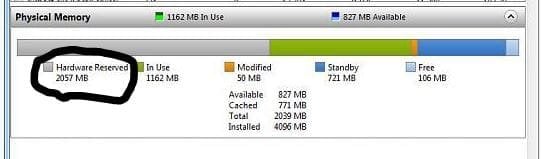
Your hardware (gray) is way to high. Normally it's 100 or less.

This normally means the wrong ram or it's installed incorrectly.

We need you system specs filled in completely.
A couple of tutorial that will help you do that.

By Brink:
http://www.sevenforums.com/tutorials/180324-system-info-see-your-system-specs.html


By Kari:
http://www.sevenforums.com/tutorials/311593-speccy-publish-snapshot-your-system-specs.html

It would also be very helpful to you if you had your motherboard manual.
 

My Computer My Computer

Computer type
PC/Desktop
Computer Manufacturer/Model Number
Home made Desktop
OS
Windows 10 Pro. 64/ version 1709 Windows 7 Pro/64
CPU
Intel i7-6800K @ 4.3
Motherboard
ASUS X-99 Deluxe II
Memory
Corsair Platinum 16 gig @2400
Graphics Card(s)
EVGA GTX 1070 OC
Monitor(s) Displays
Asus 27" LED LCD/VE278Q
Screen Resolution
1920-1080 or 1280-720 HDMI
Hard Drives
INTEL SSD 730-240 Gb Sata 3.0/
PSU
EVGA Platium 1200W
Case
Phanteks Luxe Tempered Glass 8 fans/ one radiator
Cooling
XSPC/ Water Cooled CPU
Keyboard
Das 4 Professional
Mouse
Logitech M705/MX Anywhere 2-S
Internet Speed
100 mbits
Antivirus
Microsoft Security Essentials/ Malwarebytes Premium 3.0/ SAS
Browser
I.E. 11 default/Firefox/ ISP Time Warner Cable/Spectrum
Other Info
LG BluRay Burner/
Sound system-KLipsch-THX/
Icy Dock ssd Hot Swap bays.
Is this the same ram you have always been using?
Your hardware (gray) is way to high. Normally it's 100 or less.

This normally means the wrong ram or it's installed incorrectly.

We need you system specs filled in completely.

It would also be very helpful to you if you had your motherboard manual.

Thank you for your reply.

Yes, this is the RAM that I've used in this system since 2010. It is the correct RAM for my motherboard and they are two identical sticks of G.SKILL memory that were purchased as a set. This issue has only started very recently. I do have my motherboard manual.

You can see the full specs of my rig here:
http://speccy.piriform.com/results/EEozjNLArN1gld8YJtkvekA

Thanks for any assistance anyone may be able to provide.
 

My Computer My Computer

Computer type
PC/Desktop
Computer Manufacturer/Model Number
Self-Built Custom Rig
OS
Windows 7 Home Premium 64-bit SP1
CPU
Intel Core i5 750 @ 2.67GHz
Motherboard
EVGA P55 SLI 132-LF-E655-KR
Memory
G.SKILL 4GB (2 x 2GB) 240-Pin DDR3 SDRAM DDR3 1600-PC3 12800
Graphics Card(s)
896MB NVIDIA GeForce GTX 260 SLI
Sound Card
Soundblaster X-Fi XtremeGamer
Monitor(s) Displays
ASUS VW246H
Screen Resolution
1920x1080@60Hz
Hard Drives
119GB ATA OCZ-AGILITY4 SCSI Disk Device (SSD)
59GB ATA OCZ-AGILITY SCSI Disk Device (SSD)
931GB ATA ST31000528AS SCSI Disk Device (SATA)
931GB ATA WDC WD1001FALS-0 SCSI Disk Device (SATA)
PSU
CORSAIR Enthusiast Series TX850 V2 850W
Case
Antec Two Hundred
Cooling
Cooler Master Hyper 212 Plus CPU Cooler & 3 120mm case fans
Keyboard
Logitech G710+
Mouse
Logitech G602
Internet Speed
30Mbps
Antivirus
Norton Security and Backup 2015
Thanks to anyone that sees this today and feels like piping in.

When I get in from work tonight, or sometime over the weekend, I'm going to start swapping the two sticks of RAM, swapping memory slots, moving to the two unused slots, etc., whatever I can do to try and narrow the issue down to the memory or the slots and to which stick of RAM or which slot.

If anyone has any advice or opinions on the subject, please feel free to pipe in.

Thanks.
 

My Computer My Computer

Computer type
PC/Desktop
Computer Manufacturer/Model Number
Self-Built Custom Rig
OS
Windows 7 Home Premium 64-bit SP1
CPU
Intel Core i5 750 @ 2.67GHz
Motherboard
EVGA P55 SLI 132-LF-E655-KR
Memory
G.SKILL 4GB (2 x 2GB) 240-Pin DDR3 SDRAM DDR3 1600-PC3 12800
Graphics Card(s)
896MB NVIDIA GeForce GTX 260 SLI
Sound Card
Soundblaster X-Fi XtremeGamer
Monitor(s) Displays
ASUS VW246H
Screen Resolution
1920x1080@60Hz
Hard Drives
119GB ATA OCZ-AGILITY4 SCSI Disk Device (SSD)
59GB ATA OCZ-AGILITY SCSI Disk Device (SSD)
931GB ATA ST31000528AS SCSI Disk Device (SATA)
931GB ATA WDC WD1001FALS-0 SCSI Disk Device (SATA)
PSU
CORSAIR Enthusiast Series TX850 V2 850W
Case
Antec Two Hundred
Cooling
Cooler Master Hyper 212 Plus CPU Cooler & 3 120mm case fans
Keyboard
Logitech G710+
Mouse
Logitech G602
Internet Speed
30Mbps
Antivirus
Norton Security and Backup 2015
I looked a Speccy. Some things that need checked.

1. Check and make sure the Windows 7 firewall is not activated (on) if you are using Norton's firewall.

2. Check and make sure Java is up to date.

3. You have several Windows 7 Updates that have failed. I would suggest that you check Windows 7 Updates again and get those failed updates fixed. If you can't get the proper updates please list the ones you are having problems with and any codes you recieve.

4.Do you use Norton Backup or any Norton added tools? (Tune ups, Clean ups, ect.)

5. I noticed you have mismatched video cards. How long has this been this way?

**6. Speccy only sees 2 slots with ram installed.**
Slots 1 & 2 please check your motherboard manual and make sure they are in the propers slots.

**Use page # 13 of your motherboard manual to make sure your ram is in the proper slots.**

http://www.evga.com/support/manuals/files/132-LF-E655.pdf


Could you put in your My System Specs exactly what power supply you are using.

Please post back your findings and things you have done.

I'm going to do some more looking.

P/S: Read the Red letters in my signature.
Other members are alway welcome as far as I'm concerned to join and help.


Feel free to help me help other members
 
Last edited:

My Computer My Computer

Computer type
PC/Desktop
Computer Manufacturer/Model Number
Home made Desktop
OS
Windows 10 Pro. 64/ version 1709 Windows 7 Pro/64
CPU
Intel i7-6800K @ 4.3
Motherboard
ASUS X-99 Deluxe II
Memory
Corsair Platinum 16 gig @2400
Graphics Card(s)
EVGA GTX 1070 OC
Monitor(s) Displays
Asus 27" LED LCD/VE278Q
Screen Resolution
1920-1080 or 1280-720 HDMI
Hard Drives
INTEL SSD 730-240 Gb Sata 3.0/
PSU
EVGA Platium 1200W
Case
Phanteks Luxe Tempered Glass 8 fans/ one radiator
Cooling
XSPC/ Water Cooled CPU
Keyboard
Das 4 Professional
Mouse
Logitech M705/MX Anywhere 2-S
Internet Speed
100 mbits
Antivirus
Microsoft Security Essentials/ Malwarebytes Premium 3.0/ SAS
Browser
I.E. 11 default/Firefox/ ISP Time Warner Cable/Spectrum
Other Info
LG BluRay Burner/
Sound system-KLipsch-THX/
Icy Dock ssd Hot Swap bays.
Layback Bear

1. I'm not sure how this would cause RAM to be unusable but that's a good point. I didn't check that and I need to. I'll do that tonight before I start my troubleshooting.

2. Again, I'm not sure what this has to do with unusable RAM but, yes, my Java is up-to-date, assuming a new version hasn't come out since I went to bed last night.

3. I had some updates that failed, but then went back and reinstalled them later. I last checked Windows Update Wednesday evening and, at that time, I was not showing any available updates.

4. I have Norton Security and Backup 2015 but, no, I do not use the backup or any of their other tools. I only use their anti-virus/anti-malware tools.

5. These aren't identical cards, but close enough to run together with no issues. These cards have ran fine together for the past three years.

6. Speccy is correct, I have four slots on my mobo with only two currently used. I have 2GB DIMMs in slots 1 and 3, just like what is shown in the manual. Even though Windows and Speccy show two slots with RAM installed, BIOS and MemTest86 only show 2048 GB of RAM, not 4096 GB.

I added my ps to my spec info.

I'll check on the Windows Firewall/Norton Firewall issue when I get home and will double-check that Java is up-to-date and make certain that I have all available Windows updates installed. After that, I'll check to make certain the DIMMs are still seated properly. If I don't find anything there or nothing changes I'll start swapping DIMMS and slots and installing one DIMM at a time in order to try and narrow the problem down. I'll post what I find later this evening or tomorrow morning.

Thanks again for the help.

- Byron
 

My Computer My Computer

Computer type
PC/Desktop
Computer Manufacturer/Model Number
Self-Built Custom Rig
OS
Windows 7 Home Premium 64-bit SP1
CPU
Intel Core i5 750 @ 2.67GHz
Motherboard
EVGA P55 SLI 132-LF-E655-KR
Memory
G.SKILL 4GB (2 x 2GB) 240-Pin DDR3 SDRAM DDR3 1600-PC3 12800
Graphics Card(s)
896MB NVIDIA GeForce GTX 260 SLI
Sound Card
Soundblaster X-Fi XtremeGamer
Monitor(s) Displays
ASUS VW246H
Screen Resolution
1920x1080@60Hz
Hard Drives
119GB ATA OCZ-AGILITY4 SCSI Disk Device (SSD)
59GB ATA OCZ-AGILITY SCSI Disk Device (SSD)
931GB ATA ST31000528AS SCSI Disk Device (SATA)
931GB ATA WDC WD1001FALS-0 SCSI Disk Device (SATA)
PSU
CORSAIR Enthusiast Series TX850 V2 850W
Case
Antec Two Hundred
Cooling
Cooler Master Hyper 212 Plus CPU Cooler & 3 120mm case fans
Keyboard
Logitech G710+
Mouse
Logitech G602
Internet Speed
30Mbps
Antivirus
Norton Security and Backup 2015
Windows and speccy see all of your ram, 4gb are present and correct
What im seeing is this

Capture.JPG

Approx 2gb of ram hardware reserved leaving 2 gb for windows to use
I would check bios settings and see if some of your ram has been given to your gfx setup which obviously is not required
 

My Computer My Computer

Computer type
PC/Desktop
Computer Manufacturer/Model Number
Pauly Special
OS
Win7 Ultimate X64
CPU
Intel i5 3570K
Motherboard
Gigabyte Z77X-DS3H
Memory
8GB DDR3 1600
Graphics Card(s)
Onboard
Sound Card
Onboard
Screen Resolution
1280x1024
Hard Drives
Samsung 840 Evo SSD (OS)
1TB Spinner (Data)
PSU
800W Arctic
Case
Cooler Master
Cooling
3x120mm Fans
Keyboard
MS Wireless
Mouse
MS Wireless
Internet Speed
20M
Some times removing the ram and reinstalling it can fix things and it cost nothing to try. Then reboot to let Windows 7 catch up on your change.
You could also try swapping the ram in the ram slots. Once again reboot and check the ram in Resource Monitor.

All those things I asked may or may not have any thing to do with this problem. I never assume their is just one problem is the reason I ask.

The more information other members have the better the advice they can give.
If your video cards have worked for a long time installed the same way they probable are not causing this problem. Until you posted I had no way of knowing how long they were installed.
Remember you are eyes and ears. We only know what you post.
We ask questions so we can know your system the best we can from behind our keyboards.
 

My Computer My Computer

Computer type
PC/Desktop
Computer Manufacturer/Model Number
Home made Desktop
OS
Windows 10 Pro. 64/ version 1709 Windows 7 Pro/64
CPU
Intel i7-6800K @ 4.3
Motherboard
ASUS X-99 Deluxe II
Memory
Corsair Platinum 16 gig @2400
Graphics Card(s)
EVGA GTX 1070 OC
Monitor(s) Displays
Asus 27" LED LCD/VE278Q
Screen Resolution
1920-1080 or 1280-720 HDMI
Hard Drives
INTEL SSD 730-240 Gb Sata 3.0/
PSU
EVGA Platium 1200W
Case
Phanteks Luxe Tempered Glass 8 fans/ one radiator
Cooling
XSPC/ Water Cooled CPU
Keyboard
Das 4 Professional
Mouse
Logitech M705/MX Anywhere 2-S
Internet Speed
100 mbits
Antivirus
Microsoft Security Essentials/ Malwarebytes Premium 3.0/ SAS
Browser
I.E. 11 default/Firefox/ ISP Time Warner Cable/Spectrum
Other Info
LG BluRay Burner/
Sound system-KLipsch-THX/
Icy Dock ssd Hot Swap bays.
Windows and speccy see all of your ram, 4gb are present and correct
What im seeing is this

View attachment 347346

Approx 2gb of ram hardware reserved leaving 2 gb for windows to use
I would check bios settings and see if some of your ram has been given to your gfx setup which obviously is not required

Thank you for dropping by Paul.

That is also what I'm concerned with. Most of the time that is caused by wrong ram or ram setting and or ram being installed incorrectly. Jared loose ram or dirty ram slots can also cause that problem. I have even had cpu coolers tighten to much causing the problem. My belief it was distorting the motherboard therefore distorting the ram slots. It happened to me on my Asus P6X58D-E. Backed off the screws on the cpu cooler and the ram fell right in place.
I even had a damn spider make a house around my ram and caused all kinds of problems with reading all my ram.
Evacuated the spider and her house and the problem was solved.

@ bfollowell
Have you been adjusting how your ram is to be used? Using the bios, Windows 7 or a 3rd party program.
 

My Computer My Computer

Computer type
PC/Desktop
Computer Manufacturer/Model Number
Home made Desktop
OS
Windows 10 Pro. 64/ version 1709 Windows 7 Pro/64
CPU
Intel i7-6800K @ 4.3
Motherboard
ASUS X-99 Deluxe II
Memory
Corsair Platinum 16 gig @2400
Graphics Card(s)
EVGA GTX 1070 OC
Monitor(s) Displays
Asus 27" LED LCD/VE278Q
Screen Resolution
1920-1080 or 1280-720 HDMI
Hard Drives
INTEL SSD 730-240 Gb Sata 3.0/
PSU
EVGA Platium 1200W
Case
Phanteks Luxe Tempered Glass 8 fans/ one radiator
Cooling
XSPC/ Water Cooled CPU
Keyboard
Das 4 Professional
Mouse
Logitech M705/MX Anywhere 2-S
Internet Speed
100 mbits
Antivirus
Microsoft Security Essentials/ Malwarebytes Premium 3.0/ SAS
Browser
I.E. 11 default/Firefox/ ISP Time Warner Cable/Spectrum
Other Info
LG BluRay Burner/
Sound system-KLipsch-THX/
Icy Dock ssd Hot Swap bays.
I think that hardware reserved comment is pretty strange too. I've never ran into that before. And to answer your questions, no, I haven't changed anything whatsoever in BIOS related to memory. I did, just in that past week or so, format my hard drive so I could reinstall/refresh Windows. The only change I made in BIOS was to change boot priority so that I could boot off of my Windows 7 boot flashdrive. I won't rule anything out but I haven't intentionally changed anything in BIOS, other than the aforementioned boot priority setting, in years. The memory issue had started popping up a week or two before I formatted/reinstalled though.

My wife and I did move into our recently completed new home though. Moved in on December 10 actually. It was two or three weeks after that that this issue first arose. It could be that in all the moving and shuffling, one of the DIMMs got shaken slightly loose and it just took a while to manifest itself.

Hopefully, I'll find that it's something simple like this and I'll get it corrected quickly. I'll post later this evening, after I have a chance to check out my DIMMs.

- Byron
 

My Computer My Computer

Computer type
PC/Desktop
Computer Manufacturer/Model Number
Self-Built Custom Rig
OS
Windows 7 Home Premium 64-bit SP1
CPU
Intel Core i5 750 @ 2.67GHz
Motherboard
EVGA P55 SLI 132-LF-E655-KR
Memory
G.SKILL 4GB (2 x 2GB) 240-Pin DDR3 SDRAM DDR3 1600-PC3 12800
Graphics Card(s)
896MB NVIDIA GeForce GTX 260 SLI
Sound Card
Soundblaster X-Fi XtremeGamer
Monitor(s) Displays
ASUS VW246H
Screen Resolution
1920x1080@60Hz
Hard Drives
119GB ATA OCZ-AGILITY4 SCSI Disk Device (SSD)
59GB ATA OCZ-AGILITY SCSI Disk Device (SSD)
931GB ATA ST31000528AS SCSI Disk Device (SATA)
931GB ATA WDC WD1001FALS-0 SCSI Disk Device (SATA)
PSU
CORSAIR Enthusiast Series TX850 V2 850W
Case
Antec Two Hundred
Cooling
Cooler Master Hyper 212 Plus CPU Cooler & 3 120mm case fans
Keyboard
Logitech G710+
Mouse
Logitech G602
Internet Speed
30Mbps
Antivirus
Norton Security and Backup 2015
It can be that simple. Ram being jarred in transport.
I just helped another member with ram problems. In post #5 I recommend removing and installing ram again and in post # 14 he/she tried my recommendation and it worked. It's not always that easy but who know you might get lucky.
Good luck and keep us informed.
 

My Computer My Computer

Computer type
PC/Desktop
Computer Manufacturer/Model Number
Home made Desktop
OS
Windows 10 Pro. 64/ version 1709 Windows 7 Pro/64
CPU
Intel i7-6800K @ 4.3
Motherboard
ASUS X-99 Deluxe II
Memory
Corsair Platinum 16 gig @2400
Graphics Card(s)
EVGA GTX 1070 OC
Monitor(s) Displays
Asus 27" LED LCD/VE278Q
Screen Resolution
1920-1080 or 1280-720 HDMI
Hard Drives
INTEL SSD 730-240 Gb Sata 3.0/
PSU
EVGA Platium 1200W
Case
Phanteks Luxe Tempered Glass 8 fans/ one radiator
Cooling
XSPC/ Water Cooled CPU
Keyboard
Das 4 Professional
Mouse
Logitech M705/MX Anywhere 2-S
Internet Speed
100 mbits
Antivirus
Microsoft Security Essentials/ Malwarebytes Premium 3.0/ SAS
Browser
I.E. 11 default/Firefox/ ISP Time Warner Cable/Spectrum
Other Info
LG BluRay Burner/
Sound system-KLipsch-THX/
Icy Dock ssd Hot Swap bays.
Now I feel really stupid. I always look for the hardest fix first. I'm the kind of guy that, when I flip a light switch and am surprised to find a dark room, I go grab my meter and start checking the wiring, never thinking to check the light bulb! Maybe it comes from 22 years as a maintenance guy.

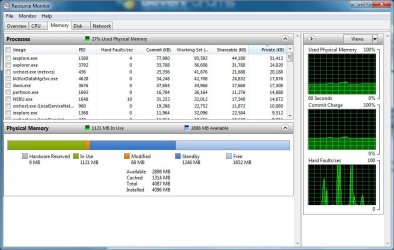
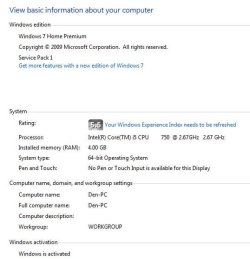
Once I got home from closing on our new house, the first thing I did was open my computer and check out the DIMMs. Nothing looked amiss. The DIMMs seemed to be seated perfectly. Still, I went ahead and unlatched them, pulled them out and gave them a quick look, then reinstalled them, making certain they were seated and latched really well. I knew after checking in BIOS and seeing 4088 MB that everything was good. Once getting into Windows, System shows 4 GB install and makes no mention of only a portion being usable. Resource Monitor only shows 9 MB as hardware reserved.

Thanks for all of the advice, especially the advice to look at the simple things first. Reputation boosts all around.

- Byron
 

Attachments

  • Capture1.JPG
    Capture1.JPG
    94.1 KB · Views: 0
  • Capture2.JPG
    Capture2.JPG
    35.7 KB · Views: 9

My Computer My Computer

Computer type
PC/Desktop
Computer Manufacturer/Model Number
Self-Built Custom Rig
OS
Windows 7 Home Premium 64-bit SP1
CPU
Intel Core i5 750 @ 2.67GHz
Motherboard
EVGA P55 SLI 132-LF-E655-KR
Memory
G.SKILL 4GB (2 x 2GB) 240-Pin DDR3 SDRAM DDR3 1600-PC3 12800
Graphics Card(s)
896MB NVIDIA GeForce GTX 260 SLI
Sound Card
Soundblaster X-Fi XtremeGamer
Monitor(s) Displays
ASUS VW246H
Screen Resolution
1920x1080@60Hz
Hard Drives
119GB ATA OCZ-AGILITY4 SCSI Disk Device (SSD)
59GB ATA OCZ-AGILITY SCSI Disk Device (SSD)
931GB ATA ST31000528AS SCSI Disk Device (SATA)
931GB ATA WDC WD1001FALS-0 SCSI Disk Device (SATA)
PSU
CORSAIR Enthusiast Series TX850 V2 850W
Case
Antec Two Hundred
Cooling
Cooler Master Hyper 212 Plus CPU Cooler & 3 120mm case fans
Keyboard
Logitech G710+
Mouse
Logitech G602
Internet Speed
30Mbps
Antivirus
Norton Security and Backup 2015
Well now that is the way memory should look.
Glad things are working now.

Happy computing.
 

My Computer My Computer

Computer type
PC/Desktop
Computer Manufacturer/Model Number
Home made Desktop
OS
Windows 10 Pro. 64/ version 1709 Windows 7 Pro/64
CPU
Intel i7-6800K @ 4.3
Motherboard
ASUS X-99 Deluxe II
Memory
Corsair Platinum 16 gig @2400
Graphics Card(s)
EVGA GTX 1070 OC
Monitor(s) Displays
Asus 27" LED LCD/VE278Q
Screen Resolution
1920-1080 or 1280-720 HDMI
Hard Drives
INTEL SSD 730-240 Gb Sata 3.0/
PSU
EVGA Platium 1200W
Case
Phanteks Luxe Tempered Glass 8 fans/ one radiator
Cooling
XSPC/ Water Cooled CPU
Keyboard
Das 4 Professional
Mouse
Logitech M705/MX Anywhere 2-S
Internet Speed
100 mbits
Antivirus
Microsoft Security Essentials/ Malwarebytes Premium 3.0/ SAS
Browser
I.E. 11 default/Firefox/ ISP Time Warner Cable/Spectrum
Other Info
LG BluRay Burner/
Sound system-KLipsch-THX/
Icy Dock ssd Hot Swap bays.
Back
Top