JavaScript is disabled. For a better experience, please enable JavaScript in your browser before proceeding.
You are using an out of date browser. It may not display this or other websites correctly.
You should upgrade or use an
alternative browser .
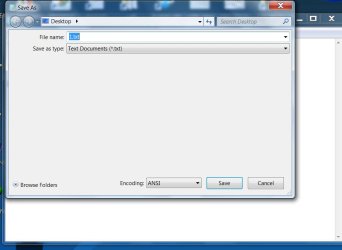
Solved What's happened here - see pic.
Notepad > When I click on the "save as" pop up box has changed format. I hate it. How do I get back to 'normal'?
Note the menu showing all possible save location is missing e.g. My Docs Pictures Cdrive e drive usb flash
all gone.
Computer type PC/Desktop Computer Manufacturer/Model Number Generic - custom build OS Microsoft Windows 7 HomePremium 64-bit 7601 Multiprocessor Free Service Pack 1 CPU Intel(R) Core(TM)2 Duo CPU E4500 @ 2.20GHz Motherboard Gigabyte Technology Co., Ltd. EP35-DS3P Memory 8Gb Graphics Card(s) NVIDIA GeForce GT 710 Sound Card (1) USB Audio Device (2) USB Audio Device (3) NVIDIA Hig Monitor(s) Displays older 21" thinkvision brand? Screen Resolution 1680 x 1050 Hard Drives WDC WD5000AAKS-22A7B0 ATA Device PSU ANTEC NEO ECO 520W Case generic tower Cooling couple of 4" fans Keyboard logitech k220 Mouse logitech 305 Antivirus malwarebytes premium Browser FireFox + opera
New member
Guru
Gold Member
VIP
Click on "Browse Folders"
Computer type PC/Desktop Computer Manufacturer/Model Number Alienware Aurora ALX R4 OS Windows 10 Pro (x64) CPU Intel Core i7-3930K (3.2GHz - 4.5GHz) Motherboard Alienware Aurora-R4 x79 Memory 4x Samsung 4GB PC3-12800 DDR3 (16GB 1600MHz) Graphics Card(s) Nvidia Geforce GTX 690 Sound Card SteelSeries Siberia Elite Monitor(s) Displays Dell UltraSharp U3011 Screen Resolution 2560x1600 Hard Drives Samsung 850 Pro 256 GB, Seagate 1TB Desktop Hybrid HDD, 2x Western Digital 4TB Green HDD PSU 875W Some Dell PSU <.< Case Alienware Aurora ALX Cooling Custom Liquid Cooling (EK CPU & GPU blocks) dual EK 480RAD Keyboard Logitech G710+ Mechanical Mouse Logitech G700s Internet Speed Verizon Fios (50 mbps average) Other Info Server: Intel NUC D54250WYK: i5-4250U, 16GB, 256 GB mSATA, Windows Server 2012 R2
An Angry Old Man
Guru
VIP
SF Team
You have accidentally moved the separator line between the
File name / Save As field and
Folder view field to its top most position, causing the
File name / Save As field to hide and cover the
Folder view field. Clicking
Browse Folders does not fix it.
See the screenshot for how to fix it:
Kari
Last edited: Jan 23, 2014
Computer type Laptop Computer Manufacturer/Model Number HP ENVY 17-1150eg OS Windows 10 Pro x64 EN-GB CPU 1.6 GHz Intel Core i7-720QM Processor Memory 6 GB Graphics Card(s) ATI Mobility Radeon HD 5850 Graphics Sound Card Beats sound system with integrated subwoofer Monitor(s) Displays 17" laptop display, 22" LED and 32" Full HD TV through HDMI Screen Resolution 1600*900 (1), 1920*1080 (2&3) Hard Drives Internal: 2 x 500 GB SATA Hard Disk Drive 7200 rpm Cooling As Envy runs a bit warm, I have it on a Cooler Master pad Keyboard Logitech diNovo Media Desktop Laser (bluetooth) Mouse Logitech Performance Mouse MX Internet Speed 50/10 Mbps VDSL Antivirus Windows Defender 4.3.9431.0 Browser Maxthon 3.5.2., IE11
New member
Member
VIP
Thread Starter
Computer type PC/Desktop Computer Manufacturer/Model Number Generic - custom build OS Microsoft Windows 7 HomePremium 64-bit 7601 Multiprocessor Free Service Pack 1 CPU Intel(R) Core(TM)2 Duo CPU E4500 @ 2.20GHz Motherboard Gigabyte Technology Co., Ltd. EP35-DS3P Memory 8Gb Graphics Card(s) NVIDIA GeForce GT 710 Sound Card (1) USB Audio Device (2) USB Audio Device (3) NVIDIA Hig Monitor(s) Displays older 21" thinkvision brand? Screen Resolution 1680 x 1050 Hard Drives WDC WD5000AAKS-22A7B0 ATA Device PSU ANTEC NEO ECO 520W Case generic tower Cooling couple of 4" fans Keyboard logitech k220 Mouse logitech 305 Antivirus malwarebytes premium Browser FireFox + opera