Whats slowing up my startup? Event Viewer shows lots of problems!

Hi Maxie.

Not any luck I'm sorry to say, I must be doing something wrong entering in:

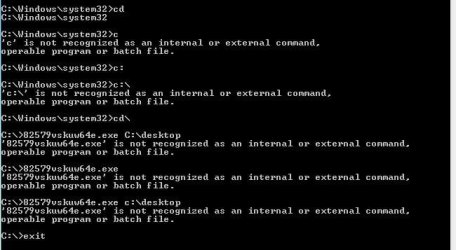
C:\ 82579vskuw64e.exe C:\ desktop
See screenshot below.
dos box 82579.JPG

What am I doing wrong?

Thanks
Alan.
Have to continue this tomorrow now.
 

My Computer My Computer

At a glance

Windows 7 Professional 64biti5-2500K 3.30Hz 6MB Cache16GB DDR3ASUSGeforce GTX1050Ti 4GB
Computer type
PC/Desktop
Computer Manufacturer/Model Number
Home Build
OS
Windows 7 Professional 64bit
CPU
i5-2500K 3.30Hz 6MB Cache
Motherboard
ASUS P8P67 Pro B3 Revision
Memory
16GB DDR3
Graphics Card(s)
ASUSGeforce GTX1050Ti 4GB
Sound Card
On-Board
Monitor(s) Displays
LG23MP65HQ-P
Hard Drives
WD Caviar Green 500gb
Maxtor 300gb
WD External USB 120gb
WD My Passport USB 2TB
LUX3 External USB 1TB
PSU
Corsair 800W
Case
Antec
Cooling
Arctic 13 Cooler
Antivirus
Bitdefender Total Security 2017
Browser
FireFox
To be honest Alan i do not know .. You seem to have run it any how when your screen flashed .. I searched the Intel Website and found the same Driver as you did that was the Latest Version .. Installing a Driver i dont think will help .. The problem seems to be when you Computer boots it is looking to load the Intel Earthnet Adapter which you do not use ...
 

My Computer My Computer

At a glance

windows 7 home 64bitINTEL-CORE I716GB
Computer Manufacturer/Model Number
W530-3630QM1
OS
windows 7 home 64bit
CPU
INTEL-CORE I7
Memory
16GB
Hard Drives
750GB
Browser
Chrome

My Computer My Computer

At a glance

windows 7 home 64bitINTEL-CORE I716GB
Computer Manufacturer/Model Number
W530-3630QM1
OS
windows 7 home 64bit
CPU
INTEL-CORE I7
Memory
16GB
Hard Drives
750GB
Browser
Chrome
Hi Trapper,

I've been reading what you gave me and now I'm catching up to what you and maxie have been doing.

I'm nt sure why you're running things in Command (other than things specified to be run in Command).... but we can straighten that out.

I'm downloading the driver now so I can compare what you said to what I see. I apologize... I should have given you guidance on which link to download - it's all the same payload, the method differs. I tend to stay away from Download Managers on any site - it's just not necessary. No harm, no foul though - you have the driver.

I did not see any mention of the Intel NVM update utility - I'll catch up some more and post what I think you need to finish. There might be more work after, but let's slow down for a minute and catch our breath.

Bill
.
 

My Computer My Computer

At a glance

x64 (6.3.9600) Win8.1 Pro & soon dual boot x6...AMD A6-3420M APU with Radeon(tm) HD Graphics6.00 GBAMD Radeon(TM) HD 6520G
Computer type
Laptop
Computer Manufacturer/Model Number
HP Pavilion dv6-6c10us
OS
x64 (6.3.9600) Win8.1 Pro & soon dual boot x64 (6.1.7601) Win7_SP1 HomePrem
CPU
AMD A6-3420M APU with Radeon(tm) HD Graphics
Motherboard
Hewlett-Packard 1805
Memory
6.00 GB
Graphics Card(s)
AMD Radeon(TM) HD 6520G
Sound Card
(1) AMD High Definition Audio Device (2) IDT High Definiti
Monitor(s) Displays
HP W2072a 20" LCD (1600 x 900) @ 60 Hz
Screen Resolution
1366 x 768 x 32 bits (4294967296 colors) @ 60 Hz
Hard Drives
ST640LM0 00 HM641JI SATA Disk Device
Keyboard
Logitech k520 wireless KB
Mouse
Logitech m320 wireless mouse (bundled with KB)
Internet Speed
15/5 | 54 MB Wireless 'n'
Antivirus
Realtime: Defender or Avast | On-demand: Malwarebytes, ESET
Browser
IE 11 on Win8, IE 10 on win 7
Other Info
Media: [Gimp, Audacity, VLC] || Comm: [WEmail 2012, Skype] || Productivity: [OpenOffice,| Textpad] || Utils: [Sysinternals, cCleaner, Speccy, Defraggler]
I think to sort this through, a recap is in order

The issue: Slow startup & Errors/Warnings in the event log
Maxie suggested uninstalling Bonjour & Apple Product Updater
-> You disabled the Bonjour Service, saw no change so you re-enabled it
:note: You can safely uninstall both - please do

You noted that reading through some event logs that Computer Browser depends on the Server Service which failed to start due to a dependency service failure to start. You changed some service (not sure which) from manual to automatic start, rebooted and saw fewer errors in event logs. The slow startup issue was still present.
:note: Are the Computer Browser and Server services running now? If not, look at the Server service - > Dependencies tab and see which component is failing. Post a screenshot of the Server service - > Dependencies tab


Maxie suggested a MS Fixit for WMI 10, but redirected you to msconfig to disable Adobe Arm.
:warn: No mention of msconfig startup changes

You couldn't find the MS Fixit and found a 82579v driver using the free Driver Genius. When you tried to install the driver, it said you had to uninstall the previous version of the driver.
:note: Never use 3rd party drivers - ALWAYS get a driver from the OEM site! No harm, no foul as you did not install that driver.

Maxie confirmed that it was not a good driver and pointed you to the Mobo's website.


I suggested that you create system image. then I wanted to see if IPv4 or IPv6 took precedence on your machine. I asked for the event logs under performance. I suggested the clean startup tutorial and provided a link to the WMI 10 MS Fixit. I asked for an ipconfig /all, requested the current version of the installed driver, and I provided a link to the Asus download for the 82579v driver noting the additional download stated on the Asus download reference.
:note: You had an image, but would create a fresh one. Your system prefers IPv4 and does not support IPv6. There were 17 pages of Event log entries (errors / warnings) posted later. WMI 10 MS Fixit will run later. ipconfig output posted. Current driver version is 11.8.74.0. You noted that Bitdefender was flagged as a slow startup item in the logs - this is fairly common with AV apps (27 seconds does seem long though - perhaps a configuration change might speed it up - not sure... back burner for now). You waited for a response on your feedback before downloading the Asus driver. You also noted that you recalled previously having both IPv4 & IPv6
:warn: No mention of following the tutorial: Troubleshoot Application Conflicts by Performing a Clean Startup. This addresses the issue directly and needs to be completed.
:warn: The WMI 10 MS Fixit is not critical, but I'd like you to run it so that I can check it as done - thanks.

Maxie confirmed the Asus driver as a good choice and suggested removing Bitdefender from your startup.
:warn: No mention of msconfig startup changes

I reviewed what you posted, commented and had more to read. I suggested the SevenForums Diagnostic tool and the System File Checker to help this side of your monitor see what you see and to verify the system files.
:warn: No mention of the SevenForums Diagnostic tool and no output to read


PBCopter confirmed that the e1cexpress error was a timeout issue and suggested a workaround.

You posted the 17 pages of event logs from performance.


This is where things get a bit off track.

I'm not sure why you were in Command Prompt. Could you point me to the place where you were told to launch a Command? I know that the SFC tutorial needs an elevated Command, but do any other instructions (driver, NVM utility) require a Command prompt?

You chose to use the Global (DLM) link on Asus to download the driver. I'm not familiar with how that's all tied together and I should have pointed you to the Global (without DLM) download link. I think it would be easier if you download the driver again using the Global link (middle one).
:warn: Download the NVM utility first and run it. It might not have any work to do, but you won't know that until you run it.
:warn: Then install the 82579v driver second


maxie pointed you to the SFC tutorial again

You were still working in Command prompt trying to install the driver and having some difficulty. You asked about SFC (scan or verify). You also commented on the status of the Ethernet connection - it is marked unplugged.
:note: No mention if you applied PBCopter's configuration change - please do make the change.
:warn: This throws a stumble onto the path we were on, doesn't it! The device is not being used, yet it migh still contribute to the slow startup.

maxie suggested placing 82579vskuw64e.exe on your desktop for easy access. And confirmed the scan function of SFC.

You ran SFC with /verifyonly which returned Windows Resource Protection did not find any integrity violations. You had more questions about Command prompt. This is some fairly technical stuff we're asking you to do, don't worry if you have questions.


maxie 'explained' the arrows, but I'm not sure that helped :). then he asked if your internet connection was secure or not.

maxie suggested that a hardwired connection might solve the issue.

you were still having Command difficulties. You seemed to be stuck on running things in Command - try this: Forget about Command Prompt unless explicitly instructed to launch one.

maxie shrugged

maxie requested a speedtest and reiterated that you might get better throughput using a hardwired connection.


I played catchup which prompted this recap. I will post a todo lit next, then I'll go back to reading the performance logs.

You can work off the todo list in my next post - this is just a recap.

Bill
.

 

My Computer My Computer

At a glance

x64 (6.3.9600) Win8.1 Pro & soon dual boot x6...AMD A6-3420M APU with Radeon(tm) HD Graphics6.00 GBAMD Radeon(TM) HD 6520G
Computer type
Laptop
Computer Manufacturer/Model Number
HP Pavilion dv6-6c10us
OS
x64 (6.3.9600) Win8.1 Pro & soon dual boot x64 (6.1.7601) Win7_SP1 HomePrem
CPU
AMD A6-3420M APU with Radeon(tm) HD Graphics
Motherboard
Hewlett-Packard 1805
Memory
6.00 GB
Graphics Card(s)
AMD Radeon(TM) HD 6520G
Sound Card
(1) AMD High Definition Audio Device (2) IDT High Definiti
Monitor(s) Displays
HP W2072a 20" LCD (1600 x 900) @ 60 Hz
Screen Resolution
1366 x 768 x 32 bits (4294967296 colors) @ 60 Hz
Hard Drives
ST640LM0 00 HM641JI SATA Disk Device
Keyboard
Logitech k520 wireless KB
Mouse
Logitech m320 wireless mouse (bundled with KB)
Internet Speed
15/5 | 54 MB Wireless 'n'
Antivirus
Realtime: Defender or Avast | On-demand: Malwarebytes, ESET
Browser
IE 11 on Win8, IE 10 on win 7
Other Info
Media: [Gimp, Audacity, VLC] || Comm: [WEmail 2012, Skype] || Productivity: [OpenOffice,| Textpad] || Utils: [Sysinternals, cCleaner, Speccy, Defraggler]
Follow this list one by one and see if your startup time improves. do each one in order (easiest first). Some might not affect the issue at all (WMI 10 error) and I'll note that.

As you go though the list, please inform me that it was completed - and the status. If at any time, there is an error reported, STOP and ask BEFORE continuing. If at any time the startup time improves, STOP and we can work from that point forward.

There are some tasks that should be done even if you stop before then - this is more housekeeping than and absolute requirement.

Todo
  • Purchase an Ethernet cable and connect your machine to your router or cable modem. check your documentation - I'll see what I can find.
  • Make sure Computer Browser and Server services are running.
  • Fix WMI error 10 MS Fixit 50688 - scroll down on the MS Fixit page and click the Microsoft Fix it button. This is not related to the issue, run it and go on to the next item in the list.
  • Change the adapter setting Wait for link to ON (per PBCopter)
    • Network and Sharing center -> Change adapter settings
    • Right click on your Intel 82579V Network adapter
    • Select Properties
    • Press the Configure button
    • Navigate to the Advanced tab
    • Scroll down the Property list (alphabetical) to
    • Wait for link
    • Change the value to ON
    • Restart your machine
  • Follow this tutorial: SF Diagnostic Tool - Using for Troubleshooting. Output = SF_DD_MM_YYYY.zip
  • Follow this tutorial: Troubleshoot Application Conflicts by Performing a Clean Startup
  • Download and install NVM Update Utility for Intel 82579V Gigabit Ethernet PHY Network Connection BEFORE you update the driver.
  • Asus download (use the Global link, NOT the Global (DLM) link:
    Intel LAN Driver V17.3.0.0 for Windows XP / Windows 7 / Win8 (WHQL) x86 & x64
    • In a Windows Explorer, Dbl click on the zip file and extract the folder inside.
    • The extracted folder should be the one in focus.
    • Dbl click on the AsusSetup application and follow the instructions.
    • Post a screenshot of the driver in Dev Mgr showing the version has been updated to 17.3.0.0
    • Restart your machine
  • Houskeeping todos
    • Uninstall Bonjour and Apple Product update
Take your time and please don't look elsewhere for solutions - your feedback has been very helpful and sometimes it has been an epiphany. I'm only trying to keep us both on one path. If we get to the end and there still isn't a resolution, I'll let you know that I've exhausted my resources.

Bill
.
 

My Computer My Computer

At a glance

x64 (6.3.9600) Win8.1 Pro & soon dual boot x6...AMD A6-3420M APU with Radeon(tm) HD Graphics6.00 GBAMD Radeon(TM) HD 6520G
Computer type
Laptop
Computer Manufacturer/Model Number
HP Pavilion dv6-6c10us
OS
x64 (6.3.9600) Win8.1 Pro & soon dual boot x64 (6.1.7601) Win7_SP1 HomePrem
CPU
AMD A6-3420M APU with Radeon(tm) HD Graphics
Motherboard
Hewlett-Packard 1805
Memory
6.00 GB
Graphics Card(s)
AMD Radeon(TM) HD 6520G
Sound Card
(1) AMD High Definition Audio Device (2) IDT High Definiti
Monitor(s) Displays
HP W2072a 20" LCD (1600 x 900) @ 60 Hz
Screen Resolution
1366 x 768 x 32 bits (4294967296 colors) @ 60 Hz
Hard Drives
ST640LM0 00 HM641JI SATA Disk Device
Keyboard
Logitech k520 wireless KB
Mouse
Logitech m320 wireless mouse (bundled with KB)
Internet Speed
15/5 | 54 MB Wireless 'n'
Antivirus
Realtime: Defender or Avast | On-demand: Malwarebytes, ESET
Browser
IE 11 on Win8, IE 10 on win 7
Other Info
Media: [Gimp, Audacity, VLC] || Comm: [WEmail 2012, Skype] || Productivity: [OpenOffice,| Textpad] || Utils: [Sysinternals, cCleaner, Speccy, Defraggler]
Hi Bill.
Thank you for your very complete reply, I will read through this once I have printed it out.

Just to clarify a question over my use of command prompt. I understood this was required as in the 825759VSKU.exe link it stated:

Quote:
82579VSKU.exe Version 1.2.2

Tool to update the NVRAM for the Intel® 82579V Gigabit Ethernet PHY
Copyright (C) 2012 Intel Corporation

Three tools are included, to support three different operation systems (Windows 32 bit; Windows 64 bit; DOS).

Steps to run the update tool:

1. Download the utility from the Intel download center
2. Select the correct tool file name based on the operating system installed
3. Open a command prompt window with administrator privileges
4. Run the executable file from the common prompt
5. The NVM image will be updated. Reboot the computer for best results.
Unquote.

I will try again as per your notes below.


Asking questions is not a problem, its understanding the replies that’s the problem! There are so many
abbreviations used I find it difficult to grasp. Check your NIC properties, err I do not know what NIC
stands for so checking its properties is a task in itself! Likewise I not understand DLM stood for
DownLoad manager, as I just picked the first one in line. Anyway I will persevere.

I cannot thank you enough for your help.

Alan.

--------------------------------------------------------------------------------------------------
Follow this list one by one and see if your startup time improves. do each one in order (easiest first). Some might not affect the issue at all (WMI 10 error) and I'll note that.

As you go though the list, please inform me that it was completed - and the status. If at any time, there is an error reported, STOP and ask BEFORE continuing. If at any time the startup time improves, STOP and we can work from that point forward.

There are some tasks that should be done even if you stop before then - this is more housekeeping than and absolute requirement.

Todo
  • Purchase an Ethernet cable and connect your machine to your router or cable modem. check your documentation - I'll see what I can find.
  • Reply. My BT Hub is on a lower floor, plugged into an Open Reach socket, the PC is ‘sort of’ built in to my desk here in the loft (Converted to a male domain) so attaching a cable would be a major operation. Or I would need to get a cable made up to do this
  • Make sure Computer Browser and Server services are running.
  • Reply. Not sure what you mean here, please advise where I can check these. Or is this correct;
    • For the services, if you open the Start Menu and type Services into the Search programs and files, you will get a few options.
    • Right click on the option with gears as the icon and Run as administrator.
    • [FONT=&quot]
      [/FONT]
  • Fix WMI error 10 MS Fixit 50688 - scroll down on the MS Fixit page and click the Microsoft Fix it button. This is not related to the issue, run it and go on to the next item in the list.
  • Reply. I ran this last night so hopefully that is one out of the way!
  • These are my next jobs
  • Change the adapter setting Wait for link to ON (per PBCopter)
    • Network and Sharing center -> Change adapter settings
    • Right click on your Intel 82579V Network adapter
    • Select Properties
    • Press the Configure button
    • Navigate to the Advanced tab
    • Scroll down the Property list (alphabetical) to
    • Wait for link
    • Change the value to ON
    • Restart your machine
  • Follow this tutorial: SF Diagnostic Tool - Using for Troubleshooting. Output = SF_DD_MM_YYYY.zip
  • Follow this tutorial: Troubleshoot Application Conflicts by Performing a Clean Startup
  • Download and install NVM Update Utility for Intel 82579V Gigabit Ethernet PHY Network Connection BEFORE you update the driver.
    • Launch an Elevated Command Prompt
    • cd C:\<folder name where you downloaded the NVM util>\Win64e
    • Then type
      • 82579VSKUW64e
    • read any msgs - post any errors. As I originally stated, this might not have any work to do, but the Asus download page made a strict reference.
    • then you can type
      • exit
  • Asus download (use the Global link, NOT the Global (DLM) link:
    Intel LAN Driver V17.3.0.0 for Windows XP / Windows 7 / Win8 (WHQL) x86 & x64
    • In a Windows Explorer, Dbl click on the zip file and extract the folder inside.
    • The extracted folder should be the one in focus.
    • Dbl click on the AsusSetup application and follow the instructions.
    • Post a screenshot of the driver in Dev Mgr showing the version has been updated to 17.3.0.0
    • Restart your machine
  • Houskeeping todos
    • Uninstall Bonjour and Apple Product update
Take your time and please don't look elsewhere for solutions - your feedback has been very helpful and sometimes it has been an epiphany. I'm only trying to keep us both on one path. If we get to the end and there still isn't a resolution, I'll let you know that I've exhausted my resources.

Bill
 

My Computer My Computer

At a glance

Windows 7 Professional 64biti5-2500K 3.30Hz 6MB Cache16GB DDR3ASUSGeforce GTX1050Ti 4GB
Computer type
PC/Desktop
Computer Manufacturer/Model Number
Home Build
OS
Windows 7 Professional 64bit
CPU
i5-2500K 3.30Hz 6MB Cache
Motherboard
ASUS P8P67 Pro B3 Revision
Memory
16GB DDR3
Graphics Card(s)
ASUSGeforce GTX1050Ti 4GB
Sound Card
On-Board
Monitor(s) Displays
LG23MP65HQ-P
Hard Drives
WD Caviar Green 500gb
Maxtor 300gb
WD External USB 120gb
WD My Passport USB 2TB
LUX3 External USB 1TB
PSU
Corsair 800W
Case
Antec
Cooling
Arctic 13 Cooler
Antivirus
Bitdefender Total Security 2017
Browser
FireFox
Hi Maxie.
The results of the speed test were:
Download Test 1 27.61Mbps Test 2 29.59Mbps
Upload Test 1 8.79Mbps Test 2 8.82Mpbs

Hope that's okay for fibre optic Broad band.
 

My Computer My Computer

At a glance

Windows 7 Professional 64biti5-2500K 3.30Hz 6MB Cache16GB DDR3ASUSGeforce GTX1050Ti 4GB
Computer type
PC/Desktop
Computer Manufacturer/Model Number
Home Build
OS
Windows 7 Professional 64bit
CPU
i5-2500K 3.30Hz 6MB Cache
Motherboard
ASUS P8P67 Pro B3 Revision
Memory
16GB DDR3
Graphics Card(s)
ASUSGeforce GTX1050Ti 4GB
Sound Card
On-Board
Monitor(s) Displays
LG23MP65HQ-P
Hard Drives
WD Caviar Green 500gb
Maxtor 300gb
WD External USB 120gb
WD My Passport USB 2TB
LUX3 External USB 1TB
PSU
Corsair 800W
Case
Antec
Cooling
Arctic 13 Cooler
Antivirus
Bitdefender Total Security 2017
Browser
FireFox
Hi there Alan .. Your speeds are quite good ... Who is your Internet Service Provider and do you know what package you are on ? More than likely you would have better speeds with the Lan connection .. Bill has given you plenty to work through please report back with your findings ..
 

My Computer My Computer

At a glance

windows 7 home 64bitINTEL-CORE I716GB
Computer Manufacturer/Model Number
W530-3630QM1
OS
windows 7 home 64bit
CPU
INTEL-CORE I7
Memory
16GB
Hard Drives
750GB
Browser
Chrome
Hi Maxie.

I am with BT fibre optic BB option 1 I think! I get 40GB download.

Yip, Bill has given me a few tasks to keep me out of mischief!

Hi Bill.

Completed the SF Diagnostic task, results as below. Happy reading:rolleyes:

View attachment SF_20-02-2014.zip

Now on to troubleshooting app conflicts by performing a clean startup.
(after a caffeine fix!)

Regards
Alan.
 

My Computer My Computer

At a glance

Windows 7 Professional 64biti5-2500K 3.30Hz 6MB Cache16GB DDR3ASUSGeforce GTX1050Ti 4GB
Computer type
PC/Desktop
Computer Manufacturer/Model Number
Home Build
OS
Windows 7 Professional 64bit
CPU
i5-2500K 3.30Hz 6MB Cache
Motherboard
ASUS P8P67 Pro B3 Revision
Memory
16GB DDR3
Graphics Card(s)
ASUSGeforce GTX1050Ti 4GB
Sound Card
On-Board
Monitor(s) Displays
LG23MP65HQ-P
Hard Drives
WD Caviar Green 500gb
Maxtor 300gb
WD External USB 120gb
WD My Passport USB 2TB
LUX3 External USB 1TB
PSU
Corsair 800W
Case
Antec
Cooling
Arctic 13 Cooler
Antivirus
Bitdefender Total Security 2017
Browser
FireFox
Oh Dear, here I am in Safe Mode with Networking and only half a visible screen due to resolution.

Bill, you did say to stop before continuing if it went wrong well....
Okay, the Clean start up went a little wrong.

From the tutorial it went fine, exactly as shown until step 4 where all the boxes were already unchecked and the Disable All button was greyed out.

I clicked OK and waited about 5 min for the cursor to stop spinning, which it didn't.
The System Configuration box then showed as not responding.

My only option was to stop it from Task Manager which it did, I was then back at my desktop but nothing would run, only the start menu but the shut down button did not work. I then hit the reset button and restarted here in safe mode.

I will now try a normal startup and hope it all goes well!!

Regards

Alan.
 

My Computer My Computer

At a glance

Windows 7 Professional 64biti5-2500K 3.30Hz 6MB Cache16GB DDR3ASUSGeforce GTX1050Ti 4GB
Computer type
PC/Desktop
Computer Manufacturer/Model Number
Home Build
OS
Windows 7 Professional 64bit
CPU
i5-2500K 3.30Hz 6MB Cache
Motherboard
ASUS P8P67 Pro B3 Revision
Memory
16GB DDR3
Graphics Card(s)
ASUSGeforce GTX1050Ti 4GB
Sound Card
On-Board
Monitor(s) Displays
LG23MP65HQ-P
Hard Drives
WD Caviar Green 500gb
Maxtor 300gb
WD External USB 120gb
WD My Passport USB 2TB
LUX3 External USB 1TB
PSU
Corsair 800W
Case
Antec
Cooling
Arctic 13 Cooler
Antivirus
Bitdefender Total Security 2017
Browser
FireFox
Let us know how it goes Alan .. I was looking at them Reports .. Does your CD-Rom not work .. Have to go out soon as i have a Hospital Appointment . Hope to get back ASAP .. you know what them places are like could be all day ...
 

My Computer My Computer

At a glance

windows 7 home 64bitINTEL-CORE I716GB
Computer Manufacturer/Model Number
W530-3630QM1
OS
windows 7 home 64bit
CPU
INTEL-CORE I7
Memory
16GB
Hard Drives
750GB
Browser
Chrome
Hi Maxie.
I am back in the real world not safe mode :D
I have two cd/dvd Rom's, just put a music cd in each and both played so assume all is okay with them, I have not opened the zip file yet due to clean start up problems!

Good luck at the hospital, my wife and I look after her 90 year old disabled mother who lives with us (Not my choice! I was out voted!!) and know only to well about delays. War & Peace seems a good option!

Regards
Alan.
 

My Computer My Computer

At a glance

Windows 7 Professional 64biti5-2500K 3.30Hz 6MB Cache16GB DDR3ASUSGeforce GTX1050Ti 4GB
Computer type
PC/Desktop
Computer Manufacturer/Model Number
Home Build
OS
Windows 7 Professional 64bit
CPU
i5-2500K 3.30Hz 6MB Cache
Motherboard
ASUS P8P67 Pro B3 Revision
Memory
16GB DDR3
Graphics Card(s)
ASUSGeforce GTX1050Ti 4GB
Sound Card
On-Board
Monitor(s) Displays
LG23MP65HQ-P
Hard Drives
WD Caviar Green 500gb
Maxtor 300gb
WD External USB 120gb
WD My Passport USB 2TB
LUX3 External USB 1TB
PSU
Corsair 800W
Case
Antec
Cooling
Arctic 13 Cooler
Antivirus
Bitdefender Total Security 2017
Browser
FireFox
Glad all is well Alan .. I will read the rest of the Reports when i get back and thanks .. I am very close to your Mother in law age .. :D
 

My Computer My Computer

At a glance

windows 7 home 64bitINTEL-CORE I716GB
Computer Manufacturer/Model Number
W530-3630QM1
OS
windows 7 home 64bit
CPU
INTEL-CORE I7
Memory
16GB
Hard Drives
750GB
Browser
Chrome
Hi Bill
I have printed out your recap post and will try to clear up anything I can, I must say you're going above and beyond what anyone could expect and all I can do is say a humble 'thank you'.

Back to business, you've probably seen my post about the clean boot.

The recap.

I will uninstall both Bonjour and Apple items assuming I can find the right way, control panel or program.

Sorry getting confused. Where do I find Computer Browser and Server Service?

Done the MS Fixit and disabled the Adobe ARM

I only used Driver Genius to get driver info, I did not use it to download anything, why pay to get it wrong when I can do it for free?!! :o

I created a new System Image as suggested and renamed my previous version as OLD.

I wonder what good the 17 pages of Event Logs would do as there is there is very little information on what the Critical, Error and Warnings relate to, I am not sure I got that right.......

My nework status used to show as both IPv4 and IPv6 as active, why and where v6 has gone is a mystery. These were both working since open reach installed the new Broadband service over a year ago and has never been connected with a cable during this time.

See post above re Clean Start up, I would imagine it's a case of have another try but.....

Have done nothing about the Bitdefender delay, other items more important at the moment.

SF Diagnostic now completed.

I think I answered the query re Command Prompt in my previous post, again I hope that made sense.

As said I am not familiar with all the abbreviations, and did not realise what DLM stood for, until now.

Common sense eventually arrived and I performed a Verify only in SFC ( I know that one :))

My Ethernet cable (Which I have never used) is still unplugged :huh:

Once you have had a look a the file upload and had time, and scotch, to digest it, you may be able to shed a little more light on the problem then.

I will be out this afternoon so will check back here later today.

Regards

Alan.
 

My Computer My Computer

At a glance

Windows 7 Professional 64biti5-2500K 3.30Hz 6MB Cache16GB DDR3ASUSGeforce GTX1050Ti 4GB
Computer type
PC/Desktop
Computer Manufacturer/Model Number
Home Build
OS
Windows 7 Professional 64bit
CPU
i5-2500K 3.30Hz 6MB Cache
Motherboard
ASUS P8P67 Pro B3 Revision
Memory
16GB DDR3
Graphics Card(s)
ASUSGeforce GTX1050Ti 4GB
Sound Card
On-Board
Monitor(s) Displays
LG23MP65HQ-P
Hard Drives
WD Caviar Green 500gb
Maxtor 300gb
WD External USB 120gb
WD My Passport USB 2TB
LUX3 External USB 1TB
PSU
Corsair 800W
Case
Antec
Cooling
Arctic 13 Cooler
Antivirus
Bitdefender Total Security 2017
Browser
FireFox
Alan,

You're welcome, I'll address only the uncertainties in your post# 35. The completed task - well done.

Funny, I was responding to post# 35, when I needed to review something. I saw post# 27 and now I'll add a bit more .


Wireless/Wired: I understand - it's a distance from Cable modem to Desktop. There are three ways to solve this
  1. Connect wirelessly - this is how you solved it!
  2. Move the Cable modem it should work just as well connected to any cable coming into the house. There might be considerations I'm not aware of (not familiar with an Open Reach socket), but too many of my friends think the cable modem has to be where the tech put it at install time.
  3. Use Powerline adapters: see this How Stuff Works article (seems outdated: references from 2001 & 2002, but it gives you the general concept)
Clean boot: when you boot into safe mode, you essentially do 3/4 of a clean boot. Only required services and startup items run. Why it "hung" is another thing to add to investigation. Safe mode "hang" - back burner for now.

Apple uninstall: Control Panel -> Programs and Features.

Browser and Server: Control Panel -> Administrative Tools -> Services
>> just see if the services are running. If not.... yet another investigative task.

Event logs: you did fine. The error number is what is important, I have to look them up and it takes some time. Luckily there aren't too many unique errors/warnings, but each has to be researched in context. Most are just the same error at different times. The SevenForums (SF) tool output will give me a lot more information to use. I'm still chugging through it.

IPv6: I have to look at BT and your wireless card to check IPv6 capability. I'm sure they both support IPv6, but is it enabled and is there anything you can do or is it on the BT side first. Answers always bring more questions.

Clean boot: We'll come back to that. I'm drinking single malt scotch this morning and digesting the information on the issue :)

Bitdefender: this seems to be the most likely candidate for a slow boot. This and the Network Interface Card (NIC) are probably where you'll get the most improvement. I don't have intimate knowledge of Bitdefender so I'll read up on the configuration options. The trick will be to keep the highest protection while lessening the impact on startup.

Command Prompt (Cmd): you're correct, the NVM utility does call for Cmd. I saw that late last night while writing the Todo list.

Abbr.: Computer folks are not as bad as the gov't or military folks when it comes to abbr. and acronyms, but we're no slackers either. I'll try to spell it out and follow with the abbreviation (abbr.). If I forget, don't hesitate to ask "What do you mean LAN - what's a LAN? Dis you forget the 'd'? This land is my land, this land is your land....." :geek:

SFC: I'm glad there were no integrity issues found, if there were I would have to ask you to run SFC again and it takes a while on most systems. Phew!

Ethernet cable: Wait until the driver is updated, then if everything is well, you should make the change from wireless to wired. Take a look at the BT Hub - I expect that there are RJ-45 / Ethernet ports available (larger than a phone jack), but maybe not. I'll try to locate the manual.

Ok, you're five hours ahead of me. I'll read and research more in between helping other members. If my plate is clean (and I don't get involved in another thread) I can give this thread better focus.

Methinks I should have numbered the tasks for easier reference.:(


Not too much left, other than what I already mentioned, it looks as though you're down to
  1. PBCopter adapter config change?
  2. NVM utility - it won't hurt to run again if you think it worked way back when.
  3. Intel driver - there's a readme in the download, take a moment to review it after you unzip the install folder.
I'll run through the list and your response, but I think those three above should be your focus... other things can wait. I think that put both of us in sync.

Bill
.
 

My Computer My Computer

At a glance

x64 (6.3.9600) Win8.1 Pro & soon dual boot x6...AMD A6-3420M APU with Radeon(tm) HD Graphics6.00 GBAMD Radeon(TM) HD 6520G
Computer type
Laptop
Computer Manufacturer/Model Number
HP Pavilion dv6-6c10us
OS
x64 (6.3.9600) Win8.1 Pro & soon dual boot x64 (6.1.7601) Win7_SP1 HomePrem
CPU
AMD A6-3420M APU with Radeon(tm) HD Graphics
Motherboard
Hewlett-Packard 1805
Memory
6.00 GB
Graphics Card(s)
AMD Radeon(TM) HD 6520G
Sound Card
(1) AMD High Definition Audio Device (2) IDT High Definiti
Monitor(s) Displays
HP W2072a 20" LCD (1600 x 900) @ 60 Hz
Screen Resolution
1366 x 768 x 32 bits (4294967296 colors) @ 60 Hz
Hard Drives
ST640LM0 00 HM641JI SATA Disk Device
Keyboard
Logitech k520 wireless KB
Mouse
Logitech m320 wireless mouse (bundled with KB)
Internet Speed
15/5 | 54 MB Wireless 'n'
Antivirus
Realtime: Defender or Avast | On-demand: Malwarebytes, ESET
Browser
IE 11 on Win8, IE 10 on win 7
Other Info
Media: [Gimp, Audacity, VLC] || Comm: [WEmail 2012, Skype] || Productivity: [OpenOffice,| Textpad] || Utils: [Sysinternals, cCleaner, Speccy, Defraggler]
I tend to forget about Windows troubleshooters, but they sometimes correct an issue quickly. Other times they give you something else to figure out :)

Try this, go to Control Panel -> Troubleshooting and select Check for performance issues under System and Security
When the troubleshooter opens, click on advanced, tick the Apply repairs automatically and then click Run as administrator

When it is finished, click on View detailed information
Click on the chevrons to expand the categories and post the results (even if it did not find anything)

Thanks,

Bill
.
 

My Computer My Computer

At a glance

x64 (6.3.9600) Win8.1 Pro & soon dual boot x6...AMD A6-3420M APU with Radeon(tm) HD Graphics6.00 GBAMD Radeon(TM) HD 6520G
Computer type
Laptop
Computer Manufacturer/Model Number
HP Pavilion dv6-6c10us
OS
x64 (6.3.9600) Win8.1 Pro & soon dual boot x64 (6.1.7601) Win7_SP1 HomePrem
CPU
AMD A6-3420M APU with Radeon(tm) HD Graphics
Motherboard
Hewlett-Packard 1805
Memory
6.00 GB
Graphics Card(s)
AMD Radeon(TM) HD 6520G
Sound Card
(1) AMD High Definition Audio Device (2) IDT High Definiti
Monitor(s) Displays
HP W2072a 20" LCD (1600 x 900) @ 60 Hz
Screen Resolution
1366 x 768 x 32 bits (4294967296 colors) @ 60 Hz
Hard Drives
ST640LM0 00 HM641JI SATA Disk Device
Keyboard
Logitech k520 wireless KB
Mouse
Logitech m320 wireless mouse (bundled with KB)
Internet Speed
15/5 | 54 MB Wireless 'n'
Antivirus
Realtime: Defender or Avast | On-demand: Malwarebytes, ESET
Browser
IE 11 on Win8, IE 10 on win 7
Other Info
Media: [Gimp, Audacity, VLC] || Comm: [WEmail 2012, Skype] || Productivity: [OpenOffice,| Textpad] || Utils: [Sysinternals, cCleaner, Speccy, Defraggler]
My Ethernet cable (Which I have never used) is still unplugged :huh:

If your Ethernet cable is unplugged, you will get the e1cexpress warning regardless of the settings.

You can disable the adapter if you are not using it however.
 

My Computer My Computer

At a glance

Windows 10 Pro x64, Windows 8.1 Pro x64, Wind...INTEL i9-7920X LGA 206664 GB (4 X 16 GB) G-Skill V Series DDR4 3200 ...EVGA GTX 1060 SC 3 GB
Computer type
PC/Desktop
Computer Manufacturer/Model Number
Custom Built
OS
Windows 10 Pro x64, Windows 8.1 Pro x64, Windows 7 Ultimate x64 SP1,
CPU
INTEL i9-7920X LGA 2066
Motherboard
Gigabyte X299-WU8 F3
Memory
64 GB (4 X 16 GB) G-Skill V Series DDR4 3200 Quad Channel
Graphics Card(s)
EVGA GTX 1060 SC 3 GB
Sound Card
Realtek Onboard ALC1220
Monitor(s) Displays
2 x Samsung S27E310
Screen Resolution
1920x1080
Hard Drives
Samsung 2 x 970 EVO Plus 500 GB NVMe
1 x 6TB WD 6003FZBX SATA
1 x 6TB WD 60EFRX SATA
12 x 3TB WD 30EFRX SATA
PSU
Seasonic X-1050
Case
Thermaltake Armor+
Cooling
Corsair H80i V2 Liquid AOI Cooler
Keyboard
Logitech G510s
Mouse
Logitech MX Master 2S
Internet Speed
200 Mb/s
Antivirus
ESET NOD32 13.1
Browser
EDGE (Dev, Canary, Beta), Chrome
Other Info
ASUS RT-AC68U router
Malwarebytes 4.0.4
If your Ethernet cable is unplugged, you will get the e1cexpress warning regardless of the settings.

You can disable the adapter if you are not using it however.

PBCopter: Thanks, I won't scratch my head after Alan makes the configuration change and the e1cexpress warning still gets reported.

I was going to suggest the same thing - disable the adapter. I want to wait until after the driver was installed.


Bill
.
 

My Computer My Computer

At a glance

x64 (6.3.9600) Win8.1 Pro & soon dual boot x6...AMD A6-3420M APU with Radeon(tm) HD Graphics6.00 GBAMD Radeon(TM) HD 6520G
Computer type
Laptop
Computer Manufacturer/Model Number
HP Pavilion dv6-6c10us
OS
x64 (6.3.9600) Win8.1 Pro & soon dual boot x64 (6.1.7601) Win7_SP1 HomePrem
CPU
AMD A6-3420M APU with Radeon(tm) HD Graphics
Motherboard
Hewlett-Packard 1805
Memory
6.00 GB
Graphics Card(s)
AMD Radeon(TM) HD 6520G
Sound Card
(1) AMD High Definition Audio Device (2) IDT High Definiti
Monitor(s) Displays
HP W2072a 20" LCD (1600 x 900) @ 60 Hz
Screen Resolution
1366 x 768 x 32 bits (4294967296 colors) @ 60 Hz
Hard Drives
ST640LM0 00 HM641JI SATA Disk Device
Keyboard
Logitech k520 wireless KB
Mouse
Logitech m320 wireless mouse (bundled with KB)
Internet Speed
15/5 | 54 MB Wireless 'n'
Antivirus
Realtime: Defender or Avast | On-demand: Malwarebytes, ESET
Browser
IE 11 on Win8, IE 10 on win 7
Other Info
Media: [Gimp, Audacity, VLC] || Comm: [WEmail 2012, Skype] || Productivity: [OpenOffice,| Textpad] || Utils: [Sysinternals, cCleaner, Speccy, Defraggler]
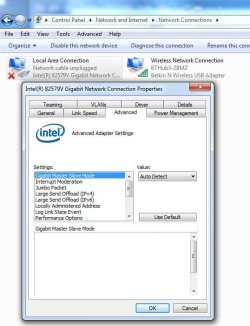
Hi Bill. Okay I have done the pbcopter suggestion a few times now. Each time I reboot it reverts to as it was before:

advanced adaptor settings.JPG

Maybe I've lost the plot, maybe I should be on weaker tablets. I have checked on my brothers PC running win 7 Pro, using an identical Belkin Adapter and connecting via the same BT hub & router. His network cable is also unplugged so I must assume I was hallucinating when I said I thought I had IPv6 connected.

My tiny brain wonders if, as we are not using any cables to connect the hub to my PC then obviously it would report a 'cable not connected' error? I also wonder if IPv4 is for Wireless connections and if IPv6 is for wired connections. I am probably hopelessly wrong but I can only ask!

Troubleshooting:

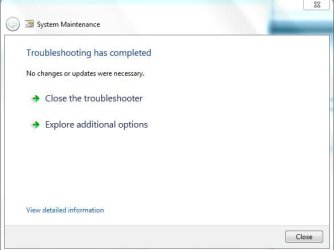
I tried both System Maintenance and Performance, System Maintenance showed no problems as per the attached:
system maintenance.JPG

And the file log as a word document:

View attachment System Maintenance Publisher details.docx

Performance:
system & security screen.JPG

I did not delete startup on most of the programs listed as I know (Hope) that these are needed.

I will now attempt another go at the NVM utility and driver.

Regards

Alan.
 

My Computer My Computer

At a glance

Windows 7 Professional 64biti5-2500K 3.30Hz 6MB Cache16GB DDR3ASUSGeforce GTX1050Ti 4GB
Computer type
PC/Desktop
Computer Manufacturer/Model Number
Home Build
OS
Windows 7 Professional 64bit
CPU
i5-2500K 3.30Hz 6MB Cache
Motherboard
ASUS P8P67 Pro B3 Revision
Memory
16GB DDR3
Graphics Card(s)
ASUSGeforce GTX1050Ti 4GB
Sound Card
On-Board
Monitor(s) Displays
LG23MP65HQ-P
Hard Drives
WD Caviar Green 500gb
Maxtor 300gb
WD External USB 120gb
WD My Passport USB 2TB
LUX3 External USB 1TB
PSU
Corsair 800W
Case
Antec
Cooling
Arctic 13 Cooler
Antivirus
Bitdefender Total Security 2017
Browser
FireFox
Back
Top