On intel drivers pour chipsets you can notice that there are two chipset drivers. 9.2.3.1017 and 9.2.0.1031. Both are recent and seem to be different branches, like apache and apache2. Can anyone confirm or deny this and tell me what the difference is? My motherboard maker (msi) recommends 9.2.0.1030 for my z68 gd mobo. Im currently running 9.2.0.1031 without hitches. But the 9.2.3.1017 are whql. Whats the difference between these branches?
It's just that the 9.2.3.1017 WHQL version is the latest version released for those chipsets. The motherboard manufacturer driver download sites are usually way behind the latest version.
New Features, Fixes & Changes Features Added - 9.2.3.1017 – 06/17/2011
Description
1. Updated Name String on 1D3E
2. Added HECI INF
Features Added WHQL- 9.2.3.1016 – 04/22/2011
Description
WHQLed to 1.6
Features Added in Beta 9.2.3.1015 – 04/07/2011
Description
1. Jaketown name changes
2. Updated Installer with Klockwork scan fixes 1.1.42
3. Updated Official Branding For Patsburg
4. Moved to Installer Label 1.1.36
a. Updated extractdriver function
b. Creates MUP.xml (packageversion not correct)
Features Added in Alpha 9.2.3.1010 – 02/28/2011
Description
Added support for Waimea Bay platform
Features Added in Alpha 9.2.3.1010 – 01/14/2011
ID Description
1 Removed Commented SMB from PatCore
2 Fixed spelling of Controller in AHCI and IDE inf files
Features Added in Alpha 9.2.3.1009
1 Added 1D41 LPC device
Features Added in Alpha 9.2.3.1008
1 Changed ® to (R)
2 3C00 changed to No_Drv for the “A” stepping in order for a BOSD not to
occur
3 Removed 3C60 and 3C61
4 Added 1D76 and 1D77
5 Added Audio INF (1D20)
Features Added in Alpha 9.2.3.1004
1 Removed commented out Devices from JakeTown.Inf
2 Changed Installer Version to 1.1.32 (Fixes –overall switch and 2nd install of
filtered INF files)
Features Added in Alpha 9.2.3.1003
ID Description
1 JakeTown.inf: commented out PCI devices 3C00-3C0F
2 Changed 3C88 to 3C90
3 Added 3C44 QPI Link
Added 3CE4 R2 PCIe
Features Added in Alpha 9.2.2.1002
Commented out 3C02 from jaketown.inf
Features Added in Alpha 9.2.2.1001
Added JakeTown.inf
Updated all Patsburg related INF
Software Sightings and/or Known Issues
ID Information
1 After version 9.2.3.1004 B0 must be used (jaketown B0 should be used with
Patsburg B0)
My Computer
Computer type
PC/Desktop
Computer Manufacturer/Model Number
Self built custom
OS
64-bit Windows 11 Pro for Workstations
CPU
Intel i7-8700K OC'd to 5 GHz
Motherboard
ASUS ROG Maximus XI Formula Z390
Memory
64 GB (4x16GB) G.SKILL TridentZ RGB DDR4 3600 MHz
Graphics Card(s)
ASUS ROG-STRIX-GTX1080TI-O11G-GAMING
Sound Card
Integrated
Monitor(s) Displays
2 x Samsung Odyssey G7 27"
Screen Resolution
2560x1440
Hard Drives
1TB Samsung 990 PRO M.2,
4TB Samsung 990 PRO PRO M.2,
TerraMaster F8 SSD Plus NAS
PSU
Seasonic Prime Titanium 850W
Case
Thermaltake Core P3
Cooling
Corsair Hydro H115i
Keyboard
Logitech wireless K800
Mouse
Logitech MX Master 4
Internet Speed
2 Gb/s Download and 100 Mb/s Upload
Antivirus
Malwarebyte Anti-Malware Premium
Browser
Google Chrome
Other Info
Logitech Z625 speaker system,
Logitech BRIO 4K Pro webcam,
HP Color LaserJet Pro MFP M477fdn,
APC SMART-UPS RT 1000 XL - SURT1000XLI,
Galaxy S23 Plus phone
Those Intel Inf are made for the constant renew of the computers platforms and are forced to be updated. It does only update the Inf infos files for newer systems...if you own a machine a year old you will not get any improvement at all, unless you have other related material working along with Intel drivers. So, you can say you're up to date with your drivers.
My Computer
Computer type
PC/Desktop
Computer Manufacturer/Model Number
Custom Build
OS
Windows 7 Professional SP1 - x64 [Non-UEFI Boot]
CPU
Ivy Bridge Core i5 3570K (Delidded)
Motherboard
Asus P8Z77-V LE PLUS
Memory
G.Skill "Ares" DDR3 PC3-12800 - 1600MHz (16Gb)
Graphics Card(s)
Asus Dual-RX480-O4G
Sound Card
Creative Sound Blaster Z w/5.1 sound system
Monitor(s) Displays
Asus IPS 23"
Screen Resolution
16/9
Hard Drives
Internal:
500Go Sata 6Gb/s (x2)
500Go Sata 3Gb/s (x2)
SSD 60Go Sata 6Gb/s
PSU
In Win C 900W Series 80+ Platinum
Case
Thermaltake Chaser A71
Cooling
Custom Water Cooling Loop
Keyboard
Cooler Master QuickFire XTi
Mouse
Razer Imperator 2012 (4G)
Antivirus
MSE
Browser
IE 11.0.xxx Rtm
Other Info
"Raid0" with Intel Smart Response Technology (HDD/SSD)
I have the same question and for me the question remains unanswered (couldn't find anything in web): whats the difference between all those branches v9.0/v9.1/v9.2/v9.3/v9.4? And what does the third number (e.g. v9.1.1) mean? Has anyone an idea what naming convention/schema is behind those numbers?
Jumping from v8 to v9 would be classed as a major update. The .1 usually refers to a minor update, bugfix etc.
My Computer
Computer type
PC/Desktop
Computer Manufacturer/Model Number
Custom Build
OS
Win 7 Ultimate, Win 8.1 Pro, Linux Mint 19 Cinnamon (All 64-Bit)
CPU
Intel i5 4690K
Motherboard
Gigabyte Z97X-UD3H
Memory
Corsair Vengeance LP 32GB DDR3
Graphics Card(s)
MSI GTX 1060 GAMING X 6GB
Sound Card
Onboard
Hard Drives
Samsung 850 EVO 250GB SSD (x2)
Samsung 860 EVO 1TB SSD (x2)
Crucial MX300 525GB SSD
WD Blue 2TB 5400rpm Intellipark Disabled (x2)
PSU
Corsair HX750i
Case
Phanteks Enthoo Pro
Cooling
CM Hyper 212 EVO on CPU, Noctua Redux NF-P14S 1500rpm (x6)
Keyboard
Corsair K70 RGB LUX
Mouse
Corsair Sabre RGB
Antivirus
Avast Free, MalwareBytes, SAS & CryptoPrevent
Browser
Chrome
Other Info
StarTech PEXESAT322I 2 Port PCI-E SATA Card
ASUS PCE-AC56 Dual-band AC1300 Wireless Card
Akasa FC.Six Manual Fan Controller
And a Partridge in a Pear Tree!
Please don't tell me what a version number in gerneral is... I have seen version numbering before
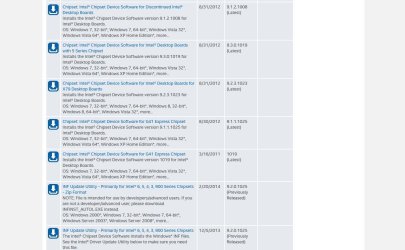
Did you notice that Intel has several branches for its releases? Look at my attached screenshot.
...
As you can see several different versions/branches were released on 8/31/12. And although v9.3.0.1019 was released in 2012, Intel released v9.2.0.1025 in 2014. This is the point I don't understand! This is quite strange and can not be answered with general statements like "version number" or "bugfix".
So, does anybody understand Intel's version scheme?
We can't answer for Intel. We don't work for them.
Each software company will have different ways of numbering their own software. There is no set "rule" to this.
This isn't something we can give a definitive answer to as every company will have different ways of numbering.
My Computer
Computer type
PC/Desktop
Computer Manufacturer/Model Number
Custom Build
OS
Win 7 Ultimate, Win 8.1 Pro, Linux Mint 19 Cinnamon (All 64-Bit)
CPU
Intel i5 4690K
Motherboard
Gigabyte Z97X-UD3H
Memory
Corsair Vengeance LP 32GB DDR3
Graphics Card(s)
MSI GTX 1060 GAMING X 6GB
Sound Card
Onboard
Hard Drives
Samsung 850 EVO 250GB SSD (x2)
Samsung 860 EVO 1TB SSD (x2)
Crucial MX300 525GB SSD
WD Blue 2TB 5400rpm Intellipark Disabled (x2)
PSU
Corsair HX750i
Case
Phanteks Enthoo Pro
Cooling
CM Hyper 212 EVO on CPU, Noctua Redux NF-P14S 1500rpm (x6)
Keyboard
Corsair K70 RGB LUX
Mouse
Corsair Sabre RGB
Antivirus
Avast Free, MalwareBytes, SAS & CryptoPrevent
Browser
Chrome
Other Info
StarTech PEXESAT322I 2 Port PCI-E SATA Card
ASUS PCE-AC56 Dual-band AC1300 Wireless Card
Akasa FC.Six Manual Fan Controller
And a Partridge in a Pear Tree!
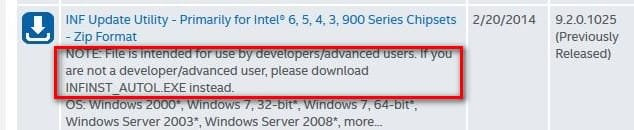
I can only venture a GUESS. You have to read the release notes too. It would seem intel decided to keep the v9.2 branch for developers while v9.3 is a production version. The developer branch has a lower version number but a more recent release date. But a user wouldn't want the developer branch.
Bottom line: You're correct. It can be hard to discern the best Intel driver based only on version number and date. That's another good reason to let Intel do it for you. Intel Driver Update Tool.
(You are probably already aware of the tool but figured I'd mention it too for anyone reading in the future who is not)
We can't answer for Intel. We don't work for them.
Each software company will have different ways of numbering their own software. There is no set "rule" to this.
I know that it is up to companies to decide how the version numbering looks like. But there is definitely a scheme behind it which I want to know!
Although you don't know perhaps someone in Sevenforum does know more details about it.... so why shouldn't I ask here??:huh:
@ComputerGeek: Your guess is wrong. The only reason why Intel writes "for use by developers/advanced users" is that this file is the .zip version. For "normal" users they recommend the self-extracting .exe file, of course. Normally every version is released as .zip and .exe (see attached screenshot).
I didn't say don't ask here.
You seem unhappy with the answers you're getting, from people that's all. Every time someone has answered you've replied with "I already know this".
You might get an answer quicker if you contact Intel, that's all I was suggesting.
My Computer
Computer type
PC/Desktop
Computer Manufacturer/Model Number
Custom Build
OS
Win 7 Ultimate, Win 8.1 Pro, Linux Mint 19 Cinnamon (All 64-Bit)
CPU
Intel i5 4690K
Motherboard
Gigabyte Z97X-UD3H
Memory
Corsair Vengeance LP 32GB DDR3
Graphics Card(s)
MSI GTX 1060 GAMING X 6GB
Sound Card
Onboard
Hard Drives
Samsung 850 EVO 250GB SSD (x2)
Samsung 860 EVO 1TB SSD (x2)
Crucial MX300 525GB SSD
WD Blue 2TB 5400rpm Intellipark Disabled (x2)
PSU
Corsair HX750i
Case
Phanteks Enthoo Pro
Cooling
CM Hyper 212 EVO on CPU, Noctua Redux NF-P14S 1500rpm (x6)
Keyboard
Corsair K70 RGB LUX
Mouse
Corsair Sabre RGB
Antivirus
Avast Free, MalwareBytes, SAS & CryptoPrevent
Browser
Chrome
Other Info
StarTech PEXESAT322I 2 Port PCI-E SATA Card
ASUS PCE-AC56 Dual-band AC1300 Wireless Card
Akasa FC.Six Manual Fan Controller
And a Partridge in a Pear Tree!
@Brds7t7: sorry but there were too many common statements about software versioning in general which don't answer my and the question of "Conditioned". Moreover I don't think Intel will reveal their scheme if there is no need.
@Brds7t7: sorry but there were too many common statements about software versioning in general which don't answer my and the question of "Conditioned". Moreover I don't think Intel will reveal their scheme if there is no need.