What's the point of adjusting sample rate and bit depth?

imeem

New member
Member
VIP
Local time
5:28 PM
Messages
387
Does adjusting it affect sound quality and performance? Which one should I choose?
 

Attachments

  • Untitled.png
    Untitled.png
    13.5 KB · Views: 66

My Computer My Computer

At a glance

Win 7 & 10 x64Intel(R) Core(TM)2 Quad CPU Q8400 @ 2.66GHz (...8GB DDR2HD 6970 2 GB
Computer type
PC/Desktop
Computer Manufacturer/Model Number
Acer M802
OS
Win 7 & 10 x64
CPU
Intel(R) Core(TM)2 Quad CPU Q8400 @ 2.66GHz (4 CPUs), ~2.7GH
Motherboard
MB.SCQ07.002 MB KIT G43 ICH10R HMII EUPLOT6 ECS R
Memory
8GB DDR2
Graphics Card(s)
HD 6970 2 GB
Sound Card
Realtek ALC 888s
Monitor(s) Displays
AOC
Screen Resolution
1920x1080 60hz
Hard Drives
WD Black 1 TB

WD My Book Essential 1 TB external HDD
PSU
Corsair TX650m
Case
CM 690 II Advanced mid tower
Cooling
fan
Audio is one of those quantities that is analogue in nature. However, a computer can only work with digital data - all analogue information needs to be converted to its digital equivalent. This is done primarily by means of sampling. At regular intervals of time, a digital snapshot is taken of the analogue input signal. Depending on the settings, this takes the form of an 8/16/24/32 bit number, with a greater bit size equating to a better representation of the analogue information. For example, take a nominal analogue signal varying between 0 and 1. With 8-bit, a snap shot can only have 256 discrete values. Using 32-bit, that rises to 4,294,967,296 discrete values, meaning that the information is captured with greater accuracy and precision. That is basically what bit depth is, sample rate is merely the number of times in a given period of time that a snapshot is taken.

As to your question, unless you have space restrictions, you should choose the one that gives you the best result. Generally, this is the one with the greatest sample rate and bit depth, as you have shown in your image above. Although, having said that, you probably won't notice much difference between the lowest and highest qualities available. However, if you are doing audio processing, you should always choose the highest quality available at each stage to minimize data loss.

 

My Computer My Computer

At a glance

Windows 8.1 Pro RTM x64Intel Core-i5-3570K 4-core @ 3.4GHz (Ivy Brid...4 x 4GB DDR3-1600 Corsair Vengeance CMZ8GX3M2...MSI GeForce GTX770 Gaming OC 2GB
Computer type
PC/Desktop
Computer Manufacturer/Model Number
Dwarf Dwf/11/2012 r09/2013
OS
Windows 8.1 Pro RTM x64
CPU
Intel Core-i5-3570K 4-core @ 3.4GHz (Ivy Bridge) (OC 4.4GHz)
Motherboard
ASRock Z77 Extreme4-M
Memory
4 x 4GB DDR3-1600 Corsair Vengeance CMZ8GX3M2A1600C9B (16GB)
Graphics Card(s)
MSI GeForce GTX770 Gaming OC 2GB
Sound Card
Realtek High Definition on board solution (ALC 898)
Monitor(s) Displays
ViewSonic VA1912w Widescreen (VGA)
Screen Resolution
1440x900
Hard Drives
OCZ Agility 3 SSD 120GB SATA III x2 (RAID 0)
Samsung HD501LJ 500GB SATA II x2
Hitachi HDS721010CLA332 1TB SATA II
Iomega 1.5TB Ext USB 2.0
WD 2.0TB Ext USB 3.0
PSU
XFX Pro Series 850W Semi-Modular
Case
Gigabyte IF233
Cooling
1 x 120mm Front Inlet 1 x 120mm Rear Exhaust
Keyboard
Microsoft Comfort Curve Keyboard 3000 (USB)
Mouse
Microsoft Comfort Mouse 3000 for Business (USB)
Internet Speed
NetGear DG834Gv3 ADSL Modem/Router (Ethernet) ~4.0 Mb/s (O2)
Antivirus
Avast! 8.0.1497
Browser
IE 11
Other Info
Optical Drive: HL-DT-ST BD-RE BH10LS30 SATA Bluray
Lexmark S305 Printer/Scanner/Copier (USB)
WEI Score: 8.1/8.1/8.5/8.5/8.25
Asus Eee PC 1011PX Netbook (Windows 7 x86 Starter)
Audio is one of those quantities that is analogue in nature. However, a computer can only work with digital data - all analogue information needs to be converted to its digital equivalent. This is done primarily by means of sampling. At regular intervals of time, a digital snapshot is taken of the analogue input signal. Depending on the settings, this takes the form of an 8/16/24/32 bit number, with a greater bit size equating to a better representation of the analogue information. For example, take a nominal analogue signal varying between 0 and 1. With 8-bit, a snap shot can only have 256 discrete values. Using 32-bit, that rises to 4,294,967,296 discrete values, meaning that the information is captured with greater accuracy and precision. That is basically what bit depth is, sample rate is merely the number of times in a given period of time that a snapshot is taken.

As to your question, unless you have space restrictions, you should choose the one that gives you the best result. Generally, this is the one with the greatest sample rate and bit depth, as you have shown in your image above. Although, having said that, you probably won't notice much difference between the lowest and highest qualities available. However, if you are doing audio processing, you should always choose the highest quality available at each stage to minimize data loss.

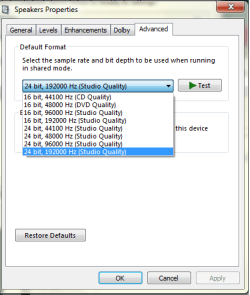
Really, that i did not realise.

I tend to set mine to 24bit, 48000hz through Realtek as i thought the higher sample rate and bit depth became more work for the CPU that and i never really notice any difference above that.

Thanks Dwarf +1
Lucky
 

My Computer My Computer

At a glance

Windows 7 Ultimate x64 RTM + SP1Intel Core i7 950 3.06GHZ (OC'd to 3.99Ghz)6GB OCZ Reaper HPC Edition PC3-16000 (set 160...EVGA Nvidia Geforce GTX 570
Computer Manufacturer/Model Number
The HAFmeister (Custom)
OS
Windows 7 Ultimate x64 RTM + SP1
CPU
Intel Core i7 950 3.06GHZ (OC'd to 3.99Ghz)
Motherboard
Asus Rampage III Extreme x58 SATA 6GB & USB 3.0
Memory
6GB OCZ Reaper HPC Edition PC3-16000 (set 1606Mhz 8-8-8-26)
Graphics Card(s)
EVGA Nvidia Geforce GTX 570
Sound Card
Creative SB X-Fi Titanium Fatal1ty Professional Series
Monitor(s) Displays
Samsung SM2433BW 24" Widescreen Monitor
Screen Resolution
1920x1200
Hard Drives
Western Digital Caviar Black 500GB 32Mb Buffer SATA II
Western Digital Caviar Black 750GB 32Mb Buffer SATA II
Western Digital Caviar Blue 500GB 16Mb Buffer SATA II
Western Digital My Book Essential Edition 750GB USB
Samsung Spinpoint 2TB SATA II
PSU
Thermaltake Toughpower 1200w (Modular)
Case
CoolerMaster HAF-932
Cooling
Zalman Reserator XT and ZM-WB5 Plus - GPU uses Stock coolers
Keyboard
Logitech G510
Mouse
Logitech G9 Gaming Mouse
Internet Speed
3MB Profile - 350-400kbs (Real-Speed)
Other Info
IcyBox Hot-Swap Bay,
Logitech G27 Steering Wheel,
Xbox 360 Wirless Elite Controller with Microsoft Reciever and
Play & Charge Kit,
Belkin USB Wireless Adaptor,
GAME Generic Controller (Playstation Looky-Likey),
Epson SX125 All-in-One.
Keep in mind "CD Quality" (and what the standard redbook audio CD uses) is 16 bit 44.1Khz. If you have a 24 bit, for example, audio file and you want to burn that to a standard audio CD according to what I read the last 8 bits are just truncated.

I use higher bitrates for recording in my studio (with Sonar) but ultimately when I export them for "standard" audio use they are converted to 16 bit 44.1Khz.
 

My Computer My Computer

At a glance

Windows 10 64 bitIntel i7 6700K16GB Corsair DominatorIntel CPU Graphics
Computer type
PC/Desktop
Computer Manufacturer/Model Number
My Own Build
OS
Windows 10 64 bit
CPU
Intel i7 6700K
Motherboard
ASUS ROG Maximus VIII Hero
Memory
16GB Corsair Dominator
Graphics Card(s)
Intel CPU Graphics
Sound Card
RealTek
Monitor(s) Displays
27" Dell S2719dgf
Screen Resolution
2560X1440
Hard Drives
1 TB Samsung 850 EVO SSD for Win 10 Pro
500GB Samsung 850 EVO SSD for Win 10 Insider
2 TB drive for backup
PSU
EVGA Supernova 750G2
Case
BeQuiet Silent Base 600
Cooling
Deepcool Captain 120EX
Keyboard
Microsoft Wireless 2000
Mouse
Microsoft wireless
Internet Speed
100 MB/sec (Cable)
Antivirus
Microsoft Defender and Malwarebytes
Browser
Edge/Firefox
Other Info
Cakewalk (Sonar) by BandLab and Studio One 4.1 Pro recording studio software. MOTU 896Mk3 Hybrid recording interface, Frontier Tranzport wireless control unit, Behringer X-Touch Control Surface.
Five USB connected optical drives for CD Audio production using Nero BurningROM
Dwarf and Firebird:


I appreciate the discussion, but I remain unclear.

Three questions:

1: If your system works well on any of those settings and you cannot detect any difference by ear over your best speakers, why would you choose setting A over setting B, assuming the sound files in question are for your own use?

2: If you took 1000 people at random off the street and had them do controlled blind A/B tests of the various choices, what is your speculation as to what percentage of those 1000 people could reliably detect any differences--that is, consistently detect a difference more often than random chance would dictate?

3: Do you contend that you can tell the difference?

I'd appreciate answers as explicit as possible.
 

My Computer My Computer

At a glance

Windows 7 Home Premium SP1, 64-bitIntel Skylake i5-6600K, not overclocked8 GB HyperX DDR4-2666 (2 x 4 GB)none; graphics are integrated on CPU
Computer type
PC/Desktop
Computer Manufacturer/Model Number
Ignatz Special; 4 speed manual gearbox; factory air conditioning; one of one
OS
Windows 7 Home Premium SP1, 64-bit
CPU
Intel Skylake i5-6600K, not overclocked
Motherboard
AsRock Z170M Extreme 4, micro ATX
Memory
8 GB HyperX DDR4-2666 (2 x 4 GB)
Graphics Card(s)
none; graphics are integrated on CPU
Sound Card
onboard: Realtek ALC1150; external: USB Behringer UF0-202
Monitor(s) Displays
Dell S2340M 23 inch IPS
Screen Resolution
1600 x 900
Hard Drives
System: Crucial MX100 series SSD, 128 GB;
Data: Samsung Spinpoint 103SJ, 1 TB;
Backup: WD Caviar Green WD30EZRX-00D8PB0, 3 TB
PSU
Rosewill SilentNight 500 watt fanless, semi-modular
Case
Antec Solo II
Cooling
Noctua NH-U12S; Noctua F12 intake, Noctua S12A exhaust
Keyboard
Microsoft 200 6JH-00001 USB
Mouse
Dell or Microsoft optical wired; USB
Antivirus
Microsoft Security Essentials and Malwarebytes Premium
Browser
Pale Moon
Other Info
All fans PWM; speeds at idle: CPU circa 500 rpm; intake circa 600 rpm; exhaust circa 600 rpm; CPU temps 27 idle and 47 C load in a warm room (27 C/81 F) when running Intel Extreme Tuning Utility stress test.
Dwarf and Firebird:


I appreciate the discussion, but I remain unclear.

Three questions:

1: If your system works well on any of those settings and you cannot detect any difference by ear over your best speakers, why would you choose setting A over setting B, assuming the sound files in question are for your own use?

2: If you took 1000 people at random off the street and had them do controlled blind A/B tests of the various choices, what is your speculation as to what percentage of those 1000 people could reliably detect any differences--that is, consistently detect a difference more often than random chance would dictate?

3: Do you contend that you can tell the difference?

I'd appreciate answers as explicit as possible.
To answer your questions, here is my take on it:

1: There is no reason, it's just if you are doing any audio processing you should keep to the highest possible quality for each stage, only reducing the quality at the end if necessary.

2: The probability on this is ~50/50, about the same as you would expect from tossing a coin.

3: Generally speaking, I can't tell the difference, but it does depend on the source and the original.
 

My Computer My Computer

At a glance

Windows 8.1 Pro RTM x64Intel Core-i5-3570K 4-core @ 3.4GHz (Ivy Brid...4 x 4GB DDR3-1600 Corsair Vengeance CMZ8GX3M2...MSI GeForce GTX770 Gaming OC 2GB
Computer type
PC/Desktop
Computer Manufacturer/Model Number
Dwarf Dwf/11/2012 r09/2013
OS
Windows 8.1 Pro RTM x64
CPU
Intel Core-i5-3570K 4-core @ 3.4GHz (Ivy Bridge) (OC 4.4GHz)
Motherboard
ASRock Z77 Extreme4-M
Memory
4 x 4GB DDR3-1600 Corsair Vengeance CMZ8GX3M2A1600C9B (16GB)
Graphics Card(s)
MSI GeForce GTX770 Gaming OC 2GB
Sound Card
Realtek High Definition on board solution (ALC 898)
Monitor(s) Displays
ViewSonic VA1912w Widescreen (VGA)
Screen Resolution
1440x900
Hard Drives
OCZ Agility 3 SSD 120GB SATA III x2 (RAID 0)
Samsung HD501LJ 500GB SATA II x2
Hitachi HDS721010CLA332 1TB SATA II
Iomega 1.5TB Ext USB 2.0
WD 2.0TB Ext USB 3.0
PSU
XFX Pro Series 850W Semi-Modular
Case
Gigabyte IF233
Cooling
1 x 120mm Front Inlet 1 x 120mm Rear Exhaust
Keyboard
Microsoft Comfort Curve Keyboard 3000 (USB)
Mouse
Microsoft Comfort Mouse 3000 for Business (USB)
Internet Speed
NetGear DG834Gv3 ADSL Modem/Router (Ethernet) ~4.0 Mb/s (O2)
Antivirus
Avast! 8.0.1497
Browser
IE 11
Other Info
Optical Drive: HL-DT-ST BD-RE BH10LS30 SATA Bluray
Lexmark S305 Printer/Scanner/Copier (USB)
WEI Score: 8.1/8.1/8.5/8.5/8.25
Asus Eee PC 1011PX Netbook (Windows 7 x86 Starter)
Dwarf:

Thanks for the candid comments.


2: The probability on this is ~50/50, about the same as you would expect from tossing a coin.

I assume you DON'T mean that about 500 people per 1000 could in fact detect differences with enough accuracy so as to NOT be attributable to chance (coin flipping)?

Generally speaking, I can't tell the difference, but it does depend on the source and the original.

Can you expound on this or give an example of where you have detected a difference and don't believe it was guesswork?

I've done thousands of hours of analog recording in my time and try to be sensitive to any audible differences.

I can pick up clipping, over-zealous use of compression or noise reduction techniques, tape hiss, bad mixing (vocals not prominent enough, guitar nearly inaudible, etc) and a general decline in high frequencies (muffling, "low-fi").

But I've never been able to detect any differences among the settings in question. I'm using 44,100 sampling and 16 bits and have experimented with other settings.

I still do my editing in WAV format as much as possible, reducing to mp3 only at the final stage. However, I have edited mp3s directly to eliminate a major defect when I did not have a WAV and never regretted it.

I'd guess there might be some minor speed advantage to using a lower setting---not enough to notice.
 

My Computer My Computer

At a glance

Windows 7 Home Premium SP1, 64-bitIntel Skylake i5-6600K, not overclocked8 GB HyperX DDR4-2666 (2 x 4 GB)none; graphics are integrated on CPU
Computer type
PC/Desktop
Computer Manufacturer/Model Number
Ignatz Special; 4 speed manual gearbox; factory air conditioning; one of one
OS
Windows 7 Home Premium SP1, 64-bit
CPU
Intel Skylake i5-6600K, not overclocked
Motherboard
AsRock Z170M Extreme 4, micro ATX
Memory
8 GB HyperX DDR4-2666 (2 x 4 GB)
Graphics Card(s)
none; graphics are integrated on CPU
Sound Card
onboard: Realtek ALC1150; external: USB Behringer UF0-202
Monitor(s) Displays
Dell S2340M 23 inch IPS
Screen Resolution
1600 x 900
Hard Drives
System: Crucial MX100 series SSD, 128 GB;
Data: Samsung Spinpoint 103SJ, 1 TB;
Backup: WD Caviar Green WD30EZRX-00D8PB0, 3 TB
PSU
Rosewill SilentNight 500 watt fanless, semi-modular
Case
Antec Solo II
Cooling
Noctua NH-U12S; Noctua F12 intake, Noctua S12A exhaust
Keyboard
Microsoft 200 6JH-00001 USB
Mouse
Dell or Microsoft optical wired; USB
Antivirus
Microsoft Security Essentials and Malwarebytes Premium
Browser
Pale Moon
Other Info
All fans PWM; speeds at idle: CPU circa 500 rpm; intake circa 600 rpm; exhaust circa 600 rpm; CPU temps 27 idle and 47 C load in a warm room (27 C/81 F) when running Intel Extreme Tuning Utility stress test.
I set my bit depth at 24 bit 96000. This is because the highest quality audio files I play are the same. They are mostly advance resolution recordings ripped from DVD Audio discs. You will not gain anything in terms of sound quality by simply changing this setting in the sound control panel and playing low res audio files which do not require that higher bit rate. Going by "what works best for you" should read "set the bit depth which is = to that of your highest quality recordings."

I notice my Denon AVR reads 96k 24 bit no matter the source material. I can only assume windows puts out that depth at all times and is basically filling the extra bandwidth of lesser recordings with digital "air".
 

My Computer My Computer

At a glance

Windows 7 Professional 64 bitAMD Phenom II X6 1055T 2.8 GHz (3.51 over clo...Corsair 8 GB CMX4GX3M2A1600C9R (1333 mHz)Saphire Radeon 5830HD + Hauppauge WinTV-HVR-2...
Computer type
PC/Desktop
Computer Manufacturer/Model Number
Custom build
OS
Windows 7 Professional 64 bit
CPU
AMD Phenom II X6 1055T 2.8 GHz (3.51 over clocked)
Motherboard
Asus M4A87TD-EVO
Memory
Corsair 8 GB CMX4GX3M2A1600C9R (1333 mHz)
Graphics Card(s)
Saphire Radeon 5830HD + Hauppauge WinTV-HVR-2250 Dual Tuner
Sound Card
VIA VT1818 High Definition Audio 8-Channel, AMD Radeon HDMI
Monitor(s) Displays
23" Samsung SyncMaster PX2370 + 47" LG 47LH90 LED HDTV
Screen Resolution
1920x1080p
Hard Drives
Western Digital --> WD10EARS-00Y5B1 1 TB 5200 rpm (Backup)
Seagate --> ST2000DM001-1CH164 2 TB 7200 rpm (Media) Mirrored to
Seagate --> ST2000DM001-1CH164 2 TB 7200 rpm
BUSlink --> "USB2.0 Disk-On-The-Go/Lite" 18 GB mini HDD (Bootable Win 7 Insta
PSU
850 WATT OCZ --> OCZ850GXSSLI RTL
Case
Cool Master Scout --> SGC-2000-KKN1-GP RT
Cooling
CM 140mm front & top, 120mm rear & 2x side, stock CPU fan
Keyboard
Razer Lycosa Mirror, Logitech MX3200 wireless
Mouse
Logitech G9x, Logitech MX3200 wireless
Internet Speed
10 Mbps
Antivirus
Microsoft Security Essentials
Browser
Chrome & Internet Explorer 11
Other Info
Custom rig self build.
Recently upgraded for part time Media Center DVR duties.
Back
Top