
What's wrong with the picture?

nicoricarte

New member
Local time
5:57 PM
Messages
7
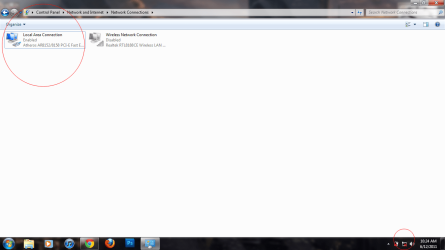
Check the picture attached.

As you probably have seen, the picture isn't exactly subtle. Two very contradictory things. It looks like I'm really connected, but windows doesn't show it. It shows up in the Network and Sharing too.

If I enable the Wireless adapter, it's pretty much the same, but only thing that shows up is either there are connections available or not at all.

This has been bugging me ever since my friends wanted to try HomeGroup. So, now let's keep it simple starting with the LAN, first. Possible fix please?
 

Attachments
  • Untitled-1.png
    Untitled-1.png
    51 KB · Views: 42

My Computer My Computer

OS
Windows 7 Home Premium x64
Graphics Card(s)
Intel HD Graphics
Screen Resolution
1366 x 768
Check the picture attached.

As you probably have seen, the picture isn't exactly subtle. Two very contradictory things. It looks like I'm really connected, but windows doesn't show it. It shows up in the Network and Sharing too.

If I enable the Wireless adapter, it's pretty much the same, but only thing that shows up is either there are connections available or not at all.

This has been bugging me ever since my friends wanted to try HomeGroup. So, now let's keep it simple starting with the LAN, first. Possible fix please?

Easy workaround.

Go to network and sharing. Create a new network connection using workgroup (uses IPv4 instead of homegroup IPv6). Connect using that and if successful disable IPv6 and kill homegroup.
 

My Computer My Computer

Computer Manufacturer/Model Number
HP Pavillion dv-7 1005 Tx
OS
Win 8 Release candidate 8400
CPU
[email protected]
Memory
4 gigs
Graphics Card(s)
Nvidia 9600M
Sound Card
HD built-in
Monitor(s) Displays
17" Wxga
Screen Resolution
1440x900
Cooling
none
Internet Speed
45Mb down 5Mb up
I'm sorry but I don't know how. Can you please teach me how?
 

My Computer My Computer

OS
Windows 7 Home Premium x64
Graphics Card(s)
Intel HD Graphics
Screen Resolution
1366 x 768
Same issue, unresolved

I've had this for a few months now, and haven't found a fix yet. I finally decided to do a fresh install again. What brought me to this forum was an issue with my HG and Play To function; which overnight decided to quit. Anyway, I have a DWA-131 adapter which works perfectly fine, yet the icon would be red X'd. I tried to un/reinstall all drviers, no luck. Changed out adapters, no luck.

If anyone has any info, it would be greatly appreciated for my sanity. :mad2:

aloha,
bc
 

My Computer My Computer

Computer Manufacturer/Model Number
LKS Hawaii Custom
OS
Windows 7 Ultimate x64
CPU
Q9550 oc'd 3.6Ghz
Motherboard
GA-EP45-UD3P
Memory
8GB G-Skill DDR2
Graphics Card(s)
ATI HD5850
Sound Card
onboard
Monitor(s) Displays
24" Samsung 1080p
Hard Drives
1- Samsung F3 1TB
2- WD Black 1TB 6MB\s
1- WD Black 1TB 3MB\s
2- WD 320GB RAID_0
PSU
750W Antec
Case
Antec 900
Cooling
Artic Cooling
I've had this for a few months now, and haven't found a fix yet. I finally decided to do a fresh install again. What brought me to this forum was an issue with my HG and Play To function; which overnight decided to quit. Anyway, I have a DWA-131 adapter which works perfectly fine, yet the icon would be red X'd. I tried to un/reinstall all drviers, no luck. Changed out adapters, no luck.

If anyone has any info, it would be greatly appreciated for my sanity. :mad2:

aloha,
bc

I totally agree. It's very annoying. I can't use HomeGroup, too.
 

My Computer My Computer

OS
Windows 7 Home Premium x64
Graphics Card(s)
Intel HD Graphics
Screen Resolution
1366 x 768
Back
Top