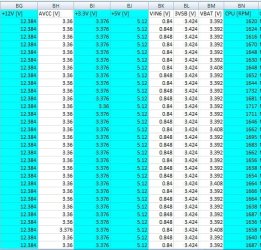
My computer runs fine If I just browse the web but when I run games such as Counter Strike and League of Legends my framerate starts dropping. It starts at 120 fps for the first 5 minutes then slowlys decreases and then my computer shuts off. I was wondering If this is the cause of my PSU or something else?
Welcome to Seven Forums.
Much more accurate info is need so we can help you.
To better help us to help you would you please add your systems specs? Here's the correct way to do it. :SystemInfo See Your System SpecsUnder System Manufacturer/Model Number add whether it is a desktop or laptop and whether self built. Very important
Log in to Seven Forums and you will be able to transfer the info directly to the specs page in your profile from within the System Info app.
After doing this your specs will be available in each of your posts.
Click on My system Specs in the lower left of this post to see how it should look.
Full instructions are in the tutorial.
_______________________________________________________________________________________________
This is the preferred, best way to upload an image or a file to a post.
That is the hardware and softwarew list of you PC.
When you start HW info click Sensors Only the Logging start, you will get a prompt for a save location and file name.
My Computer
Computer type
PC/Desktop
Computer Manufacturer/Model Number
Home Built Desktop By DataTech
OS
Windows 7 Ultimate X64 SP1
CPU
Intel i5-2550K, Differing ~4.4-4.8GHz No built in GPU
Motherboard
ASUS P8Z68-V PRO/GEN3
Memory
16GB G.Skill Sniper 1866MHz @ 2133MHz 2x8GB
Graphics Card(s)
ASUS GTX650TIB-DC2OC-2GD5, (650TI Boost)
Sound Card
Onboard Realtek 5-1
Monitor(s) Displays
Samsung P2570HD
Screen Resolution
1920x1080
Hard Drives
Samsung 840 Pro 256GB SSD for OS, 500GB Seagate Constellation (Enterprise drive) for Data
PSU
Corsair HX650W
Case
Inwin Dragon Rider
Cooling
Hyper 212 EVO w/two Noctua fans, push-pull, @1300 RPM
Keyboard
E-Z Eyes, bright yellow keys with large characters
Mouse
steelseries SENSEI Laser Pro Gaming
Internet Speed
48-51Mbs Mbs down, 11 Mbs up Xfinity Cable
Antivirus
Norton Internet Security 2013
Browser
IE 10, Opera, Pale Moon if needed
Other Info
4 case fans, LG BluRay-RE, ASUS DVD-RW, Mr. Fusion power supply, 1.21 gigawatts.
That worked although I don't see anything wrong. Your voltages are rock solid, but the CPU fan doesn't change much. Was this log while gaming and a crash, it's only several seconds long?]
My Computer
Computer type
PC/Desktop
Computer Manufacturer/Model Number
Home Built Desktop By DataTech
OS
Windows 7 Ultimate X64 SP1
CPU
Intel i5-2550K, Differing ~4.4-4.8GHz No built in GPU
Motherboard
ASUS P8Z68-V PRO/GEN3
Memory
16GB G.Skill Sniper 1866MHz @ 2133MHz 2x8GB
Graphics Card(s)
ASUS GTX650TIB-DC2OC-2GD5, (650TI Boost)
Sound Card
Onboard Realtek 5-1
Monitor(s) Displays
Samsung P2570HD
Screen Resolution
1920x1080
Hard Drives
Samsung 840 Pro 256GB SSD for OS, 500GB Seagate Constellation (Enterprise drive) for Data
PSU
Corsair HX650W
Case
Inwin Dragon Rider
Cooling
Hyper 212 EVO w/two Noctua fans, push-pull, @1300 RPM
Keyboard
E-Z Eyes, bright yellow keys with large characters
Mouse
steelseries SENSEI Laser Pro Gaming
Internet Speed
48-51Mbs Mbs down, 11 Mbs up Xfinity Cable
Antivirus
Norton Internet Security 2013
Browser
IE 10, Opera, Pale Moon if needed
Other Info
4 case fans, LG BluRay-RE, ASUS DVD-RW, Mr. Fusion power supply, 1.21 gigawatts.
Near the last 20 seconds I ran league at max setting and everything and then it started to lag. Do you want me to runn it until my computer shuts down?
My Computer
Computer type
PC/Desktop
Computer Manufacturer/Model Number
Custom Build
OS
Ontario
CPU
Intel(R) Core(TM) i7-2600K CPU @ 3.40GHz
Motherboard
Intel(R) Core(TM) i7-2600K CPU @ 3.40GHz
Memory
8.00 GB
Graphics Card(s)
(1) AMD Radeon HD 6800 Series (2) Intel(R) HD Graphics Fam
Sound Card
(1) USB Audio Device (2) AMD High Definition Audio Device
Haven't seen this issue addressed so... yeah, 58C idle for that CPU is a bit high.
Have you checked to see if the CPU is properly seated?
Is the fan working?
Are the case fans working?
Is there a lot of dust inside?
Tried replacing the thermo paste on the CPU?
These are but a few questions as to why your idle temps are so high.
My Computer
Computer type
PC/Desktop
Computer Manufacturer/Model Number
Custom built by me.
OS
Windows 10 Pro
CPU
Intel Core i7-4770K (3.5Ghz)
Motherboard
Gigabyte G1 Sniper 5 (F10 Bios)
Memory
32 gig Corsair Dominator Platinum (4x8Gig)
Graphics Card(s)
Sapphire Tri-X R9 Fury
Sound Card
Soundblaster ZXR
Monitor(s) Displays
NEC PA242W 24" LCD Monitor
Screen Resolution
1920 x 1200
Hard Drives
Primary - Samsung 850 Pro (512gig), Samsung 840 Pro (256gig), 2TB WD Caviar Black.
PSU
EVGA Supernova 1000 G2
Case
Cooler Master HAF X
Cooling
Corsair H100i with Corsair Air Series SP120 Quiet Fans