WHEA-Logger - code 18 still generating after stat system

SGvagon

Member
Member
Local time
3:45 PM
Messages
47
Hello,

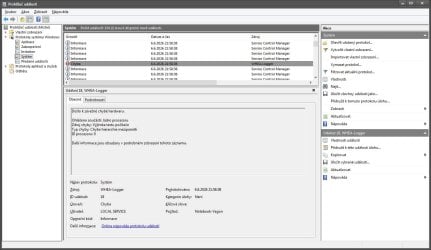
I have strange "issue" with WHEA-Logger - code 18 ID Processor Core: 0 , which generating in Event viewer every after system start.

But my laptop (Lenovo Y50-70) works perfectly (zero freeze, zero BSOD) . I installed Windows 10 next to the Windows 7 as dual boot, and in W10 this WHEA-Logger not generating after start system.

Can I somehow fix this issue and stop generating this "maybe" false positive error?

I tried reset bios settings, SFC /SCANNOW, re install Intel chipset driver, reinstall GPU drivers (Intel/Nvidia) via DDU , nothing helped.

Thank you in advance for any advice.
 

My Computer My Computer

At a glance

Dual boot W7 Pro x64 / W10 Pro x64Intel Core i5-4210H2x Kingston 8GB DDR3 1600 CL11Nvidia GeForce GTX960M 4GB
Computer type
Laptop
Computer Manufacturer/Model Number
Lenovo Y50-70 (20378)
OS
Dual boot W7 Pro x64 / W10 Pro x64
CPU
Intel Core i5-4210H
Memory
2x Kingston 8GB DDR3 1600 CL11
Graphics Card(s)
Nvidia GeForce GTX960M 4GB
Sound Card
Sound Blaster PLAY! 3
Monitor(s) Displays
2
Screen Resolution
2x 1920x1080
Hard Drives
Vi560 S3 M.2 SSD 1TB
Cooling
Deepcool Multi Core X6
Keyboard
Yenkee YKB 1002 CS USB
Mouse
Crono CM645 Wired optical mouse
Internet Speed
95 Mb/s Down 95 Mb/s Up
Antivirus
MSE
Browser
Firefox 115.36.0esr x64bit

My Computers My Computers

  • At a glance

    Windows 7 pro/Windows 10 ProIntel i7 860 Quad core 2.8 ghz8 gbATI Radeon HD 5770 1 gb ram
    Computer type
    PC/Desktop
    Computer Manufacturer/Model Number
    HP Pavillion Elite HPE-250f
    OS
    Windows 7 pro/Windows 10 Pro
    CPU
    Intel i7 860 Quad core 2.8 ghz
    Memory
    8 gb
    Graphics Card(s)
    ATI Radeon HD 5770 1 gb ram
    Monitor(s) Displays
    Alienware 25 AW2521HF & Viewsonic
    Screen Resolution
    1920 x1080 & 1680x1050
    Hard Drives
    WD blue 1 tb & 500 gb.
    Browser
    FF of course.
    Other Info
    https://www.bestbuy.com/site/hp-pavilion-elite-desktop-intel-core-i7-processor-8gb-memory-1tb-hard-drive/9921493.p?skuId=9921493
  • At a glance

    Windows 2012 R2 Data center/Linux Minti3 9100 3.6GHz, 8M cache, 4C/4T8GB 2666MT/s DDR4 ECC UDIMM
    Computer type
    PC/Desktop
    System Manufacturer/Model Number
    Dell Poweredge T140
    OS
    Windows 2012 R2 Data center/Linux Mint
    CPU
    i3 9100 3.6GHz, 8M cache, 4C/4T
    Memory
    8GB 2666MT/s DDR4 ECC UDIMM
    Monitor(s) Displays
    Viewsonic
    Screen Resolution
    1680x1050
    Hard Drives
    1 TB & 750 GB
    Other Info
    https://www.dell.com/en-us/work/shop/productdetailstxn/poweredge-t140?~ck=bt
Yes, I saw that discussion, but I don't have any freezing or BSOD. And in Windows 10 don't have WHEA Logger at all, only in Windows 7 .

Maybe some trobleshooting tools may can do fix this issue? I remember, that Microsoft had a lot's of FixIt tools.
 
Last edited:

My Computer My Computer

At a glance

Dual boot W7 Pro x64 / W10 Pro x64Intel Core i5-4210H2x Kingston 8GB DDR3 1600 CL11Nvidia GeForce GTX960M 4GB
Computer type
Laptop
Computer Manufacturer/Model Number
Lenovo Y50-70 (20378)
OS
Dual boot W7 Pro x64 / W10 Pro x64
CPU
Intel Core i5-4210H
Memory
2x Kingston 8GB DDR3 1600 CL11
Graphics Card(s)
Nvidia GeForce GTX960M 4GB
Sound Card
Sound Blaster PLAY! 3
Monitor(s) Displays
2
Screen Resolution
2x 1920x1080
Hard Drives
Vi560 S3 M.2 SSD 1TB
Cooling
Deepcool Multi Core X6
Keyboard
Yenkee YKB 1002 CS USB
Mouse
Crono CM645 Wired optical mouse
Internet Speed
95 Mb/s Down 95 Mb/s Up
Antivirus
MSE
Browser
Firefox 115.36.0esr x64bit
Can I somehow diagnostic this WHEA-Logger error and why it showing up only after system start? Is it driver error, or system error?
 

My Computer My Computer

At a glance

Dual boot W7 Pro x64 / W10 Pro x64Intel Core i5-4210H2x Kingston 8GB DDR3 1600 CL11Nvidia GeForce GTX960M 4GB
Computer type
Laptop
Computer Manufacturer/Model Number
Lenovo Y50-70 (20378)
OS
Dual boot W7 Pro x64 / W10 Pro x64
CPU
Intel Core i5-4210H
Memory
2x Kingston 8GB DDR3 1600 CL11
Graphics Card(s)
Nvidia GeForce GTX960M 4GB
Sound Card
Sound Blaster PLAY! 3
Monitor(s) Displays
2
Screen Resolution
2x 1920x1080
Hard Drives
Vi560 S3 M.2 SSD 1TB
Cooling
Deepcool Multi Core X6
Keyboard
Yenkee YKB 1002 CS USB
Mouse
Crono CM645 Wired optical mouse
Internet Speed
95 Mb/s Down 95 Mb/s Up
Antivirus
MSE
Browser
Firefox 115.36.0esr x64bit
I'm not sure but do you actually have any symptoms or is it just the event logs? There is a lot that makes it in the event logs that doesn't indicate a problem.
 

My Computers My Computers

  • At a glance

    Windows 7 pro/Windows 10 ProIntel i7 860 Quad core 2.8 ghz8 gbATI Radeon HD 5770 1 gb ram
    Computer type
    PC/Desktop
    Computer Manufacturer/Model Number
    HP Pavillion Elite HPE-250f
    OS
    Windows 7 pro/Windows 10 Pro
    CPU
    Intel i7 860 Quad core 2.8 ghz
    Memory
    8 gb
    Graphics Card(s)
    ATI Radeon HD 5770 1 gb ram
    Monitor(s) Displays
    Alienware 25 AW2521HF & Viewsonic
    Screen Resolution
    1920 x1080 & 1680x1050
    Hard Drives
    WD blue 1 tb & 500 gb.
    Browser
    FF of course.
    Other Info
    https://www.bestbuy.com/site/hp-pavilion-elite-desktop-intel-core-i7-processor-8gb-memory-1tb-hard-drive/9921493.p?skuId=9921493
  • At a glance

    Windows 2012 R2 Data center/Linux Minti3 9100 3.6GHz, 8M cache, 4C/4T8GB 2666MT/s DDR4 ECC UDIMM
    Computer type
    PC/Desktop
    System Manufacturer/Model Number
    Dell Poweredge T140
    OS
    Windows 2012 R2 Data center/Linux Mint
    CPU
    i3 9100 3.6GHz, 8M cache, 4C/4T
    Memory
    8GB 2666MT/s DDR4 ECC UDIMM
    Monitor(s) Displays
    Viewsonic
    Screen Resolution
    1680x1050
    Hard Drives
    1 TB & 750 GB
    Other Info
    https://www.dell.com/en-us/work/shop/productdetailstxn/poweredge-t140?~ck=bt
Just WHEA-Logger code 18 event log, but it shows every after system start. So I am little worry if this harm or not for my laptop. Windows 10 not showing this.
d09a9a80-3624-467f-a5c4-1b3739e8ccac.jpg
 

My Computer My Computer

At a glance

Dual boot W7 Pro x64 / W10 Pro x64Intel Core i5-4210H2x Kingston 8GB DDR3 1600 CL11Nvidia GeForce GTX960M 4GB
Computer type
Laptop
Computer Manufacturer/Model Number
Lenovo Y50-70 (20378)
OS
Dual boot W7 Pro x64 / W10 Pro x64
CPU
Intel Core i5-4210H
Memory
2x Kingston 8GB DDR3 1600 CL11
Graphics Card(s)
Nvidia GeForce GTX960M 4GB
Sound Card
Sound Blaster PLAY! 3
Monitor(s) Displays
2
Screen Resolution
2x 1920x1080
Hard Drives
Vi560 S3 M.2 SSD 1TB
Cooling
Deepcool Multi Core X6
Keyboard
Yenkee YKB 1002 CS USB
Mouse
Crono CM645 Wired optical mouse
Internet Speed
95 Mb/s Down 95 Mb/s Up
Antivirus
MSE
Browser
Firefox 115.36.0esr x64bit
Ok, now I contacted one of my friend with same laptop and Windows 7 too. He have same WHEA-Logger error in event log after system start. So. I think this is false positive error, on 99% . Lenovo released chipset drivers with this "bug" maybe, and maybe in Windows 10 there is no WHEA-Logger error because there are newer chipset drivers?
 

My Computer My Computer

At a glance

Dual boot W7 Pro x64 / W10 Pro x64Intel Core i5-4210H2x Kingston 8GB DDR3 1600 CL11Nvidia GeForce GTX960M 4GB
Computer type
Laptop
Computer Manufacturer/Model Number
Lenovo Y50-70 (20378)
OS
Dual boot W7 Pro x64 / W10 Pro x64
CPU
Intel Core i5-4210H
Memory
2x Kingston 8GB DDR3 1600 CL11
Graphics Card(s)
Nvidia GeForce GTX960M 4GB
Sound Card
Sound Blaster PLAY! 3
Monitor(s) Displays
2
Screen Resolution
2x 1920x1080
Hard Drives
Vi560 S3 M.2 SSD 1TB
Cooling
Deepcool Multi Core X6
Keyboard
Yenkee YKB 1002 CS USB
Mouse
Crono CM645 Wired optical mouse
Internet Speed
95 Mb/s Down 95 Mb/s Up
Antivirus
MSE
Browser
Firefox 115.36.0esr x64bit
Back
Top