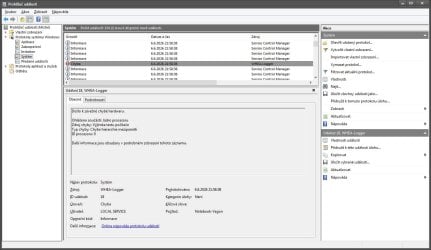
WHEA-Logger - code 18 still generating after stat system

SGvagon

Member
Hello,

I have strange "issue" with WHEA-Logger - code 18 ID Processor Core: 0 , which generating in Event viewer every after system start.

But my laptop (Lenovo Y50-70) works perfectly (zero freeze, zero BSOD) . I installed Windows 10 next to the Windows 7 as dual boot, and in W10 this WHEA-Logger not generating after start system.

Can I somehow fix this issue and stop generating this "maybe" false positive error?

I tried reset bios settings, SFC /SCANNOW, re install Intel chipset driver, reinstall GPU drivers (Intel/Nvidia) via DDU , nothing helped.

Thank you in advance for any advice.
 

My Computer

Computer type
Laptop
Computer Manufacturer/Model Number
Lenovo Y50-70 (20378)
OS
Windows 7 Professional x64
CPU
Intel Core i5-4210H
Memory
2x Kingston 8GB DDR3 1600 CL11
Graphics Card(s)
Nvidia GeForce GTX960M 4GB
Sound Card
Sound Blaster PLAY! 3
Monitor(s) Displays
2
Screen Resolution
2x 1920x1080
Hard Drives
Crucial MX500 500GB SSD
Cooling
Deepcool Multi Core X6
Keyboard
Yenkee YKB 1002 CS USB
Mouse
Crono CM645 Wired optical mouse
Internet Speed
95 Mb/s Down 95 Mb/s Up
Antivirus
MSE
Browser
Firefox 91.13.0esr x64bit

My Computers

System One System Two

Yes, I saw that discussion, but I don't have any freezing or BSOD. And in Windows 10 don't have WHEA Logger at all, only in Windows 7 .

Maybe some trobleshooting tools may can do fix this issue? I remember, that Microsoft had a lot's of FixIt tools.
 
Last edited:

My Computer

Computer type
Laptop
Computer Manufacturer/Model Number
Lenovo Y50-70 (20378)
OS
Windows 7 Professional x64
CPU
Intel Core i5-4210H
Memory
2x Kingston 8GB DDR3 1600 CL11
Graphics Card(s)
Nvidia GeForce GTX960M 4GB
Sound Card
Sound Blaster PLAY! 3
Monitor(s) Displays
2
Screen Resolution
2x 1920x1080
Hard Drives
Crucial MX500 500GB SSD
Cooling
Deepcool Multi Core X6
Keyboard
Yenkee YKB 1002 CS USB
Mouse
Crono CM645 Wired optical mouse
Internet Speed
95 Mb/s Down 95 Mb/s Up
Antivirus
MSE
Browser
Firefox 91.13.0esr x64bit
Can I somehow diagnostic this WHEA-Logger error and why it showing up only after system start? Is it driver error, or system error?
 

My Computer

Computer type
Laptop
Computer Manufacturer/Model Number
Lenovo Y50-70 (20378)
OS
Windows 7 Professional x64
CPU
Intel Core i5-4210H
Memory
2x Kingston 8GB DDR3 1600 CL11
Graphics Card(s)
Nvidia GeForce GTX960M 4GB
Sound Card
Sound Blaster PLAY! 3
Monitor(s) Displays
2
Screen Resolution
2x 1920x1080
Hard Drives
Crucial MX500 500GB SSD
Cooling
Deepcool Multi Core X6
Keyboard
Yenkee YKB 1002 CS USB
Mouse
Crono CM645 Wired optical mouse
Internet Speed
95 Mb/s Down 95 Mb/s Up
Antivirus
MSE
Browser
Firefox 91.13.0esr x64bit
I'm not sure but do you actually have any symptoms or is it just the event logs? There is a lot that makes it in the event logs that doesn't indicate a problem.
 

My Computers

System One System Two

Just WHEA-Logger code 18 event log, but it shows every after system start. So I am little worry if this harm or not for my laptop. Windows 10 not showing this.
d09a9a80-3624-467f-a5c4-1b3739e8ccac.jpg
 

My Computer

Computer type
Laptop
Computer Manufacturer/Model Number
Lenovo Y50-70 (20378)
OS
Windows 7 Professional x64
CPU
Intel Core i5-4210H
Memory
2x Kingston 8GB DDR3 1600 CL11
Graphics Card(s)
Nvidia GeForce GTX960M 4GB
Sound Card
Sound Blaster PLAY! 3
Monitor(s) Displays
2
Screen Resolution
2x 1920x1080
Hard Drives
Crucial MX500 500GB SSD
Cooling
Deepcool Multi Core X6
Keyboard
Yenkee YKB 1002 CS USB
Mouse
Crono CM645 Wired optical mouse
Internet Speed
95 Mb/s Down 95 Mb/s Up
Antivirus
MSE
Browser
Firefox 91.13.0esr x64bit
Ok, now I contacted one of my friend with same laptop and Windows 7 too. He have same WHEA-Logger error in event log after system start. So. I think this is false positive error, on 99% . Lenovo released chipset drivers with this "bug" maybe, and maybe in Windows 10 there is no WHEA-Logger error because there are newer chipset drivers?
 

My Computer

Computer type
Laptop
Computer Manufacturer/Model Number
Lenovo Y50-70 (20378)
OS
Windows 7 Professional x64
CPU
Intel Core i5-4210H
Memory
2x Kingston 8GB DDR3 1600 CL11
Graphics Card(s)
Nvidia GeForce GTX960M 4GB
Sound Card
Sound Blaster PLAY! 3
Monitor(s) Displays
2
Screen Resolution
2x 1920x1080
Hard Drives
Crucial MX500 500GB SSD
Cooling
Deepcool Multi Core X6
Keyboard
Yenkee YKB 1002 CS USB
Mouse
Crono CM645 Wired optical mouse
Internet Speed
95 Mb/s Down 95 Mb/s Up
Antivirus
MSE
Browser
Firefox 91.13.0esr x64bit
Back
Top