Solved When edit hosts file, it will reload with the default value.

anantodn

New member
Local time
7:25 AM
Messages
4
Hi All,
When I edited the file hosts in the etc folder, its saved successfully, but after 10 seconds, it will revert to default value.
Any additional value will be removed.
I already tried make it read-only, change owner, disable AV, disable Windows Firewall, disable UAC.
any help will be appreciated.

Thank you,
 

My Computer My Computer

Computer type
PC/Desktop
OS
Win 7 Proffesional 32bit
What antivirus (AV) app do you have? Disabling your AV app might not disable every component of the AV app. Don't disable the firewall. It has nothing to do with the HOSTS file. Turn your UAC to the highest level and leave it there.


Process Monitor might* be able to show you which app is acting on the HOSTS file.

When you first open Process Monitor, you should see the EULA.

After agreeing to that, Process Monitor should start collecting data.

Press CTRL+E to stop the data collection.

Press CTRL+X to clear the data.

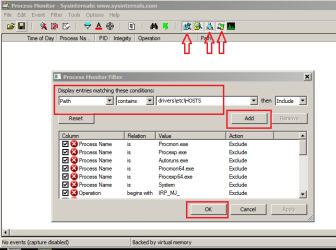
Press CTRL+L to open the filter window.

Set up a filter like this:

filter.png

After applying that filter and close the filter window via OK.

Click on each of the three icon/buttons shown in the screenshot above to filter out registry/network/process stuff. You only want to see what is happening to a file.

Press CTRL+E to start the data collection.


Make your change to the HOSTS file via notepad (or whatever). Process Monitor should show you entries related to that change. Keep an eye on Process Monitor to see what app is changing it back.


*Some AV apps might prevent Process Monitor from seeing actions taken by some components of the AV app.
 

My Computer My Computer

Computer type
Laptop
Computer Manufacturer/Model Number
Employer provided Dell Latitude
OS
W7 Pro SP1 64bit
CPU
i7
Memory
8GB
Graphics Card(s)
Intel HD Graphics
Hard Drives
crappy SSD
Antivirus
Employer mandated Symantec Endpoint Protection
Browser
Pale Moon 64bit, IE11 64bit & Chrome 64bit
Hi UsernameIssues,

Thank you for the prompt response.

I will try it first and will back again once its resolved.

Thank you,
 

My Computer My Computer

Computer type
PC/Desktop
OS
Win 7 Proffesional 32bit
What antivirus (AV) app do you have? Disabling your AV app might not disable every component of the AV app. Don't disable the firewall. It has nothing to do with the HOSTS file. Turn your UAC to the highest level and leave it there.


Process Monitor might* be able to show you which app is acting on the HOSTS file.

When you first open Process Monitor, you should see the EULA.

After agreeing to that, Process Monitor should start collecting data.

Press CTRL+E to stop the data collection.

Press CTRL+X to clear the data.

Press CTRL+L to open the filter window.

Set up a filter like this:

View attachment 381977

After applying that filter and close the filter window via OK.

Click on each of the three icon/buttons shown in the screenshot above to filter out registry/network/process stuff. You only want to see what is happening to a file.

Press CTRL+E to start the data collection.


Make your change to the HOSTS file via notepad (or whatever). Process Monitor should show you entries related to that change. Keep an eye on Process Monitor to see what app is changing it back.


*Some AV apps might prevent Process Monitor from seeing actions taken by some components of the AV app.

Hi UsernameIssues,

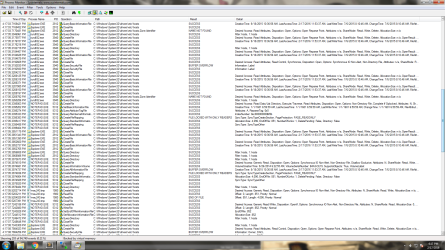
here is the screenshot with the process monitor

Any advise?

Thank you,
 

Attachments

  • 3 (2).png
    3 (2).png
    115.4 KB · Views: 7

My Computer My Computer

Computer type
PC/Desktop
OS
Win 7 Proffesional 32bit
I'm not sure when the change was made or by what app.

One thing that might help is to not have Explorer viewing the folder (maybe it wasn't).

I tested using notepad on my HOSTS file and only two processes showed in Process Monitor: notepad and my AV.


Try this:
Close Windows Explorer.
(Don't kill the explorer process. Just close the windows.)
Right click on a shortcut to notepad and select run as admin.
Use the File > Open dialog box from within notepad to open the HOSTS file.
Make a change, but do not save.
Clear the data in Process Monitor.
Start the data collection in Process Monitor.
Close notepad - saving the file when prompted.
Watch Process Monitor to see if any app acts on the HOSTS file.


What AV are you using? (I asked earlier :-)

Is the UAC turned on now?

I'm not sure what that hnsu243.tmp process is in your screenshot. Some AV tools use tmp files like that... as do infections.
 

My Computer My Computer

Computer type
Laptop
Computer Manufacturer/Model Number
Employer provided Dell Latitude
OS
W7 Pro SP1 64bit
CPU
i7
Memory
8GB
Graphics Card(s)
Intel HD Graphics
Hard Drives
crappy SSD
Antivirus
Employer mandated Symantec Endpoint Protection
Browser
Pale Moon 64bit, IE11 64bit & Chrome 64bit
Also I notice that your HOSTS file has an ads stream attached. Did you download a HOSTS file from the internet and replace the original? If so, try removing the zone identifier.
 

My Computer My Computer

Computer type
Laptop
Computer Manufacturer/Model Number
ASUS
OS
Microsoft Windows 7 Home Premium 64-bit 7601 Multiprocessor Free Service Pack 1
CPU
AMD C-60 APU with Radeon(tm) HD Graphics
Motherboard
ASUSTeK COMPUTER INC. X501U
Memory
4.00 GB
Graphics Card(s)
AMD Radeon HD 6290 Graphics
Sound Card
(1) AMD High Definition Audio Device (2) Realtek High Defi
Screen Resolution
1366 x 768 x 32 bits (4294967296 colors) @ 60 Hz
Hard Drives
Hitachi HTS545050A7E380 SATA Disk Device
Antivirus
Comodo CIS & FW, SecureAplus App Whitelisting, Threatfire
Browser
Cyberfox 64bit, Opera 64bit, Airfox
Other Info
Spy-The-Spy, HitmanPro.Alert, Norton Connect Safe, MJRegWatcher, BitDefender TrafficLight, Voodoo Shield, Zemana AntiMalware
Also I notice that your HOSTS file has an ads stream attached. Did you download a HOSTS file from the internet and replace the original? If so, try removing the zone identifier.

Is this what you are talking about:
ZI.PNG
 

My Computer My Computer

Computer type
Laptop
Computer Manufacturer/Model Number
Employer provided Dell Latitude
OS
W7 Pro SP1 64bit
CPU
i7
Memory
8GB
Graphics Card(s)
Intel HD Graphics
Hard Drives
crappy SSD
Antivirus
Employer mandated Symantec Endpoint Protection
Browser
Pale Moon 64bit, IE11 64bit & Chrome 64bit
Yes it is but now I'm thinking that it's just a zone identifier check rather than an attached ads stream.
 

My Computer My Computer

Computer type
Laptop
Computer Manufacturer/Model Number
ASUS
OS
Microsoft Windows 7 Home Premium 64-bit 7601 Multiprocessor Free Service Pack 1
CPU
AMD C-60 APU with Radeon(tm) HD Graphics
Motherboard
ASUSTeK COMPUTER INC. X501U
Memory
4.00 GB
Graphics Card(s)
AMD Radeon HD 6290 Graphics
Sound Card
(1) AMD High Definition Audio Device (2) Realtek High Defi
Screen Resolution
1366 x 768 x 32 bits (4294967296 colors) @ 60 Hz
Hard Drives
Hitachi HTS545050A7E380 SATA Disk Device
Antivirus
Comodo CIS & FW, SecureAplus App Whitelisting, Threatfire
Browser
Cyberfox 64bit, Opera 64bit, Airfox
Other Info
Spy-The-Spy, HitmanPro.Alert, Norton Connect Safe, MJRegWatcher, BitDefender TrafficLight, Voodoo Shield, Zemana AntiMalware
Agreed. That is just a check and no zone identifiers were found :-)
 

My Computer My Computer

Computer type
Laptop
Computer Manufacturer/Model Number
Employer provided Dell Latitude
OS
W7 Pro SP1 64bit
CPU
i7
Memory
8GB
Graphics Card(s)
Intel HD Graphics
Hard Drives
crappy SSD
Antivirus
Employer mandated Symantec Endpoint Protection
Browser
Pale Moon 64bit, IE11 64bit & Chrome 64bit
Hi UsernameIssues and Callender,

Thanks for your time on when reply this issue.
This is just odd, the issue is resolved itself.
Not sure what kind of apps that make this issue happened before.

Thank you,
 

My Computer My Computer

Computer type
PC/Desktop
OS
Win 7 Proffesional 32bit
Back
Top