
You are using an out of date browser. It may not display this or other websites correctly.
You should upgrade or use an alternative browser.
You should upgrade or use an alternative browser.
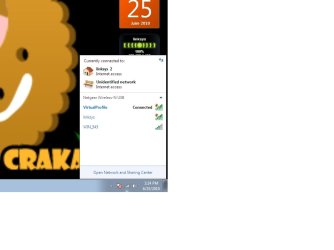
When I connect to my wireless router it says "linksys 2"
- Thread starter secor941
- Start date

hi and welcome
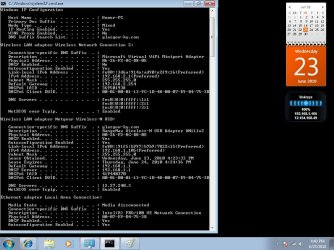
can you type ipconfig /all and post screenshot. http://www.sevenforums.com/tutorials/9733-how-post-screenshot-seven-forums.html
can you type ipconfig /all and post screenshot. http://www.sevenforums.com/tutorials/9733-how-post-screenshot-seven-forums.html
My Computer
At a glance
windows 7Phenom II AMD Dragon 3.5GhzDDR3 4GBATI Radeon 512Mb
- Computer Manufacturer/Model Number
- built up
- OS
- windows 7
- CPU
- Phenom II AMD Dragon 3.5Ghz
- Memory
- DDR3 4GB
- Graphics Card(s)
- ATI Radeon 512Mb
- Monitor(s) Displays
- HP L1506
- Screen Resolution
- 1152 x 864
- Hard Drives
- WDC 1 TB SATA-II Green Power
- Keyboard
- HP wireless keyboard
- Mouse
- HP Optic
- Internet Speed
- 1GB
My Computer
At a glance
windows 7Phenom II AMD Dragon 3.5GhzDDR3 4GBATI Radeon 512Mb
- Computer Manufacturer/Model Number
- built up
- OS
- windows 7
- CPU
- Phenom II AMD Dragon 3.5Ghz
- Memory
- DDR3 4GB
- Graphics Card(s)
- ATI Radeon 512Mb
- Monitor(s) Displays
- HP L1506
- Screen Resolution
- 1152 x 864
- Hard Drives
- WDC 1 TB SATA-II Green Power
- Keyboard
- HP wireless keyboard
- Mouse
- HP Optic
- Internet Speed
- 1GB
It's not an issue with the router, I do not need to change my ssid or security and if I did I don't need any assistance with that. This is an issue with windows. Also sometimes i get another network that doesn't even exist called virtual profile.
My Computer
At a glance
windows 7 enterprise
- OS
- windows 7 enterprise

Have you connected to another wireless network with the ssid of Linksys? Windows remembers all the wireless networks you have connected to. So if you had connected to a wireless network named linksys in the past it has remembered this and is putting the 2 at the end to distinguish the two diff networks.
I dont have wireless on my windows PC here, but I believe you can go into the wireless settings and see all the wireless networks that your computer has trusted.
I dont have wireless on my windows PC here, but I believe you can go into the wireless settings and see all the wireless networks that your computer has trusted.
My Computer
At a glance
Windows 7
- OS
- Windows 7
My Computer
At a glance
windows 7 enterprise
- OS
- windows 7 enterprise
Check out this post
Wireless Network Virtual Profile - ignore the post by Savan HMicrosoft Support, Moderator.... read a little further down.
Wireless Network Virtual Profile - ignore the post by Savan HMicrosoft Support, Moderator.... read a little further down.
My Computer
At a glance
Windows 7
- OS
- Windows 7

I've had this happen with NICs before. Once Windows sets it up you can remove it and then when it reinstalls it sees it as "NIC 2". My guess is that you unplugged your router and when you hooked it back up it saw it as a new one. It's been a while, but as I recall I had to burrow pretty deep into the registry to clean it all out, then let Windows detect it as a brand new connection. Now when that happens I just ignore it as not being worth the trouble. 
My Computer
At a glance
Main - Windows 7 Pro SP1 64-Bit; 2nd - Window...Main - Core i7 2600K; 2nd - Core i7 920Main - 16GB Corsair Vengeance; 2nd - 12GB Cor...Main - XFX Radeon 6870 1GB; 2nd - XFX Radeon ...
- Computer Manufacturer/Model Number
- Self
- OS
- Main - Windows 7 Pro SP1 64-Bit; 2nd - Windows Server 2008 R2
- CPU
- Main - Core i7 2600K; 2nd - Core i7 920
- Motherboard
- Main - Asus P8Z68-V Pro/Gen3; 2nd - Gigabyte GA-EX58-UDR3
- Memory
- Main - 16GB Corsair Vengeance; 2nd - 12GB Corsair Vengeance
- Graphics Card(s)
- Main - XFX Radeon 6870 1GB; 2nd - XFX Radeon 4870 1GB
- Sound Card
- Both: Onboard Realtek Azalia
- Monitor(s) Displays
- Main - Hann 25" + I-INC 25" + Acer 23"; 2nd - Upgrading Soon
- Screen Resolution
- Main - 1920x1080 (All Three Monitors); 2nd - Upgrading Soon
- Hard Drives
- Main - (1) Crucial M4 128GB (Boot)
Main - (1) Seagate 2TB 64MB Cache (Data)
Main - (1) Seagate 2TB 64MB Cache (Data Backup)
2nd - (1) Intel X25-M SSD 80GB (Boot)
2nd - (3) Seagate 1TB 32MB Cache (Data Backup)
2nd - (1) Seagate 320GB (Because)
- PSU
- Main - OCZ 600W Modular; 2nd - OCZ 600W
- Case
- Main - Thermaltake Element G; 2nd - NZXT something or other
- Cooling
- Main - Corsair H80; 2nd - Prolimatech Megahalems
- Keyboard
- Main - Razer Reclusa; 2nd - Old MS Keyboard
- Mouse
- Main - Logitech MX Revolution; 2nd - Old MS Mouse
- Internet Speed
- 20Mbps Time-Warner Cable
your previous post would change the ADAPTER name not NETWORK name. I fixed the linksys 2 issue by going through my registry and deleting everything that said linksys and the restarted the computer.. The "virtual profile" issure could be because of my internet connection sharing with a program called Connectify which is a wireless hotspot repeater program for windows 7
My Computer
At a glance
windows 7 enterprise
- OS
- windows 7 enterprise
sorry for the late reply, but i'm glad your issue linksys 2 already fixed.
about the virtual profil,yap the virtual profileis cause by the connectify, that's a virtual wifi to turn PC into wifi access point.
about the virtual profil,yap the virtual profileis cause by the connectify, that's a virtual wifi to turn PC into wifi access point.
My Computer
At a glance
windows 7Phenom II AMD Dragon 3.5GhzDDR3 4GBATI Radeon 512Mb
- Computer Manufacturer/Model Number
- built up
- OS
- windows 7
- CPU
- Phenom II AMD Dragon 3.5Ghz
- Memory
- DDR3 4GB
- Graphics Card(s)
- ATI Radeon 512Mb
- Monitor(s) Displays
- HP L1506
- Screen Resolution
- 1152 x 864
- Hard Drives
- WDC 1 TB SATA-II Green Power
- Keyboard
- HP wireless keyboard
- Mouse
- HP Optic
- Internet Speed
- 1GB
new member looking for answers on ssid one and two resolved for me
i was having a heck of a time with ssid 1 and 2. 2 kept on restarting my browser and wouldn't allow some countries to unblock. i came here and got an idea. i went into my zhone router settings and clicked wireless/security, scrolled down to manual set ap, then noticed the network authentication wasn't right. changed that, put in my password and voila! i no longer have ssid 2 showing.
i was having a heck of a time with ssid 1 and 2. 2 kept on restarting my browser and wouldn't allow some countries to unblock. i came here and got an idea. i went into my zhone router settings and clicked wireless/security, scrolled down to manual set ap, then noticed the network authentication wasn't right. changed that, put in my password and voila! i no longer have ssid 2 showing.
My Computer
At a glance
7 professional
- Computer type
- PC/Desktop
- Computer Manufacturer/Model Number
- toshiba
- OS
- 7 professional
- Antivirus
- macafee
- Browser
- chrome

your previous post would change the ADAPTER name not NETWORK name. I fixed the linksys 2 issue by going through my registry and deleting everything that said linksys and the restarted the computer.. The "virtual profile" issure could be because of my internet connection sharing with a program called Connectify which is a wireless hotspot repeater program for windows 7
You could try this Hotfix next time it happens...or install it in case it comes back: Duplicate friendly names of network adapters are displayed in Windows
My Computer
At a glance
Windows 7 Professional SP1 - x64 [Non-UEFI Boot]Ivy Bridge Core i5 3570K (Delidded)G.Skill "Ares" DDR3 PC3-12800 - 1600MHz (16Gb)Asus Dual-RX480-O4G
- Computer type
- PC/Desktop
- Computer Manufacturer/Model Number
- Custom Build
- OS
- Windows 7 Professional SP1 - x64 [Non-UEFI Boot]
- CPU
- Ivy Bridge Core i5 3570K (Delidded)
- Motherboard
- Asus P8Z77-V LE PLUS
- Memory
- G.Skill "Ares" DDR3 PC3-12800 - 1600MHz (16Gb)
- Graphics Card(s)
- Asus Dual-RX480-O4G
- Sound Card
- Creative Sound Blaster Z w/5.1 sound system
- Monitor(s) Displays
- Asus IPS 23"
- Screen Resolution
- 16/9
- Hard Drives
- Internal:
500Go Sata 6Gb/s (x2)
500Go Sata 3Gb/s (x2)
SSD 60Go Sata 6Gb/s
- PSU
- In Win C 900W Series 80+ Platinum
- Case
- Thermaltake Chaser A71
- Cooling
- Custom Water Cooling Loop
- Keyboard
- Cooler Master QuickFire XTi
- Mouse
- Razer Imperator 2012 (4G)
- Antivirus
- MSE
- Browser
- IE 11.0.xxx Rtm
- Other Info
- "Raid0" with Intel Smart Response Technology (HDD/SSD)
Similar threads
- Replies
- 3
- Views
- 1K
- Replies
- 7
- Views
- 4K

- Replies
- 4
- Views
- 2K
