
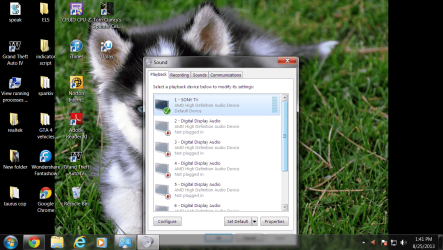
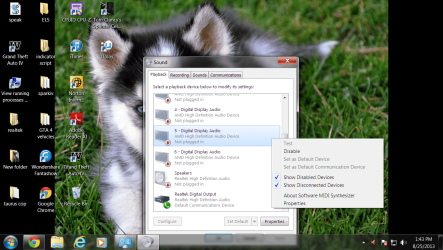
my pc wont show a notification telling me i have pluged in my headset, i am trying to use my mic-build-in kind of headset. when i plug it in nothing happens is if i never had plug it in, my headset also does not appear in my playback devices, shows as 'not plugged in'
my headset is the kind where it has the mic and headphones divided into two plugs connected to the rear of the PC.
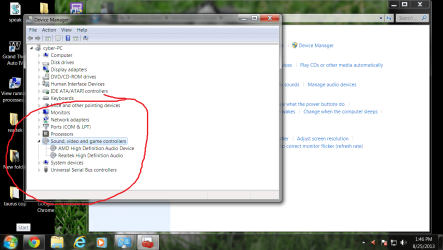
i am using windows 7 home premium 64-bit with REALTEK.
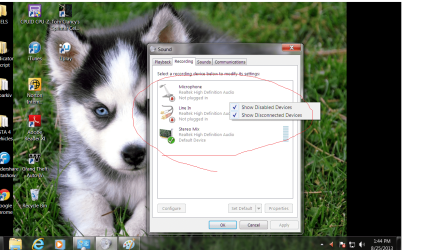
yes i am sure everything is connected and volume is okay. I was playing an online game and i could hear what people were saying but not speak, after i umpluged and pluged back my headset i found 'stereo mix' to be in the wrong tab, see pictures.
my headset is the kind where it has the mic and headphones divided into two plugs connected to the rear of the PC.
i am using windows 7 home premium 64-bit with REALTEK.
yes i am sure everything is connected and volume is okay. I was playing an online game and i could hear what people were saying but not speak, after i umpluged and pluged back my headset i found 'stereo mix' to be in the wrong tab, see pictures.
Attachments

My Computer
At a glance
windows 7 home premium 64-bit3.40
- Computer type
- PC/Desktop
- Computer Manufacturer/Model Number
- custom build
- OS
- windows 7 home premium 64-bit
- CPU
- 3.40
- Motherboard
- AMD 780

