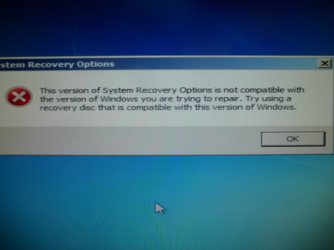
when I try to reinstall and repair windows, wrong version error

lem45216

New member
Local time
8:54 PM
Messages
8
Win 7 Home Premium will not finish booting. The splash screen just starts showing a little color, when it goes to choice of system repair or start windows normally. If normally is chosen the same choices repeat. If repair system, no solution is found. Next is an option of 7 choices to manually repair. None advance the cause.


History; bought off craigslist. Believe I may have foolishly bought a computer with illegal Win7 Home Premium OS. Downloaded Win 7 Home Premium iso from Microsoft link. After I installed the key previously used and Microsoft rejected it. I had one more key from a update 3 pack and it worked.


Later I decided to upgrade the BIOS, but did not BU the old BIOS. That was when the booting problem started.


Now when I try to reinstall and repair windows, wrong version error. Help
 

My Computer My Computer

Computer type
PC/Desktop
Computer Manufacturer/Model Number
custom build
OS
Windows 7 Home Premium 64bit.
CPU
I3
Motherboard
Gigabyte B75M-D3H
Memory
8G
Graphics Card(s)
iNTELL 4000
Hard Drives
WD 1T
Antivirus
AVG
Browser
FIREFOX
Probably a bad BIOS update. Get into your BIOS and reset the settings to default, save and exit. See if it helps.

Also you could try popping open your case, taking the CMOS battery out, waiting for half an hour and then placing it back. This also resets BIOS to factory defaults along with the loss of date and time which need to be set after performing this step.

Hope it helps.
 
"Probably a bad BIOS update. Get into your BIOS and reset the settings to default, save and exit."
Default BIOS settings did not change anything.
Other things I have tried: Replaced HD with one cloned 2 weeks ago. No help.
Run AVG Live CD to look for virus. No help.
Works great from another HD where I have Linux Mint 14 installed.
I want to recover my programs and data from win 7.
Could I buy another version of windows and upgrade to save programs and data? If so what version?
I feel like I have already purchased 2 versions of windows, although the first was probably counterfeit.
 

My Computer My Computer

Computer type
PC/Desktop
Computer Manufacturer/Model Number
custom build
OS
Windows 7 Home Premium 64bit.
CPU
I3
Motherboard
Gigabyte B75M-D3H
Memory
8G
Graphics Card(s)
iNTELL 4000
Hard Drives
WD 1T
Antivirus
AVG
Browser
FIREFOX
Windows 7 Home Premium x64 RTM X15-65733.iso from Digital River did not work. Wrong version. I thought that was the version I installed. What other versions are there.
 

My Computer My Computer

Computer type
PC/Desktop
Computer Manufacturer/Model Number
custom build
OS
Windows 7 Home Premium 64bit.
CPU
I3
Motherboard
Gigabyte B75M-D3H
Memory
8G
Graphics Card(s)
iNTELL 4000
Hard Drives
WD 1T
Antivirus
AVG
Browser
FIREFOX
Please describe the error a bit more. Where and when do you get this error? Posting a photo of the error if possible would be a lot better.
 
System recovery options from Win 7 Home Prem X15-65733. This version of windows is not compatible with the version of windows you are trying to repair. Try using a recovery disk that is compatible with this version of windows.

Purchased this computer from Craigslist, the goggled key supplied tracks to win 7 Home Premium Alienware OEM version. Don't know if that helps. Microsoft let me activate the computer with a win 7 Home Premium key purchased at Sam's. Then I updated the BIOS and I was locked out.
 

Attachments

  • win system recovery options 002.JPG
    win system recovery options 002.JPG
    182.6 KB · Views: 4

My Computer My Computer

Computer type
PC/Desktop
Computer Manufacturer/Model Number
custom build
OS
Windows 7 Home Premium 64bit.
CPU
I3
Motherboard
Gigabyte B75M-D3H
Memory
8G
Graphics Card(s)
iNTELL 4000
Hard Drives
WD 1T
Antivirus
AVG
Browser
FIREFOX
What version is the OS? 64-bit or 32-bit. A 64-bit Recovery disc could only recover a 64-bit OS. Same goes for 32-bit OS. Win 7 Home Prem X15-65733 is a 64-BIT iso file you probably have a 32bit OS installed.
 

My Computer My Computer

Computer Manufacturer/Model Number
Custom Built
OS
Windows 7 Ultimate 32-Bit & Windows 7 Ultimate 64-Bit
CPU
Intel Core i7 CPU 950 @ 3.07GHz
Motherboard
ASUS P6T DELUXE V2
Memory
OCZ 6GB (3 x 2GB) 240-Pin DDR3 SDRAM DDR3 1600 OCZ3X1600R2
Graphics Card(s)
ATI Radeon HD 5700 Series
Sound Card
OnBoard
Hard Drives
WD6400AACS-00M3B0 (640GB SATA )
PSU
CORSAIR 850w
Case
NZXT LEXA
Cooling
Intel Stock Heatsink Fan
Keyboard
Microsoft Wireless Laser Keyboard 7000
Mouse
Microsoft Wireless Laser Mouse 7000
Both are 64 bit. I installed 64 bit versions of software when available.
 

My Computer My Computer

Computer type
PC/Desktop
Computer Manufacturer/Model Number
custom build
OS
Windows 7 Home Premium 64bit.
CPU
I3
Motherboard
Gigabyte B75M-D3H
Memory
8G
Graphics Card(s)
iNTELL 4000
Hard Drives
WD 1T
Antivirus
AVG
Browser
FIREFOX
Why are you trying to repair? You should perform a clean install using the 'Install' button that appears on the wizard after you boot from the ISO.
 
I don't want to lose my data and programs is why I don't want to do a new install..
 

My Computer My Computer

Computer type
PC/Desktop
Computer Manufacturer/Model Number
custom build
OS
Windows 7 Home Premium 64bit.
CPU
I3
Motherboard
Gigabyte B75M-D3H
Memory
8G
Graphics Card(s)
iNTELL 4000
Hard Drives
WD 1T
Antivirus
AVG
Browser
FIREFOX
You could only do an upgrade from within Windows. If you can't then you will have to do a clean install which you will lose your data and programs. You could do is backup your data onto an external hard drive .

Have your external hard drive plugged in. Click on Repair your computer Choose Windows 7 on the System Recovery screen choose Command Prompt

In command prompt type

Code:
notepad.exe

Inside Notepad click on File then choose open and save your data that way to your external. Programs won't be saved . You would have to reinstall them again.
 

My Computer My Computer

Computer Manufacturer/Model Number
Custom Built
OS
Windows 7 Ultimate 32-Bit & Windows 7 Ultimate 64-Bit
CPU
Intel Core i7 CPU 950 @ 3.07GHz
Motherboard
ASUS P6T DELUXE V2
Memory
OCZ 6GB (3 x 2GB) 240-Pin DDR3 SDRAM DDR3 1600 OCZ3X1600R2
Graphics Card(s)
ATI Radeon HD 5700 Series
Sound Card
OnBoard
Hard Drives
WD6400AACS-00M3B0 (640GB SATA )
PSU
CORSAIR 850w
Case
NZXT LEXA
Cooling
Intel Stock Heatsink Fan
Keyboard
Microsoft Wireless Laser Keyboard 7000
Mouse
Microsoft Wireless Laser Mouse 7000
Well that's not at all possible in your case since the Windows version you got with your purchase doesn't seem to be genuine and/or is a modified version.

Doing a clean install seems to be the only option. Just format C, you'll loose everything on C, rest will remain intact, but you'll obviuosly need to reinstall all programs.
 
He should be able to back up his files if his Windows isn't genuine .
 

My Computer My Computer

Computer Manufacturer/Model Number
Custom Built
OS
Windows 7 Ultimate 32-Bit & Windows 7 Ultimate 64-Bit
CPU
Intel Core i7 CPU 950 @ 3.07GHz
Motherboard
ASUS P6T DELUXE V2
Memory
OCZ 6GB (3 x 2GB) 240-Pin DDR3 SDRAM DDR3 1600 OCZ3X1600R2
Graphics Card(s)
ATI Radeon HD 5700 Series
Sound Card
OnBoard
Hard Drives
WD6400AACS-00M3B0 (640GB SATA )
PSU
CORSAIR 850w
Case
NZXT LEXA
Cooling
Intel Stock Heatsink Fan
Keyboard
Microsoft Wireless Laser Keyboard 7000
Mouse
Microsoft Wireless Laser Mouse 7000
Probably a bad BIOS update. Get into your BIOS and reset the settings to default, save and exit. See if it helps.

Also you could try popping open your case, taking the CMOS battery out, waiting for half an hour and then placing it back. This also resets BIOS to factory defaults along with the loss of date and time which need to be set after performing this step.

Hope it helps.

CMOS Battery is only for the RTC (real time clock) Mostly these days. You will have to look up the motherboard manual to reset the BIOS from the jumpers on the motherboard.
 

My Computer My Computer

Computer type
PC/Desktop
Computer Manufacturer/Model Number
Dell / Lenovo g550
OS
Windows 7 Ultimate 64-bit
CPU
Intel Core 2 Duo E6550 @2.33GHz
Motherboard
foxconn g33m02
Memory
4GB DDR"
Graphics Card(s)
NVIDIA GeForce 8600 GS
Hard Drives
HDD 1 = 150GB
HDD 2 = 1.5TB
PSU
450W
Cooling
Stock fan
Internet Speed
12Mb
Antivirus
AVG Internet Security
http://www.sevenforums.com/tutorials/93347-copy-paste-windows-recovery-console.html

The computer should have a COA with the windows key code on it. Use that to activate windows after you rescue your data and do a clean install.

http://www.sevenforums.com/tutorials/219487-clean-reinstall-factory-oem-windows-7-a.html


If you fouled up your bios, then simply resetting it will probably not fix it. But as mentioned find the jumper pins ( 3 of them with a cap on 2 of them ) marked clear cmos. They will not be far from the cmos battery. Move the jumper pin over the other 2 pins for 5 seconds, put it back then restart the machine. You will have to go back into the bios to change a few things. As long as you don`t pull the cmos battery the date and time should be right, but check it.

Do all this with the power unplugged and drain the power by holding down the power button for 5 seconds.
 

My Computer My Computer

Computer type
PC/Desktop
Computer Manufacturer/Model Number
Skylake Special #666
OS
Windows 10 Pro x64
CPU
Intel Core i7 6700K
Motherboard
Asus Sabertooth Z170 Mark 1
Memory
GSkill TridentZ RGB 16GB 3600 16-16-16-36
Graphics Card(s)
EVGA GTX 980 Ti SC x2
Sound Card
Realtek High Definition
Monitor(s) Displays
AOC G2460PG
Screen Resolution
1920 x 1080 144Hz
Hard Drives
Samsung 860 Pro 256GB, Seagate Barracuda 4TB x2
PSU
EVGA 1000 P2, EVGA White Custom Braided Cables
Case
Corsair Vengeance C70 Gunmetal Black
Cooling
Corsair H100i v2, Corsair ML120 x2, Thermal Grizzly Kryonaut
Keyboard
Logitech G910 Orion Spectrum
Mouse
Logitech G700s
Internet Speed
Verizon Fios Quantum Gateway 75/75
Antivirus
Windows Defender, Malwarebytes Free 3.8.3
Browser
Chrome
Other Info
Corsair SP120 x4, LG Blu-ray Drive, Durabrand HT-395 100 Watt Dolby Digital Amp, Corsair H2100 Wireless 7.1 Headset
Back up your files using the Win7 DVD as suggested to Copy & Paste - in Windows Recovery Console.

Unplug all other HD's and peripherals,

Boot into BIOS setup, reset to defaults, save changes. If an EFI BIOS, enable Legacy BIOS or Compatibility Support Module, set DVD drive first to boot, HD second. Then set SATA controller to AHCI. Save changes and Exit.

Then boot into installer DVD or flash stick burned or written using tool and latest ISO for your licensed OS version here.

At first installer screen Press Shift + F10 to open a Command Box, type:

DISKPART
LIST DISK
SELECT DISK 0 (after confirming Windows 7 target HD #)
CLEAN
CREATE PARTITION PRIMARY SIZE=102400 (for 100gb partition, adjust as desired)
FORMAT FS=NTFS LABEL="WINDOWS 7"
ACTIVE
EXIT
EXIT

Next click Install Now, then Custom install to Clean Install Windows 7 to the partition you created. If it fails then report back at which step and the verbatim error message.

In addition read over these steps to understand the tools and methods which work best to get and maintain a perfect Clean Reinstall - Factory OEM Windows 7. The steps are the same for retail.

After install you can adjust partition size or Create new partitions for data, etc. in Disk Mgmt.You are creating the partition here for the purpose of marking it Active which overcomes certain install failures.
 
Used Paragon Rescue kit 11 to BU data, and started clean install. I have been working on it about 8 hours and it looks like everything is going well. Thanks to all of you who helped me reach this point.
 

My Computer My Computer

Computer type
PC/Desktop
Computer Manufacturer/Model Number
custom build
OS
Windows 7 Home Premium 64bit.
CPU
I3
Motherboard
Gigabyte B75M-D3H
Memory
8G
Graphics Card(s)
iNTELL 4000
Hard Drives
WD 1T
Antivirus
AVG
Browser
FIREFOX
Equally important to getting a perfect Clean Reinstall - Factory OEM Windows 7
is how you set it up. So be sure to read over the steps again and ask back if you have any questions.

Especially focus on getting online to run all Important and Optional Updates. Normally you can do this while you are setting up your desktop and even installing important programs. Just heed the reboots and go right back to run Windows Update until they are all completed.

Then check Device Manager to see which drivers are still missing to import from your PC or device's Support Downloads webpage. We can help you if you throw it back to us there.

Once it's all set up and running perfectly (in a day or two) capture a Win7 backup image externally so you never have to reinstall again. You can even apply this install to other PC's using Paragon Adaptive Restore CD freeware.
 
I'm ready to restore the user data that I saved with paragon rescue kit 11. Any recommendations of how to do that?

I see that my question was answered above before I asked it.
 
Last edited:

My Computer My Computer

Computer type
PC/Desktop
Computer Manufacturer/Model Number
custom build
OS
Windows 7 Home Premium 64bit.
CPU
I3
Motherboard
Gigabyte B75M-D3H
Memory
8G
Graphics Card(s)
iNTELL 4000
Hard Drives
WD 1T
Antivirus
AVG
Browser
FIREFOX
Back
Top