JavaScript is disabled. For a better experience, please enable JavaScript in your browser before proceeding.
You are using an out of date browser. It may not display this or other websites correctly.
You should upgrade or use an
alternative browser .
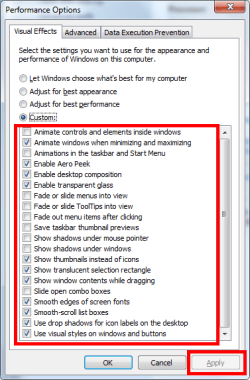
When playing BF4 Windows 7 pops up
the Performance Option's screen and I have to choose either best performance, best appearance or custom.
It just started doing this last week. I always choose the best appearance option. But still this screen keeps popping up when starting the game.
So my question is how to make my choice remain permanent?
Windows 7 Prof x64.
Thanks in advance.
Computer type PC/Desktop Computer Manufacturer/Model Number HomieJunker OS W7 Prof 64 bit CPU i7-3770k Motherboard Sabertooth Z77 Memory G.Skill Sniper 1866 16 GB Graphics Card(s) Evga GTX 770 Sound Card Sound Blaster Z Monitor(s) Displays Asus VG278HE Screen Resolution 1920 x 1080 Hard Drives 4 Seagate Barracudas 250 GB PSU Corsair H1000X Case Lian-Li A77B Cooling Phantek 120 dual fans Keyboard Corsair K70 RGB Mouse Logitech G502 Internet Speed FiOS Quantum Antivirus Avira Browser Chrome
R.I.P. 7/09/2014
Guru
VIP
Go to
Control Panel\All Control Panel Items\Performance Information and Tools Click on Adjust Visual effects in the left pane and set the item as you like, here's mine. Click Apply after you're done.
Computer type PC/Desktop Computer Manufacturer/Model Number Home Built Desktop By DataTech OS Windows 7 Ultimate X64 SP1 CPU Intel i5-2550K, Differing ~4.4-4.8GHz No built in GPU Motherboard ASUS P8Z68-V PRO/GEN3 Memory 16GB G.Skill Sniper 1866MHz @ 2133MHz 2x8GB Graphics Card(s) ASUS GTX650TIB-DC2OC-2GD5, (650TI Boost) Sound Card Onboard Realtek 5-1 Monitor(s) Displays Samsung P2570HD Screen Resolution 1920x1080 Hard Drives Samsung 840 Pro 256GB SSD for OS, 500GB Seagate Constellation (Enterprise drive) for Data PSU Corsair HX650W Case Inwin Dragon Rider Cooling Hyper 212 EVO w/two Noctua fans, push-pull, @1300 RPM Keyboard E-Z Eyes, bright yellow keys with large characters Mouse steelseries SENSEI Laser Pro Gaming Internet Speed 48-51Mbs Mbs down, 11 Mbs up Xfinity Cable Antivirus Norton Internet Security 2013 Browser IE 10, Opera, Pale Moon if needed Other Info 4 case fans, LG BluRay-RE, ASUS DVD-RW, Mr. Fusion power supply, 1.21 gigawatts.
New member
Member
VIP
Thread Starter
Computer type PC/Desktop Computer Manufacturer/Model Number HomieJunker OS W7 Prof 64 bit CPU i7-3770k Motherboard Sabertooth Z77 Memory G.Skill Sniper 1866 16 GB Graphics Card(s) Evga GTX 770 Sound Card Sound Blaster Z Monitor(s) Displays Asus VG278HE Screen Resolution 1920 x 1080 Hard Drives 4 Seagate Barracudas 250 GB PSU Corsair H1000X Case Lian-Li A77B Cooling Phantek 120 dual fans Keyboard Corsair K70 RGB Mouse Logitech G502 Internet Speed FiOS Quantum Antivirus Avira Browser Chrome
R.I.P. 7/09/2014
Guru
VIP
You're welcome, did that help?
Computer type PC/Desktop Computer Manufacturer/Model Number Home Built Desktop By DataTech OS Windows 7 Ultimate X64 SP1 CPU Intel i5-2550K, Differing ~4.4-4.8GHz No built in GPU Motherboard ASUS P8Z68-V PRO/GEN3 Memory 16GB G.Skill Sniper 1866MHz @ 2133MHz 2x8GB Graphics Card(s) ASUS GTX650TIB-DC2OC-2GD5, (650TI Boost) Sound Card Onboard Realtek 5-1 Monitor(s) Displays Samsung P2570HD Screen Resolution 1920x1080 Hard Drives Samsung 840 Pro 256GB SSD for OS, 500GB Seagate Constellation (Enterprise drive) for Data PSU Corsair HX650W Case Inwin Dragon Rider Cooling Hyper 212 EVO w/two Noctua fans, push-pull, @1300 RPM Keyboard E-Z Eyes, bright yellow keys with large characters Mouse steelseries SENSEI Laser Pro Gaming Internet Speed 48-51Mbs Mbs down, 11 Mbs up Xfinity Cable Antivirus Norton Internet Security 2013 Browser IE 10, Opera, Pale Moon if needed Other Info 4 case fans, LG BluRay-RE, ASUS DVD-RW, Mr. Fusion power supply, 1.21 gigawatts.
New member
Member
VIP
Thread Starter
The changes helped desktop to run much faster. But it still pops up whenever I play Battlefield 4.
Computer type PC/Desktop Computer Manufacturer/Model Number HomieJunker OS W7 Prof 64 bit CPU i7-3770k Motherboard Sabertooth Z77 Memory G.Skill Sniper 1866 16 GB Graphics Card(s) Evga GTX 770 Sound Card Sound Blaster Z Monitor(s) Displays Asus VG278HE Screen Resolution 1920 x 1080 Hard Drives 4 Seagate Barracudas 250 GB PSU Corsair H1000X Case Lian-Li A77B Cooling Phantek 120 dual fans Keyboard Corsair K70 RGB Mouse Logitech G502 Internet Speed FiOS Quantum Antivirus Avira Browser Chrome
R.I.P. 7/09/2014
Guru
VIP
Strange, with your specs there shouldn't be any performance bottlenecks. Best Appearance will enable most of the options, try best performance?
Computer type PC/Desktop Computer Manufacturer/Model Number Home Built Desktop By DataTech OS Windows 7 Ultimate X64 SP1 CPU Intel i5-2550K, Differing ~4.4-4.8GHz No built in GPU Motherboard ASUS P8Z68-V PRO/GEN3 Memory 16GB G.Skill Sniper 1866MHz @ 2133MHz 2x8GB Graphics Card(s) ASUS GTX650TIB-DC2OC-2GD5, (650TI Boost) Sound Card Onboard Realtek 5-1 Monitor(s) Displays Samsung P2570HD Screen Resolution 1920x1080 Hard Drives Samsung 840 Pro 256GB SSD for OS, 500GB Seagate Constellation (Enterprise drive) for Data PSU Corsair HX650W Case Inwin Dragon Rider Cooling Hyper 212 EVO w/two Noctua fans, push-pull, @1300 RPM Keyboard E-Z Eyes, bright yellow keys with large characters Mouse steelseries SENSEI Laser Pro Gaming Internet Speed 48-51Mbs Mbs down, 11 Mbs up Xfinity Cable Antivirus Norton Internet Security 2013 Browser IE 10, Opera, Pale Moon if needed Other Info 4 case fans, LG BluRay-RE, ASUS DVD-RW, Mr. Fusion power supply, 1.21 gigawatts.
New member
Member
VIP
Thread Starter
I don't have a performance problems. The problem is the 'visual effects' screen popping up.
Computer type PC/Desktop Computer Manufacturer/Model Number HomieJunker OS W7 Prof 64 bit CPU i7-3770k Motherboard Sabertooth Z77 Memory G.Skill Sniper 1866 16 GB Graphics Card(s) Evga GTX 770 Sound Card Sound Blaster Z Monitor(s) Displays Asus VG278HE Screen Resolution 1920 x 1080 Hard Drives 4 Seagate Barracudas 250 GB PSU Corsair H1000X Case Lian-Li A77B Cooling Phantek 120 dual fans Keyboard Corsair K70 RGB Mouse Logitech G502 Internet Speed FiOS Quantum Antivirus Avira Browser Chrome
Overclocking the Web
Power User
Actually, we can't "see" what's on your screen when you start the game. You might want to hit the Print Screen key when you launch it again later.
Computer type PC/Desktop Computer Manufacturer/Model Number Custom OS Microsoft Windows 7 Home Premium 64-bit Service Pack 1 CPU AMD A10-6800K APU with Radeon(tm)™ HD Graphics 4100 Motherboard ASRock FM2A85X Extreme4-M Memory (2) G.Skill F3-12800CL10-8GBXL Graphics Card(s) ASUS R7 250 Series (0x6610) Sound Card Realtek High Definition Audio Monitor(s) Displays Acer X213H LCD monitor, 21" Screen Resolution 1920 x 1080 x 32 bits @ 60 Hz Hard Drives WD Black, 1.0TB, WDC WD1002FAEX-00Z3A0 PSU Rosewill Quark-650 Case Raidmax Comet SECC Steel ATX Mid Tower Computer Case Cooling 1 x 80mm + 2 x 120mm + Stock cooler Mouse Gear Head Wireless Optical 5-button mouse Internet Speed FTTx 6000 / 1000 Antivirus Avast! Free Antivirus 2015.10.0.2208 Browser Google Chrome Version 40.0.2214.115 Other Info *AMD Dual-Graphics
Breaking Bad
Guru
Gold Member
VIP
Computer type PC/Desktop Computer Manufacturer/Model Number Dude Build OS Windows 10 Pro X64 CPU Intel(R) Core(TM) i5-3570K CPU OC@ 4.5GHZ Turbo Motherboard MSI Z77A-G45 Gaming Memory 8.00 GB DDR3 1600Mhz Graphics Card(s) MSI Gaming X GTX 1070 Sound Card Realtek High Definition Monitor(s) Displays Dell S23O9W, HP L1710 Screen Resolution DELL-1920 x 1080 HP-1280 x1024 Hard Drives Crucial m4 256 SSD, WD 7200RPM 500GB WD 1TB PSU Seasonic X650 GOLD Case Zalman Z12 Cooling Antec Kuhler 920 Keyboard Logitech Mouse MSI DS100 Interceptor Internet Speed 50 down and 5 up Antivirus MSE Browser Chrome, IE 11 Other Info Logitech X-620 Speakers
New member
Member
VIP
Thread Starter
I'll give that a try Dude. I'll see how it goes today.
Last edited: Apr 27, 2014
Computer type PC/Desktop Computer Manufacturer/Model Number HomieJunker OS W7 Prof 64 bit CPU i7-3770k Motherboard Sabertooth Z77 Memory G.Skill Sniper 1866 16 GB Graphics Card(s) Evga GTX 770 Sound Card Sound Blaster Z Monitor(s) Displays Asus VG278HE Screen Resolution 1920 x 1080 Hard Drives 4 Seagate Barracudas 250 GB PSU Corsair H1000X Case Lian-Li A77B Cooling Phantek 120 dual fans Keyboard Corsair K70 RGB Mouse Logitech G502 Internet Speed FiOS Quantum Antivirus Avira Browser Chrome
New member
Member
VIP
Thread Starter
Seems to okay today after unchecking 'Windows Troubleshooting'. We shall see.
Computer type PC/Desktop Computer Manufacturer/Model Number HomieJunker OS W7 Prof 64 bit CPU i7-3770k Motherboard Sabertooth Z77 Memory G.Skill Sniper 1866 16 GB Graphics Card(s) Evga GTX 770 Sound Card Sound Blaster Z Monitor(s) Displays Asus VG278HE Screen Resolution 1920 x 1080 Hard Drives 4 Seagate Barracudas 250 GB PSU Corsair H1000X Case Lian-Li A77B Cooling Phantek 120 dual fans Keyboard Corsair K70 RGB Mouse Logitech G502 Internet Speed FiOS Quantum Antivirus Avira Browser Chrome
Breaking Bad
Guru
Gold Member
VIP
Good luck, it worked for me
Computer type PC/Desktop Computer Manufacturer/Model Number Dude Build OS Windows 10 Pro X64 CPU Intel(R) Core(TM) i5-3570K CPU OC@ 4.5GHZ Turbo Motherboard MSI Z77A-G45 Gaming Memory 8.00 GB DDR3 1600Mhz Graphics Card(s) MSI Gaming X GTX 1070 Sound Card Realtek High Definition Monitor(s) Displays Dell S23O9W, HP L1710 Screen Resolution DELL-1920 x 1080 HP-1280 x1024 Hard Drives Crucial m4 256 SSD, WD 7200RPM 500GB WD 1TB PSU Seasonic X650 GOLD Case Zalman Z12 Cooling Antec Kuhler 920 Keyboard Logitech Mouse MSI DS100 Interceptor Internet Speed 50 down and 5 up Antivirus MSE Browser Chrome, IE 11 Other Info Logitech X-620 Speakers
New member
Member
VIP
Thread Starter
Damn problem still acts up randomly.
Computer type PC/Desktop Computer Manufacturer/Model Number HomieJunker OS W7 Prof 64 bit CPU i7-3770k Motherboard Sabertooth Z77 Memory G.Skill Sniper 1866 16 GB Graphics Card(s) Evga GTX 770 Sound Card Sound Blaster Z Monitor(s) Displays Asus VG278HE Screen Resolution 1920 x 1080 Hard Drives 4 Seagate Barracudas 250 GB PSU Corsair H1000X Case Lian-Li A77B Cooling Phantek 120 dual fans Keyboard Corsair K70 RGB Mouse Logitech G502 Internet Speed FiOS Quantum Antivirus Avira Browser Chrome