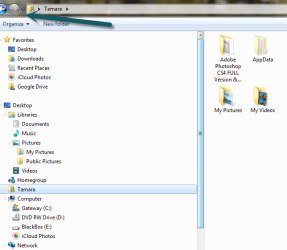
I am using IE or FF and when i click on say a .jpg and do a save image as a windows browser opens to the fodler i was last in the issue is i want to move up the hiearchary and save in a different folder, this option was available in XP so i have to take the long way and go to music\folder\folder\ folder etc this takes too long where is the UP button?
My Computer
At a glance
Windows 7 pro 64 bitAMD FX 8370G.SKILL Ripjaws Series 16GB (4 x 4GB) DDR3 SD...MSI Geforce GTx 66ti
Computer type
PC/Desktop
Computer Manufacturer/Model Number
Custom Built
OS
Windows 7 pro 64 bit
CPU
AMD FX 8370
Motherboard
MSI Gaming board 970 series
Memory
G.SKILL Ripjaws Series 16GB (4 x 4GB) DDR3 SDRAM DDR3
Graphics Card(s)
MSI Geforce GTx 66ti
Sound Card
onboard real tek
Monitor(s) Displays
Acer 22in
Screen Resolution
2048 tops
Hard Drives
SSD 120gig hyper X kingston - 4 other hard drives for storage
I guess I don't understand the issue. Folder hierarchy navigation in Windows 7 and 8 is vastly improved over what was provided with XP. Along the top of the Save As folder in the address bar, you can click on the any of the arrow heads between the folders in the hierarchy and a dropdown menu will appear that will allow you to instantly change to a different drive or folder in the hierarchy. You couldn't do that with XP. There is a back key available (just like XP) that will allow you to go back 1 level but the active links in the address bar are far more capable.
In addition, there is the folder hierarchy displayed on the left that can be used to navigate as well.
My Computer
At a glance
W10 Pro desktop, W11 laptop, W11 Pro tablet (...3.7Ghz 8700K i7, i7-11800H, i7-1065G716G desktop, 16G laptop, 4G tabletAMD Radeon RX580, RTX 3060, Intel Iris Plus
Computer type
PC/Desktop
Computer Manufacturer/Model Number
Home Built desktop, Dell G15 5511 Gaming laptop,MS Surface Pro 7 tablet
OS
W10 Pro desktop, W11 laptop, W11 Pro tablet (all 64-bit)
CPU
3.7Ghz 8700K i7, i7-11800H, i7-1065G7
Motherboard
ASUS TUF Z370-Pro Gaming in desktop
Memory
16G desktop, 16G laptop, 4G tablet
Graphics Card(s)
AMD Radeon RX580, RTX 3060, Intel Iris Plus
Sound Card
High Definition Audio (Built-in to mobo)
Monitor(s) Displays
Samsung U32J59 32" (2x), 15.6", 12"
Screen Resolution
3840x2160, 3840x2160, 1920x1080, 2160x1440
Hard Drives
500G SSD for OS; 2T, 10T & 15T HDDs for Data on Desktop, 1TB SSD laptop, 128G SSD tablet.
PSU
Corsair CX 750M
Case
Antec 100
Cooling
CM 212+
Keyboard
IBM Model M - used continuously since 1986
Mouse
Microsoft Pro IntelliMouse
Internet Speed
400M down 8M up
Antivirus
Windows Defender
Browser
FireFox
Other Info
Built my first computer (8Mhz 8088cpu, 640K RAM, 20MB HDD, 2 360K floppy drives) in 1985 and have been building them for myself, relatives and friends ever since.
im not sure how to explain it but it is when i am in either IE or FF it doesnt matter and i want to save a file. I have to select the folder from the navigation window on the left to get back to the folder that i previously worked in. there is no up button or left arrow to go back to the main folder from the sub folder. that shell code programs works with Explorer but not IE or FF i can also add that the folder hiearcahry is like 6 folders deep so when i save a file to \folder\folder\folder\folder\folder\folder\folder A i save it but then when i need to save a file it opens to the folder i was just in that is normal the problem is i cant go up the hiearchary to save the file in a different folder instead i have to browse and click multple times to get back to the for example folder\ folder\folderA
My Computer
At a glance
Windows 7 pro 64 bitAMD FX 8370G.SKILL Ripjaws Series 16GB (4 x 4GB) DDR3 SD...MSI Geforce GTx 66ti
Computer type
PC/Desktop
Computer Manufacturer/Model Number
Custom Built
OS
Windows 7 pro 64 bit
CPU
AMD FX 8370
Motherboard
MSI Gaming board 970 series
Memory
G.SKILL Ripjaws Series 16GB (4 x 4GB) DDR3 SDRAM DDR3
Graphics Card(s)
MSI Geforce GTx 66ti
Sound Card
onboard real tek
Monitor(s) Displays
Acer 22in
Screen Resolution
2048 tops
Hard Drives
SSD 120gig hyper X kingston - 4 other hard drives for storage
The image I posted shows the Save Picture dialog from IE but I see the same thing in FireFox. Can you post a screenshot of what you see?
My Computer
At a glance
W10 Pro desktop, W11 laptop, W11 Pro tablet (...3.7Ghz 8700K i7, i7-11800H, i7-1065G716G desktop, 16G laptop, 4G tabletAMD Radeon RX580, RTX 3060, Intel Iris Plus
Computer type
PC/Desktop
Computer Manufacturer/Model Number
Home Built desktop, Dell G15 5511 Gaming laptop,MS Surface Pro 7 tablet
OS
W10 Pro desktop, W11 laptop, W11 Pro tablet (all 64-bit)
CPU
3.7Ghz 8700K i7, i7-11800H, i7-1065G7
Motherboard
ASUS TUF Z370-Pro Gaming in desktop
Memory
16G desktop, 16G laptop, 4G tablet
Graphics Card(s)
AMD Radeon RX580, RTX 3060, Intel Iris Plus
Sound Card
High Definition Audio (Built-in to mobo)
Monitor(s) Displays
Samsung U32J59 32" (2x), 15.6", 12"
Screen Resolution
3840x2160, 3840x2160, 1920x1080, 2160x1440
Hard Drives
500G SSD for OS; 2T, 10T & 15T HDDs for Data on Desktop, 1TB SSD laptop, 128G SSD tablet.
PSU
Corsair CX 750M
Case
Antec 100
Cooling
CM 212+
Keyboard
IBM Model M - used continuously since 1986
Mouse
Microsoft Pro IntelliMouse
Internet Speed
400M down 8M up
Antivirus
Windows Defender
Browser
FireFox
Other Info
Built my first computer (8Mhz 8088cpu, 640K RAM, 20MB HDD, 2 360K floppy drives) in 1985 and have been building them for myself, relatives and friends ever since.
i attached a pic of the issue, there is no up button for the save as dialog box for IE nor FF it is a pain to go click thru the folders to back where i want to be instead of just ticking up to the folder i want
Attachments
10-5-2013 3-37-40 PM.png
24.9 KB
· Views: 11
My Computer
At a glance
Windows 7 pro 64 bitAMD FX 8370G.SKILL Ripjaws Series 16GB (4 x 4GB) DDR3 SD...MSI Geforce GTx 66ti
Computer type
PC/Desktop
Computer Manufacturer/Model Number
Custom Built
OS
Windows 7 pro 64 bit
CPU
AMD FX 8370
Motherboard
MSI Gaming board 970 series
Memory
G.SKILL Ripjaws Series 16GB (4 x 4GB) DDR3 SDRAM DDR3
Graphics Card(s)
MSI Geforce GTx 66ti
Sound Card
onboard real tek
Monitor(s) Displays
Acer 22in
Screen Resolution
2048 tops
Hard Drives
SSD 120gig hyper X kingston - 4 other hard drives for storage
Yours is exactly as I described. See the picture below where I have labeled the back button as well as the dropdown folder lists.
My Computer
At a glance
W10 Pro desktop, W11 laptop, W11 Pro tablet (...3.7Ghz 8700K i7, i7-11800H, i7-1065G716G desktop, 16G laptop, 4G tabletAMD Radeon RX580, RTX 3060, Intel Iris Plus
Computer type
PC/Desktop
Computer Manufacturer/Model Number
Home Built desktop, Dell G15 5511 Gaming laptop,MS Surface Pro 7 tablet
OS
W10 Pro desktop, W11 laptop, W11 Pro tablet (all 64-bit)
CPU
3.7Ghz 8700K i7, i7-11800H, i7-1065G7
Motherboard
ASUS TUF Z370-Pro Gaming in desktop
Memory
16G desktop, 16G laptop, 4G tablet
Graphics Card(s)
AMD Radeon RX580, RTX 3060, Intel Iris Plus
Sound Card
High Definition Audio (Built-in to mobo)
Monitor(s) Displays
Samsung U32J59 32" (2x), 15.6", 12"
Screen Resolution
3840x2160, 3840x2160, 1920x1080, 2160x1440
Hard Drives
500G SSD for OS; 2T, 10T & 15T HDDs for Data on Desktop, 1TB SSD laptop, 128G SSD tablet.
PSU
Corsair CX 750M
Case
Antec 100
Cooling
CM 212+
Keyboard
IBM Model M - used continuously since 1986
Mouse
Microsoft Pro IntelliMouse
Internet Speed
400M down 8M up
Antivirus
Windows Defender
Browser
FireFox
Other Info
Built my first computer (8Mhz 8088cpu, 640K RAM, 20MB HDD, 2 360K floppy drives) in 1985 and have been building them for myself, relatives and friends ever since.