Solved when starting windows i get a rundll error

biotech326

New member
Local time
12:06 AM
Messages
8
hey guys,

everytime when i start windows
i get the following message:

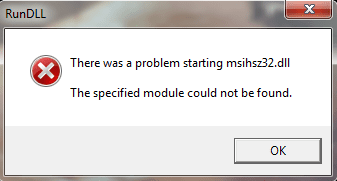
"There was a problem starting msihsz32.dll
The specified module could not be found"

i've tried to search on this issue in google but with no success,
it could be related to some program i've installed or something
but don't really know which one.

how can i make it go away?
thanks alot!
 

My Computer

OS
Windows 7 home premium 64 bit

My Computer

Computer type
PC/Desktop
Computer Manufacturer/Model Number
Self assembled
OS
Windows 10 Home 64Bit
CPU
Intel Core i5 10400 @ 2.90GHz
Motherboard
Intel Corporation DG41WV (PROCESSOR)
Memory
8.00GB Single-Channel Unknown @ 1329MHz (16-20-20-38)
Sound Card
Realtek High Definition Audio
Monitor(s) Displays
DELL E170S
Screen Resolution
1280x1024 pixels
Hard Drives
931GB TOSHIBA DT01ACA100 (SATA)
238GB TEAM TM8PS7256G (SATA SSD)
Case
Nothing Fancy
Cooling
Fans
Keyboard
A4 Tech Co LTD
Mouse
A4 Tech Co Ltd/Logitech
Internet Speed
25 Mbps
hey man thanks for the quick reply
ive downloaded the MSE and ran a scan
it found one threat and removed it
but the error still appears after restarting the computer
several times.

i am using avg internet security 2012

any other thoughts perhaps?
 

My Computer

OS
Windows 7 home premium 64 bit
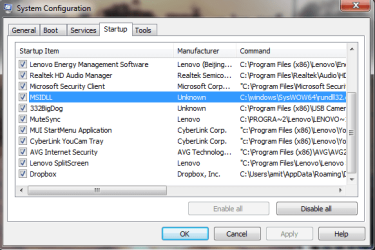
does it only pop up when you start the computer? or while using it too?, could you post a screen shot of your start up items in msconfig?
 

My Computer

Computer type
PC/Desktop
Computer Manufacturer/Model Number
Self assembled
OS
Windows 10 Home 64Bit
CPU
Intel Core i5 10400 @ 2.90GHz
Motherboard
Intel Corporation DG41WV (PROCESSOR)
Memory
8.00GB Single-Channel Unknown @ 1329MHz (16-20-20-38)
Sound Card
Realtek High Definition Audio
Monitor(s) Displays
DELL E170S
Screen Resolution
1280x1024 pixels
Hard Drives
931GB TOSHIBA DT01ACA100 (SATA)
238GB TEAM TM8PS7256G (SATA SSD)
Case
Nothing Fancy
Cooling
Fans
Keyboard
A4 Tech Co LTD
Mouse
A4 Tech Co Ltd/Logitech
Internet Speed
25 Mbps
Hey man ive uploaded screenshots of the error message and the msconfig
starting proccesses

i think the problemetic one is the MSIdll which ive marked.

thanks!
 

Attachments

  • 1.png
    1.png
    17.9 KB · Views: 28
  • 3.png
    3.png
    20.3 KB · Views: 19
  • 2.png
    2.png
    18.5 KB · Views: 18

My Computer

OS
Windows 7 home premium 64 bit
here's the error message:
 

Attachments

  • rundell.png
    rundell.png
    7.1 KB · Views: 5

My Computer

OS
Windows 7 home premium 64 bit
Hey man ive uploaded screenshots of the error message and the msconfig
starting proccesses

i think the problemetic one is the MSIdll which ive marked.

thanks!
thanks for the snips.
i have never seen that kind of .dll or don't know what program requires it.
have you tried un checking the option on the start up tab and restarted?
and its not man, its woman here :cool:
edit: btw, are you using avg latest free version? i'd suggest to use mse :(
 

My Computer

Computer type
PC/Desktop
Computer Manufacturer/Model Number
Self assembled
OS
Windows 10 Home 64Bit
CPU
Intel Core i5 10400 @ 2.90GHz
Motherboard
Intel Corporation DG41WV (PROCESSOR)
Memory
8.00GB Single-Channel Unknown @ 1329MHz (16-20-20-38)
Sound Card
Realtek High Definition Audio
Monitor(s) Displays
DELL E170S
Screen Resolution
1280x1024 pixels
Hard Drives
931GB TOSHIBA DT01ACA100 (SATA)
238GB TEAM TM8PS7256G (SATA SSD)
Case
Nothing Fancy
Cooling
Fans
Keyboard
A4 Tech Co LTD
Mouse
A4 Tech Co Ltd/Logitech
Internet Speed
25 Mbps
hey sorry for the man issue :)

if i uncheck the box so message won't re-appear
but the problem is i dont know what does it influence
and maybe its something important

why do you suggest using mse over avg?
im not using only anti virus or some free edition but the complete internet security
from avg.
 

My Computer

OS
Windows 7 home premium 64 bit
why do you suggest using mse over avg?
im not using only anti virus or some free edition but the complete internet security
from avg.

oops, my apologies for that, i didn't know :(
hey sorry for the man issue :)

if i uncheck the box so message won't re-appear
but the problem is i dont know what does it influence
and maybe its something important

since when are you getting this error message?
 

My Computer

Computer type
PC/Desktop
Computer Manufacturer/Model Number
Self assembled
OS
Windows 10 Home 64Bit
CPU
Intel Core i5 10400 @ 2.90GHz
Motherboard
Intel Corporation DG41WV (PROCESSOR)
Memory
8.00GB Single-Channel Unknown @ 1329MHz (16-20-20-38)
Sound Card
Realtek High Definition Audio
Monitor(s) Displays
DELL E170S
Screen Resolution
1280x1024 pixels
Hard Drives
931GB TOSHIBA DT01ACA100 (SATA)
238GB TEAM TM8PS7256G (SATA SSD)
Case
Nothing Fancy
Cooling
Fans
Keyboard
A4 Tech Co LTD
Mouse
A4 Tech Co Ltd/Logitech
Internet Speed
25 Mbps
did you make any changes to your computer back then? and have you un checked the option? does it still pop up?
 

My Computer

Computer type
PC/Desktop
Computer Manufacturer/Model Number
Self assembled
OS
Windows 10 Home 64Bit
CPU
Intel Core i5 10400 @ 2.90GHz
Motherboard
Intel Corporation DG41WV (PROCESSOR)
Memory
8.00GB Single-Channel Unknown @ 1329MHz (16-20-20-38)
Sound Card
Realtek High Definition Audio
Monitor(s) Displays
DELL E170S
Screen Resolution
1280x1024 pixels
Hard Drives
931GB TOSHIBA DT01ACA100 (SATA)
238GB TEAM TM8PS7256G (SATA SSD)
Case
Nothing Fancy
Cooling
Fans
Keyboard
A4 Tech Co LTD
Mouse
A4 Tech Co Ltd/Logitech
Internet Speed
25 Mbps
hey ive downloaded something which appeared to be a virus or trojan and
when i removed it it may have harmed the functionality of other things
such ad this msi dll.

when i uncheck the box the message won't come up which is good
but still i want to know what its in charge of
so i can be with ease with the fact not having it.
 

My Computer

OS
Windows 7 home premium 64 bit
This dll is was part of the virus thus when the virus was removed it deleted the dll. Just remove the entry from the start up.
 

My Computer

Computer type
PC/Desktop
Computer Manufacturer/Model Number
Alienware Aurora ALX R4
OS
Windows 10 Pro (x64)
CPU
Intel Core i7-3930K (3.2GHz - 4.5GHz)
Motherboard
Alienware Aurora-R4 x79
Memory
4x Samsung 4GB PC3-12800 DDR3 (16GB 1600MHz)
Graphics Card(s)
Nvidia Geforce GTX 690
Sound Card
SteelSeries Siberia Elite
Monitor(s) Displays
Dell UltraSharp U3011
Screen Resolution
2560x1600
Hard Drives
Samsung 850 Pro 256 GB, Seagate 1TB Desktop Hybrid HDD, 2x Western Digital 4TB Green HDD
PSU
875W Some Dell PSU <.<
Case
Alienware Aurora ALX
Cooling
Custom Liquid Cooling (EK CPU & GPU blocks) dual EK 480RAD
Keyboard
Logitech G710+ Mechanical
Mouse
Logitech G700s
Internet Speed
Verizon Fios (50 mbps average)
Other Info
Server: Intel NUC D54250WYK: i5-4250U, 16GB, 256 GB mSATA, Windows Server 2012 R2
This dll is was part of the virus thus when the virus was removed it deleted the dll. Just remove the entry from the start up.

so does that mean his problem is solved. also i tried to google the .dll he gets.. but nothing comes up. weird right? :rolleyes:
 

My Computer

Computer type
PC/Desktop
Computer Manufacturer/Model Number
Self assembled
OS
Windows 10 Home 64Bit
CPU
Intel Core i5 10400 @ 2.90GHz
Motherboard
Intel Corporation DG41WV (PROCESSOR)
Memory
8.00GB Single-Channel Unknown @ 1329MHz (16-20-20-38)
Sound Card
Realtek High Definition Audio
Monitor(s) Displays
DELL E170S
Screen Resolution
1280x1024 pixels
Hard Drives
931GB TOSHIBA DT01ACA100 (SATA)
238GB TEAM TM8PS7256G (SATA SSD)
Case
Nothing Fancy
Cooling
Fans
Keyboard
A4 Tech Co LTD
Mouse
A4 Tech Co Ltd/Logitech
Internet Speed
25 Mbps
This dll is was part of the virus thus when the virus was removed it deleted the dll. Just remove the entry from the start up.

so does that mean his problem is solved. also i tried to google the .dll he gets.. but nothing comes up. weird right? :rolleyes:

You said you did a google search and couldn't find it, so it's not an important dll file, and logicearth is probably right that it was part of the virus. It usually means the dll pointer is still in the registry. I run into this a lot helping other people with their computers, and if it is not a system dll or program dll for one of the programs installed on the computer, I'll just delete the entry from the registry. It doesn't affect system integrity in the slightest. Removing it from startup was also a good workaround. Well done! :)
 

My Computer

Computer Manufacturer/Model Number
HP Pavilion e9110t
OS
Windows 7 Home Premium 64 Bit
CPU
Intel(R) Core(TM)2 Quad CPU Q9550 @ 2.83GHz
Motherboard
Pegatron IPIEL-LA3
Memory
6.00 GB Hundai HMT125U6BFR8C-H9
Graphics Card(s)
ATI Radeon HD 4850
Sound Card
Realtek High Definition Audio/ATI High Definition Audio
Monitor(s) Displays
Acer AL2216W
Screen Resolution
1680x1050
Hard Drives
Hitachi HDP725050GLA360 ATA Device 500 GB
PSU
Unknown/installed by HP
Case
HP generic case
Cooling
Intel Stock Cooling
Keyboard
HP Keyboard
Mouse
HP Mouse
Internet Speed
Download: 19.15 Mbps Upload: 1.67 Mbps
Other Info
Network Adapter Realtek RTL8168D/8111D Family PCI-E Gigabit Ethernet NIC (NDIS 6.20)
Network Adapter 802.11n Wireless PCI Express Card LAN Adapter
This dll is was part of the virus thus when the virus was removed it deleted the dll. Just remove the entry from the start up.

so does that mean his problem is solved. also i tried to google the .dll he gets.. but nothing comes up. weird right? :rolleyes:

You said you did a google search and couldn't find it, so it's not an important dll file, and logicearth is probably right that it was part of the virus. It usually means the dll pointer is still in the registry. I run into this a lot helping other people with their computers, and if it is not a system dll or program dll for one of the programs installed on the computer, I'll just delete the entry from the registry. It doesn't affect system integrity in the slightest. Removing it from startup was also a good workaround. Well done! :)

thank you for the very clear information:geek:
i never faced any problem with any dll files ever so, i was just not sure.
thank you again :)
 

My Computer

Computer type
PC/Desktop
Computer Manufacturer/Model Number
Self assembled
OS
Windows 10 Home 64Bit
CPU
Intel Core i5 10400 @ 2.90GHz
Motherboard
Intel Corporation DG41WV (PROCESSOR)
Memory
8.00GB Single-Channel Unknown @ 1329MHz (16-20-20-38)
Sound Card
Realtek High Definition Audio
Monitor(s) Displays
DELL E170S
Screen Resolution
1280x1024 pixels
Hard Drives
931GB TOSHIBA DT01ACA100 (SATA)
238GB TEAM TM8PS7256G (SATA SSD)
Case
Nothing Fancy
Cooling
Fans
Keyboard
A4 Tech Co LTD
Mouse
A4 Tech Co Ltd/Logitech
Internet Speed
25 Mbps
thanks everyone you helped me alot!
 

My Computer

OS
Windows 7 home premium 64 bit
mark the thread as solved :D
 

My Computer

Computer type
PC/Desktop
Computer Manufacturer/Model Number
Self assembled
OS
Windows 10 Home 64Bit
CPU
Intel Core i5 10400 @ 2.90GHz
Motherboard
Intel Corporation DG41WV (PROCESSOR)
Memory
8.00GB Single-Channel Unknown @ 1329MHz (16-20-20-38)
Sound Card
Realtek High Definition Audio
Monitor(s) Displays
DELL E170S
Screen Resolution
1280x1024 pixels
Hard Drives
931GB TOSHIBA DT01ACA100 (SATA)
238GB TEAM TM8PS7256G (SATA SSD)
Case
Nothing Fancy
Cooling
Fans
Keyboard
A4 Tech Co LTD
Mouse
A4 Tech Co Ltd/Logitech
Internet Speed
25 Mbps
Back
Top