
When trying to share files I get access denined

Docfxit

New member
Power User
VIP
Local time
2:31 AM
Messages
118
I'm trying to share files from Win7 to an AS/400. Other XP Pro and '98 PC's can share just fine. I can't figure out what to change in Win7. When I click on the AS/400 a password screen comes up and it says at the bottom "Access is Denied" . I put in a valid user that is created on this Win7 PC and on the AS/400. It comes back with the same password screen.

What can I try to resolve this?

This PC shows in the network map with 7 other machines show at the bottom of the screen where it says:
The following discovered devices cannot be placed in the map.

Thanks,

Docfxit
 

My Computer My Computer

At a glance

Win 7 Ultimate x32, x64, Win 7 Pro x32, x64 W...
Computer type
PC/Desktop
OS
Win 7 Ultimate x32, x64, Win 7 Pro x32, x64 Win 7 Home x64, XP Pro sp3
check to see if the firewall is turned off. try unchecking the "use sharing wizard" check box in folder options (this will make file sharing behave more like xp)
 

My Computer My Computer

At a glance

Windows 7
OS
Windows 7
check to see if the firewall is turned off. try unchecking the "use sharing wizard" check box in folder options (this will make file sharing behave more like xp)

Thanks for the reply...

The firewall was off. I have removed the check in "use sharing wizard". I have re-booted the PC.

The signon screen still says "Access is Denied". And when I signon with a valid user the signon screen comes right back.

Thanks,

Docfxit
 

My Computer My Computer

At a glance

Win 7 Ultimate x32, x64, Win 7 Pro x32, x64 W...
Computer type
PC/Desktop
OS
Win 7 Ultimate x32, x64, Win 7 Pro x32, x64 Win 7 Home x64, XP Pro sp3
On the folder that you are sharing from windows 7, do you have "everyone" added in security settings with full permission?

Have you checked the settings in control panel -> network and sharing center -> Choose homegroup and sharing options -> change advanced sharing settings

I noticed a setting in there about using 128 encryption, and it says some devices do not support this.
 

My Computer My Computer

At a glance

Windows 7
OS
Windows 7
On the folder that you are sharing from windows 7, do you have "everyone" added in security settings with full permission?

Yes. File sharing works from all other PC's connected to the network.

Have you checked the settings in control panel -> network and sharing center -> Choose homegroup and sharing options -> change advanced sharing settings
I turned off Password protected shareing.

Allow windows to manage homegroup connections is selected.
I have a message that says "This computer can't connect to a homegroup"


I noticed a setting in there about using 128 encryption, and it says some devices do not support this.

I went to 40/56 bit just in case.

It still won't connect.

Thanks,

Docfxit
 

My Computer My Computer

At a glance

Win 7 Ultimate x32, x64, Win 7 Pro x32, x64 W...
Computer type
PC/Desktop
OS
Win 7 Ultimate x32, x64, Win 7 Pro x32, x64 Win 7 Home x64, XP Pro sp3
Change 'Homegroup" to "Workgroup".
 

My Computer My Computer

At a glance

Windows 7 Ultimate 32bit SP1Intel(R) Core(TM)2 Quad CPU @ 2.40GHz, 2400 MHz4 GBATI Radeon HD 2600 Pro
Computer type
PC/Desktop
Computer Manufacturer/Model Number
Bruce ... somewhere in his 40's
OS
Windows 7 Ultimate 32bit SP1
CPU
Intel(R) Core(TM)2 Quad CPU @ 2.40GHz, 2400 MHz
Motherboard
INTEL/D975XBX2
Memory
4 GB
Graphics Card(s)
ATI Radeon HD 2600 Pro
Monitor(s) Displays
Samsung SyncMaster 914v
Screen Resolution
1280 x 1024
Hard Drives
2/500GB each ... ST3500630AS ATA Device.
One is not connected
PSU
Rocketfish 700 W
Case
G.Skill Gigabyte Chassis
Keyboard
Standard PS/2 Keyboard
Mouse
Microsoft PS/2 Mouse
Internet Speed
DSL
Antivirus
Avira Internet Security
Browser
IE 11
Other Info
ATI HDMI Audio

My Computer My Computer

At a glance

Win 7 Ultimate x32, x64, Win 7 Pro x32, x64 W...
Computer type
PC/Desktop
OS
Win 7 Ultimate x32, x64, Win 7 Pro x32, x64 Win 7 Home x64, XP Pro sp3
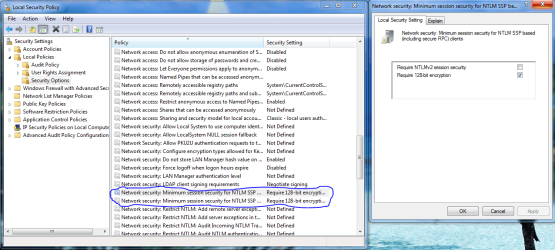
With older servers it sometimes helps to relax the Network security or disable security settings that the server can't use. These settings will allow the older Samba servers to work with Windows 7 so I figured it might work with the AS/400.

No guarantee on this but it's worked with other old servers in the past. The pictures below should make it easier to find these settings.

Control Panel - Administrative Tools - Local Security Policy

Local Policies - Security Options

Network security: LAN Manager authentication level
Set this to> Send LM & NTLM responses, then hit apply,ok

Minimum session security for NTLM SSP
Disable, Require 128-bit encryption, then hit apply,ok

Restart all machines after doing this.

Also in order for your older XP machines to appear on the Windows 7 network map you need to install the LLTD "Link Layer Topology Discovery" hotfix and also have XP SP3 installed.
Network Map in Windows Vista does not display computers that are running Windows XP
 

Attachments

  • LAN MANAGER SETTINGS FOR OLD SERVERS.PNG
    LAN MANAGER SETTINGS FOR OLD SERVERS.PNG
    72.1 KB · Views: 83
  • MINIMUM SESSION SECURITY SETTINGS FOR OLD SERVERS.PNG
    MINIMUM SESSION SECURITY SETTINGS FOR OLD SERVERS.PNG
    67 KB · Views: 92

My Computer My Computer

At a glance

Windows 7 Ult, Windows 8.1 Pro,Q9650-4.275GHz, E8600 4.5GHz, E6750-3.8GHzG.Skill PC2 9600 1200Mhz 5 5 5 15 2TGTX480
Computer type
PC/Desktop
Computer Manufacturer/Model Number
Home built
OS
Windows 7 Ult, Windows 8.1 Pro,
CPU
Q9650-4.275GHz, E8600 4.5GHz, E6750-3.8GHz
Motherboard
Evga 780i FTW
Memory
G.Skill PC2 9600 1200Mhz 5 5 5 15 2T
Graphics Card(s)
GTX480
Sound Card
Asus Xonar D2
Monitor(s) Displays
HannsG
Screen Resolution
1680X1050
Hard Drives
GSkill Phoenix Pro 120GB SSD
PSU
ThermalTake Toughpower 1000Watt modular
Case
ThermalTake XaserV
Cooling
Xigmatek S1283
Keyboard
Logitech G15
Mouse
Logitech G9
Internet Speed
T1
Thanks for the reply...

After applying the previous changes, I still can't get past the sign on screen.

Thanks,

Docfxit
 

My Computer My Computer

At a glance

Win 7 Ultimate x32, x64, Win 7 Pro x32, x64 W...
Computer type
PC/Desktop
OS
Win 7 Ultimate x32, x64, Win 7 Pro x32, x64 Win 7 Home x64, XP Pro sp3
Can you browse to the windows 7 machine from one of your other windows xp machines?
 

My Computer My Computer

At a glance

Windows 7
OS
Windows 7
Back
Top