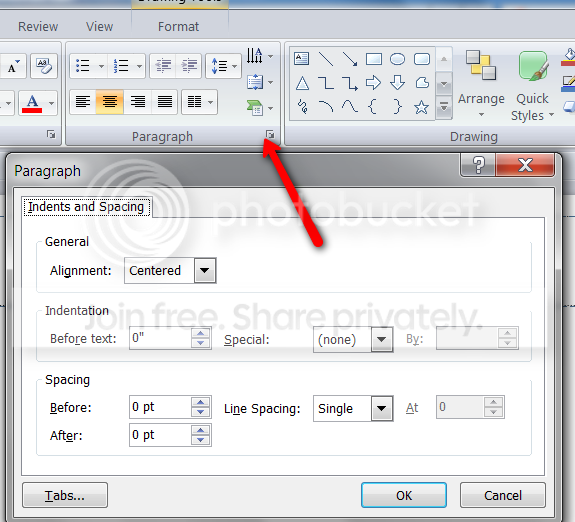
where are "incr/decr paragraph spacing" in PPT 2007?

Verne

New member
Local time
7:16 AM
Messages
5
I have recently switched from Powerpoint 2003 to Powerpoint 2007, and I am looking in vain for two buttons which I use routinely in PPT 2003. They are the "increase paragraph spacing" and "decrease paragraph spacing" buttons (see the red circled buttons in the image below).

PPoint 2003 WinXP toolbar customization.JPG

I can't find them anywhere! Can someone help point me in the right direction? I like these buttons because they automatically increase (or decrease) your paragraph spacing by a set amount relative to the current setting.

Please note, this is NOT the same feature as "line spacing".

Thanks in advance for any help you can provide!

Verne
 

My Computer My Computer

At a glance

Windows 7 Professional
OS
Windows 7 Professional
2010-03-31_1217.png
 

My Computer My Computer

At a glance

Vista, Windows7, Mint Mate, Zorin, Windows 8from 1.6GHz Duo to i7
Computer Manufacturer/Model Number
HP, Dell, Gateway, Toshiba - 4 laptops and 2 desktops
OS
Vista, Windows7, Mint Mate, Zorin, Windows 8
CPU
from 1.6GHz Duo to i7
Monitor(s) Displays
2x HP w2207
Hard Drives
5x HDD, 7x SSD, 12x Externals
Keyboard
with trackball - no mices
Mouse
Trackball mice
Internet Speed
DSL 6000
not quite what I'm looking for...

Thanks for the help, whs. Unfortunately that's not quite what I'm looking for. Users can access the nitty-gritty numerical details of paragraph spacing, etc. via that sort of dialog box in either 2003 or 2007. However, the utility of the 2003-version buttons is that they automatically increase (or decrease) your paragraph spacing by a set amount relative to the current setting, with only one click, and without requiring any parsing of points, inches, before-spacing, after-spacing, etc. The buttons are quick, easy, and efficient. I hope they aren't gone entirely! If so, does anyone have a nifty way of bringing them back?

Thanks
Verne
 

My Computer My Computer

At a glance

Windows 7 Professional
OS
Windows 7 Professional
Back
Top