Where are system restore points saved?

tedcredted

New member
Local time
5:34 AM
Messages
18
I want to save a system restore point to disc, but it seems to only let me save the most recent one, whereas I want to save the oldest one to disc. Where is it located on my hard drive, and can I manually send it to a disc or flash drive if I can find it? Thank you for your help!
 

My Computer My Computer

At a glance

Windows 7
OS
Windows 7
On the root of "C" under "system volume information"

You have to un-hide protected system files to see it.

Hope this helps.
 

My Computer My Computer

At a glance

Windows 7 Professional x64Intel Core i7 8604GB DDR3 Mushkin 1600Mhz @ 7-8-7-20MSI GTS250 1GB DDR3 Twin Frozr
Computer Manufacturer/Model Number
Keeps changing - (Custom)
OS
Windows 7 Professional x64
CPU
Intel Core i7 860
Motherboard
Gigabyte GA-P55-UD4P
Memory
4GB DDR3 Mushkin 1600Mhz @ 7-8-7-20
Graphics Card(s)
MSI GTS250 1GB DDR3 Twin Frozr
Sound Card
Onboard realtek
Monitor(s) Displays
Samsung SyncMaster 24" P2450 + Samsung 20" 2033
Screen Resolution
1920 X 1080 and 1600 X 900 (#2 system 1440 X 900)
Hard Drives
Patriot Inferno 120GB SSD + 3 WD Blue 640GB drives
PSU
Corsair 750 HX Modular
Case
Lancool PC-K62
Cooling
Cooler Master TX3 CPU cooler and 4-140mm and 1-120mm case
Keyboard
Gigabyte USB keyboard
Mouse
Microsoft wireless laser mouse 5000
Internet Speed
7 Mb down 1.5 up
Other Info
System #2: AMD Phenom II X6 1055T (Freezer 7 Pro cooler) - Gigabyte 880GMA-UD2H - WD 500GB Black - 9500GT (1GB) 500W OCZ modular PSU - Antec 200 case. System #3 (LapTop) Core 2 Duo T6670 - 320GB 7200RPM HD - 4GB DDR3 RAM.
@ tedcredted...

The following link should 'satisfy' your curiosity....
Windows XP System Restore

From the looks of things, you may be able to copy the restore point to a temp directory and then burn to disk, but you may have to copy the restore point back to that same location to have the system register it.

I guess it's trial and error from here on....

Hope this helps...

:)
 

My Computer My Computer

At a glance

Windows 7 x64 UltimateIntel Quad Core Q6600OCZ Platinum 2x4GB 1066Asus EAH 3450
Computer Manufacturer/Model Number
Home Built
OS
Windows 7 x64 Ultimate
CPU
Intel Quad Core Q6600
Motherboard
Asus P5Q
Memory
OCZ Platinum 2x4GB 1066
Graphics Card(s)
Asus EAH 3450
Sound Card
On board
Monitor(s) Displays
Dell 17'
Hard Drives
1xsata 320GB OS
1xsata 500GB VM
1xsata 640GB Dynamic mirrored with 1.0TB
1xsata 1.0TB Dynamic mirrored with 640GB
1xsata 1.5TB External via E-sata Docking Station
PSU
OCZ 700MXSP
Case
Thermaltake full-tower
Cooling
Air
Thanks Nate, I can see the system volume information folder, but it is denying me access. How do I change the permission for that folder? Thank you for your help!
 

My Computer My Computer

At a glance

Windows 7
OS
Windows 7
Thanks Nate, I can see the system volume information folder, but it is denying me access. How do I change the permission for that folder? Thank you for your help!

You will need to have admin rights on the machine.

Beyond that you will probably need to take ownership.

That is one of my "weak points" so I will have to defer to someone else if you're not the admin on the machine.
 

My Computer My Computer

At a glance

Windows 7 Professional x64Intel Core i7 8604GB DDR3 Mushkin 1600Mhz @ 7-8-7-20MSI GTS250 1GB DDR3 Twin Frozr
Computer Manufacturer/Model Number
Keeps changing - (Custom)
OS
Windows 7 Professional x64
CPU
Intel Core i7 860
Motherboard
Gigabyte GA-P55-UD4P
Memory
4GB DDR3 Mushkin 1600Mhz @ 7-8-7-20
Graphics Card(s)
MSI GTS250 1GB DDR3 Twin Frozr
Sound Card
Onboard realtek
Monitor(s) Displays
Samsung SyncMaster 24" P2450 + Samsung 20" 2033
Screen Resolution
1920 X 1080 and 1600 X 900 (#2 system 1440 X 900)
Hard Drives
Patriot Inferno 120GB SSD + 3 WD Blue 640GB drives
PSU
Corsair 750 HX Modular
Case
Lancool PC-K62
Cooling
Cooler Master TX3 CPU cooler and 4-140mm and 1-120mm case
Keyboard
Gigabyte USB keyboard
Mouse
Microsoft wireless laser mouse 5000
Internet Speed
7 Mb down 1.5 up
Other Info
System #2: AMD Phenom II X6 1055T (Freezer 7 Pro cooler) - Gigabyte 880GMA-UD2H - WD 500GB Black - 9500GT (1GB) 500W OCZ modular PSU - Antec 200 case. System #3 (LapTop) Core 2 Duo T6670 - 320GB 7200RPM HD - 4GB DDR3 RAM.
Well I thought I was the admin on my machine, but apparently not. I'll see what I can find out about that and how to take ownership, then I'll check back here, thanks for the help!
 

My Computer My Computer

At a glance

Windows 7
OS
Windows 7
Well I thought I was the admin on my machine, but apparently not. I'll see what I can find out about that and how to take ownership, then I'll check back here, thanks for the help!

You are still Limited Administrator and not full power Admin (like Builtin administrator)
(actually Builtin Administrtor not only all powerful user. Tha's just on your Administrator account UAC makes token of limited User for you for security reasons, so system sees you as Limited user in some cases, but anyway it's not important now)

It will help you to take ownership:
http://www.vistax64.com/tutorials/67717-take-ownership-file.html it's for vista, but it should work for Windows 7 aswell.
http://www.sevenforums.com/tutorials/1911-take-ownership-shortcut.html

If you want I may write how to do here. But those tutorials explain it better.
 

My Computer My Computer

At a glance

Windows 7 Ultimate x86 SP1
OS
Windows 7 Ultimate x86 SP1
Hello Jav, when I right click the extracted reg file, it doesn't give me the option to merge like it says, do you happen to know why that is or how I can get it to work? Thank you!

ok, wait I will write some tutorial to you.. 2 mins ;)
 

My Computer My Computer

At a glance

Windows 7 Ultimate x86 SP1
OS
Windows 7 Ultimate x86 SP1
Now, I suppose you are taking ownership of the folder. yeah?

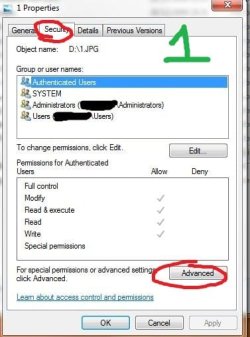
1. Right click that folder and go to properties.
2. Go to Security Tab and click Advanced (Look At image 1)
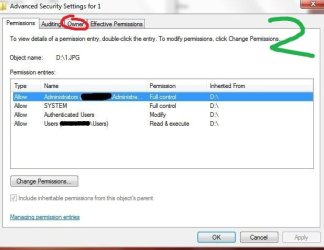
3. Go to Owner Tab (look at image 2)
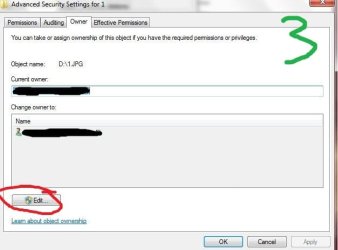
4. Click on Edit (look at image 3) (note: If you are administrator you will be prompted with UAC, if limited user UAC with administrator password)
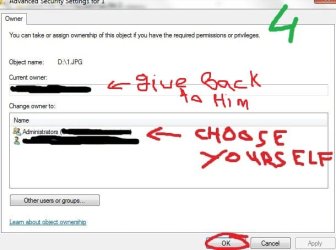
5. Choose your current account (look at image 4)

And now you are owner.

It will be better before changing you remember who was last owner so you will give ownership back when you are done.

P.S. That registry thing was to automate it, but we can do it manually, can't we? ;)
P.S.1 I know it's rubbish tutorial, but I did it in 3 minutes and I am not that good at this like Brink or Mr GRiM.
P.S.2. for my own privacy reasons I had to cover some names, sorry for that.
 

Attachments

  • Capture.JPG
    Capture.JPG
    37.4 KB · Views: 170
  • Capture1.JPG
    Capture1.JPG
    37 KB · Views: 179
  • Capture2.JPG
    Capture2.JPG
    32.5 KB · Views: 174
  • Capture3.JPG
    Capture3.JPG
    38.3 KB · Views: 173

My Computer My Computer

At a glance

Windows 7 Ultimate x86 SP1
OS
Windows 7 Ultimate x86 SP1
Thank you so much Jav! I have given myself ownership, but am I correct in that I still have to give myself permission in order to open that particular folder?
 

My Computer My Computer

At a glance

Windows 7
OS
Windows 7
Thank you so much Jav! I have given myself ownership, but am I correct in that I still have to give myself permission in order to open that particular folder?

ermm.. actually you are owner so you have full control.

ok, just give yourself Full control permission, just in case :)
(need help on that?)
 

My Computer My Computer

At a glance

Windows 7 Ultimate x86 SP1
OS
Windows 7 Ultimate x86 SP1
I followed the instructions on this site to give myself full permission (correctly I think?!) and I still can't get into that folder. I think it might just be impossible to get in there.
 

My Computer My Computer

At a glance

Windows 7
OS
Windows 7
I followed the instructions on this site to give myself full permission (correctly I think?!) and I still can't get into that folder. I think it might just be impossible to get in there.

What folder are you trying to access?
 

My Computer My Computer

At a glance

Windows 7 Ultimate x86 SP1
OS
Windows 7 Ultimate x86 SP1
System volume information, I want to get access to older system restore points so I can save them to a disc.
 

My Computer My Computer

At a glance

Windows 7
OS
Windows 7
System volume information, I want to get access to older system restore points so I can save them to a disc.

I got access to System volume information on my own PC.
But it was a bit troublesome as I had to create find create my account permission and put it full power to each folder.
i got there, I got into system restore folders, but I am getting into empty folder. :confused:

Wait i will try to find easier way
 

My Computer My Computer

At a glance

Windows 7 Ultimate x86 SP1
OS
Windows 7 Ultimate x86 SP1
Thank you Jav, I really appreciate you going out of your way to help me find a resolution to this issue. I know I have several old restore points because I can see them as options when I start up system restore, but I can't seem to get to where I can select the actual files and move them onto an external device.
 

My Computer My Computer

At a glance

Windows 7
OS
Windows 7

My Computer My Computer

At a glance

Vista, Windows7, Mint Mate, Zorin, Windows 8from 1.6GHz Duo to i7
Computer Manufacturer/Model Number
HP, Dell, Gateway, Toshiba - 4 laptops and 2 desktops
OS
Vista, Windows7, Mint Mate, Zorin, Windows 8
CPU
from 1.6GHz Duo to i7
Monitor(s) Displays
2x HP w2207
Hard Drives
5x HDD, 7x SSD, 12x Externals
Keyboard
with trackball - no mices
Mouse
Trackball mice
Internet Speed
DSL 6000
Thank you Jav, I really appreciate you going out of your way to help me find a resolution to this issue. I know I have several old restore points because I can see them as options when I start up system restore, but I can't seem to get to where I can select the actual files and move them onto an external device.

ok, now I can get anywhere I want. (did some tweakings, got full powers, turned off UAC, and some more things)
But you know it's not that good as it sounds.
I got into C:\System Volume Information\SystemRestore\FRStaging\Windows\System32\DriverStore\Temp

I am running into empty folder in this Systemrestore folder. And I have system restore points aswell. :shock:

So I think after some hard work and some contribution of other members we may get your restore points.
But just ask yourself are they worth it?

It is a lot (I mean A LOT) easier to just make system images with either Windows itself or with all those free Imagining programs.

So are you still determined to get them? if so I will try to help you as much as i can, but again are they worth it?

Or If you need any help with imagining just ask here, will try to help on it aswell ;)
 

My Computer My Computer

At a glance

Windows 7 Ultimate x86 SP1
OS
Windows 7 Ultimate x86 SP1
I guess I will just leave it alone if it is that much work. I created a system restore point today and saved it to disc, but I wanted an older system restore just in case a so far solitary blue screen should pop up again at some point.
 

My Computer My Computer

At a glance

Windows 7
OS
Windows 7
This is what I use.


1.Click Start, click Run, type cmd, and then click OK.

2.Make sure that you are in the root folder of the partition for which you want to gain access to the System Volume Information folder. For example, to gain access the C:\System Volume Information folder, make sure that you are in the root folder of drive C (at a "C:\" prompt).

3.Type the following line, and then press ENTER:
cacls "driveletter:\System Volume Information" /E /G username:F
Make sure to type the quotation marks as indicated. This command adds the specified user to the folder with Full Control permissions.

4.Double-click the System Volume Information folder in the root folder to open it.

5.If you need to remove the permissions after troubleshooting, type the following line at a command prompt:
cacls "driveletter:\System Volume Information" /E /R username
This command removes all permissions for the specified user.


This is what my command line looks like
cacls "C:\System Volume Information" /E /G iggyaz:F
 

My Computer My Computer

At a glance

Windows 10 ProIntel i5I'm old and lost a few chipsYup
Computer type
PC/Desktop
Computer Manufacturer/Model Number
Self Built
OS
Windows 10 Pro
CPU
Intel i5
Motherboard
I have a fatherboard
Memory
I'm old and lost a few chips
Graphics Card(s)
Yup
Sound Card
Yup
Monitor(s) Displays
Samsung 32" UHD
Screen Resolution
3840 x 2160
Hard Drives
Samsung 860 EVO drives
PSU
450 Watt and some fans that blow
Case
Small tower
Cooling
Yes I am cool. lol
Keyboard
Who needs a keyboard?
Mouse
Logitech Laser G7 wireless
Internet Speed
Zippy fast UP and DOWN
Antivirus
I got a shot
Browser
The new Improved EDGE 2020
Back
Top