Where can I find a fault log

JohnEdg

New member
Local time
4:28 PM
Messages
24
that will help someone on here to tell me why my PC keeps dropping its connection to the internet. Its not the router or the BT Infinity line so it must be my computer

If I know where to look for the log then I can paste it on here so that one of you experts can tell me what is wrong.;)
 

My Computer My Computer

At a glance

64 bit Windows 7 Home Premium
Computer type
PC/Desktop
OS
64 bit Windows 7 Home Premium
You could use this link below, i know its nothing to do with your problem however it will help up get the event log.

   Information
Before posting a BSOD thread, please read the instructions here: Blue Screen of Death (BSOD) Posting Instructions

If you need to add new information like the dump files, please make a new post in your initial BSOD thread. Please do not make an extra new thread.

If your computer is not creating DMP Files please follow this link: http://www.sevenforums.com/tutorials/174459-dump-files-configure-windows-create-bsod.html

I look Forward to Helping you.
 

My Computer My Computer

At a glance

Windows 7 Ultimate 64-bitIntel G3420 3.2GHZ Dual CoreKingson 8GB 1600mhzMSI R7970 TF 3GD5/OC BE
Computer type
PC/Desktop
Computer Manufacturer/Model Number
Custom Build
OS
Windows 7 Ultimate 64-bit
CPU
Intel G3420 3.2GHZ Dual Core
Motherboard
Gigabyte H87-HD3
Memory
Kingson 8GB 1600mhz
Graphics Card(s)
MSI R7970 TF 3GD5/OC BE
Monitor(s) Displays
21" LG & "19 Vertical Samsung
Hard Drives
120GB SSD - Boot
1TB WD
350GB External
2TB External (Wireless)
PSU
Corsair CX 500 modular
Case
Zalman Z11 Plus (modified)
Cooling
Corsair H55, 2x 120mm SP Corsair, 1x 140 Coolermaster
Keyboard
Corsair K50
Mouse
CSL Gaming
Internet Speed
164Mbps
Antivirus
Avast, Malwarebytes
Browser
Google Chrome, IE, Firefox
Thank you, I am a definite numpty when it comes to things like this so a quick question, will this run in the background and when the connection drops, as it will, presumably there will be a time and some technical stuff that will allow a diagnosis
 

My Computer My Computer

At a glance

64 bit Windows 7 Home Premium
Computer type
PC/Desktop
OS
64 bit Windows 7 Home Premium
It will collect all the event that have happened upto now, :)
 

My Computer My Computer

At a glance

Windows 7 Ultimate 64-bitIntel G3420 3.2GHZ Dual CoreKingson 8GB 1600mhzMSI R7970 TF 3GD5/OC BE
Computer type
PC/Desktop
Computer Manufacturer/Model Number
Custom Build
OS
Windows 7 Ultimate 64-bit
CPU
Intel G3420 3.2GHZ Dual Core
Motherboard
Gigabyte H87-HD3
Memory
Kingson 8GB 1600mhz
Graphics Card(s)
MSI R7970 TF 3GD5/OC BE
Monitor(s) Displays
21" LG & "19 Vertical Samsung
Hard Drives
120GB SSD - Boot
1TB WD
350GB External
2TB External (Wireless)
PSU
Corsair CX 500 modular
Case
Zalman Z11 Plus (modified)
Cooling
Corsair H55, 2x 120mm SP Corsair, 1x 140 Coolermaster
Keyboard
Corsair K50
Mouse
CSL Gaming
Internet Speed
164Mbps
Antivirus
Avast, Malwarebytes
Browser
Google Chrome, IE, Firefox
Ok thank you. I have downloaded the collector and have attached the file here for someone to have a look at.
 

Attachments

My Computer My Computer

At a glance

64 bit Windows 7 Home Premium
Computer type
PC/Desktop
OS
64 bit Windows 7 Home Premium
Okay i have had a look for you:

Code:
Event[58945]:
  Log Name: System
  Source: Service Control Manager
  Date: 2014-09-20T15:45:41.215
  Event ID: 7023
  Task: N/A
  Level: Error
  Opcode: N/A
  Keyword: Classic
  User: N/A
  User Name: N/A
  Computer: Dad-HP
  Description: 
[COLOR="Red"]The HP Network Devices Support service terminated with the following error: 
The specified module could not be found.[/COLOR]

Can you try this Please: Removed HPSA, go to control panel, programs and make sure there is no trace of it.
HP support assistant - HP Support Forum - 2559701
 

My Computer My Computer

At a glance

Windows 7 Ultimate 64-bitIntel G3420 3.2GHZ Dual CoreKingson 8GB 1600mhzMSI R7970 TF 3GD5/OC BE
Computer type
PC/Desktop
Computer Manufacturer/Model Number
Custom Build
OS
Windows 7 Ultimate 64-bit
CPU
Intel G3420 3.2GHZ Dual Core
Motherboard
Gigabyte H87-HD3
Memory
Kingson 8GB 1600mhz
Graphics Card(s)
MSI R7970 TF 3GD5/OC BE
Monitor(s) Displays
21" LG & "19 Vertical Samsung
Hard Drives
120GB SSD - Boot
1TB WD
350GB External
2TB External (Wireless)
PSU
Corsair CX 500 modular
Case
Zalman Z11 Plus (modified)
Cooling
Corsair H55, 2x 120mm SP Corsair, 1x 140 Coolermaster
Keyboard
Corsair K50
Mouse
CSL Gaming
Internet Speed
164Mbps
Antivirus
Avast, Malwarebytes
Browser
Google Chrome, IE, Firefox
Hi thank you for wanting to help me. I am in the control panel programs but I cant see HPSA but what I can see is HP Support Assistant, is this what you want me to remove? I use this to keep the computer running smoothly so should it be taken out
 

My Computer My Computer

At a glance

64 bit Windows 7 Home Premium
Computer type
PC/Desktop
OS
64 bit Windows 7 Home Premium
Im wondering if thats whats causing your crashes?

You shouldn't need to have any software enabling you to connect to the internet providing you have the correct drivers installed!

Let me ask one of the network guru's to have a look, don't delete anything yet, hang on in there.
 

My Computer My Computer

At a glance

Windows 7 Ultimate 64-bitIntel G3420 3.2GHZ Dual CoreKingson 8GB 1600mhzMSI R7970 TF 3GD5/OC BE
Computer type
PC/Desktop
Computer Manufacturer/Model Number
Custom Build
OS
Windows 7 Ultimate 64-bit
CPU
Intel G3420 3.2GHZ Dual Core
Motherboard
Gigabyte H87-HD3
Memory
Kingson 8GB 1600mhz
Graphics Card(s)
MSI R7970 TF 3GD5/OC BE
Monitor(s) Displays
21" LG & "19 Vertical Samsung
Hard Drives
120GB SSD - Boot
1TB WD
350GB External
2TB External (Wireless)
PSU
Corsair CX 500 modular
Case
Zalman Z11 Plus (modified)
Cooling
Corsair H55, 2x 120mm SP Corsair, 1x 140 Coolermaster
Keyboard
Corsair K50
Mouse
CSL Gaming
Internet Speed
164Mbps
Antivirus
Avast, Malwarebytes
Browser
Google Chrome, IE, Firefox
as a matter of interest when it drops I run the BT help thing and sometimes all they do is release and renew the IP address but at other times it goes as far as shutting down the router and restarting the PC. Whilst all of this is happening my iPhone stays connected to the internet so it must be the Desktop. Did you note that I have a Devolo Delan 500 triple+ installed because the wireless signal to where the PC is located is poor
 

My Computer My Computer

At a glance

64 bit Windows 7 Home Premium
Computer type
PC/Desktop
OS
64 bit Windows 7 Home Premium

My Computer My Computer

At a glance

Windows 7 Ultimate 64-bitIntel G3420 3.2GHZ Dual CoreKingson 8GB 1600mhzMSI R7970 TF 3GD5/OC BE
Computer type
PC/Desktop
Computer Manufacturer/Model Number
Custom Build
OS
Windows 7 Ultimate 64-bit
CPU
Intel G3420 3.2GHZ Dual Core
Motherboard
Gigabyte H87-HD3
Memory
Kingson 8GB 1600mhz
Graphics Card(s)
MSI R7970 TF 3GD5/OC BE
Monitor(s) Displays
21" LG & "19 Vertical Samsung
Hard Drives
120GB SSD - Boot
1TB WD
350GB External
2TB External (Wireless)
PSU
Corsair CX 500 modular
Case
Zalman Z11 Plus (modified)
Cooling
Corsair H55, 2x 120mm SP Corsair, 1x 140 Coolermaster
Keyboard
Corsair K50
Mouse
CSL Gaming
Internet Speed
164Mbps
Antivirus
Avast, Malwarebytes
Browser
Google Chrome, IE, Firefox
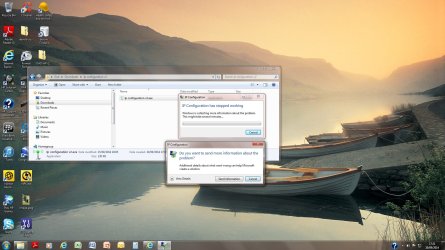
ok I think that I have done that, I got a Microsoft screen telling me that IP configuration had stopped working so I guess it has flushed it through but I did not get anything else such as the screen that you show when doing the demo
 

My Computer My Computer

At a glance

64 bit Windows 7 Home Premium
Computer type
PC/Desktop
OS
64 bit Windows 7 Home Premium
When you pushed FLUSH DNS, did the text box below tell you that is has been Flushed?

Can you upload a screenshot?
 

My Computer My Computer

At a glance

Windows 7 Ultimate 64-bitIntel G3420 3.2GHZ Dual CoreKingson 8GB 1600mhzMSI R7970 TF 3GD5/OC BE
Computer type
PC/Desktop
Computer Manufacturer/Model Number
Custom Build
OS
Windows 7 Ultimate 64-bit
CPU
Intel G3420 3.2GHZ Dual Core
Motherboard
Gigabyte H87-HD3
Memory
Kingson 8GB 1600mhz
Graphics Card(s)
MSI R7970 TF 3GD5/OC BE
Monitor(s) Displays
21" LG & "19 Vertical Samsung
Hard Drives
120GB SSD - Boot
1TB WD
350GB External
2TB External (Wireless)
PSU
Corsair CX 500 modular
Case
Zalman Z11 Plus (modified)
Cooling
Corsair H55, 2x 120mm SP Corsair, 1x 140 Coolermaster
Keyboard
Corsair K50
Mouse
CSL Gaming
Internet Speed
164Mbps
Antivirus
Avast, Malwarebytes
Browser
Google Chrome, IE, Firefox
I will give that a go but the screenshot file was quite large so I will look at another way of doing it but no it went straight into the Microsoft notification that it has stopped working. I did not get anything once I told the programme to run
 

My Computer My Computer

At a glance

64 bit Windows 7 Home Premium
Computer type
PC/Desktop
OS
64 bit Windows 7 Home Premium
Right okay :(

I have asked a network expert to come and assist you further.
 

My Computer My Computer

At a glance

Windows 7 Ultimate 64-bitIntel G3420 3.2GHZ Dual CoreKingson 8GB 1600mhzMSI R7970 TF 3GD5/OC BE
Computer type
PC/Desktop
Computer Manufacturer/Model Number
Custom Build
OS
Windows 7 Ultimate 64-bit
CPU
Intel G3420 3.2GHZ Dual Core
Motherboard
Gigabyte H87-HD3
Memory
Kingson 8GB 1600mhz
Graphics Card(s)
MSI R7970 TF 3GD5/OC BE
Monitor(s) Displays
21" LG & "19 Vertical Samsung
Hard Drives
120GB SSD - Boot
1TB WD
350GB External
2TB External (Wireless)
PSU
Corsair CX 500 modular
Case
Zalman Z11 Plus (modified)
Cooling
Corsair H55, 2x 120mm SP Corsair, 1x 140 Coolermaster
Keyboard
Corsair K50
Mouse
CSL Gaming
Internet Speed
164Mbps
Antivirus
Avast, Malwarebytes
Browser
Google Chrome, IE, Firefox
here we go
 

Attachments

  • Untitled.jpg
    Untitled.jpg
    217.2 KB · Views: 6

My Computer My Computer

At a glance

64 bit Windows 7 Home Premium
Computer type
PC/Desktop
OS
64 bit Windows 7 Home Premium
Stuff me its done it again, :cry:connection dropped but then came back again after a few minutes but without any help of intervention but thank you very much for helping and lets see what happens next

:D
 

My Computer My Computer

At a glance

64 bit Windows 7 Home Premium
Computer type
PC/Desktop
OS
64 bit Windows 7 Home Premium
Right okay, are you connecting through wireless?
 

My Computer My Computer

At a glance

Windows 7 Ultimate 64-bitIntel G3420 3.2GHZ Dual CoreKingson 8GB 1600mhzMSI R7970 TF 3GD5/OC BE
Computer type
PC/Desktop
Computer Manufacturer/Model Number
Custom Build
OS
Windows 7 Ultimate 64-bit
CPU
Intel G3420 3.2GHZ Dual Core
Motherboard
Gigabyte H87-HD3
Memory
Kingson 8GB 1600mhz
Graphics Card(s)
MSI R7970 TF 3GD5/OC BE
Monitor(s) Displays
21" LG & "19 Vertical Samsung
Hard Drives
120GB SSD - Boot
1TB WD
350GB External
2TB External (Wireless)
PSU
Corsair CX 500 modular
Case
Zalman Z11 Plus (modified)
Cooling
Corsair H55, 2x 120mm SP Corsair, 1x 140 Coolermaster
Keyboard
Corsair K50
Mouse
CSL Gaming
Internet Speed
164Mbps
Antivirus
Avast, Malwarebytes
Browser
Google Chrome, IE, Firefox
no I have the Devolo Delan 500 Triple+ Powerline system. I has always worked ok but maybe its that but at over £100 its an expensive piece of kit to throw away or just try another
 

My Computer My Computer

At a glance

64 bit Windows 7 Home Premium
Computer type
PC/Desktop
OS
64 bit Windows 7 Home Premium
no I have the Devolo Delan 500 Triple+ Powerline system. I has always worked ok but maybe its that but at over £100 its an expensive piece of kit to throw away or just try another

Of course we dont want to through it away!

Have a look at there website and see if they have any drivers avalible!
 

My Computer My Computer

At a glance

Windows 7 Ultimate 64-bitIntel G3420 3.2GHZ Dual CoreKingson 8GB 1600mhzMSI R7970 TF 3GD5/OC BE
Computer type
PC/Desktop
Computer Manufacturer/Model Number
Custom Build
OS
Windows 7 Ultimate 64-bit
CPU
Intel G3420 3.2GHZ Dual Core
Motherboard
Gigabyte H87-HD3
Memory
Kingson 8GB 1600mhz
Graphics Card(s)
MSI R7970 TF 3GD5/OC BE
Monitor(s) Displays
21" LG & "19 Vertical Samsung
Hard Drives
120GB SSD - Boot
1TB WD
350GB External
2TB External (Wireless)
PSU
Corsair CX 500 modular
Case
Zalman Z11 Plus (modified)
Cooling
Corsair H55, 2x 120mm SP Corsair, 1x 140 Coolermaster
Keyboard
Corsair K50
Mouse
CSL Gaming
Internet Speed
164Mbps
Antivirus
Avast, Malwarebytes
Browser
Google Chrome, IE, Firefox
Its got up to date drivers and firmware which was why I was hoping that the log would help us to identify the problem area or at least point in the right direction
 

My Computer My Computer

At a glance

64 bit Windows 7 Home Premium
Computer type
PC/Desktop
OS
64 bit Windows 7 Home Premium
Back
Top